When I select a class from the dropdownlist, only the students from that class should appear in the gridview. Currently, all the students from all classes get displayed. When I select mark attendance(Button1) the gridview should reflect students from the class selected. Could someone help me out with the code that needs to be written under Button1 in aspx.cs page.
attendance.aspx:
attendance.aspx.cs:
using System;
using System.Collections.Generic;
using System.Linq;
using System.Web;
using System.Web.UI;
using System.Web.UI.WebControls;
using System.Data.SqlClient;
using System.Data;
public partial class Faculty_attendance : System.Web.UI.Page
{
SqlConnection cn = new SqlConnection("Data Source=DESKTOP-UIGAOQI\\SQLEXPRESS;Initial Catalog=mydb;Integrated Security=True;");
protected void Page_Load(object sender, EventArgs e)
{
}
protected void Button1_Click(object sender, EventArgs e)
{
}
protected void Button2_Click(object sender, EventArgs e)
{
foreach (GridViewRow row in GridView1.Rows)
{
String RegNo = row.Cells[0].Text;
String Name = row.Cells[1].Text;
RadioButton rbtn1 = (row.Cells[2].FindControl("RadioButton1") as RadioButton);
RadioButton rbtn2 = (row.Cells[2].FindControl("RadioButton2") as RadioButton);
String status1;
if (rbtn1.Checked)
{
status1 = "Present";
}
else
{
status1 = "Absent";
}
String dateofclass1 = date.Text;
String sclass1 = DropDownList1.SelectedItem.Text;
saveattendance(RegNo, Name, dateofclass1, status1, sclass1);
}
Label4.Text = "Attendance has been saved succesfully";
}
private void saveattendance(String regno, String studentname, String dateofclass1, String status, String sclass)
{
String query = "insert into attendance(RegNo,Name, Date,Status,Class) values('" + regno + "','" + studentname + "', '" + dateofclass1 + "','" + status + "','" + sclass + "')";
String mycon = "Data Source=DESKTOP-UIGAOQI\\SQLEXPRESS;Initial Catalog=mydb;Integrated Security=True";
SqlConnection cn = new SqlConnection(mycon);
cn.Open();
SqlCommand cmd = new SqlCommand();
cmd.CommandText = query;
cmd.Connection = cn;
cmd.ExecuteNonQuery();
}
protected void GridView1_SelectedIndexChanged(object sender, EventArgs e)
{
}
protected void DropDownList1_SelectedIndexChanged1(object sender, EventArgs e)
{
}
protected void Calendar1_SelectionChanged(object sender, EventArgs e)
{
date.Text = Calendar1.SelectedDate.ToLongDateString();
}
protected void TxtBoxDate_TextChanged(object sender, EventArgs e)
{
}
}
Amit MohantyPosted Apr 12, 2024, 9:31 AM
Try this:
SumathiPosted Apr 12, 2024, 2:48 PM
Thank you Amit, I am getting the desired output now :)
Amit MohantyPosted Apr 12, 2024, 11:39 AM
Remove below lines:
SumathiPosted Apr 12, 2024, 11:24 AM
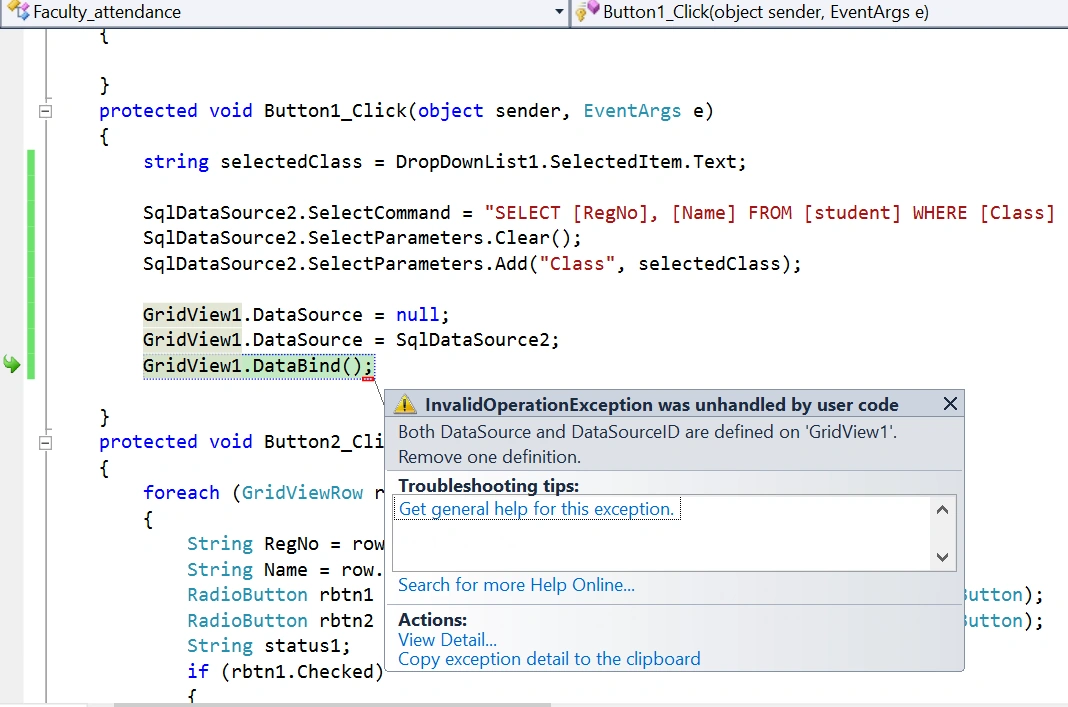
Hi Amit, I tried your code and amgetting the below error:
Jithu ThomasPosted Apr 12, 2024, 10:53 AM
I'd be glad to help you with the code for the
Button1_Clickevent in your ASP.NET application to filter the GridView based on the selected class and mark attendance. Here's the improved code:attendance.aspx.cs: