
Introduction
Ajax (Asynchronous JavaScript and XML) is a new web development technique for interactive websites. With AJAX help we can develop web applications and retrieve small amounts of data from a web server. AJAX consists Of a different type of technology.
- JavaScript
- XML
- Asynchronous Call to the server
The AJAX Control Toolkit released a new Twitter control. With the help of this control we can display the recent tweets associated with a particular Twitter user. We can use this control to show the result of a Twitter search. Twitter limits the number of times that we can interact with their API in an hour. Twitter recommends that we cache results on the server.
Properties
- TabIndex
- ViewStateMode
- Screnne Name
- CacheDuration
- Caption
Step 1 : Open Visual Studio 2010
- Go to File->New->WebSite
- Select ASP.NET WebSite
Step 2 : Go to Solution Explorer and right-click.
- Select Add->New Item
- Select WebForm
- Default.aspx page open
Step 3 : Open Default.aspx page and click in [Design option].
- Drag and drop ScriptManager
Step 4 : Go to the Default.aspx[Source] page and drag the Twitter Control from the Toolbox.
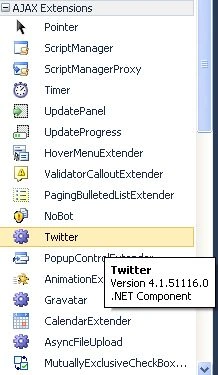
Step 5 : Now the simple code for the Twitter Control.
Code
<asp:Twitter ID="Twitter1" runat="server"> </asp:Twitter>
Step 6 : Now in the Default.aspx[Source] option, register the Twitter control code with TagPrefix.
Syntax
<%@ Register Assembly="AjaxControlToolkit" Namespace="AjaxControlToolkit" TagPrefix="asp" %>
Step 7 : Now we define the Twitter control property ScreneName"raj".
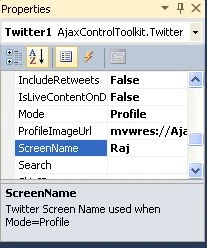
Code
<asp:Twitter ID="Twitter1" runat="server" ScreenName="Raj" >
Step 8 : Write the code in the Deault.aspx[Source] option.

Enes GunesPosted Sep 4, 2012, 2:45 PM
Thanks