

This chapter is taken from book "Programming Windows Phone 7" by Charles Petzold published by Microsoft press. http://www.charlespetzold.com/phone/index.html
Game Components
To give your fingers a target to touch and drag, the programs display translucent disks at the Texture2D corners. It would be nice to code these draggable translucent disks so they're usable by multiple programs. In a traditional graphics programming environment, we might think of something like this as a control but in XNA it's called a game component.
Components help modularize your XNA programs. Components can derive from the GameComponent class but often they derive from DrawableGameComponent so they can display something on the screen in addition to (and on top of) what goes out in the Draw method of your Game class.
To add a new component class to your project, right-click the project name, select Add and then New Item, and then pick Game Component from the list. You'll need to change the base class to DrawableGameComponent and override the Draw method if you want the component to participate in drawing.
A game generally instantiates the components that it needs either in the game's constructor or during the Initialize method. The components officially become part of the game when they are added to the Components collection defined by the Game class.
As with Game, a DrawableGameComponent derivative generally overrides the Initialize, LoadContent, Update, and Draw methods. When the Initialize override of the Game derivative calls the Initialize method in the base class, the Initialize methods in all the components are called. Likewise, when the LoadComponent, Update, and Draw overrides in the Game derivative call the method in the base class, the LoadComponent, Update, and Draw methods in all the components are called.
As you know, the Update override normally handles touch input. In my experience that attempting to access touch input in a game component is somewhat problematic. It seems as if the game itself and the components end up competing for input.
To fix this, I decided that my Game derivative would be solely responsible for calling TouchPanel.GetState, but the game would then give the components the opportunity to
process this touch input. To accommodate this concept, I created this interface for GameComponent and DrawableGameComponent derivatives:
using Microsoft.Xna.Framework.Input.Touch;
namespace Petzold.Phone.Xna
{
public interface IProcessTouch
{
bool ProcessTouch(TouchLocation touch);
}
}
When a game component implements this interface, the game calls the game component's ProcessTouch method for every TouchLocation object. If the game component needs to use that TouchLocation, it returns true from ProcessTouch, and the game then probably ignores that TouchLocation.
The first component I'll show you is called Dragger, and it is part of the Petzold.Phone.Xna library. Dragger derives from DrawableGameComponent and implements the IProcessTouch interface:
public class
Dragger :
DrawableGameComponent, IProcessTouch
{
SpriteBatch spriteBatch;
int? touchId;
public event
EventHandler PositionChanged;
public Dragger(Game
game)
: base(game)
{
}
public
Texture2D Texture { set;
get; }
public
Vector2 Origin { set;
get; }
public
Vector2 Position { set;
get; }
....
}
A program making use of Dragger could define a custom Texture2D for the
component and set it through this public Texture property, at which time it
would probably also set the Origin property. However, Dragger defines a default
Texture property for itself during its LoadContent method:
protected
override void LoadContent()
{
spriteBatch = new
SpriteBatch(this.GraphicsDevice);
// Create default texture
int radius = 48;
Texture2D texture =
new Texture2D(this.GraphicsDevice,
2 * radius, 2 * radius);
uint[] pixels =
new uint[texture.Width
* texture.Height];
for (int
y = 0; y < texture.Height; y++)
for (int
x = 0; x < texture.Width; x++)
{
Color clr =
Color.Transparent;
if ((x - radius) * (x -
radius) +
(y - radius) * (y - radius) <
radius * radius)
{
clr = new
Color(0, 128, 128, 128);
}
pixels[y * texture.Width + x] = clr.PackedValue;
}
texture.SetData<uint>(pixels);
Texture = texture;
Origin = new
Vector2(radius, radius);
base.LoadContent();
}
The Dragger class implements the IProcessTouch interface so it has a
ProcessTouch method that is called from the Game derivative for each
TouchLocation object. The ProcessTouch method is interested in finger presses
that occur over the component itself. If that is the case, it retains the ID and
basically owns that finger until it lifts from the screen. For every movement of
that finger, Dragger fires a PositionChanged event.
public bool
ProcessTouch(TouchLocation touch)
{
if (Texture ==
null)
return
false;
bool touchHandled =
false;
switch (touch.State)
{
case
TouchLocationState.Pressed:
if ((touch.Position.X >
Position.X - Origin.X) &&
(touch.Position.X < Position.X - Origin.X +
Texture.Width) &&
(touch.Position.Y > Position.Y - Origin.Y) &&
(touch.Position.Y < Position.Y - Origin.Y +
Texture.Height))
{
touchId = touch.Id;
touchHandled = true;
}
break;
case
TouchLocationState.Moved:
if (touchId.HasValue &&
touchId.Value == touch.Id)
{
TouchLocation previousTouch;
touch.TryGetPreviousLocation(out
previousTouch);
Position += touch.Position - previousTouch.Position;
// Fire the event!
if (PositionChanged != null)
PositionChanged(this,
EventArgs.Empty);
touchHandled = true;
}
break;
case
TouchLocationState.Released:
if (touchId.HasValue &&
touchId.Value == touch.Id)
{
touchId = null;
touchHandled = true;
}
break;
}
return touchHandled;
}
The Draw override just draws the Texture2D at the new position:
public override
void Draw(GameTime
gameTime)
{
if (Texture !=
null)
{
spriteBatch.Begin();
spriteBatch.Draw(Texture, Position,
null, Color.White,
0, Origin, 1,
SpriteEffects.None, 0);
spriteBatch.End();
}
base.Draw(gameTime);
}
Affine and Non-Affine Transforms
Sometimes it's convenient to derive a transform that maps a particular set
of points to a particular destination. For example, here's a program that
incorporates three instances of the Dragger component I just described, and lets
you drag three corners of the Texture2D
to arbitrary locations on the screen:
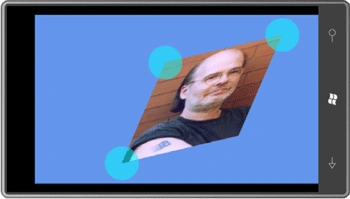
This program uses an affine transform, which means that rectangles are always mapped to parallelograms. The fourth corner isn't draggable because it's always determined by the other three:
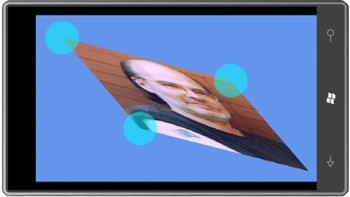
You can't choose just any three points. Everything goes kaflooey if you attempt to make an interior angle greater than 180 degree.
A static class named MatrixHelper in the Petzold.Phone.Xna library has a method named ComputeAffineTransform that creates a Matrix object based on these formulas:
static
Matrix ComputeAffineTransform(Vector2
ptUL, Vector2 ptUR,
Vector2 ptLL)
{
return new
Matrix()
{
M11 = (ptUR.X - ptUL.X),
M12 = (ptUR.Y - ptUL.Y),
M21 = (ptLL.X - ptUL.X),
M22 = (ptLL.Y - ptUL.Y),
M33 = 1,
M41 = ptUL.X,
M42 = ptUL.Y,
M44 = 1
};
}
This method isn't public because it's not very useful by itself. It's not very useful because the formulas are based on transforming an image that is one-pixel wide and one-pixel tall. Notice, however, that the code sets M33 and M44 to 1. This doesn't happen automatically and it is essential for the matrix to work right.
To compute a Matrix for an affine transform that applies to an object of a particular size, this public method is much more useful:
public
static Matrix
ComputeMatrix(Vector2 size,
Vector2 ptUL,
Vector2 ptUR, Vector2 ptLL)
{
// Scale transform
Matrix S =
Matrix.CreateScale(1 / size.X, 1 / size.Y,
1);
// Affine transform
Matrix A =
ComputeAffineTransform(ptUL, ptUR, ptLL);
// Product of two transforms
return S * A;
}
The first transform scales the object down to a 1*1 size before applying the computed affine transform. The AffineTransform project is responsible for the two screen shots shown above. It creates three instances of the Dragger component in its Initialize override, sets a handler for the PositionChanged event, and adds the component to the Components collection:
public
class Game1 :
Microsoft.Xna.Framework.Game
{
GraphicsDeviceManager graphics;
SpriteBatch spriteBatch;
Texture2D texture;
Matrix matrix =
Matrix.Identity;
Dragger draggerUL, draggerUR,
draggerLL;
...
protected
override void Initialize()
{
draggerUL = new Dragger(this);
draggerUL.PositionChanged += OnDraggerPositionChanged;
this.Components.Add(draggerUL);
draggerUR = new Dragger(this);
draggerUR.PositionChanged += OnDraggerPositionChanged;
this.Components.Add(draggerUR);
draggerLL = new Dragger(this);
draggerLL.PositionChanged += OnDraggerPositionChanged;
this.Components.Add(draggerLL);
base.Initialize();
}
...
}
Don't forget to add the components to the Components collection of the Game class!
The LoadContent override is responsible for loading the image that will be transformed and initializing the Position properties of the three Dragger components at the three corners of the image:
protected
override void
LoadContent()
{
// Create a new SpriteBatch, which can be
used to draw textures.
spriteBatch = new
SpriteBatch(GraphicsDevice);
Viewport viewport =
this.GraphicsDevice.Viewport;
texture = this.Content.Load<Texture2D>("PetzoldTattoo");
draggerUL.Position = new
Vector2((viewport.Width - texture.Width) / 2,
(viewport.Height - texture.Height)
/ 2);
draggerUR.Position = draggerUL.Position +
new Vector2(texture.Width, 0);
draggerLL.Position = draggerUL.Position +
new Vector2(0, texture.Height);
OnDraggerPositionChanged(null,
EventArgs.Empty);
}
Dragger only fires its PositionChanged event when the component is actually dragged by the user, so the LoadContent method concludes by simulating a PositionChanged event, which calculates an initial Matrix based on the size of the Texture2D and the initial positions of the Dragger components:
void
OnDraggerPositionChanged(object sender,
EventArgs args)
{
matrix = MatrixHelper.ComputeMatrix(new
Vector2(texture.Width, texture.Height),
draggerUL.Position,
draggerUR.Position,
draggerLL.Position);
}
The program doesn't need to handle any touch input of its own, but Dragger
implements the IProcessTouch interface, so the program funnels touch input to
the Dragger components. These Dragger components respond by possibly moving
themselves and setting new Position properties, which will cause PositionChanged
events to be fired.
protected
override void
Update(GameTime gameTime)
{
// Allows the game to exit
if (GamePad.GetState(PlayerIndex.One).Buttons.Back
== ButtonState.Pressed)
this.Exit();
TouchCollection touches =
TouchPanel.GetState();
foreach (TouchLocation
touch in touches)
{
bool touchHandled =
false;
foreach (GameComponent
component in this.Components)
{
if (component
is IProcessTouch
&&
(component as
IProcessTouch).ProcessTouch(touch))
{
touchHandled = true;
break;
}
}
if (touchHandled ==
true)
continue;
}
base.Update(gameTime);
}
It is possible for the program to dispense with setting handlers for the PositionChanged event of the Dragger components and instead poll the Position properties during each Update call and recalculate a Matrix from those values. However, recalculating a Matrix only when one of the Position properties actually changes is much more efficient.
The Draw override uses that Matrix to display the texture:
protected
override void
Draw(GameTime gameTime)
{
GraphicsDevice.Clear(Color.CornflowerBlue);
spriteBatch.Begin(SpriteSortMode.Immediate,
null, null,
null, null,
null, matrix);
spriteBatch.Draw(texture, Vector2.Zero,
Color.White);
spriteBatch.End()
base.Draw(gameTime);
}
As you experiment with AffineTransform, you'll want to avoid making the interior angles at any corner greater than 180 degree. (In other words, keep it convex.) Affine transforms can express familiar operations like translation, scaling, rotation, and skew, but they never transform a square into anything more exotic than a parallelogram.
Non-affine transforms are much more common in 3D than 2D. In 3D, non-affine transforms are necessary to implement perspective effects. A long straight desert highway in a 3D world must seem to get narrower as it recedes into the distance, just like in the real world. Although we know that the sides of the road remains parallel, visually they seem to converge at infinity. This tapering effect is characteristic of non-affine transforms.
Although non-affine transforms are essential for 3D graphics programming, I wasn't even sure if SpriteBatch supported two-dimensional non-affine transforms until I tried them, and I was pleased to discover that XNA says "No problem!" What this means is that you can use non-affine transforms in 2D programming to simulate perspective effects.
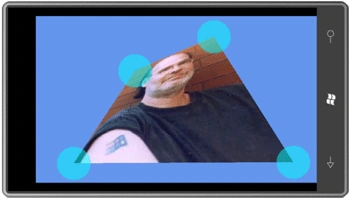
A non-affine transform in 2D can transform a square into a simple convex quadrilateral-a four-sided figure where the sides meet only at the corners, and interior angles at any corner are less than 180 degree. Here's one example:
This one makes me look really smart:
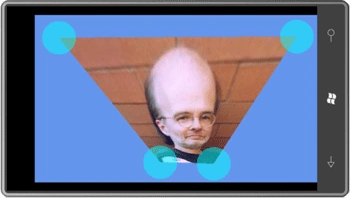
This program is called NonAffineTransform and it's just like AffineTransform except it has a fourth Dragger component and it calls a somewhat more sophisticated method in the MatrixHelper class in Petzold.Phone.Xna. You can move the little disks around with a fair amount of freedom; as long as you're not trying to form a concave quadrilateral, you'll get an image stretched to fit.
The math of NonAffineTransform has been incorporated
into a second static
MatrixHelper.ComputeMatrix method in the Petzold.Phone.Xna library:
public
static Matrix
ComputeMatrix(Vector2 size,
Vector2 ptUL,
Vector2 ptUR,
Vector2 ptLL, Vector2 ptLR)
{
// Scale transform
Matrix S =
Matrix.CreateScale(1 / size.X, 1 / size.Y,
1);
// Affine transform
Matrix A =
ComputeAffineTransform(ptUL, ptUR, ptLL);
// Non-Affine transform
Matrix B =
new Matrix();
float den = A.M11 * A.M22 - A.M12 *
A.M21;
float a = (A.M22 * ptLR.X - A.M21 *
ptLR.Y +
A.M21 * A.M42 - A.M22 * A.M41) / den;
float b = (A.M11 * ptLR.Y - A.M12 *
ptLR.X +
A.M12 * A.M41 - A.M11 * A.M42) / den;
B.M11 = a / (a + b - 1);
B.M22 = b / (a + b - 1);
B.M33 = 1;
B.M14 = B.M11 - 1;
B.M24 = B.M22 - 1;
B.M44 = 1;
// Product of three transforms
return S * B * A;
}
I won't show you the NonAffineTransform program here because it's pretty much the same as the AffineTransform program but with a fourth Dragger component whose Position property is passed to the second ComputeMatrix method.
The big difference with the new program is that non-affine transforms are much more fun!
Join the conversation! Your thoughts help the community grow.