

Entity Framework 5 brings a number of improvements and Enum Support in the EF Designer or Code First is one of them. In this article you will learn about it by creating a simple console application then will add EF Designer and will sketch the Model on the designer surface. Please note, the EF Designer can also be used with the Database First workflow to map to an existing database.
Just follow the steps, to setup the demo project.
Step 1: Create New Project
Create a new console application "File" > "New" > "Project..." > Visual C# > Console Application.
Step 2: Adding EF Designer (ADO.NET Entity Data Model)
Right-click on the project name in "Solution Explorer", point to "Add", and then click "New Item" and in the window select "Visual C# Items" and then "Data", now you will find "ADO.NET Entity Data Model" in the Templates pane, add it in the project.
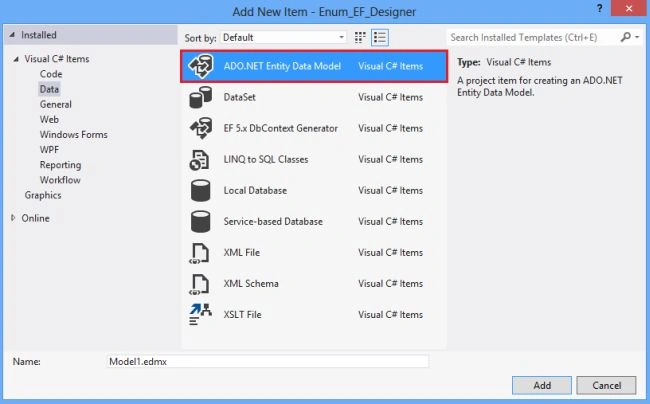
The ADO.NET Entity Data Model will bring the following things:
An EnumTestModel.edmx file that defines the conceptual model, the storage model, and the mapping between them. Sets the Metadata Artifact Processing property of the .edmx file to Embed in Output Assembly so the generated metadata files get embedded into the assembly.
Assemblies files like EntityFramework, System.ComponentModel.DataAnnotations, and System.Data.Entity.
EnumTestModel.tt and EnumTestModel.Context.tt files and adds them under the .edmx file. These T4 template files generate the code that defines the DbContext derived type and POCO types that map to the entities in the .edmx model.
Step 3: Adding New Entity
Right-click on the Designer and select Add New > Scalar Property. This will bring the following window, enter the name "Student" in Entity name box and it will pluralize the Entity Set name (like Students) automatically.


Megha GoyalPosted Sep 27, 2012, 11:55 PM
Nice concept....