

In this article I will
show you how to show battery status of laptop battery like its battery is discharging,
charging, full etc. We will do this using WMI because WMI have power to answer
questions about battery status .So let's start with WMI.
Project Menu>>Add Reference.
after that at the top of the code use
using System.Management;
so that you can use of
its classes .
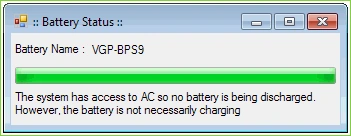
here i have taken two labels one textbox with read only property and one progress bar and a timer control .
now to get battery status we need to code like below .
Dictionary<UInt16, string>
StatusCodes;
private void
Form1_Load(object sender, EventArgs e)
{
StatusCodes = new Dictionary<ushort,
string>();
StatusCodes.Add(1, "The battery is
discharging");
StatusCodes.Add(2, "The system has
access to AC so no battery is being discharged. However, the battery is not
necessarily charging");
StatusCodes.Add(3, "Fully Charged");
StatusCodes.Add(4, "Low");
StatusCodes.Add(5, "Critical");
StatusCodes.Add(6, "Charging");
StatusCodes.Add(7, "Charging and
High");
StatusCodes.Add(8, "Charging and
Low");
StatusCodes.Add(9, "Undefined");
StatusCodes.Add(10,"Partially
Charged");
/* Set progress bar values and Properties */
progressBar1.Maximum = 100;
progressBar1.Style = ProgressBarStyle.Continuous;
timer1.Enabled = true;
ManagementObjectSearcher mos = new ManagementObjectSearcher("select * from Win32_Battery");
foreach (ManagementObject
mo in mos.Get())
{
lblBatteryName.Text = mo["Name"].ToString();
UInt16
statuscode = (UInt16)mo["BatteryStatus"];
string
statusString = StatusCodes[statuscode];
lblBatteryStatus.Text =
statusString;
}
}
private void
timer1_Tick(object sender, EventArgs e)
{
ManagementObjectSearcher mos = new ManagementObjectSearcher("select * from Win32_Battery where Name='"+lblBatteryName.Text+"'");
foreach
(ManagementObject mo in mos.Get())
{
UInt16
statuscode = (UInt16)mo["BatteryStatus"];
string
statusString = StatusCodes[statuscode];
lblBatteryStatus.Text =
statusString;
/*
Set Progress bar according to status */
if
(statuscode == 4)
{
progressBar1.ForeColor = Color.Red;
progressBar1.Value = 5;
}
else
if (statuscode == 3)
{
progressBar1.ForeColor = Color.Blue;
progressBar1.Value = 100;
}
else
if (statuscode == 2)
{
progressBar1.ForeColor = Color.Green;
progressBar1.Value = 100;
}
else
if (statuscode == 5)
{
progressBar1.ForeColor = Color.Red;
progressBar1.Value = 1;
}
else
if (statuscode == 6)
{
progressBar1.ForeColor = Color.Blue;
progressBar1.Value = 100;
}
}
}
Here i have used few status only to show in progress bar you can code whatever you want to show in progress bar..
Thank you :)
Zaid KhanPosted Apr 13, 2015, 6:55 AM
My Mail ID [email protected]
Zaid KhanPosted Apr 13, 2015, 6:02 AM
it s not working I run the code I didn;t get the batter name even and even it s not going inside the loop
JayPosted Apr 19, 2011, 5:34 AM
do you know how to disable and enable battery charge?
kevin shahPosted Feb 2, 2011, 2:12 AM
Hello sir.. You have done some nice work on Aps.net
Mahesh ChandPosted Aug 8, 2010, 12:03 PM
Interesting. I didn't know how to do that :)