

I am here to continue the discussion around AngularJS 2.0. In my previous article, I already discussed about the model driven form binding in Angular 2.0. Now, in this article, we will discuss about http module or how to call external APIs in the Angular 2.0. In case, you did not have a look at the previous articles of this series, go through the links mentioned below.
- AngularJS 2.0 From Beginning Introduction of AngularJS 2.0 (Day 1)
- AngularJS 2.0 From Beginning Component (Day 2)
- AngularJS 2.0 From Beginning Data Binding (Day 3)
- AngularJS 2.0 From Beginning Input Data Binding (Day 4)
- AngularJS 2.0 From Beginning - Output Property Binding (Day 5)
- AngularJS 2.0 From Beginning - Attribute Directive (Day 6)
- AngularJS 2.0 From Beginning - Structural Directives (Day 7)
- AngularJs 2.0 From Beginning - Pipes (Day 8)
- AngularJS 2.0 From Beginning - Viewchild (Day 9)
- AngularJS 2.0 From Beginning - Dynamic Grid (Day 10)
- AngularJS 2.0 From Beginning - Service (Day 11)
- AngularJs 2.0 From Beginning - ngContent (Day 12)
- AngularJS 2.0 From Beginning - Route Part I (Day 13)
- AngularJs 2.0 From Beginning - Route Part 2 (Day 14)
- AngularJs 2.0 From Beginning - ngForm Part 1 (Day 15)
- AngularJs 2.0 From Beginning - ngForm Part 2 (Day 16)
Angular 2 introduces many innovative concepts like performance improvements, Component Routing, sharpened Dependency Injection (DI), lazy loading, async templating, mobile development with Native Script; all linked with a solid tooling and excellent testing support. Making HTTP requests in Angular 2 apps looks somewhat different then what we're used to from Angular 1.x, a key difference being that Angular 2's Http returns observables.
It is very clear to us that Angular 2.0 always look and feels different compared to Angular 1.x. In case of Http API calling, the same scenario occurred. The $http Service, which Angular 1.x provides us works very nicely in most of the cases. Angular 2.0 Http requires us to learn some new concept or mechanism, including how to work with observables.
Reactive Extensions for JavaScript (RxJS) is a reactive streams library, which allows you to work with Observables. RxJS combines Observables, Operators and Schedulers, so we can subscribe to streams and react to changes, using composable operations.
Differences between Angular 1.x $http and Angular 2 Http
Angular 2's Http API calling again provides a fairly straightforward way of handling the requests. For starters, HTTP calls in Angular 2 by default return observables through RxJS, whereas $http in Angular 1.x returns Promises. Using observable streams, gives us the benefit of greater flexibility, when it comes to handling the responses coming from HTTP requests. For example, we have the potential of tapping into useful RxJS operators like retry, so that a failed HTTP request is automatically re-sent, which is useful for the cases, where the users have poor or intermittent network communication.
In Angular 2, Http is accessed as an injectable class from angular2/http and, just like other classes, we import it when we want to use it in our components. Angular 2 also comes with a set of injectable providers for Http, which are imported via HTTP_PROVIDERS. With these , we get the providers such as RequestOptions and ResponseOptions, which allows us to modify the requests and the responses by extending the base class for each. In Angular 1.x, we would do this by providing a transformRequest or transformResponse function to our $httpoptions.
Observables vs Promises
When used with Http, both implementations provide an easy API to handle the requests, but there are some key differences, which makes Observables; a superior alternative.
- Promises only accepts one value unless we compose multiple Promises (Eg: $q.all).
- Promises can’t be cancelled.
Angular 2 http module @angular/http exposes a Http Service, which our Application can use to access the Web Services over HTTP. We’ll use this utility in our PeopleService Service. We start by importing it together will all the types involved in doing http request:
- import { Http, Response } from '@angular/http';
- import { Observable } from 'rxjs/Rx';
These are all the types and methods required to make and handle an HTTP request to a Web service:
- Http
The Angular 2 http service that provides the API to make HTTP requests with methods corresponding to HTTP verbs like get, post, put, etc
- Response
which represents a response from an HTTP service and follows the fetch API specification
- Observable
which is the async pattern used in Angular 2. The concept of observable comes from the observer design pattern as an object that notifies an interested party of observers when something interesting happens. In RxJs it has been generalized to manage sequences of data or events, to become composable with other observables and to provide a lot of utility functions known as operators that let you achieve amazing stuff.
Angular comes with its own HTTP library, which we can use to call out to external APIs.
When we make calls to an external Server, we want our user to continue to be able to interact with the page i.e. we don’t want our page to freeze until the HTTP request returns from the external Server. To achieve this effect, our HTTP requests are asynchronous.
Dealing with an asynchronous code is, historically, more tricky than dealing with synchronous code. In Javascript, there are generally three approaches of dealing with asynchronous code, namely.
- Callbacks
- Promises
- Observables
For this, we first need to add another project of type ASP.NET Web Application and select Web API option from the new dialog box. After creating a project, add the files given below.
- using System;
- using System.Collections.Generic;
- using System.Linq;
- using System.Web;
- namespace SampleAPI.Models.Sample
- {
- public class Employee
- {
- public int Id { get; set; }
- public string Code { get; set; }
- public string Name { get; set; }
- public DateTime DOB { get; set; }
- public DateTime DOJ { get; set; }
- public string Department { get; set; }
- public string Designation { get; set; }
- public double Salary { get; set; }
- }
- }
- using SampleAPI.Models.Sample;
- using System;
- using System.Collections.Generic;
- using System.Linq;
- using System.Net;
- using System.Net.Http;
- using System.Web.Http;
- using System.Web.Http.Description;
- namespace SampleAPI.Controllers.Sample
- {
- public class EmployeeController : ApiController
- {
- public EmployeeController()
- {
- }
- [ResponseType(typeof(Employee))]
- [HttpGet]
- [Route("Employee/GetEmployee")]
- public IHttpActionResult GetEmployee()
- {
- return Ok(this.FetchEmployee());
- }
- private List<Employee> FetchEmployee()
- {
- List<Employee> lstData = new List<Employee>();
- Employee objEmp = new Employee() { };
- objEmp.Id = 1;
- objEmp.Code = "A001";
- objEmp.Name = "RABIN";
- objEmp.DOB = Convert.ToDateTime("10-06-1980");
- objEmp.DOJ = Convert.ToDateTime("01-09-2006");
- objEmp.Department = "ACCOUNTS";
- objEmp.Designation = "CLERK";
- objEmp.Salary = 15000.00;
- lstData.Add(objEmp);
- objEmp = new Employee() { };
- objEmp.Id = 2;
- objEmp.Code = "A002";
- objEmp.Name = "SUJIT";
- objEmp.DOB = Convert.ToDateTime("12-22-1986");
- objEmp.DOJ = Convert.ToDateTime("04-15-2010");
- objEmp.Department = "SALES";
- objEmp.Designation = "MANAGER";
- objEmp.Salary = 35000.00;
- lstData.Add(objEmp);
- objEmp = new Employee() { };
- objEmp.Id = 3;
- objEmp.Code = "A003";
- objEmp.Name = "KAMALESH";
- objEmp.DOB = Convert.ToDateTime("03-22-1982");
- objEmp.DOJ = Convert.ToDateTime("07-15-2006");
- objEmp.Department = "ACCOUNTS";
- objEmp.Designation = "CLERK";
- objEmp.Salary = 16000.00;
- lstData.Add(objEmp);
- return lstData;
- }
- }
- }
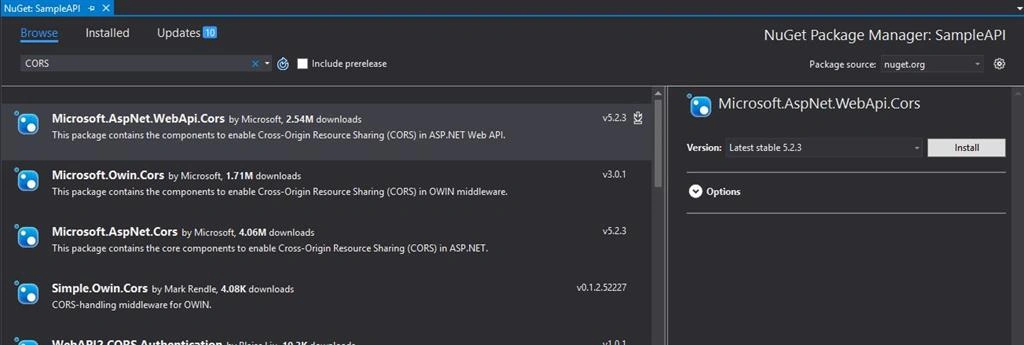
Now, change WebAPIConfig.cs file of Web AP project, as shown below.
- using System;
- using System.Collections.Generic;
- using System.Linq;
- using System.Net.Http;
- using System.Web.Http;
- using Microsoft.Owin.Security.OAuth;
- using Newtonsoft.Json.Serialization;
- using System.Web.Http.Cors;
- namespace SampleAPI
- {
- public static class WebApiConfig
- {
- public static void Register(HttpConfiguration config)
- {
- // Web API configuration and services
- // Configure Web API to use only bearer token authentication.
- config.SuppressDefaultHostAuthentication();
- config.Filters.Add(new HostAuthenticationFilter(OAuthDefaults.AuthenticationType));
- // Web API routes
- config.MapHttpAttributeRoutes();
- var cors = new EnableCorsAttribute("*", "*", "*");
- config.EnableCors(cors);
- config.Routes.MapHttpRoute(
- name: "DefaultApi",
- routeTemplate: "api/{controller}/{id}",
- defaults: new { id = RouteParameter.Optional }
- );
- }
- }
- }
app.component.homepage.html
- <div>
- <h3>HTTP Module Sample - Get Data</h3>
- <div class="panel panel-default">
- <div class="panel-body">
- <table class="table table-striped table-bordered">
- <thead>
- <tr>
- <th>Srl No</th>
- <th>Alias</th>
- <th>Employee Name</th>
- <th>Date of Birth</th>
- <th>Join Date</th>
- <th>Department</th>
- <th>Designation</th>
- <th>Salary</th>
- </tr>
- </thead>
- <tbody>
- <tr *ngFor="let item of data">
- <td>{{item.Id}}</td>
- <td>{{item.Code}}</td>
- <td>{{item.Name}}</td>
- <td>{{item.DOB | date :'shortDate'}}</td>
- <td>{{item.DOJ | date :'mediumDate'}}</td>
- <td>{{item.Department}}</td>
- <td>{{item.Designation}}</td>
- <td>{{item.Salary |currency:'INR':true}}</td>
- </tr>
- </tbody>
- </table>
- <p>
- <button class="btn btn-primary" (click)="loadData()">
- Load Data
- </button>
- </p>
- </div>
- </div>
- </div>
- import { Component, OnInit, ViewChild } from '@angular/core';
- import { Http, Response } from '@angular/http';
- import 'rxjs/Rx';
- @Component({
- moduleId: module.id,
- selector: 'home-page',
- templateUrl: 'app.component.homepage.html'
- })
- export class HomePageComponent implements OnInit {
- private data: Array<any> = [];
- constructor(private http: Http) {
- }
- ngOnInit(): void {
- }
- private loadData(): void {
- debugger;
- let self = this;
- this.http.request('http://localhost:5201/employee/getemployee')
- .subscribe((res: Response) => {
- self.data = res.json();
- });
- }
- }
- import { NgModule, NO_ERRORS_SCHEMA } from '@angular/core';
- import { BrowserModule } from '@angular/platform-browser';
- import { ReactiveFormsModule } from "@angular/forms";
- import { HttpModule } from '@angular/http';
- import { HomePageComponent } from './src/app.component.homepage';
- @NgModule({
- imports: [BrowserModule, ReactiveFormsModule, HttpModule],
- declarations: [HomePageComponent],
- bootstrap: [HomePageComponent]
- })
- export class AppModule { }
- import { platformBrowserDynamic } from '@angular/platform-browser-dynamic';
- import { AppModule } from './app.module';
- const platform = platformBrowserDynamic();
- platform.bootstrapModule(AppModule);
- <!DOCTYPE html>
- <html>
- <head>
- <title>Angular2 - HTTP Module (GET) </title>
- <meta charset="UTF-8">
- <meta name="viewport" content="width=device-width, initial-scale=1">
- <link href="../resources/style/bootstrap.css" rel="stylesheet" />
- <link href="../resources/style/style1.css" rel="stylesheet" />
- <!-- Polyfill(s) for older browsers -->
- <script src="../resources/js/jquery-2.1.1.js"></script>
- <script src="../resources/js/bootstrap.js"></script>
- <script src="../node_modules/core-js/client/shim.min.js"></script>
- <script src="../node_modules/zone.js/dist/zone.js"></script>
- <script src="../node_modules/reflect-metadata/Reflect.js"></script>
- <script src="../node_modules/systemjs/dist/system.src.js"></script>
- <script src="../systemjs.config.js"></script>
- <script>
- System.import('app').catch(function (err) { console.error(err); });
- </script>
- <!-- Set the base href, demo only! In your app: <base href="/"> -->
- <script>document.write('<base href="' + document.location + '" />');</script>
- </head>
- <body>
- <home-page>Loading</home-page>
- </body>
- </html>
K RajeshPosted Mar 21, 2017, 6:46 AM
How to implement spinner in NG2 , please provide information