

Background
Sometimes there is a need to disable the copy & paste feature from the ASP.Net text box. This article provides the details of how to disable the copy & paste feature in a TextBox. However you can use it for div, paragraph tag, form tag and so on which are also applicable.
Let us create an application to do this, as:
- "Start" - "All Programs" - "Microsoft Visual Studio 2010".
- "File" - "New web Site" - "C#" - "Empty WebSite" (to avoid adding a master page).
- Provide the web site a name such as dissableCopyPaste or another as you wish and specify the location.
- Then right-click on Solution Explorer - "Add New Item" - "Default.aspx" page.
- Drag and drop one textbox onto the <form> section of the Default aspx page.
Disable Copy and Paste in an ASP.NET Webpage TextBox without JavaScript; we need to set the following properties of the TextBox:
- oncopy="return false"
- onpaste="return false"
- oncut="return false"
Now the source code of the Default.aspx should look as in the following:
<%@ Page Language="C#" AutoEventWireup="true" CodeFile="Default.aspx.cs" Inherits="_Default" %>
<!DOCTYPE html PUBLIC "-//W3C//DTD XHTML 1.0 Transitional//EN" "http://www.w3.org/TR/xhtml1/DTD/xhtml1-transitional.dtd">
<html xmlns="http://www.w3.org/1999/xhtml">
<head id="Head1" runat="server">
<title></title>
</head>
<body>
<form id="form1" runat="server">
<%--added by vithal wadje--%>
<div>
<asp:TextBox ID="TextBox1" runat="server" oncopy="return false" onpaste="return false"
oncut="return false" TextMode="MultiLine">
</asp:TextBox>
</div>
</form>
</body>
</html>
Now run the application that looks as in the following:
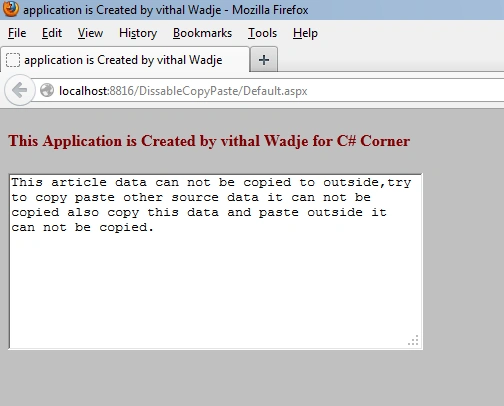
Now copy the above data and past it outside in Notepad or any other tool it can not be copied with. Similarly, copy the Notepad or any other data into the above Texbox; it cannot be copied.
Summary
I hope this article is useful for all readers if you have any suggestion then please contact me.
Anurag SarkarPosted Jun 1, 2013, 7:11 AM
Thanx.
Vithal WadjePosted Jan 21, 2013, 6:11 AM
thanks bala sir
BalaPosted Jan 21, 2013, 6:05 AM
Its really good to know.