

Introduction
This article describes how to perform basic CRUD operations in an MVC4 application using Entity Framework 5 without writing a single line of code. Entity Framework and MVC have advanced to the level that we don't need to put effort into doing extra work.
- MVC
- Model: The business entity on which the overall application operates. Many applications use a persistent storage mechanism (such as a database) to store data. MVC does not specifically mention the data access layer because it is understood to be encapsulated by the Model.
- View: The user interface that renders the model into a form of interaction.
- Controller: Handles a request from a view and updates the model that results in a change in the Model's state.
- Model: The business entity on which the overall application operates. Many applications use a persistent storage mechanism (such as a database) to store data. MVC does not specifically mention the data access layer because it is understood to be encapsulated by the Model.
- Entity Framework
Let's have a look at the standard definition of Entity Framework given by Microsoft:
"The Microsoft ADO.NET Entity Framework is an Object/Relational Mapping (ORM) framework that enables developers to work with relational data as domain-specific objects, eliminating the need for most of the data access plumbing code that developers usually need to write. Using the Entity Framework, developers issue queries using LINQ, then retrieve and manipulate data as strongly typed objects. The Entity Framework's ORM implementation provides services like change tracking, identity resolution, lazy loading, and query translation so that developers can focus on their application-specific business logic rather than the data access fundamentals."
In simple terms, Entity Framework is an Object/Relational Mapping (ORM) framework. It is an enhancement to ADO.NET, an upper layer to ADO.Net that gives developers an automated mechanism for accessing and storing the data in the database.
Hope this provides a glimpse at an ORM and EntityFramework.
- MVC Application
Step 1: Create a database named "LearningKO" and add a table named "student" to it, the script of the table is as follows:
- USE [LearningKO]
- GO
- /****** Object: Table [dbo].[Student] Script Date: 12/04/2013 23:58:12 ******/
- SETANSI_NULLS ON
- GO
- SETQUOTED_IDENTIFIER ON
- GO
- CREATETABLE [dbo].[Student](
- [StudentId] [nvarchar](10)NOT NULL,
- [FirstName] [nvarchar](50)NULL,
- [LastName] [nvarchar](50)NULL,
- [Age] [int]NULL,
- [Gender] [nvarchar](50)NULL,
- [Batch] [nvarchar](50)NULL,
- [Address] [nvarchar](50)NULL,
- [Class] [nvarchar](50)NULL,
- [School] [nvarchar](50)NULL,
- [Domicile] [nvarchar](50)NULL,
- CONSTRAINT [PK_Student] PRIMARYKEY CLUSTERED
- (
- [StudentId]ASC
- )WITH(PAD_INDEX = OFF,STATISTICS_NORECOMPUTE = OFF,IGNORE_DUP_KEY =OFF,ALLOW_ROW_LOCKS =ON,ALLOW_PAGE_LOCKS =ON)ON [PRIMARY]
- )ON [PRIMARY]
- GO
- INSERT [dbo].[Student]([StudentId], [FirstName], [LastName], [Age], [Gender], [Batch], [Address], [Class], [School], [Domicile]) VALUES(N'1',N'Akhil',N'Mittal', 28,N'Male',N'2006',N'Noida',N'Tenth',N'LFS',N'Delhi')
- INSERT [dbo].[Student]([StudentId], [FirstName], [LastName], [Age], [Gender], [Batch], [Address], [Class], [School], [Domicile]) VALUES(N'2',N'Parveen',N'Arora', 25,N'Male',N'2007',N'Noida',N'8th',N'DPS',N'Delhi')
- INSERT [dbo].[Student]([StudentId], [FirstName], [LastName], [Age], [Gender], [Batch], [Address], [Class], [School], [Domicile]) VALUES(N'3',N'Neeraj',N'Kumar', 38,N'Male',N'2011',N'Noida',N'10th',N'MIT',N'Outside Delhi')
- INSERT [dbo].[Student]([StudentId], [FirstName], [LastName], [Age], [Gender], [Batch], [Address], [Class], [School], [Domicile]) VALUES(N'4',N'Ekta',N'Mittal', 25,N'Female',N'2005',N'
- Noida',N'12th',N'LFS',N'Delhi')

Step 2: Open your Visual Studio (the Visual Studio Version should be greater than or equal to 12) and add an MVC internet application as in the following:
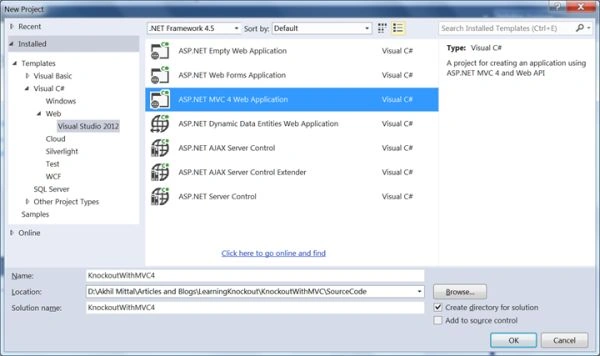
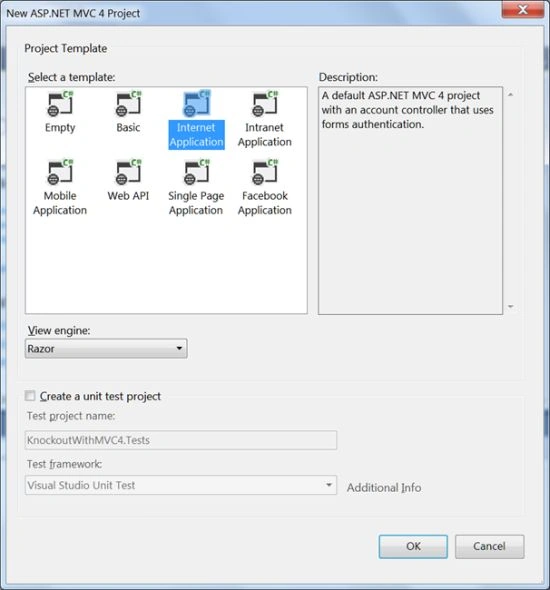
I have given it the name "KnockoutWithMVC4".
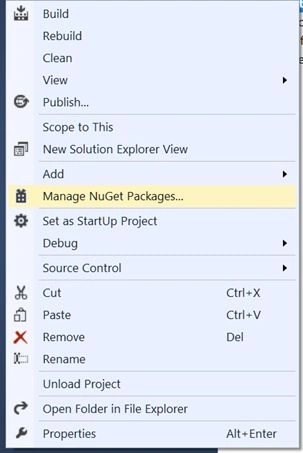
Step 3: You'll get a fully structured MVC application with default Home controller in the Controller folder. By default Entity Framework is downloaded as a package in the application folder, but if not then you can add the Entity Framework package by right-clicking the project, select "Manage nugget packages" and search and install the Entity Framework.

Step 4: Right-click the project file, select "Add a new item" and add the ADO .Net Entity Data Model, follow the procedure in the wizard as shown below:
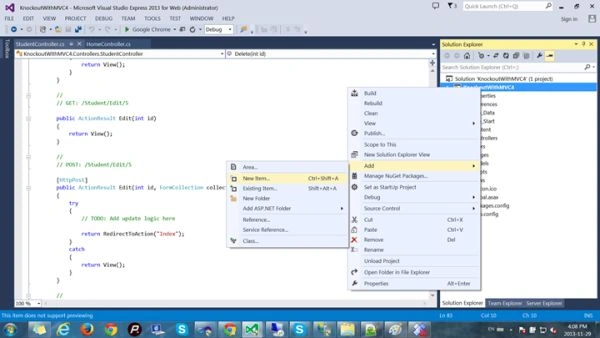
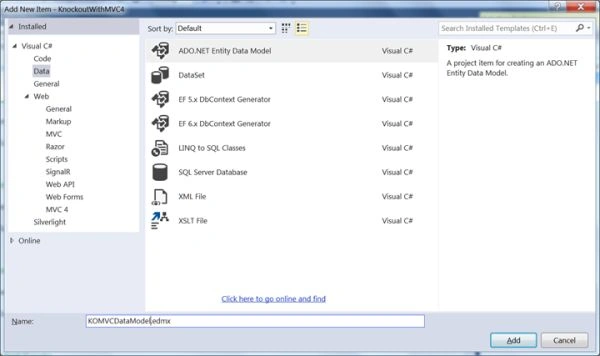
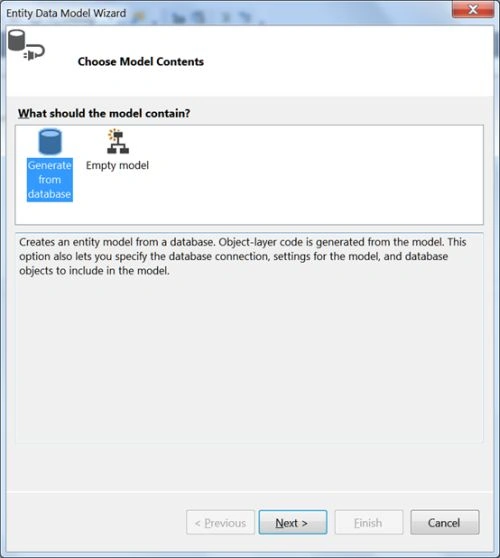
Generate a model from the database, select your server and "LearningKO" database name, the connection string will automatically be added to your Web.Config, name that connection string "LearningKOEntities".
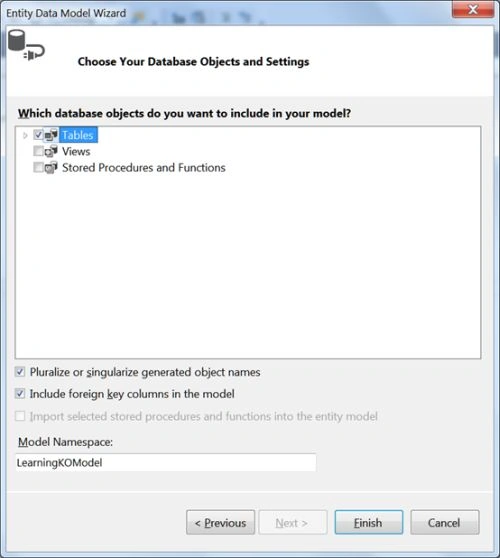
Select tables to be added to the model. In our case it's the "Student" table.
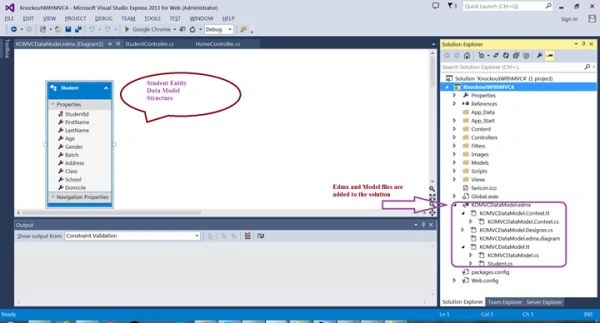
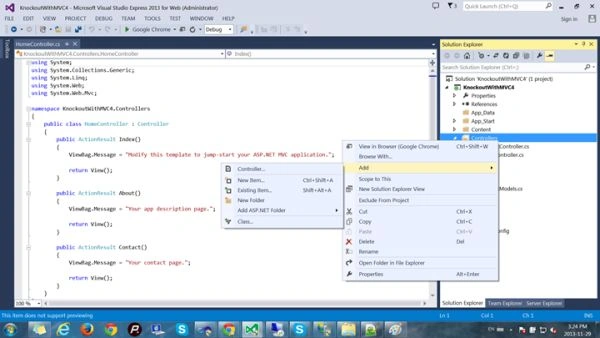
Step 5: Now add a new controller to the Controller folder, right-click the controller folder and add a controller named "Student". Since we have already created our data model, we can choose for an option where CRUD actions are created by the chosen Entity Framework data model.
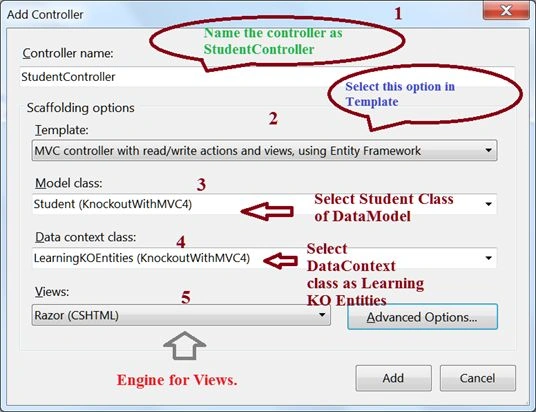
- Name your controller as "StudentController",
- From the Scaffolding Options, select "MVC controller with read/write actions and views, using Entity Framework".
- Select the Model class as "Student" that lies in our solution.
- Select the Data Context class as "LearningKOEntities" that is added to our solution when we added the Entity Framework data model.
- Select Razor as the rendering engine for views.
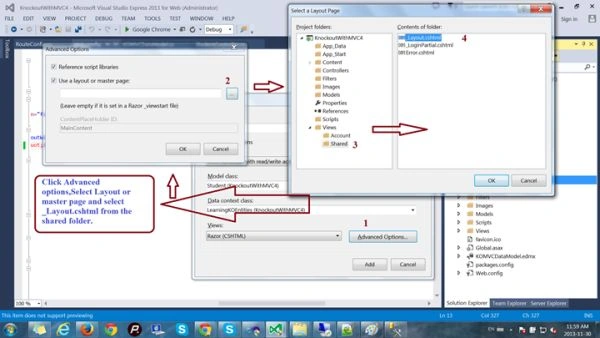
- Click "Advanced options", select "Layout or master page" and select "_Layout.cshtml" from the shared folder.
Step 6: We see out student controller prepared with all the CRUD operation actions as shown below:
Step 7: Open the "App_Start" folder and change the name of the controller from "Home" to "Student".- using System;
- using System.Collections.Generic;
- using System.Data;
- using System.Data.Entity;
- using System.Linq;
- using System.Web;
- using System.Web.Mvc;
- namespace KnockoutWithMVC4.Controllers
- {
- public class StudentController : Controller
- {
- private LearningKOEntities db = new LearningKOEntities();
- //
- // GET: /Student/
- public ActionResult Index()
- {
- return View(db.Students.ToList());
- }
- //
- // GET: /Student/Details/5
- public ActionResult Details(string id = null)
- {
- Student student = db.Students.Find(id);
- if (student == null)
- {
- return HttpNotFound();
- }
- return View(student);
- }
- //
- // GET: /Student/Create
- public ActionResult Create()
- {
- return View();
- }
- //
- // POST: /Student/Create
- [HttpPost]
- [ValidateAntiForgeryToken]
- public ActionResult Create(Student student)
- {
- if (ModelState.IsValid)
- {
- db.Students.Add(student);
- db.SaveChanges();
- return RedirectToAction("Index");
- }
- return View(student);
- }
- //
- // GET: /Student/Edit/5
- public ActionResult Edit(string id = null)
- {
- Student student = db.Students.Find(id);
- if (student == null)
- {
- return HttpNotFound();
- }
- return View(student);
- }
- //
- // POST: /Student/Edit/5
- [HttpPost]
- [ValidateAntiForgeryToken]
- public ActionResult Edit(Student student)
- {
- if (ModelState.IsValid)
- {
- db.Entry(student).State = EntityState.Modified;
- db.SaveChanges();
- return RedirectToAction("Index");
- }
- return View(student);
- }
- //
- // GET: /Student/Delete/5
- public ActionResult Delete(string id = null)
- {
- Student student = db.Students.Find(id);
- if (student == null)
- {
- return HttpNotFound();
- }
- return View(student);
- }
- //
- // POST: /Student/Delete/5
- [HttpPost, ActionName("Delete")]
- [ValidateAntiForgeryToken]
- public ActionResult DeleteConfirmed(string id)
- {
- Student student = db.Students.Find(id);
- db.Students.Remove(student);
- db.SaveChanges();
- return RedirectToAction("Index");
- }
- protected override void Dispose(bool disposing)
- {
- db.Dispose();
- base.Dispose(disposing);
- }
- }
- }
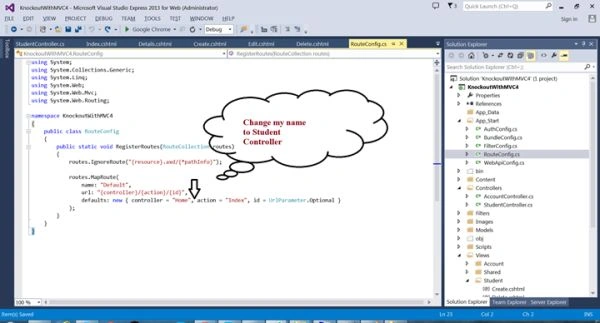
The code will become:
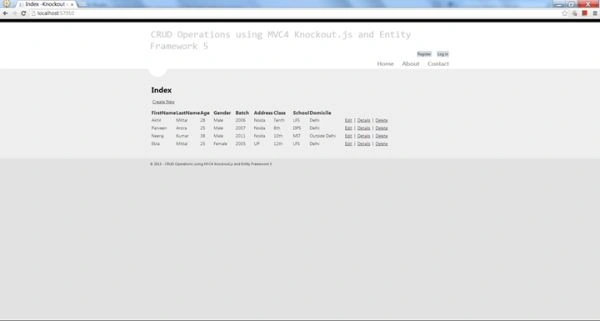
Step 8: Now press F5 to run the application, and you'll see the list of all students we added into the Student table while creating it as displayed. Since the CRUD operations are automatically written, we have action results for a display list and other edit, delete and create operations. Note that views for all the operations are created in the "Views" folder under the "Student" folder name.- public static void RegisterRoutes(RouteCollection routes)
- {
- routes.IgnoreRoute("{resource}.axd/{*pathInfo}");
- routes.MapRoute(
- name: "Default",
- url: "{controller}/{action}/{id}",
- defaults: new { controller = "Student",
- action = "Index", id = UrlParameter.Optional }
- );
- }
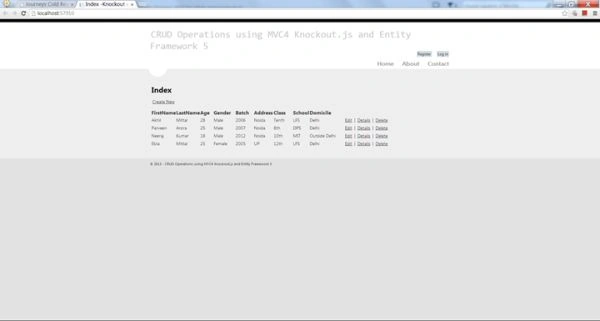
Now you can perform all the operations on this list.
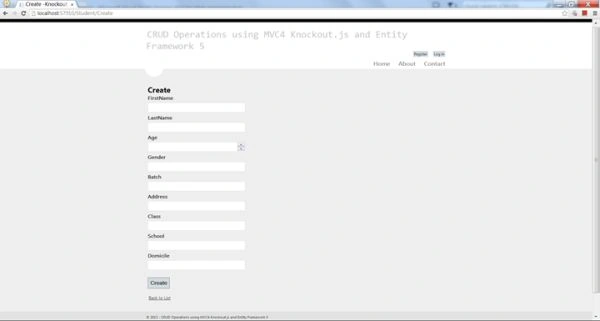

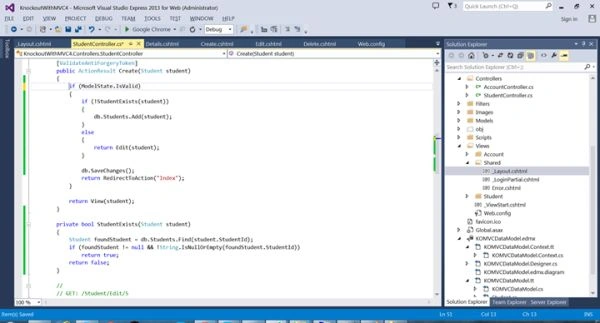
Since I have not provided any validation checks on the model or created an existing student id, the code may break, so I am calling Edit Action in the create when we find that the id already exists.
Now create a new student.
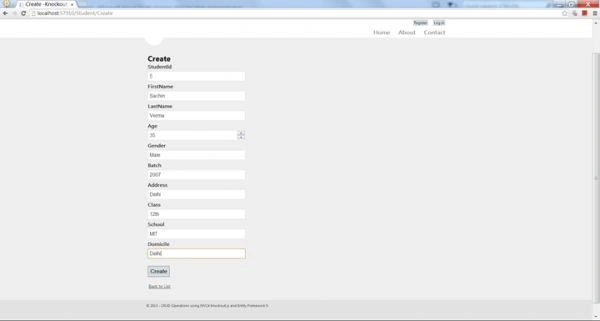
We see that the student is created successfully and added to the list.
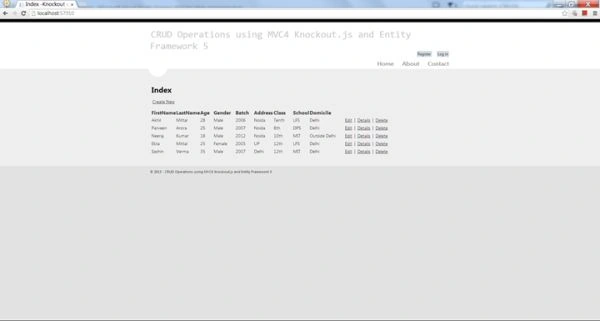
In the database:

Similarly for an edit:
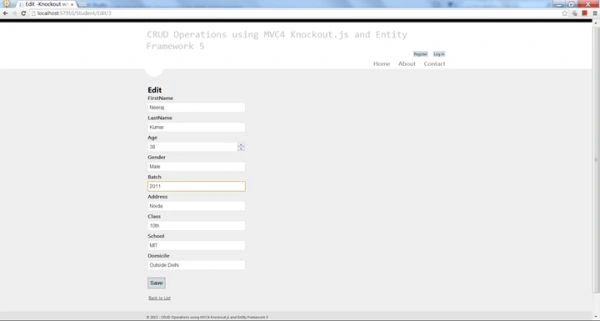
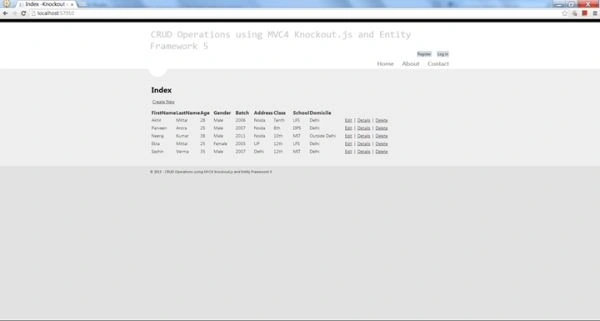
Change any field and press "Save".The change will be reflected in the list and the database.
For delete:
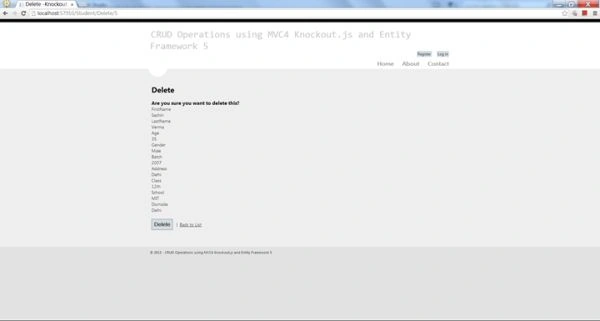
Student deleted.
And in the database:

Not a single line of code has been written.

Conclusion
In this tutorial we learned to set up an environment for MVC and Entity Framework 5 and perform CRUD operations on a Student model without writing a single line of code. You can expand the application by adding multiple Controllers, Models and Views.
Note: a few of the images in this article were obtained via Google search.
Read more:
- C# and ASP.NET Questions (All in one)
- MVC Interview Questions
- C# and ASP.NET Interview Questions and Answers
- Web Services and Windows Services Interview Questions
My other series of articles:
For more informative articles visit my Blog.
Happy Coding.
suresh gollapalliPosted Aug 25, 2016, 9:27 AM
Sir...Iam not Clear about this picture please repost it with good visuvalization i was struking hear ("Since I have not provided any validation checks on the model or created an existing student id, the code may break, so I am calling Edit Action in the create when we find that the id already exists.")
suresh gollapalliPosted Aug 25, 2016, 9:01 AM
Awsome sir
Sr KarthigaPosted Mar 2, 2016, 7:20 AM
good one
Sr KarthigaPosted Mar 2, 2016, 7:20 AM
Nice explanation
Abbas HamzaPosted Jan 20, 2016, 7:49 AM
Hi Akhil, I have a scenario where I have created students and I want to assign student to a course using a single view any idea how do I go about doing that thank you
Abhay ShankerPosted Oct 4, 2015, 5:39 AM
Nice Article
Pushpendra KumarPosted Jun 15, 2015, 2:22 AM
Awful English...."I am calling Edit Action in the create when we find that the id already exists." ??? not able to understand?
Maurilio FilhoPosted Feb 7, 2015, 1:33 PM
Ok this is amazing, but I would like some help if they know to use that formula but using Firebird Database !!
Baljeet SinghPosted May 4, 2014, 1:38 AM
nice style of coding.. thanks bro
imran khanPosted Dec 20, 2013, 1:05 AM
i get the error MvcScaffolding does not support Entity Frame work 6 or later
pinkyPosted Dec 16, 2013, 7:28 AM
Great ......Is it possible to do the same with SQL Server or LINQ instead of ADO.net connectivity
Ekta MittalPosted Dec 8, 2013, 9:46 AM
great style of writing,awesome work.