

Introduction
In this source sample I show how to add the autocomplete functionality in your WPF application's TextBox control using your own model data, .NET assemblies and WPF assemblies. There is no need to add any third-party NuGet package or any other DLL file. You can create your own after reading this article and by using the sample attached.
Description
This sample gives an overview of how to do autocomplete in WPF. The Autocomplete function is based on the following:
- A query provided by the user. It is the input that the user has typed into the control.
- List or collection of data that we have at the moment.
- A conditional statement to check whether the object or item in our list has the content or not.
Using this, we can create our own autocomplete feature for any TextBox. First define the model that we will use, you can extract the model from an SQL Server database, from Microsoft Azure data sources or from any other custom file also. I used the following:
C#
- using System;
- using System.Collections.Generic;
- using System.Linq;
- using System.Text;
- using System.Threading.Tasks;
- namespace AutocompleteWpfSample
- {
- class Model
- {
- static public List<string> GetData()
- {
- List<string> data = new List<string>();
- data.Add("Afzaal");
- data.Add("Ahmad");
- data.Add("Zeeshan");
- data.Add("Daniyal");
- data.Add("Rizwan");
- data.Add("John");
- data.Add("Doe");
- data.Add("Johanna Doe");
- data.Add("Pakistan");
- data.Add("Microsoft");
- data.Add("Programming");
- data.Add("Visual Studio");
- data.Add("Sofiya");
- data.Add("Rihanna");
- data.Add("Eminem");
- return data;
- }
- }
- }
- A TextBox: for user input.
- A StackPanel: for managing the TextBlocks being added.
- A Border: to separate the stuff from underground controls. Fancy stuff only.
XAML
- <TextBox Width="300" Padding="5, 3, 5, 3"
- KeyUp="TextBox_KeyUp" Name="textBox" />
- <Border Width="298" Height="150" BorderBrush="Black"
- BorderThickness="1">
- <ScrollViewer VerticalScrollBarVisibility="Auto">
- <StackPanel Name="resultStack"></StackPanel>
- </ScrollViewer>
- </Border>
C#
- private void TextBox_KeyUp(object sender, KeyEventArgs e)
- {
- bool found = false;
- var border = (resultStack.Parent as ScrollViewer).Parent as Border;
- var data = Model.GetData();
- string query = (sender as TextBox).Text;
- if (query.Length == 0)
- {
- // Clear
- resultStack.Children.Clear();
- border.Visibility = System.Windows.Visibility.Collapsed;
- }
- else
- {
- border.Visibility = System.Windows.Visibility.Visible;
- }
- // Clear the list
- resultStack.Children.Clear();
- // Add the result
- foreach (var obj in data)
- {
- if (obj.ToLower().StartsWith(query.ToLower()))
- {
- // The word starts with this... Autocomplete must work
- addItem(obj);
- found = true;
- }
- }
- if (!found)
- {
- resultStack.Children.Add(new TextBlock() { Text = "No results found." });
- }
- }
C#
- private void addItem(string text)
- {
- TextBlock block = new TextBlock();
- // Add the text
- block.Text = text;
- // A little style...
- block.Margin = new Thickness(2, 3, 2, 3);
- block.Cursor = Cursors.Hand;
- // Mouse events
- block.MouseLeftButtonUp += (sender, e) =>
- {
- textBox.Text = (sender as TextBlock).Text;
- };
- block.MouseEnter += (sender, e) =>
- {
- TextBlock b = sender as TextBlock;
- b.Background = Brushes.PeachPuff;
- };
- block.MouseLeave += (sender, e) =>
- {
- TextBlock b = sender as TextBlock;
- b.Background = Brushes.Transparent;
- };
- // Add to the panel
- resultStack.Children.Add(block);
- }
Note
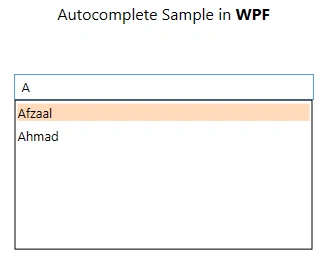
There are many other UI changes that I have made. So, you can surely ignore them. Such as mouse enter and mouse leave event handling to change the background color.
Example of the project
The following is the live example of this sample.
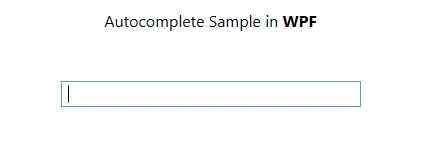
If we start typing something into it (that doesn't have a match) it would show the following UI:

Great, isn't it? Now if there is a query that has a match in the model of ours, then it would generate a new list and would show it to us. Have a look below.
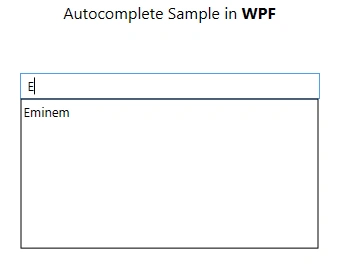
Um, if you hover over the list item then you will see that it also reflects events, as already said in the Note section above.
Great. So, I hope you might have learned how to create autocomplete functionality in your TextBoxes using only WPF and .NET Framework's libraries without having to use other third-party applications and NuGet packages. That's all for now. :-) I hope I helped you.
Arnold MejiaPosted Mar 4, 2022, 10:50 PM
?Y si ahora quiero traer los datos de diferentes campos de una base de datos en sql server??Como puedo hacerlo?
Fabián RomoPosted Jul 15, 2020, 10:35 AM
Mouse events don't work. Any suggestions?
Sharad GaurPosted Sep 3, 2018, 12:31 AM
When I'm clicking on the drop-down item in a scroll view, it is not appending the text I typed in the textbox with text in the suggestion in the scroll view. How can I do this when I click on suggestion it automatically completes the text and hides?
Sagar Pandurang KapPosted Jan 2, 2018, 5:59 AM
Great yaar.Nice article..
Sam KingPosted Oct 5, 2017, 3:28 AM
Really simple solution, can we also add multiple columns with header ?
Kay LeePosted May 23, 2016, 10:39 PM
I tried several other libraries but finally adopt this solution to my application. My deepest appreciation to the author of this post. By the way, modifying for keyboard down & up took days. Again, the idea of this solution is really simple and excellent ! Thank you so much !
Sr KarthigaPosted Feb 14, 2016, 8:02 AM
Good one sir
Sujeet SumanPosted Sep 21, 2015, 11:57 AM
Nice Article............
NitinPosted Jun 1, 2015, 9:45 AM
good one
Atul GuptaPosted Jun 1, 2015, 2:32 AM
Nice & thanks for sharing
Sibeesh VenuPosted Jun 1, 2015, 1:41 AM
Good one.
Santhakumar MunuswamyPosted May 31, 2015, 11:15 PM
Thanks for nice one