

Introduction
In this article I will explain how to send multiple emails with Inline Image. Before reading this article you must read my previous email related article because I have explained some basics part in my previous article and changed few of the code part in new one. The following are my previous articles.
- Send Email Using ASP.Net With C#
- Send Email To Multiple Email Addresses With Attachment Using ASP.NET With C#
Code
- protected void btn_sendemail_Click(object sender, EventArgs e)
- {
- string to = Txt_toaddress.Text; //To address
- string from = "fromaddress email"; //From address
- string[] Multiple = to.Split(',');
- MailMessage message = new MailMessage();
- message.From = new MailAddress(from);
- foreach (string multiple_email in Multiple)
- {
- message.To.Add(new MailAddress(multiple_email));
- }
- string mailbody = Txt_Bodycontent.Text + "<br/><html><body><h1>Happy Coding</h1><br> <img src=\"cid:Email\" width='600' height='300'></body></html>";
- AlternateView AlternateView_Html = AlternateView.CreateAlternateViewFromString(mailbody, null, MediaTypeNames.Text.Html);
- // Create a LinkedResource object and set Image location path and Type
- LinkedResource Picture1 = new LinkedResource(Server.MapPath("Selfie.jpeg"), MediaTypeNames.Image.Jpeg);
- Picture1.ContentId = "Email";
- AlternateView_Html.LinkedResources.Add(Picture1);
- message.AlternateViews.Add(AlternateView_Html);
- message.Subject = Txt_Subject.Text;
- message.Body = mailbody;
- message.BodyEncoding = Encoding.UTF8;
- message.IsBodyHtml = true;
- SmtpClient client = new SmtpClient("smtp.gmail.com", 587); //Gmail smtp
- System.Net.NetworkCredential basicCredential1 = new
- System.Net.NetworkCredential("fromaddress email", "fromaddress password");
- client.EnableSsl = true;
- client.UseDefaultCredentials = false;
- client.Credentials = basicCredential1;
- try
- {
- client.Send(message);
- }
- catch (Exception ex)
- {
- throw ex;
- }
- }
We must add the following namespace:
- using System.Net;
- using System.Net.Mail;
- using System.Text;
- using System.IO;
- using System.Net.Mime;
The following code will help to split the Comma '"," separated email in the given textbox ( Txt_toaddress.Text ).
- string to = Txt_toaddress.Text; //To address
- string from = "fromaddress email"; //From address
- string[] Multiple = to.Split(',');
- MailMessage message = new MailMessage();
- message.From = new MailAddress(from);
- foreach (string multiple_email in Multiple)
- {
- message.To.Add(new MailAddress(multiple_email));
- }
Inline Image Code
The following code will help to fetch the image and set into the inline of the email body.
- string mailbody = Txt_Bodycontent.Text + "<br/><html><body><h1>Happy Coding</h1><br><img src=\"cid:Email\" width='600' height='300'></body></html>";
- AlternateView AlternateView_Html = AlternateView.CreateAlternateViewFromString(mailbody, null, MediaTypeNames.Text.Html);
- // Create a LinkedResource object and set Image location path and Type
- LinkedResource Picture1 = new LinkedResource(Server.MapPath("Selfie.jpeg"), MediaTypeNames.Image.Jpeg);
- Picture1.ContentId = "Email";
- AlternateView_Html.LinkedResources.Add(Picture1);
- message.AlternateViews.Add(AlternateView_Html);
- message.Body = mailbody;
Important Notes
- Firstly, create one string that contain the html body with Inline image. In the above code "mailbody" is the string. It contains the html body.
- Create an AlternateView object for those supporting the HTML content.
- System.Net.Mime namespace contain the Image type and html format ( MediaTypeNames.Image.Jpeg & MediaTypeNames.Text.Html ).
- Create a LinkedResource object for the Inline image to send.
- Add a LinkedResource object to the AlternateView object.
- Check the correct Image location otherwise it will throw an error.
- Give same Image source id and LinkedResource ContentId.Like "<img src=\"cid:Email\" width='600' height='300'>" & Picture1.ContentId = "Email";
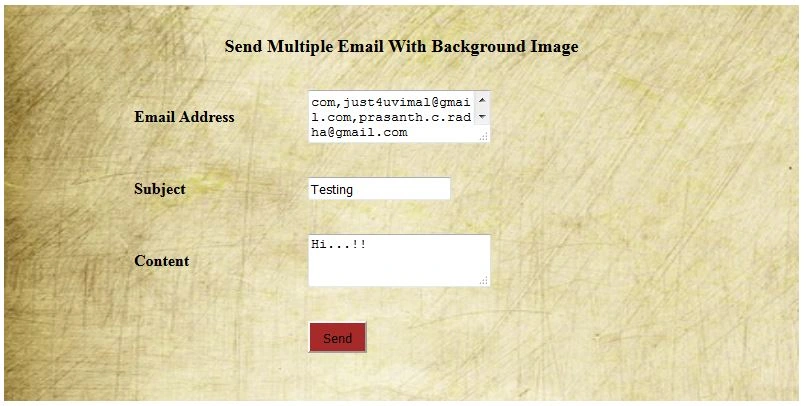
Design
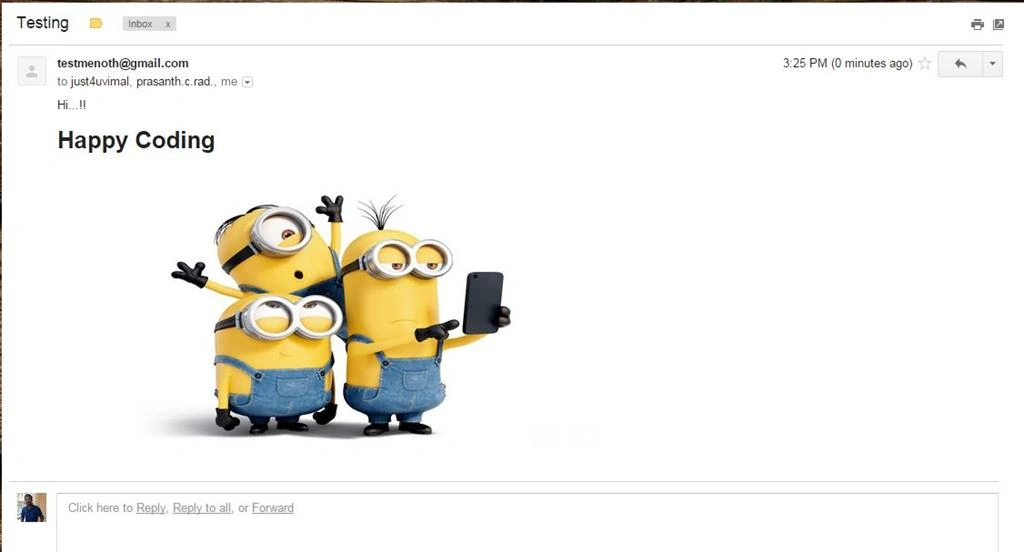
Output
Common Error for sending an Email
Check the following reference to solve your 5.5.1 Authentication.
Reference: You can also see this in my blog:
Summary
We learned how to send multiple emails with Inline Image using ASP.NET and C#. I hope this article is useful for all .NET beginners.
Rajeesh MenothPosted Aug 30, 2016, 4:28 AM
Thank You Delpin Susai Raj
Delpin Susai RajPosted Aug 28, 2016, 7:08 AM
Nice
Rajeesh MenothPosted Sep 27, 2015, 9:53 PM
Thank You Santhakumar Munuswamy Sir
Santhakumar MunuswamyPosted Sep 26, 2015, 12:31 PM
Nice share
Rajeesh MenothPosted Sep 24, 2015, 11:46 AM
Thank you Rakesh Chavda :)
RakeshPosted Sep 24, 2015, 10:28 AM
Nice work buddy
Rajeesh MenothPosted Sep 24, 2015, 5:50 AM
Thank You Prathamesh Purandare
Prathamesh PurandarePosted Sep 24, 2015, 5:39 AM
Nice Article
Rajeesh MenothPosted Sep 24, 2015, 2:22 AM
Thank You Sibeesh Venu
Sibeesh VenuPosted Sep 24, 2015, 2:18 AM
Nice Share
Ajeet MishraPosted Sep 24, 2015, 1:47 AM
nice
Rajeesh MenothPosted Sep 23, 2015, 11:27 AM
Thanks Shridhar Sharma bro :)
Shridhar SharmaPosted Sep 23, 2015, 11:01 AM
Nice one Rajeesh. :)
Rajeesh MenothPosted Sep 23, 2015, 10:29 AM
Thank you N Vinodh
Vinodh NarayananPosted Sep 23, 2015, 8:51 AM
Nice share
Sanjay SabariyaPosted Sep 23, 2015, 8:49 AM
good one...
Ankit BansalPosted Sep 23, 2015, 8:43 AM
thanks for sharing..
Abhishek AroraPosted Sep 23, 2015, 8:13 AM
Nice article.!
Saritha K TPosted Sep 23, 2015, 7:48 AM
Excellent ...
Rajeesh MenothPosted Sep 23, 2015, 6:59 AM
Thanks Humayun Kabir Mamun
Humayun Kabir MamunPosted Sep 23, 2015, 6:47 AM
Nice...