

Introduction
This article explains how to consume in the ASP.NET Web API. The Web API is defined as Consumption by various applications for supporting data transfer. It is also used for creating HTTP services.
Step 1
Create a Web API application as in the following:
- Start Visual Studio 2012.
- From the start window Select "Installed" -> "Visual C#" -> "Web".
- Select "ASP.NET MVC4 Web Application" and click on the "Ok" button.

- From the "MVC4 Project" window select "Web API".
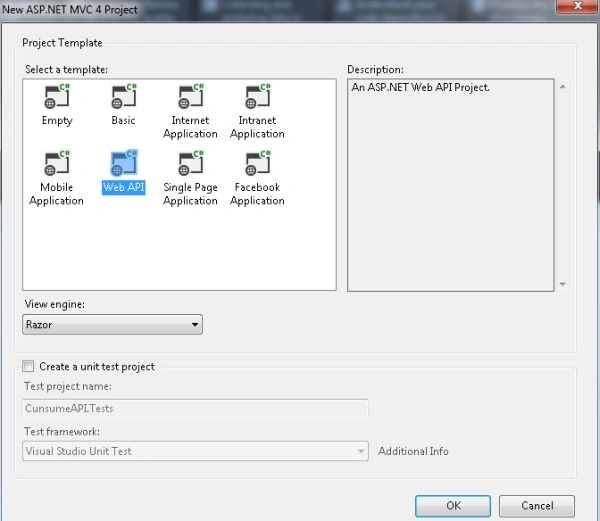
- Click on the "OK" button.
Step 2
Creating a model class:
- In the "Solution Explorer".
- Right-click on the Model Folder.
- Select "Add" -> "Class".
- Select "Installed" -> "Visual C#" and select class.

- Click on the "Add" button.
Add the following code:
- using System;
- using System.Collections.Generic;
- using System.Linq;
- using System.Web;
- namespace ConsumeAPI.Models
- {
- public class Vehical
- {
- public int Vehical_ID { get; set; }
- public string Va_Cmp { get; set; }
- public string V_Colr { get; set; }
- }
- }
Step 3
Add an apicontroller as in the following:
- In the "Solution Explorer".
- Right-click on the Controller folder.
- Select "Add" -> "Controller".
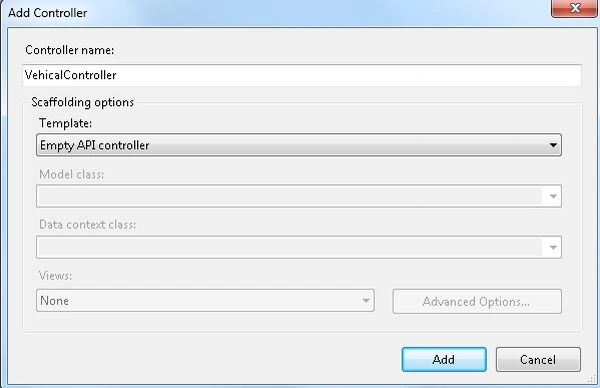
- Click on the "Add" button.
Add the following code:
- using System;
- using System.Collections.Generic;
- using System.Linq;
- using System.Net;
- using System.Net.Http;
- using System.Web.Http;
- using ConsumeAPI.Models;
- namespace ConsumeAPI.Controllers
- {
- public class VehicalController : ApiController
- {
- List<Vehical> model = new List<Vehical>()
- {
- new Vehical()
- {
- Vehical_ID = 101,
- Va_Cmp = "Tvera",
- V_Colr = "White",
- },
- new Vehical()
- {
- Vehical_ID = 102,
- Va_Cmp = "Toyota",
- V_Colr = "Gray",
- },
- new Vehical()
- {
- Vehical_ID = 1002,
- Va_Cmp = "BMW",
- V_Colr = "Red",
- },
- new Vehical()
- {
- Vehical_ID = 1002,
- Va_Cmp = "Hyundai",
- V_Colr = "Black",
- }
- };
- public IEnumerable<Vehical> GetAllVehicals()
- {
- return model;
- }
- public Vehical GetVehicalById(int id)
- {
- var car = model.FirstOrDefault((I) => I.Vehical_ID == id);
- if (car == null)
- {
- throw new HttpResponseException(HttpStatusCode.NotFound);
- }
- return car;
- }
- }
- }
Here we create a "VehicalController" class that inherits from the "apicontroller" class. In it the action method returns data, not views. The action method is mapped to the GET, PUT, POST, DELETE HTTP operations.
Step 4
Execute the application. The output will be:
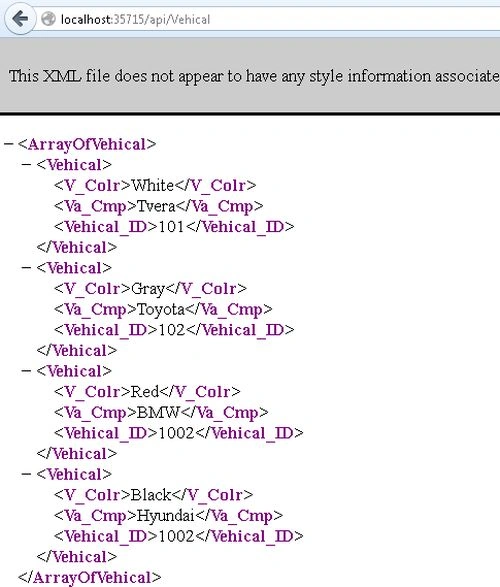
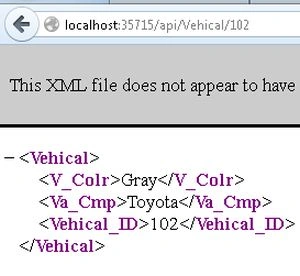
Get by ID:
Dipendra ShekhawatPosted Jan 4, 2016, 5:11 AM
Hey Zeeshan, you can refer to this article - http://dipendrashekhawat.com/consuming-web-api-through-html-clients/
Zeeshan AzimPosted Dec 25, 2015, 1:13 PM
Where have you consumed this web API? I did not see anywhere in this article.