
Introduction : The Replicator Activity enables you to create an arbitrary number of instances of a single activity during run time. Each ReplicatorActivity can contain only one child activity, but the child can be a composite activity. The Replicator Activity finishes when all child activities have finished. The Replicator Activity can be use in two way.
- Sequence Type.
- Parallel Type.
When we use the Unit Condition property to stop execution of the Replicator Activity before the completion of the child activity instance. The Replicator Activity is similar to a ForEach statement in code.
Step 1 : Open Visual Studio 2010.
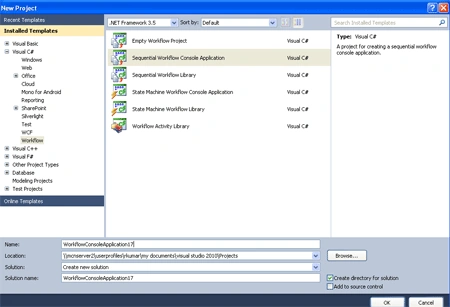
- Go to File-> New-> Project.
- Select Sequential Workflow Console Application.
Step 2 : Drag activity form Toolbox.
- Drag Replicator, Sequence, Delay, Code activity.
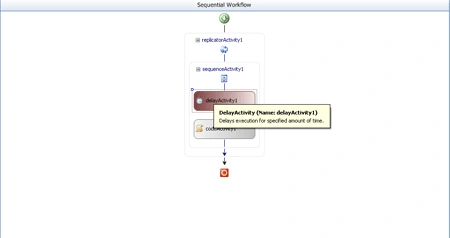
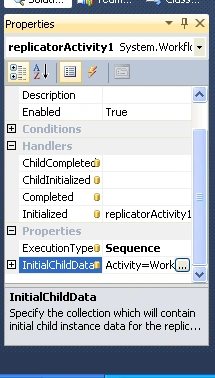
Step 3 : Now we select Replicator Activity and right -click.
- Go to the properties option and define InitialChildData, Execution Type.
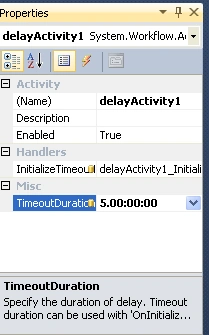
Step 4 : Again select the Delay activity and right-click.
- Define TimeOutDuration.
Step 5 : Go to the Solution Explorer and select program.cs.
- Write the below code.
Code :
using System;
using
System.Collections.Generic;
using
System.Linq;
using
System.Text;
using
System.Threading;
using
System.Workflow.Runtime;
using
System.Workflow.Runtime.Hosting;
namespace
WorkflowConsoleApplication17
{
class Program
{
static void
Main(string[] args)
{
using (WorkflowRuntime
workflowRuntime = new
WorkflowRuntime())
{
AutoResetEvent waitHandle =
new AutoResetEvent(false);
workflowRuntime.WorkflowCompleted +=
delegate(object sender,
WorkflowCompletedEventArgs e) {
waitHandle.Set(); };
workflowRuntime.WorkflowTerminated +=
delegate(object sender,
WorkflowTerminatedEventArgs e)
{
Console.WriteLine(e.Exception.Message);
Console.ReadLine();
waitHandle.Set();
};
WorkflowInstance instance =
workflowRuntime.CreateWorkflow(typeof(WorkflowConsoleApplication17.Workflow1));
instance.Start();
waitHandle.WaitOne();
}
}
}
}
Step 6 : Go to Workflow1.Designer.cs option and right a code for the DependencyProperty that is created using the DependencyProperty.RegisterAttached() function.
Code :
public static DependencyProperty LoopValueProperty = DependencyProperty.RegisterAttached("LoopValue", typeof(int), typeof(Workflow1));
Step 7 : Go to Workflow1.cs[Design] and select code activity.
- Double-click in code activity define the ReplicatorActivity works in sequential mode.
Join the conversation! Your thoughts help the community grow.