

Introduction
A mouse event occurs when a user moves the mouse in the user interface of an application. There are seven types of mouse events, they are:
- Onclick
- Ondblclick
- Onmousedown
- Onmouseup
- Onmouseover
- Onmouseout
- Onmousemove
In this article, I am describing the "Onclick" and "Ondblclick" mouse events in TypeScript.
Onclick
Note: When using the onclick event to trigger an action, also consider adding this same action to the onkeydown event, to allow the use of that same action by people who don't use a mouse or a touch screen.
OndblClick
This event is defined by the XHTML specification, but not by the DOM specification.
Complete Program
Onclick_Ondblclick.ts
- class Onclick_Ondblclick {
- Onclick() {
- alert("Fire Onclick event");
- }
- Ondblclick() {
- alert("Fire Ondblclick event");
- }
- }
- window.onload = () => {
- var obj = new Onclick_Ondblclick();
- var bttnclick = < HTMLButtonElement > document.getElementById("onclick");
- var bttndblclick = < HTMLButtonElement > document.getElementById("ondblclick");
- bttnclick.onclick = function() {
- obj.Onclick();
- }
- bttndblclick.ondblclick = function() {
- obj.Ondblclick();
- }
- };
Onclick_Ondblclick_Event_Demo.html
- < !DOCTYPE html >
- <
- html lang = "en"
- xmlns = "http://www.w3.org/1999/xhtml" >
- <
- head >
- <
- meta charset = "utf-8" / >
- <
- title > TypeScript HTML App < /title> <
- link rel = "stylesheet"
- href = "app.css"
- type = "text/css" / >
- <
- script src = "Onclick_Ondblclick.js" > < /script> <
- /head> <
- body >
- <
- h3 style = "color: #0033CC" > Onclick and Ondblclick event in TypeScript < /h3> <
- div id = "content" >
- <
- input id = "onclick"
- type = "button"
- value = "Onclick Event" / >
- <
- input id = "ondblclick"
- type = "button"
- value = "Ondblclick Event" / >
- <
- /div> <
- /body> <
- /html>
Onclick_Ondblclick.js
- var Onclick_Ondblclick = (function() {
- function Onclick_Ondblclick() {}
- Onclick_Ondblclick.prototype.Onclick = function() {
- alert("Fire Onclick event");
- };
- Onclick_Ondblclick.prototype.Ondblclick = function() {
- alert("Fire Ondblclick event");
- };
- return Onclick_Ondblclick;
- })();
- window.onload = function() {
- var obj = new Onclick_Ondblclick();
- var bttnclick = document.getElementById("onclick");
- var bttndblclick = document.getElementById("ondblclick");
- bttnclick.onclick = function() {
- obj.Onclick();
- };
- bttndblclick.ondblclick = function() {
- obj.Ondblclick();
- };
- };
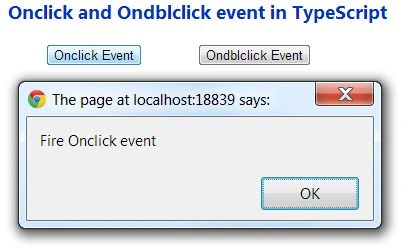
Output 1
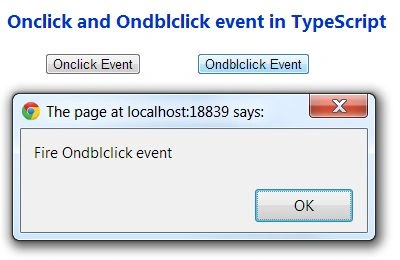
Output 2
Double-click on ondblclick button
Join the conversation! Your thoughts help the community grow.