

Introduction
The String object is used to manage a series of characters. The String object contains complete information about strings. In TypeScript, String objects are created with "new String()".
In this article, I am describing the TypeScript charAt and charCodeAt string methods.
chatAt() Method
Syntax
- string.charAt(position)
position: is a required parameter; represents the position of the character.
Function
A sample use of charAt is:
- charAt(str: string) {
- var position = str.charAt(0);
- var span = document.createElement("span");
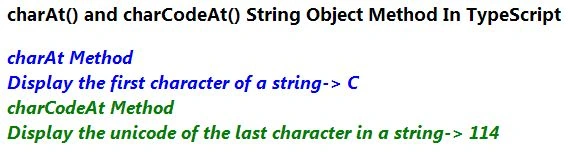
- span.innerText = "charAt Method \n Display the first character of a string-> " + position + "\n";
- document.body.appendChild(span);
- }
charCodeAt() Method
In TypeScript the charCodeAt() method returns a number that represents the Unicode value of the character at the given position.
Syntax
- string.charCodeAt(position)
position: is a required parameter; the position value is between 0 and the position of the last character, which is 1 less than the length of the string. The default position is 0.
Function
A sample use of charCodeAt is:
- charCodeAt(str: string) {
- var unicode = str.charCodeAt(str.length - 1);
- var span = document.createElement("span");
- span.style.color = "green";
- span.innerText = "charCodeAt Method \n Display the unicode of the last character in a string-> " + unicode + "\n";
- document.body.appendChild(span);
- }
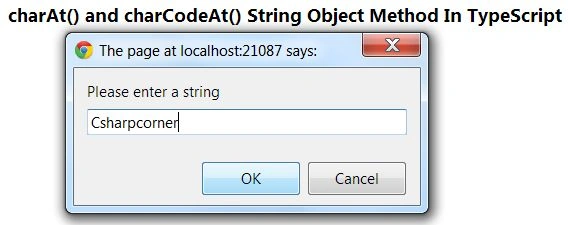
The following example shows how to use charAt and charCodeAt methods in TypeScript. In this example, we get a string from the user. The charAt() method returns the character at the specified position and the charCodeAt() method returns a Unicode character at a specified index.
Complete Program
chatAt_charCodeAt.ts
- class charAt_charCodeAt {
- charAt(str: string) {
- var position = str.charAt(0);
- var span = document.createElement("span");
- span.innerText = "charAt Method \n Display the first character of a string-> " + position + "\n";
- document.body.appendChild(span);
- }
- charCodeAt(str: string) {
- var unicode = str.charCodeAt(str.length - 1);
- var span = document.createElement("span");
- span.style.color = "green";
- span.innerText = "charCodeAt Method \n Display the unicode of the last character in a string-> " + unicode + "\n";
- document.body.appendChild(span);
- }
- }
- window.onload = () => {
- var obj = new charAt_charCodeAt();
- var str = prompt("Please enter a string");
- obj.charAt(str);
- obj.charCodeAt(str);
- };
Nitin BhardwajPosted Feb 4, 2013, 7:47 AM
Thank U Romil
romil shaheditedPosted Feb 4, 2013, 6:43 AMEdited Feb 4, 2013, 6:43 AM
nice article