

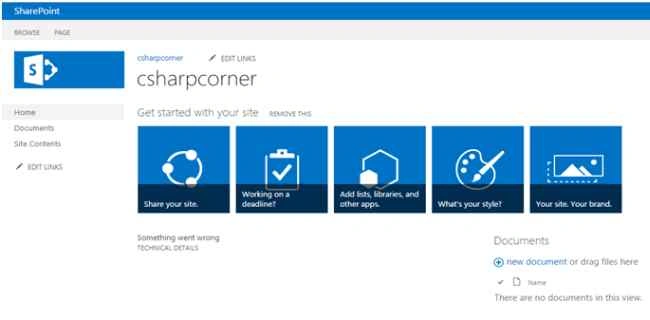
Open SharePoint Site.
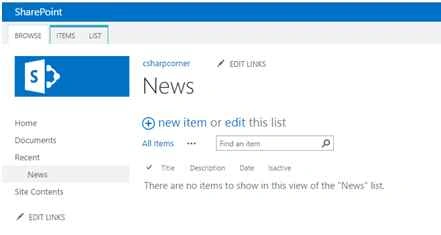
Create a simple list named “News”.
Open Visual studio.
Create a new SharePoint 2013 empty project.
Add a visual webpart into the SharePoint solution named “News rollup”.
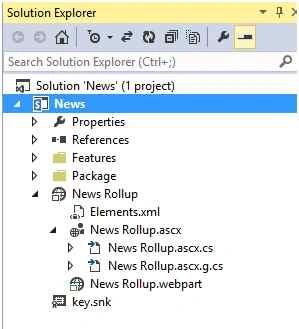
Now add a repeater control into the News Rollup.ascx.
Code:
- <asp:Repeater ID="rptsmartspeak" runat="server">
- <ItemTemplate>
- <%#DataBinder.Eval(Container.DataItem,"Date")%>
- <br />
- <h2 style="padding-top: 5px; font-weight: 700; font-size: 12px;"><%#DataBinder.Eval(Container.DataItem,"Title")%></h2>
- <br />
- <br />
- <p style="margin-top: -39px;">
- <%#FormatDescription(Container.DataItem,"Description")%>
- </p>
- <hr />
- </ItemTemplate>
- </asp:Repeater>
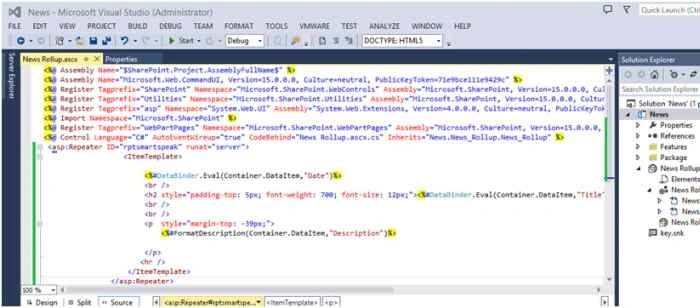
To bind the data into the repeater from SharePoint lists.
Download CAML Query builder.
Click here to download U2U CAML Query builder.
After installation, I am going to generate a query to retrieve the Isactive values from the news list.
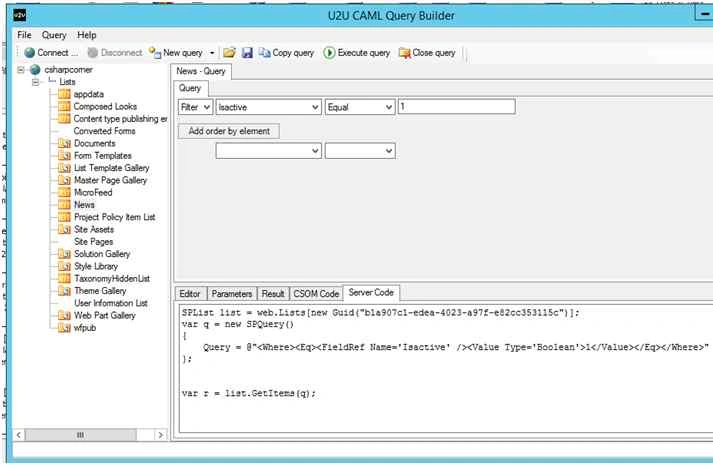
Code
- using Microsoft.SharePoint;
- using System;
- using System.ComponentModel;
- using System.Web.UI.WebControls.WebParts;
- namespace News.News_Rollup
- {
- [ToolboxItemAttribute(false)]
- public partial class News_Rollup : WebPart
- {
- // Uncomment the following SecurityPermission attribute only when doing Performance Profiling on a farm solution
- // using the Instrumentation method, and then remove the SecurityPermission attribute when the code is ready
- // for production. Because the SecurityPermission attribute bypasses the security check for callers of
- // your constructor, it's not recommended for production purposes.
- // [System.Security.Permissions.SecurityPermission(System.Security.Permissions.SecurityAction.Assert, UnmanagedCode = true)]
- public News_Rollup()
- {
- }
- protected override void OnInit(EventArgs e)
- {
- base.OnInit(e);
- InitializeControl();
- }
- protected void Page_Load(object sender, EventArgs e)
- {
- if(!Page.IsPostBack)
- {
- Bindspeaker();
- }
- }
- private void Bindspeaker()
- {
- using (SPSite site = new SPSite(SPContext.Current.Site.Url))
- {
- using (SPWeb web = site.OpenWeb())
- {
- SPList list = web.Lists["News"];
- if (list != null)
- {
- SPQuery query = new SPQuery();
- query.Query = "<Where><Eq><FieldRef Name='Isactive' /><Value Type='Boolean'>1</Value></Eq></Where>";
- SPListItemCollection collitem = list.GetItems(query);
- rptsmartspeak.DataSource = collitem.GetDataTable();
- rptsmartspeak.DataBind();
- }
- }
- }
- }
- }
- }
Full code
News Rollup.ascx
- <%@ Assembly Name="$SharePoint.Project.AssemblyFullName$" %>
- <%@ Assembly Name="Microsoft.Web.CommandUI, Version=15.0.0.0, Culture=neutral, PublicKeyToken=71e9bce111e9429c" %>
- <%@ Register Tagprefix="SharePoint" Namespace="Microsoft.SharePoint.WebControls" Assembly="Microsoft.SharePoint, Version=15.0.0.0, Culture=neutral, PublicKeyToken=71e9bce111e9429c" %>
- <%@ Register Tagprefix="Utilities" Namespace="Microsoft.SharePoint.Utilities" Assembly="Microsoft.SharePoint, Version=15.0.0.0, Culture=neutral, PublicKeyToken=71e9bce111e9429c" %>
- <%@ Register Tagprefix="asp" Namespace="System.Web.UI" Assembly="System.Web.Extensions, Version=4.0.0.0, Culture=neutral, PublicKeyToken=31bf3856ad364e35" %>
- <%@ Import Namespace="Microsoft.SharePoint" %>
- <%@ Register Tagprefix="WebPartPages" Namespace="Microsoft.SharePoint.WebPartPages" Assembly="Microsoft.SharePoint, Version=15.0.0.0, Culture=neutral, PublicKeyToken=71e9bce111e9429c" %>
- <%@ Control Language="C#" AutoEventWireup="true" CodeBehind="News Rollup.ascx.cs" Inherits="News.News_Rollup.News_Rollup" %>
- <div style="height:150px; width:200px" >
- <table style="width:100%" >
- <tr>
- <td style="width:10%" ></td>
- <td style="width:80%" >
- <marquee behavior="scroll" direction="up" scrollamount="3" onmouseover="stop();" onmouseout="start()";>
- <div class="smartspeak" style="padding-right: 20px; height:300px; width:280px;">
- <asp:Repeater ID="rptsmartspeak" runat="server">
- <ItemTemplate>
- <%#DataBinder.Eval(Container.DataItem,"Date")%>
- <br />
- <h2 style="padding-top: 5px; font-weight: 700; font-size: 12px;"><%#DataBinder.Eval(Container.DataItem,"Title")%></h2>
- <br />
- <br />
- <p style="margin-top: -39px;">
- <%#FormatDescription(Container.DataItem,"Description")%>
- </p>
- <hr />
- </ItemTemplate>
- </asp:Repeater>
- </div>
- </marquee>
- </td>
- <td style="width:10%" ></td>
- </tr>
- </table>
- using Microsoft.SharePoint;
- using System;
- using System.ComponentModel;
- using System.Web.UI;
- using System.Web.UI.WebControls.WebParts;
- namespace News.News_Rollup
- {
- [ToolboxItemAttribute(false)]
- public partial class News_Rollup : WebPart
- {
- // Uncomment the following SecurityPermission attribute only when doing Performance Profiling on a farm solution
- // using the Instrumentation method, and then remove the SecurityPermission attribute when the code is ready
- // for production. Because the SecurityPermission attribute bypasses the security check for callers of
- // your constructor, it's not recommended for production purposes.
- // [System.Security.Permissions.SecurityPermission(System.Security.Permissions.SecurityAction.Assert, UnmanagedCode = true)]
- public News_Rollup()
- {
- }
- protected override void OnInit(EventArgs e)
- {
- base.OnInit(e);
- InitializeControl();
- }
- protected void Page_Load(object sender, EventArgs e)
- {
- if (!Page.IsPostBack)
- {
- Bindspeaker();
- }
- }
- private void Bindspeaker()
- {
- using (SPSite site = new SPSite(SPContext.Current.Site.Url))
- {
- using (SPWeb web = site.OpenWeb())
- {
- SPList list = web.Lists["News"];
- if (list != null)
- {
- SPQuery query = new SPQuery();
- query.Query = "<Where><Eq><FieldRef Name='Isactive' /><Value Type='Boolean'>1</Value></Eq></Where>";
- SPListItemCollection collitem = list.GetItems(query);
- rptsmartspeak.DataSource = collitem.GetDataTable();
- rptsmartspeak.DataBind();
- }
- }
- }
- }
- protected string FormatDescription(object item, string fieldName)
- {
- if (string.IsNullOrEmpty(DataBinder.Eval(item, fieldName).ToString()))
- {
- return string.Empty;
- }
- else
- {
- string text = DataBinder.Eval(item, fieldName).ToString();
- if (text.Length < 250)
- return string.Format("{0}", text);
- return string.Format("{0}", text.Substring(0, 250));
- }
- }
- }
- }
After deploying, the webpart adds some news contents into the SharePoint list.
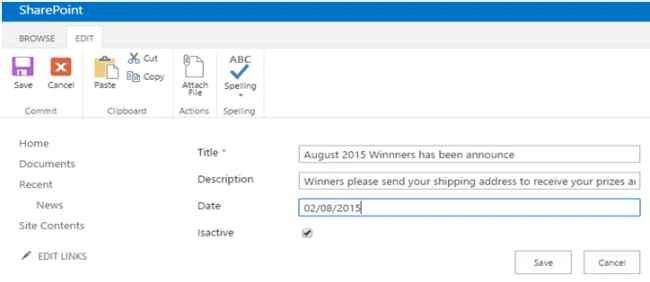
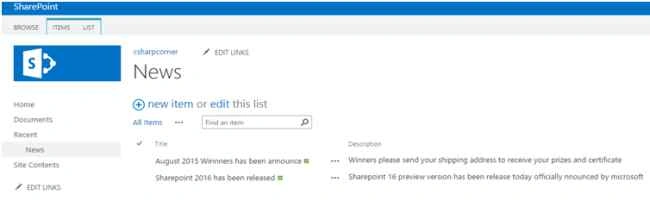
The final result is.
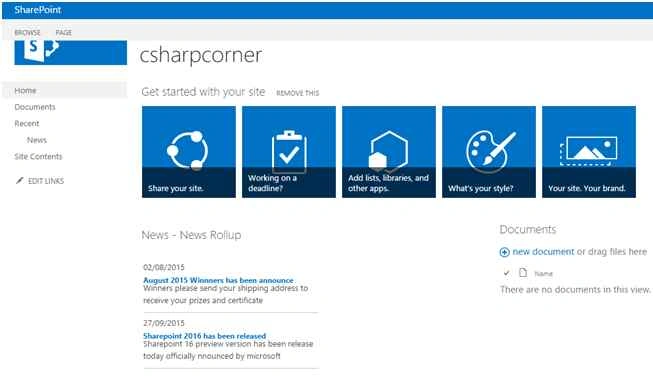
Now enjoy Stylish news webpart at free of cost with dynamic features.
Vinodh NarayananPosted Sep 28, 2015, 2:54 PM
Thanks a lot sir
Santhakumar MunuswamyPosted Sep 28, 2015, 2:06 PM
Good one
Vinodh NarayananPosted Sep 28, 2015, 4:57 AM
Sujeet Suman Thanks a lot sir
Vinodh NarayananPosted Sep 28, 2015, 4:56 AM
Jacob Robinson Thanks a lot
Sujeet SumanPosted Sep 28, 2015, 3:43 AM
Nice Article..............
Jacob RobinsonPosted Sep 28, 2015, 3:17 AM
Good One...
Vinodh NarayananPosted Sep 28, 2015, 3:15 AM
Sibeesh Venu Thanks sibeesh
Sibeesh VenuPosted Sep 28, 2015, 3:13 AM
Thanks for the share
Vinodh NarayananPosted Sep 28, 2015, 3:08 AM
Sumit Deshmukh Thanks a lot
Sumit DeshmukhPosted Sep 28, 2015, 3:03 AM
Very Nice Explain Vinodh...Thank you for Sharing