

Introduction
Z-index is used for serves to stabilize the order of elements that are in the overlap.
Z-Index is an important property of CSS. The z-index property specifies the stack order of an element and its descendants. The z-index property in CSS controls the vertical stacking order of elements that overlap. When elements overlap, z-order determines which one covers the other.
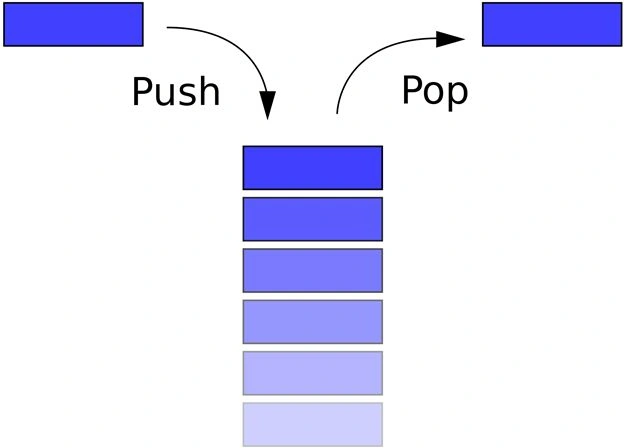 An element with a greater stack order is always in front of an element with a lower stack order. An element with a larger z-index generally covers an element with a lower one. The “Stack Order” refers to the element’s position on the Z-axis (as opposed to the X-axis or Y-axis). A higher z-index value means the element will be closer to the top of the stacking order.
Z- index Syntax
An element with a greater stack order is always in front of an element with a lower stack order. An element with a larger z-index generally covers an element with a lower one. The “Stack Order” refers to the element’s position on the Z-axis (as opposed to the X-axis or Y-axis). A higher z-index value means the element will be closer to the top of the stacking order.
Z- index Syntax
z-index: auto| number | initial | inherit;
Z- index: auto
- This is the default setting and it attributes the same value to both the element and the parent, if no value is defined for the parent then the value is zero (0);
Z- index: integer number
- Z-index: 1
- Z-index: 2
- Z-index: 2
Z- index: negative number
- Z-index: -1
Z- index: inherit
- Takes the same specified value as the property for the element's parent.
Example
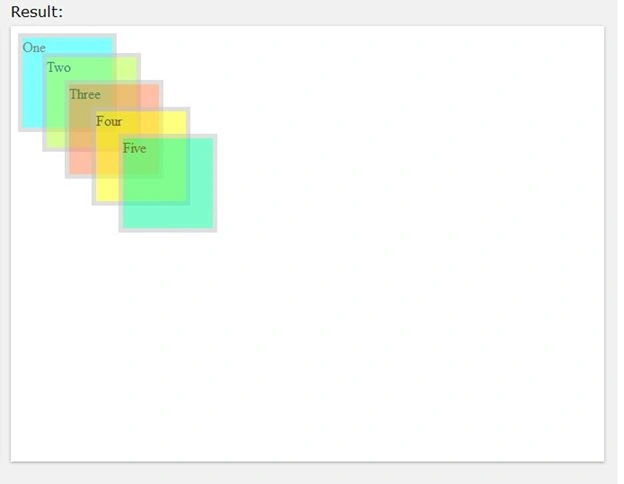
The following is the HTML code I used for this tutorial.
HTML: Structure
- <!DOCTYPE html>
- <html>
- <head>
- <title>Z-Index tutorial</title>
- </head>
- <body>
- <div id="one">One</div>
- <div id="two">Two</div>
- <div id="Three">Three</div>
- <div id="Four">Four</div>
- <div id="Five">Five</div>
- </body>
- </html>
CSS: Rule
- #
- one {
- border: solid 5 px silver;
- background - color: Aqua;
- position: absolute;
- z - index: 1;
- opacity: 0.5;
- height: 100 px;
- width: 100 px;
- }#
- two {
- border: solid 5 px silver;
- background - color: Green Yellow;
- position: absolute;
- top: 30 px;
- left: 35 px;
- z - index: 2;
- opacity: 0.5;
- height: 100 px;
- width: 100 px;
- }
- #
- Three {
- border: solid 5 px silver;
- background - color: Coral;
- position: absolute;
- top: 60 px;
- left: 60 px;
- opacity: 0.5;
- z - index: 3;
- height: 100 px;
- width: 100 px;
- }
- #
- Four {
- border: solid 5 px silver;
- background - color: Yellow;
- position: absolute;
- top: 90 px;
- left: 90 px;
- opacity: 0.5;
- z - index: 4;
- height: 100 px;
- width: 100 px;
- }
- #
- Five {
- border: solid 5 px silver;
- background - color: MediumSpringGreen;
- position: absolute;
- top: 120 px;
- left: 120 px;
- opacity: 0.5;
- z - index: 5;
- height: 100 px;
- width: 100 px;
- }
Complete code
- <!DOCTYPE html>
- <html>
- <head>
- <title>Z-Index tutorial</title>
- <style>
- #one {
- border: solid 5px silver;
- background-color: Aqua;
- position: absolute;
- z-index: 1;
- opacity: 0.5;
- height: 100px;
- width: 100px;
- }
- #two {
- border: solid 5px silver;
- background-color: Green Yellow;
- position: absolute;
- top: 30px;
- left: 35px;
- z-index: 2;
- opacity: 0.5;
- height: 100px;
- width: 100px;
- }
- #Three {
- border: solid 5px silver;
- background-color: Coral;
- position: absolute;
- top: 60px;
- left: 60px;
- opacity: 0.5;
- z-index: 3;
- height: 100px;
- width: 100px;
- }
- #Four {
- border: solid 5px silver;
- background-color: Yellow;
- position: absolute;
- top: 90px;
- left: 90px;
- opacity: 0.5;
- z-index: 4;
- height: 100px;
- width: 100px;
- }
- #Five {
- border: solid 5px silver;
- background-color: MediumSpringGreen;
- position: absolute;
- top: 120px;
- left: 120px;
- opacity: 0.5;
- z-index: 5;
- height: 100px;
- width: 100px;
- }
- </style>
- </head>
- <body>
- <div id="one">One</div>
- <div id="two">Two</div>
- <div id="Three">Three</div>
- <div id="Four">Four</div>
- <div id="Five">Five</div>
- </body>
- </html>
Prasanna MuraliPosted May 20, 2016, 11:24 AM
Nice one....
Karthikeyan KPosted Sep 5, 2015, 5:36 AM
Thank you Santhakumar sir...
Karthikeyan KPosted Sep 5, 2015, 5:36 AM
Thank you Sumit sir...
Santhakumar MunuswamyPosted Sep 5, 2015, 4:10 AM
Thanks for nice share
Sumit JoshiPosted Sep 4, 2015, 12:00 PM
Nice Share.
Karthikeyan KPosted Sep 4, 2015, 7:20 AM
Thank you Pankaj...
Pankaj Kumar ChoudharyPosted Sep 4, 2015, 6:57 AM
Nice Explain Karthikeyan Sir..........
Karthikeyan KPosted Sep 4, 2015, 5:06 AM
Thank you Ankit Bansal sir
Karthikeyan KPosted Sep 4, 2015, 5:05 AM
Thank you Upendra Pratap Shahi sir
Ankit BansalPosted Sep 4, 2015, 5:05 AM
thanks for sharing...
Upendra Pratap ShahiPosted Sep 4, 2015, 4:52 AM
thanks for sharing....good one
Karthikeyan KPosted Sep 4, 2015, 2:24 AM
Thank you Rahul Borate sir..
Karthikeyan KPosted Sep 4, 2015, 2:23 AM
Thank you Rajeesh Menoth sir...
Karthikeyan KPosted Sep 4, 2015, 2:23 AM
Thank you Jaipal Reddy sir...
Karthikeyan KPosted Sep 4, 2015, 2:23 AM
Thank you Kamlesh Bhor sir...
Karthikeyan KPosted Sep 4, 2015, 2:23 AM
Thank you Rakesh Chavda sir...
Karthikeyan KPosted Sep 4, 2015, 2:22 AM
Thank you Shridhar Sharma sir...
Karthikeyan KPosted Sep 4, 2015, 2:22 AM
Thank you Mohammed Ibrahim sir...
Rahul BoratePosted Sep 4, 2015, 2:09 AM
Nice
Rajeesh MenothPosted Sep 4, 2015, 12:26 AM
Nice Share...
Jaipal ReddyPosted Sep 3, 2015, 10:56 PM
nice one.
Kamlesh BhorPosted Sep 3, 2015, 1:46 PM
Thanks for sharing...
RakeshPosted Sep 3, 2015, 1:32 PM
Good one
Shridhar SharmaPosted Sep 3, 2015, 11:43 AM
good one Karthikeyan K
Mohammed IbrahimPosted Sep 3, 2015, 11:39 AM
thanks for sharing information...