

1. Introduction
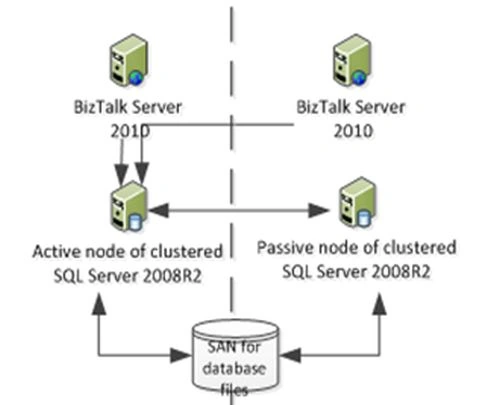
This document describes how to set up a low-cost high availability infrastructure for BizTalk Server 2010 in a LAN environment using only 4 server boxes (2 for BizTalk and 2 for SQL Server).
2. Basic Infrastructure
We will give the bare minimum infrastructure required for a high-availability scenario using BizTalk servers:
- We have two BizTalk Server boxes in an active-active configuration within the same BizTalk group for high availability (HA). This configuration also has built-in support for load balancing with the features being provided by BizTalk servers in the same group. But we will use a hardware load balancer.
- There are two SQL Server boxes in an active-passive cluster. The ENTSSO would be clustered in active-passive cluster SQL boxes along with a SSO service. The SSO service would also run locally on the BizTalk boxes locally. The master secret server would be clustered in an active-passive cluster (SQL boxes). The SQL boxes are connected to SAN storage where the database files would be stored.
- We have SQL Server 2008 R2 64-bit in the SQL boxes and BizTalk Server 2010 Enterprise edition 64-bit in the BizTalk boxes. All the boxes have Windows Server 2008 R2 Standard Edition 64-bit as the OS. IIS 7.5 on both the BizTalk boxes should also run in 64-bit native mode and would be on a NLB cluster. MSCS would run on both the SQL boxes but not in the BizTalk boxes.
- The SQL Server boxes are connected to SAN for the mdf and ldf files for SQL Server databases for BizTalk residing in SAN.
- The BizTalk boxes use NAS (or a common shared network storage) for shared folders required for file drop locations.
- For exposing web services from BizTalk boxes to the internet for the purpose of consumption by 3rd party systems, Microsoft Forefront Server in DMZ would be configured to allow traffic at port 80 to be relayed to port 80 corresponding to the IP address for the two BizTalk servers in the same group under the load balancer. The BizTalk server group name should be the same as a SQL Server instance name used by BizTalk.
- BizTalk is designed for load balancing out of the box. BizTalk processes are grouped into 3 types of Hosts; Send, Receive and Process. Hosts can consist of one or more host server instances. By having 2 host server instances for a given host, the host is load balanced. Process Hosts are always load balanced, but there are some load balancing exceptions in Receive and Send Hosts that must be considered.
- On the Receive Side, some push-based adapters (for example HTTP, SOAP and WCF-HTTP) require an additional layer to support load balancing. To accommodate this requirement, the BizTalk Service leverages on the Network Load Balancer service. A common HTTP URL will be used to point to a web service exposed by a BizTalk server for the integration layer. This common URL will then be forwarded to the two BizTalk servers using a round-robin load balancing method. A keep-alive web page will be configured on both BizTalk servers that the Network Load Balancer will use to probe for a health check. If one of the BizTalk servers is down then the keep-alive page will not be accessible and all HTTP traffic will be forwarded to the other BizTalk server. This service enables load balancing across data centers that also provide the additional benefit of high availability in the BizTalk tier.
- On the Receive and Send side, a small set of FTP-based adapters (FTP, SFTP, MSMQ) does not support load balancing. This is due to the fact that these adapters do not include a locking mechanism. To work around this limitation, one of the two BizTalk servers is assigned to manage interactions based on FTP / MSMQ with the other designated as a fallback. Again on the Receive and Send side, the FILE adapter will leverage on the existing Windows File System that provides a locking mechanism. Hence when a FILE adapter's host instance is reading a file from a drop location, it locks the file such that another host instance counterpart will not be able to read the same file.
3. Software Components
- BizTalk Server 2010 Configuration
- Windows Server 2008R2 x64 Enterprise Edition
- IIS 7.5, .NET 3.5, .NET 4.0 and ASP.NET
- Microsoft SQL Server 2008R2 Client
- BizTalk 2010 with SSO, WCF options
- Codeplex BizTalk SFTP Adapter
- BizTalk Adapter Pack 2010 x86 and x64
- SQL Server 2008R2 Configuration
- Windows Server 2008R2 x64 Enterprise Edition
- Microsoft SQL Server 2008R2 Standard Edition x64
- Enterprise Single Sign On
4. Storage
|
Path |
Purpose |
Storage size required |
|
E:\ProgramFiles\ |
Component software path for 64-bit |
30 GB |
|
E:\ProgramFiles(x86)\ |
Component software path for 32-bit | |
|
E:\SQL\BizTalk\Data |
Folder for BizTalkMsgBoxDb MDF files |
30 GB |
|
E:\SQL\BizTalk\Log |
Folder for BizTalkMsgBoxDb LDF files |
50 GB |
|
E:\SQL\Data |
Folder for other databases MDF files |
50 GB |
|
E:\SQL\Log |
Folder for other databases LDF files |
100 GB |
|
E:\SQL\Backup |
Folder for Backup files |
100 GB |
5. Conclusion
Though it is recommended to use 2 BizTalk boxes in active-active and 2 BizTalk boxes in active-passive configuration along with 3 SQL Server boxes in active-passive-passive (hot stand-by) mode for an ideal scenario to begin with, we have managed using 4 boxes in total instead of 6 boxes, assuming that FTP and MSMQ would not be heavily used. But if FTP and MSMQ are heavily used then we need to go for BizTalk clustering too.
Join the conversation! Your thoughts help the community grow.