

Introduction
I am assuming here that you are familiar with HTML and CSS. I have commented the code with the necessary information in the major part of the code. So you can understand easily. I have also attached the source code so you can download it and use it. Let's start.
I have posted this PHP Registration Script on my personal blog. You can also check it.
Note
The following are the points we will be learning in this article,
- Creating a Database in PHPMyAdmin.
- Create a connection with the MySQL database.
- Insert, delete, and view data from MySQL database.
- Some Bootstrap components.
- Sessions in PHP.
Files and IDE
- Registration
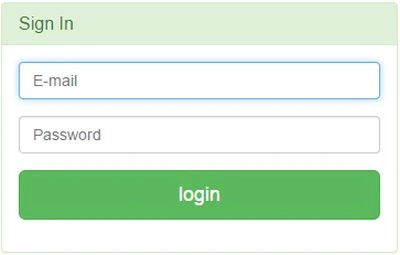
- Login
- Logout
- Welcome
- Admin_login
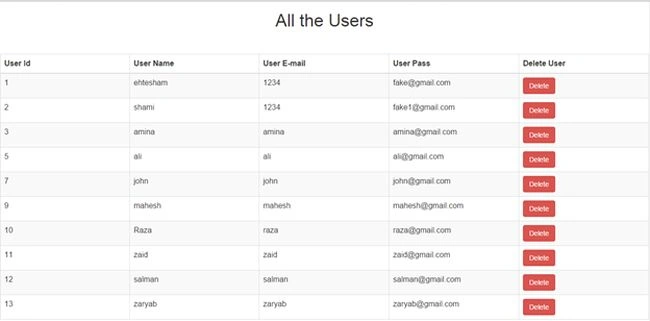
- View_users
- Db_conection
- Delete.php
I am using PHPStorm for the coding and Bootstrap framework for front end development.
Create Database
 Create Tables
 Create columns in the Users table
 Crate Admin Table
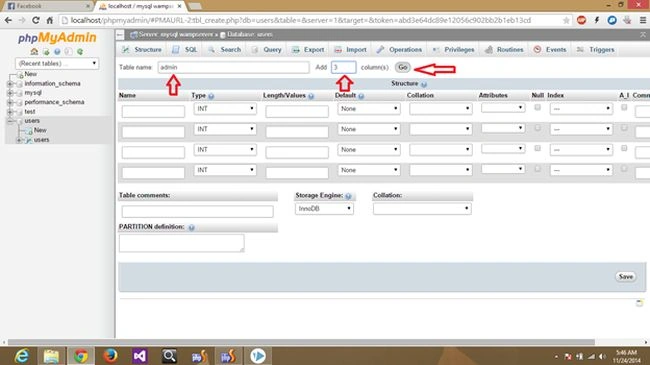 Create Admin Columns
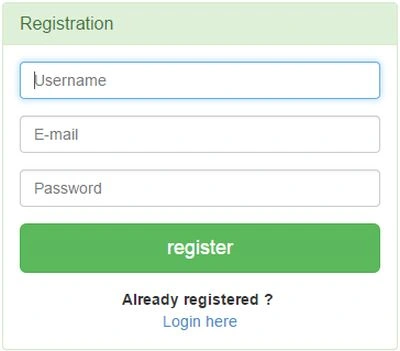
 Registration.php
- <html>
- <head lang="en">
- <meta charset="UTF-8">
- <link type="text/css" rel="stylesheet" href="bootstrap-3.2.0-dist\css\bootstrap.css">
- <title>Registration</title>
- </head>
- <style>
- .login-panel {
- margin-top: 150px;
- </style>
- <body>
- <div class="container"><!-- container class is used to centered the body of the browser with some decent width-->
- <div class="row"><!-- row class is used for grid system in Bootstrap-->
- <div class="col-md-4 col-md-offset-4"><!--col-md-4 is used to create the no of colums in the grid also use for medimum and large devices-->
- <div class="login-panel panel panel-success">
- <div class="panel-heading">
- <h3 class="panel-title">Registration</h3>
- </div>
- <div class="panel-body">
- <form role="form" method="post" action="registration.php">
- <fieldset>
- <div class="form-group">
- <input class="form-control" placeholder="Username" name="name" type="text" autofocus>
- </div>
- <div class="form-group">
- <input class="form-control" placeholder="E-mail" name="email" type="email" autofocus>
- </div>
- <div class="form-group">
- <input class="form-control" placeholder="Password" name="pass" type="password" value="">
- </div>
- <input class="btn btn-lg btn-success btn-block" type="submit" value="register" name="register" >
- </fieldset>
- </form>
- <center><b>Already registered ?</b> <br></b><a href="login.php">Login here</a></center><!--for centered text-->
- </div>
- </div>
- </div>
- </div>
- </div>
- </body>
- </html>
- <?php
- include("database/db_conection.php");//make connection here
- if(isset($_POST['register']))
- {
- $user_name=$_POST['name'];//here getting result from the post array after submitting the form.
- $user_pass=$_POST['pass'];//same
- $user_email=$_POST['email'];//same
- if($user_name=='')
- {
- //javascript use for input checking
- echo"<script>alert('Please enter the name')</script>";
- exit();//this use if first is not work then other will not show
- }
- if($user_pass=='')
- {
- echo"<script>alert('Please enter the password')</script>";
- exit();
- }
- if($user_email=='')
- {
- echo"<script>alert('Please enter the email')</script>";
- exit();
- }
- //here query check weather if user already registered so can't register again.
- $check_email_query="select * from users WHERE user_email='$user_email'";
- $run_query=mysqli_query($dbcon,$check_email_query);
- if(mysqli_num_rows($run_query)>0)
- {
- echo "<script>alert('Email $user_email is already exist in our database, Please try another one!')</script>";
- exit();
- }
- //insert the user into the database.
- $insert_user="insert into users (user_name,user_pass,user_email) VALUE ('$user_name','$user_pass','$user_email')";
- if(mysqli_query($dbcon,$insert_user))
- {
- echo"<script>window.open('welcome.php','_self')</script>";
- }
- }
- ?>
- <?php
- session_start();//session starts here
- ?>
- <html>
- <head lang="en">
- <meta charset="UTF-8">
- <link type="text/css" rel="stylesheet" href="bootstrap-3.2.0-dist\css\bootstrap.css">
- <title>Login</title>
- </head>
- <style>
- .login-panel {
- margin-top: 150px;
- </style>
- <body>
- <div class="container">
- <div class="row">
- <div class="col-md-4 col-md-offset-4">
- <div class="login-panel panel panel-success">
- <div class="panel-heading">
- <h3 class="panel-title">Sign In</h3>
- </div>
- <div class="panel-body">
- <form role="form" method="post" action="login.php">
- <fieldset>
- <div class="form-group" >
- <input class="form-control" placeholder="E-mail" name="email" type="email" autofocus>
- </div>
- <div class="form-group">
- <input class="form-control" placeholder="Password" name="pass" type="password" value="">
- </div>
- <input class="btn btn-lg btn-success btn-block" type="submit" value="login" name="login" >
- <!-- Change this to a button or input when using this as a form -->
- <!-- <a href="index.html" class="btn btn-lg btn-success btn-block">Login</a> -->
- </fieldset>
- </form>
- </div>
- </div>
- </div>
- </div>
- </div>
- </body>
- </html>
- <?php
- include("database/db_conection.php");
- if(isset($_POST['login']))
- {
- $user_email=$_POST['email'];
- $user_pass=$_POST['pass'];
- $check_user="select * from users WHERE user_email='$user_email'AND user_pass='$user_pass'";
- $run=mysqli_query($dbcon,$check_user);
- if(mysqli_num_rows($run))
- {
- echo "<script>window.open('welcome.php','_self')</script>";
- $_SESSION['email']=$user_email;//here session is used and value of $user_email store in $_SESSION.
- }
- else
- {
- echo "<script>alert('Email or password is incorrect!')</script>";
- }
- }
- ?>
- <?php
- /**
- * Created by PhpStorm.
- * User: Ehtesham Mehmood
- * Date: 11/21/2014
- * Time: 2:46 AM
- */
- session_start();//session is a way to store information (in variables) to be used across multiple pages.
- session_destroy();
- header("Location: login.php");//use for the redirection to some page
- ?>
- <?php
- session_start();
- if(!$_SESSION['email'])
- {
- header("Location: login.php");//redirect to the login page to secure the welcome page without login access.
- }
- ?>
- <html>
- <head>
- <title>
- Registration
- </title>
- </head>
- <body>
- <h1>Welcome</h1><br>
- <?php
- echo $_SESSION['email'];
- ?>
- <h1><a href="logout.php">Logout here</a> </h1>
- </body>
- </html>
- <html>
- <head lang="en">
- <meta charset="UTF-8">
- <link type="text/css" rel="stylesheet" href="bootstrap-3.2.0-dist\css\bootstrap.css">
- <title>Admin Login</title>
- </head>
- <style>
- .login-panel {
- margin-top: 150px;
- </style>
- <body>
- <div class="container">
- <div class="row">
- <div class="col-md-4 col-md-offset-4">
- <div class="login-panel panel panel-success">
- <div class="panel-heading">
- <h3 class="panel-title">Sign In</h3>
- </div>
- <div class="panel-body">
- <form role="form" method="post" action="admin_login.php">
- <fieldset>
- <div class="form-group" >
- <input class="form-control" placeholder="Name" name="admin_name" type="text" autofocus>
- </div>
- <div class="form-group">
- <input class="form-control" placeholder="Password" name="admin_pass" type="password" value="">
- </div>
- <input class="btn btn-lg btn-success btn-block" type="submit" value="login" name="admin_login" >
- </fieldset>
- </form>
- </div>
- </div>
- </div>
- </div>
- </div>
- </body>
- </html>
- <?php
- /**
- * Created by PhpStorm.
- * User: Ehtesham Mehmood
- * Date: 11/24/2014
- * Time: 3:26 AM
- */
- include("database/db_conection.php");
- if(isset($_POST['admin_login']))//this will tell us what to do if some data has been post through form with button.
- {
- $admin_name=$_POST['admin_name'];
- $admin_pass=$_POST['admin_pass'];
- $admin_query="select * from admin where admin_name='$admin_name' AND admin_pass='$admin_pass'";
- $run_query=mysqli_query($dbcon,$admin_query);
- if(mysqli_num_rows($run_query)>0)
- {
- echo "<script>window.open('view_users.php','_self')</script>";
- }
- else {echo"<script>alert('Admin Details are incorrect..!')</script>";}
- }
- ?>
- <html>
- <head lang="en">
- <meta charset="UTF-8">
- <link type="text/css" rel="stylesheet" href="bootstrap-3.2.0-dist\css\bootstrap.css"> <!--css file link in bootstrap folder-->
- <title>View Users</title>
- </head>
- <style>
- .login-panel {
- margin-top: 150px;
- }
- .table {
- margin-top: 50px;
- }
- </style>
- <body>
- <div class="table-scrol">
- <h1 align="center">All the Users</h1>
- <div class="table-responsive"><!--this is used for responsive display in mobile and other devices-->
- <table class="table table-bordered table-hover table-striped" style="table-layout: fixed">
- <thead>
- <tr>
- <th>User Id</th>
- <th>User Name</th>
- <th>User E-mail</th>
- <th>User Pass</th>
- <th>Delete User</th>
- </tr>
- </thead>
- <?php
- include("database/db_conection.php");
- $view_users_query="select * from users";//select query for viewing users.
- $run=mysqli_query($dbcon,$view_users_query);//here run the sql query.
- while($row=mysqli_fetch_array($run))//while look to fetch the result and store in a array $row.
- {
- $user_id=$row[0];
- $user_name=$row[1];
- $user_email=$row[2];
- $user_pass=$row[3];
- ?>
- <tr>
- <!--here showing results in the table -->
- <td><?php echo $user_id; ?></td>
- <td><?php echo $user_name; ?></td>
- <td><?php echo $user_email; ?></td>
- <td><?php echo $user_pass; ?></td>
- <td><a href="delete.php?del=<?php echo $user_id ?>"><button class="btn btn-danger">Delete</button></a></td> <!--btn btn-danger is a bootstrap button to show danger-->
- </tr>
- <?php } ?>
- </table>
- </div>
- </div>
- </body>
- </html>
- <?php
- /**
- * Created by PhpStorm.
- * User: Ehtesham Mehmood
- * Date: 11/21/2014
- * Time: 1:13 AM
- */
- $dbcon=mysqli_connect("localhost","root","");
- mysqli_select_db($dbcon,"users");
- ?>
- <?php
- /**
- * Created by PhpStorm.
- * User: Ehtesham Mehmood
- * Date: 11/24/2014
- * Time: 11:55 PM
- */
- include("database/db_conection.php");
- $delete_id=$_GET['del'];
- $delete_query="delete from users WHERE id='$delete_id'";//delete query
- $run=mysqli_query($dbcon,$delete_query);
- if($run)
- {
- //javascript function to open in the same window
- echo "<script>window.open('view_users.php?deleted=user has been deleted','_self')</script>";
- }
- ?>
Andropov AjebuaPosted Aug 27, 2020, 9:22 PM
Thanks for the code. Please can i have code for view and edit using modal forms
Andropov AjebuaPosted Aug 27, 2020, 9:21 PM
Hello thanks for the code it was helpful.
ara wawaPosted Jun 8, 2019, 9:02 PM
Much much muchh love this!! many thanks dude!!
Raghavendra raaguPosted Mar 15, 2019, 7:37 AM
HI I need a help ? i have website that is created from aspx, i changed all pages to html! it is working fine ,only the forms are connected through asp.net. hw can i change the connection using php?
keiraljon catalinoPosted Sep 25, 2018, 11:18 AM
How about the admin login cant open password invalid
keiraljon catalinoPosted Sep 25, 2018, 11:13 AM
I cant login
JAMES MARVINPosted Jul 9, 2018, 9:29 AM
Hey...anyone with the session tracking for the above code kindly share with me,Been having problems implementing the sessions for security reasons.Thanks
Prabhat PathakPosted May 27, 2018, 7:34 AM
Tnx but admin is not working
John CartorPosted Apr 20, 2018, 9:09 AM
Session is not working. Why. And it's causes unable to visit mainpage.php.
Lind OwserPosted Mar 14, 2018, 11:30 PM
Using this php scipts / program how can I add or capture the time that the user has login?
umeshkumar mPosted Feb 17, 2018, 12:10 PM
Wher i set my database name xyxxxxx_login / username / password and my table name users...? if local host is host name and root is username
punk loverPosted Oct 26, 2017, 6:54 AM
I think View_users.php can be viewed directly by typing into address bar .... because there is no session checking for admin login.. I'm not sure .
sageer shaikhPosted Aug 19, 2017, 10:45 AM
How to display username instead of email on welcome page after successful login....?
Yalish MayPosted May 9, 2017, 9:46 PM
Everybody can see this video, it can help you https://www.youtube.com/playlist?list=PLWCwHyO7D_vwPjcQYIrTMHnODl6fH5_rq
Asmatullah sahiPosted Apr 28, 2017, 8:36 AM
Very useful code with good logic and easy code understanding :)
Narek MikayelyanPosted Apr 3, 2017, 4:45 PM
Please send me working login script width mysql dump on email [email protected]
Manimaran CSEPosted Mar 6, 2017, 12:18 PM
Thanks very useful one
felix osehPosted Jan 6, 2017, 12:42 PM
Nice one rohna your code was really helpful to me
Rohan AbesinghePosted Dec 16, 2016, 12:26 AM
Hello Ehtesham Mehmood, Nice Explanation and good article, however your http://go2code.com/2016/02/script-for-register-login-logout-using-php-mysql-and-bootstrap/ web site is not working.
The APosted Dec 1, 2016, 3:06 AM
Thanks alot dude..................................................................................................
Ramesh PalaniappanPosted Aug 29, 2016, 11:23 AM
Nice
Manish PandeyPosted Jun 24, 2016, 3:44 AM
but what is the admin name and password in this form
shaftal khanPosted Jun 20, 2016, 3:20 AM
dnt execute if condition of login .php just execute of else condition you can help me.
aditya dubeyPosted Jun 2, 2016, 1:24 PM
thanks Ehtesham Mehmood i want to ask question about add user , i want insert some records into my datase by only specefic logged user how can i do it .........
German DominguezPosted May 30, 2016, 11:25 PM
Me ha servido bastante bien, Gracias
arnold arrietaPosted Feb 10, 2016, 12:37 PM
i cannot seem to fix this problem, i already fix the location of the DB but still get the same problem. ( Warning: include(database/db_connection.php) [<a href='function.include'>function.include</a>]: failed to open stream: No such file or directory in C:\wamp\www\NEW MRI\LogIn.php on line 60 )
Amit Kumar SinghPosted Feb 5, 2016, 5:17 AM
Nice Share
Shashangka ShekharPosted Feb 5, 2016, 2:08 AM
Nice Share, Thanks
Pankaj Kumar ChoudharyPosted Feb 5, 2016, 1:24 AM
Nice Explain...........
Ibrahim KhanPosted Jan 20, 2016, 6:56 AM
This shows webpage not available !!!
Kevin RubioPosted Oct 15, 2015, 9:18 PM
Anyone that uses this code is going to get their database wiped out. VERY Insecure code.
Kevin RubioPosted Oct 15, 2015, 9:15 PM
This script is ripe for SQL INJECTION. You never ever send user supplied data directly to the database.
luis cachinhoPosted Aug 15, 2015, 9:37 AM
mysqli_num_rows() expects parameter 1 to be mysqli_result, boolean given in /home/u468720373/public_html/registration.php on line 84
luis cachinhoPosted Aug 15, 2015, 9:36 AM
it gives some errors when i want register a user
Adebayo KayodePosted Aug 7, 2015, 9:24 AM
this is a very fantastic script fro me.Many thanks!!!!
Sandeep GuptaPosted Aug 5, 2015, 1:56 PM
Dear, I am very thanks to you for helping this concept, But as I am beginer Can you please provide the database file in sql format.
dinesh jakharPosted Jul 24, 2015, 10:18 AM
what is $dbcon
Poh Teng HewPosted Mar 10, 2015, 2:49 AM
Hello, may i know why right after the user registered, why the page straight jump into login page?
Antonio CamposPosted Nov 26, 2014, 2:06 PM
You should verify if the user is logged in every protected page... or else anyone can access to your protected pages. My suggestion is to create a file verifylogin.php where you verify if the user is logged if yes do nothing else redirect to login.php... and include the new file in the top of every protected page!!