

So let's start and create a Helper Method.
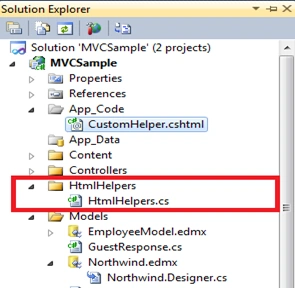
First we'll start with Extension Method syntax. I have created a sample application and it has HtmlHelpers.cs in the HtmlHelpers folder.
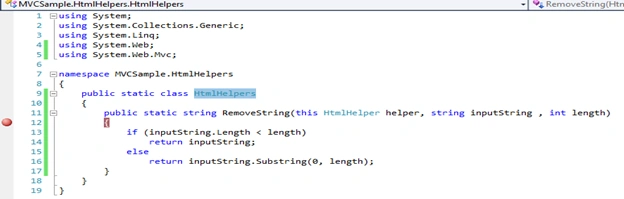
Open the HtmlHelpers.cs file and you will find the following code snippet, which is an Extension Method that takes two parameters and removes a string using the substring method.
So far we have declared an Extension Method, now to use it in our View page (.cshtml). I'll use it in the Verify.cshtml page. Here is the code snippet of that page.
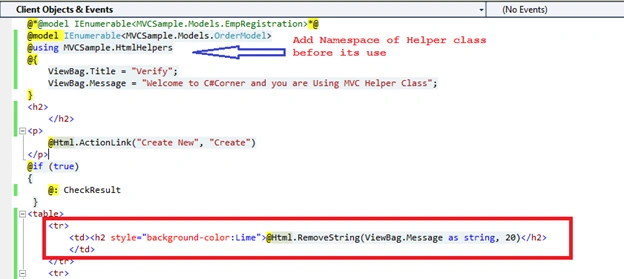
As you can see we are using the RemoveString() Helper Method in the Verify.cshtml page, that caters the raw string (raw string as declared in the ViewBag.Message property) using two parameters being passed.
Now let's run this and see the execution:
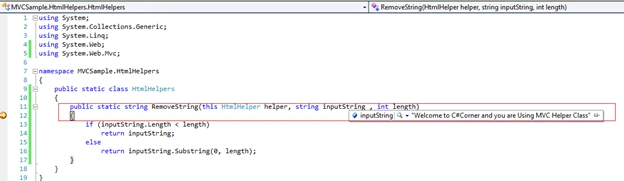
Notice that it took the complete string that we've passed, like @Html.RemoveString(ViewBag.Message as string, 20) and performs the code down the level.
Again Press F5 and see the result.
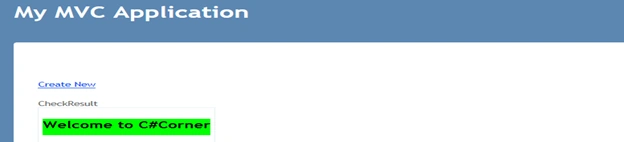
Notice that it only gives you "Welcome to C#Corner" out of the complete string.
So this is how to create a Helper Method on demand in Razor view Engine. The sample application is attached as a reference.
Stay Happy Stay Coding.
Notice that it only gives you "Welcome to C#Corner" out of the complete string.
So this is how to create a Helper Method on demand in Razor view Engine. The sample application is attached as a reference.
Stay Happy Stay Coding.
Madan ShekarPosted May 13, 2019, 4:38 AM
By reading this blog i come to know new concept in C# MVC
Sachin KaliaPosted Jun 4, 2014, 3:33 AM
Thanks Asha :)
Asha MPPosted Jun 3, 2014, 11:10 AM
Nice article....:)