Chapter Learning Objectives
- ADO.NET Architecture
- Connection class
- Command and Data Reader Class
- DataAdapter and DataTable class
- DataSet class
- Provider Agnostic code
ADO.NET Architecture
ADO.NET uses a multilayer architecture that mainly has a few concepts, for instance Connection, Reader, Command, Adapter and Dataset objects. ADO.NET introduced data providers that are a set of special classes to access a specific database, execute SQL commands and retrieve data. The Data providers are extensible. Developers can create their own providers for a proprietary data source. There are some examples of data providers such as SQL Server providers, OLE DB and Oracle provider.
ADO.NET provides the following two types of classes objects:
- Connection-based: They are the data provider objects such as Connection, Command, DataAdapter, and DataReader. They execute SQL statements and connect to a database.
- Content-based: They are found in the System.Data namespace and includes DataSet, DataColumn, DataRow, and DataRelation. They are completely independent of the type of data source.
ADO.NET Namespaces
| Namespaces |
Description |
| System.Data |
Contains the definition for columns,relations,tables,database,rows,views and constraints. |
| System.Data.SqlClient |
Contains the classes to connect to a Microsoft SQL Server database such as SqlCommand, SqlConnection, and SqlDataAdapter. |
| System.Data.Odbc |
Contains classes required to connect to most ODBC drivers. These classes include OdbcCommand and OdbcConnection. |
| System.Data.OracleClient |
Contains classes such as OracleConnection and OracleCommand required to connect to an Oracle database. |
Table 1.1 ADO.NET Namespace
Connection Class
You need to establish a connection class object for inserting, updating, deleting and retrieving data from a database. The Connection class allows you to establish a connection to the data source. The Connection class object needs the necessary information to discover the data source and this information is provided by a connection string.
Connection Strings
You need to supply a connection string in the Connection class object. The connection string is a series of name/value settings separated by semicolons (;). A connection string requires a few pieces of information such as the location of the database, the database name, and the database authentication mechanism.
This connection is used to connect to the Master database on the current computer using integrated security (indicating the currently logged-in Windows user can access the database).
C# Code
- string conString = "Data Source=localhost;Initial Catalog=Master;Integrated Security=SSPI";
In the case of integrated security, it is not supported and then the connection must indicate a valid user name and password combination as in the following.
C# Code
- string conString = "Data Source=localhost;Database=Master;user id=sa;password=sa";
If you use the OLE DB provider than your connection string will need some additional settings that identify OLE DB drivers such as:
C# Code
- string conString = "Data Source=localhost;Initial Catalog=Master;user id=sa;password=;Provider=MSDAORA";
You can specify the details of the connection strings in the global application settings file and then you can retrieve your connection string by name from the ConfigurationManager as in the following.
App.Config
- <configuration>
- <connectionStrings>
- <add name="Master" connectionString ="Data Source=localhost;Initial Catalog=Master;Integrated Security=SSPI" />
- </connectionStrings>
- </configuration>
Once you declare all the details in the App.config file that pertains to the Connection string then you can use this definition in the code file also as in the following.
C# Code
- string conSting = ConfigurationManager.ConnectionStrings["Master"].ConnectionString ;
- SqlConnection Conn = new SqlConnection(conSting);
Testing a Connection
Once you have configured the right connection string to establish connectivity with the specific data source you simply use the Open() and Close() methods as in the following.
C# Code
- private void Form1_Load(object sender, EventArgs e)
- {
- string conSting = ConfigurationManager.ConnectionStrings["Master"].ConnectionString ;
- SqlConnection Conn = new SqlConnection(conSting);
-
- try
- {
- Conn.Open();
- textBox1.Text = "Server Version=" + Conn.ServerVersion;
- textBox1.Text += "Connection Is=" + Conn.State.ToString();
- }
- catch (Exception err)
- {
- textBox1.Text = err.Message;
- }
- finally
- {
- Conn.Close();
- textBox1.Text += "Connection Is=" + Conn.State.ToString();
- }
- }
You can also use the SqlConnectionStringBuilder class to configure a connection string rather than specifying it in the App.Config file as in the following.
C# Code
- SqlConnectionStringBuilder obj = new SqlConnectionStringBuilder();
- obj.DataSource = "localhost";
- obj.InitialCatalog = "Master";
- obj.IntegratedSecurity = true;
- SqlConnection Conn = new SqlConnection(obj.ConnectionString);
Important: Connections are a limited server resource so it is imperative to release the open connection as soon as possible.
Command and Data Reader Classes
The Command Class allows performing any data definition tasks such as creating and altering tables and databases, retrieving, updating and deleting of records. The Command object used to execute SQL queries can be inline text or a Stored Procedure. It is all dependent on the type of command you are using. Before using the command, you need to configure the Command Type, Text and Connection properties as in the following.
C# Code
-
- SqlCommand sc = new SqlCommand();
- sc.Connection = Conn;
- sc.CommandType = CommandType.Text;
- sc.CommandText = query;
Alternatively, you can pass the connection argument directly to the Command class as in the following.
C# Code
-
- SqlCommand sc = new SqlCommand(query,Conn);
In the following example, we are creating a window application form with a Text Box control. We are establishing a connection to the Customer table from the AdventureWorks database. Then, using the SqlDataReader class, we will go through all the records of the table and display the FirstName and LastName in the TextBox control by executing the While() loop as in the following.
C# Code
- private void Form1_Load(object sender, EventArgs e)
- {
-
- SqlConnectionStringBuilder obj = new SqlConnectionStringBuilder();
- obj.DataSource = "localhost";
- obj.InitialCatalog = "AdventureWorksLT2008";
- obj.IntegratedSecurity = true;
-
-
- SqlConnection Conn = new SqlConnection(obj.ConnectionString);
-
-
- string query = "select FirstName,LastName from SalesLT.Customer";
-
-
- SqlCommand sc = new SqlCommand();
- sc.Connection = Conn;
- sc.CommandType = CommandType.Text;
- sc.CommandText = query;
-
- SqlDataReader sdr = null;
- try
- {
-
- Conn.Open();
- sdr = sc.ExecuteReader();
-
-
- while(sdr.Read())
- {
- textBox1.AppendText(sdr.GetValue(0) + "\t" + sdr.GetValue(1));
- textBox1.AppendText("\n");
- }
-
- }
- catch (Exception err)
- {
- textBox1.Text = err.Message;
- }
- finally
- {
-
- sdr.Close();
- Conn.Close();
- }
- }
It is important to release the objects of the Reader class manually after the job is done or you can set the CommandBehaviour Property to CloseConnection in the ExcuteReader() method to avoid the burden of manually releasing the object as in the following.
C# Code
-
- sdr = sc.ExecuteReader(CommandBehavior.CloseConnection);
DataReader Class
The DataReader Class object allows you to read the data returned by a SELECT command by a simple forward-only and read-only cursor. It requires a live connection with the data source and provides a very efficient way of looping and consuming all parts of the result set. The object of the DataReader cannot be directly instantiated. Instead you must call the ExecuteReader method of the Command object and close the connection when you are done using the Data Reader, otherwise the connection remains alive until it is explicitly closed.
DataReader with ExecuteReader() Method
Once you have the DataReader you can cycle through its records by calling the Read() method in a while loop. This moves the row cursor to the next record.
C# Code
-
- Conn.Open();
- sdr = sc.ExecuteReader(CommandBehavior.CloseConnection);
-
-
- while(sdr.Read())
- {
- textBox1.AppendText(sdr.GetValue(0) + "\t" + sdr.GetValue(1));
- textBox1.AppendText("\n");
- }
ExecuteScalar() Method
The ExecuteScalar() method returns the value stored in the first field of the first row of a result set generated by the command's SELECT query. This method is usually used to count the total number of rows in the table as in the following.
C# Code
- private void Form1_Load(object sender, EventArgs e)
- {
-
- string conString = @"Data Source=localhost;Database=AdventureWorksLT2008;Integrated Security=SSPI";
-
-
- SqlConnection Conn = new SqlConnection(conString);
-
-
- string query = "select COUNT(*) from SalesLT.Customer";
-
-
- SqlCommand sc = new SqlCommand(query, Conn);
-
-
- Conn.Open();
- int CountCustomer = (int)sc.ExecuteScalar();
-
-
- textBox1.AppendText("Total Customer=\t" + CountCustomer.ToString());
- }
ExecuteNonQuery() Method
The ExecuteNonQuery() method executes commands that don't return a result set, for instance INSERT, UPDATE and DELETE. Here in this example we made a modification to a specific record in the Customer table of the Adventure Works database.
C# Code
- private void Form1_Load(object sender, EventArgs e)
- {
-
- string conString = @"Data Source=localhost;Database=AdventureWorksLT2008;Integrated Security=SSPI";
-
-
- SqlConnection Conn = new SqlConnection(conString);
-
-
- string query = @"update AdventureWorksLT2008.SalesLT.Customer
- set FirstName='ajay'
- where CustomerID=2";
-
-
- SqlCommand sc = new SqlCommand(query, Conn);
-
-
- Conn.Open();
-
-
- int CountCustomer = sc.ExecuteNonQuery();
-
-
- MessageBox.Show("Record Update Successfully");
- }
DataAdapter and DataTable class
A DataAdapter bridges the gap between the disconnected DataTable objects and the physical data source. The SqlDataAdapter is capable of executing a SELECT, DELETE and UPDATE statement on a data source as well as extracting input from the result set into a DataTable object. The SqlDataAdapter class provides a method called Fill() to copy the result set into the DataTable.
C# Code
- private void Form1_Load(object sender, EventArgs e)
- {
-
- string conString = "Data Source=localhost;Database=AdventureWorksLT2008;Integrated Security=SSPI";
-
-
- SqlConnection Conn = new SqlConnection(conString);
-
-
- string query = "select FirstName,LastName from SalesLT.Customer";
-
-
- SqlCommand sc = new SqlCommand(query, Conn);
-
-
- SqlDataAdapter sda = new SqlDataAdapter(sc);
-
-
- DataTable dt = new DataTable();
- sda.Fill(dt);
-
-
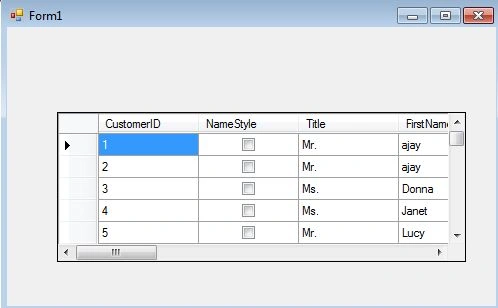
- dataGridView1.DataSource = dt.DefaultView;
- }
These are the commonly used properties offered by the
SqlDataAdapter class as in the following:
| Property |
Description |
| SelectCommand |
This command executed to fill in a Data Table with the result set. |
| InsertCommand |
Executed to insert a new row to the SQL database. |
| UpdateCommand |
Executed to update an existing record on the SQL database. |
| DeleteCommand |
Executed to delete an existing record on the SQL database. |
Table 1.2 Data Adapter Properties
SelectCommand Example
C# Code
-
- string query = "select FirstName,LastName from SalesLT.Customer";
-
-
- SqlCommand sc = new SqlCommand(query, Conn);
-
-
- SqlDataAdapter sda = new SqlDataAdapter();
- sda.SelectCommand = sc;
-
-
- DataTable dt = new DataTable();
- sda.Fill(dt);
Update Command Example
C# Code
- string query = @"update AdventureWorksLT2008.SalesLT.Customer
- set FirstName='ajay'
- where CustomerID=2";
-
-
- SqlCommand sc = new SqlCommand(query, Conn);
-
-
- SqlDataAdapter sda = new SqlDataAdapter();
- sda.UpdateCommand = sc;
Parameterized Commands (Stored Procedure)
A Stored Procedure is a batch of one or more SQL statements that are stored in the database. They are similar to a function in that they are well-encapsulated blocks of the logic that accept data using an input parameter and return data via result set or output parameter. The following is the SQL code needed to create a procedure for extracting a single something from the customer table on behalf of a specific CustomerID.
Sql.script
- Create Proc GetCustomer
- @CustID varchar(10)
- AS
- select * from SalesLT.Customer where CustomerID=@CustID
- GO
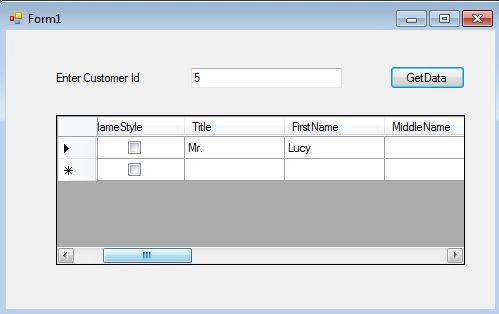
Next, you can create a SqlCommand to wrap the call to the Stored Procedure. This command takes one parameter as input and returns the records. A parameterized command is basically something that uses a placeholder in the SQL text. The placeholder indicates dynamically supplied values that are then sent using a parameters collection of the Command object as in the following.
C# Code
- private void btnData_Click(object sender, EventArgs e)
- {
-
- string conString = "Data Source=localhost;Database=AdventureWorksLT2008;Integrated Security=SSPI";
-
-
- SqlConnection Conn = new SqlConnection(conString);
-
-
- SqlCommand sc = new SqlCommand("GetCustomer", Conn);
- sc.CommandType = CommandType.StoredProcedure;
-
- sc.Parameters.Add("@CustID",txtParameter.Text);
-
-
- SqlDataAdapter sda = new SqlDataAdapter(sc);
-
-
- DataTable dt = new DataTable();
- sda.Fill(dt);
-
-
- dataGridView1.DataSource = dt.DefaultView;
- }
This example uses a parameterized command that is supplied via a text box (Customer ID) and the result is processed using the Stored Procedure in the code file and the result is displayed in the Data Grid View control as in the following:
DataSet class
A DataSet is a disconnected architecture technology. It contains zero or more tables and relationships. When you work with a dataset, the data in the data source is not touched at all. Instead, all the changes are made locally to the dataset in memory. In the following example, you will see how to retrieve data from a SQL Server table and use it to fill in a DataTable object in the DataSet.
C# Code
- private void Form1_Load(object sender, EventArgs e)
- {
-
- string conString = "Data Source=localhost;Database=AdventureWorksLT2008;Integrated Security=SSPI";
-
-
- SqlConnection Conn = new SqlConnection(conString);
-
- string query = "select * from SalesLT.Customer";
-
-
- SqlCommand sc = new SqlCommand(query, Conn);
-
-
- SqlDataAdapter sda = new SqlDataAdapter();
- sda.SelectCommand = sc;
-
-
- DataSet ds = new DataSet();
-
-
- sda.Fill(ds, "SalesLT.Customer");
-
-
- dataGridView1.DataSource = ds.Tables["SalesLT.Customer"];
- }
Here you need to create an empty DataSet and use the SqlDataAdapter Fill() method to execute the query and place the results in a new DataTable in the DataSet.
Provider Agnostic code
You can use a single factory object to create every other type of provider-specific object that you need. You can then interact with these provider-specific objects in a completely generic way using a set of base common classes.
Important: You need to import the System.Data.Common namespace in the C# code file for utilizing provider general code functionality.
The first step is to set up the App.Config file with the connection string, provider name, and the query for this example as in the following.
App.Config
- <?xml version="1.0" encoding="utf-8" ?>
- <configuration>
- <connectionStrings>
- <add name="Adventure" connectionString ="Data Source=localhost;Database=AdventureWorksLT2008;Integrated Security=SSPI" />
- </connectionStrings>
- <appSettings>
- <add key ="factory" value="System.Data.SqlClient" />
- <add key="CustQuery" value ="select * from SalesLT.Customer"/>
- </appSettings>
- </configuration>
Next here is the factory based code:
C# Code
- private void Form1_Load(object sender, EventArgs e)
- {
-
- string factory = ConfigurationManager.AppSettings["factory"];
- DbProviderFactory pro = DbProviderFactories.GetFactory(factory);
-
-
- DbConnection con = pro.CreateConnection();
- con.ConnectionString = ConfigurationManager.ConnectionStrings["Adventure"].ConnectionString;
-
-
- DbCommand cmd = pro.CreateCommand();
- cmd.CommandText = ConfigurationManager.AppSettings["CustQuery"];
- cmd.Connection = con;
-
-
- con.Open();
- DbDataReader rdr = cmd.ExecuteReader();
-
-
- while (rdr.Read())
- {
- textBox1.AppendText(rdr.GetValue(3) + "\t" + rdr.GetValue(5));
- textBox1.AppendText("\n");
- }
-
- }


Muhammad Abdul MananPosted Nov 3, 2015, 12:22 AM
good approach of teaching
Ganesh SarafPosted Mar 18, 2015, 6:26 AM
Nice explain about Ado.Net.If possible then explain about Entity Framework also.
Vithal WadjePosted Feb 26, 2015, 12:27 PM
nice
Hussain AhmedPosted Feb 26, 2015, 5:10 AM
Nice and well explained
Prasham SabadraPosted Feb 25, 2015, 11:58 PM
Thanks for sharing! Nice Article.
Manish Kumar ChoudharyPosted Feb 25, 2015, 11:48 PM
Nice and clear explanation. Thanks it helps me.
Rahul Kumar SaxenaPosted Feb 25, 2015, 11:37 PM
Nice Explanation...
Santhakumar MunuswamyPosted Feb 25, 2015, 11:18 PM
Thanks for nice article sir
Khargesh RajputPosted Feb 25, 2015, 11:13 PM
what is Provider Agnostic code sir