


In the web there are many examples related to the Web API using Entity Framework, but in community forums I see many questions being asked by members for a simple example using Web API Entity Framework with Stored Procedure. I searched a lot to find a simple article that explains a simple way to do CRUD operations using a Stored Procedure with MVC and Web API. But I couldn"t find an article that explains all this. I plan to make a simple web application using MVC 5, AngularJs, Web API to do CRUD (Create/Read/Update and Delete) using Entity Framework and a Stored Procedure.
In this article we will see the following:
- C: (Create): Insert New Student Details into the database using EF and Web API with Stored Procedure.
- R: (Read): Search/Select Student Details from the database using EF and Web API with Stored Procedure.
- U: (Update): Update Student Details to the database using EF and Web API with Stored Procedure.
- D: (Delete): Delete Student Details from the database using EF and Web API with Stored Procedure.
Visual Studio 2015. You can download it from here (in my example I used Visual Studio Community 2015 RC).
You can also view my previous articles related to AngularJs using MVC and the WCF Rest Service.
Previous articles related to AngularJs using MVC and and using Web API 2.
AngularJs
We might be familiar with what the Model, View, View Model (MVVM) and what Model, View and Controller (MVC) are. AngularJs is a JavaScript framework that is purely based on HTML, CSS and JavaScript.
The AngularJs Model View Whatever (MVW) pattern is similar to the MVC and MVVM patterns. In our example I have used Model, View and Service. In the code part let's see how to install and create AngularJs in our MVC application.
If you are interested in reading more about AngularJs then kindly go through the following link.
Code Part
- Create Database and Table
We will create a StudentMasters table under the Database "studentDB". The following is the script to create a database, table and sample insert query. Run this script in your SQL Server. I have used SQL Server 2012.
After creating our Table we will create a Stored Procedure to do our CRUD Operations.- -- =============================================
- -- Author : Shanu
- -- Create date : 2015-07-13
- -- Description : To Create Database,Table and Sample Insert Query
- -- Latest
- -- Modifier : Shanu
- -- Modify date : 2015-07-13
- -- =============================================
- --Script to create DB,Table and sample Insert data
- USE MASTER
- GO
- -- 1) Check for the Database Exists .If the database is exist then drop and create new DB
- IF EXISTS (SELECT [name] FROM sys.databases WHERE [name] = 'studentDB' )
- DROP DATABASE studentDB
- GO
- CREATE DATABASE studentDB
- GO
- USE studentDB
- GO
- -- 1) //////////// StudentMasters
- IF EXISTS ( SELECT [name] FROM sys.tables WHERE [name] = 'StudentMasters' )
- DROP TABLE StudentMasters
- GO
- CREATE TABLE [dbo].[StudentMasters](
- [StdID] INT IDENTITY PRIMARY KEY,
- [StdName] [varchar](100) NOT NULL,
- [Email] [varchar](100) NOT NULL,
- [Phone] [varchar](20) NOT NULL,
- [Address] [varchar](200) NOT NULL
- )
- -- insert sample data to Student Master table
- INSERT INTO [StudentMasters] ([StdName],[Email],[Phone],[Address])
- VALUES ('Shanu','[email protected]','01030550007','Madurai,India')
- INSERT INTO [StudentMasters] ([StdName],[Email],[Phone],[Address])
- VALUES ('Afraz','[email protected]','01030550006','Madurai,India')
- INSERT INTO [StudentMasters] ([StdName],[Email],[Phone],[Address])
- VALUES ('Afreen','[email protected]','01030550005','Madurai,India')
- select * from [StudentMasters]
Create our MVC Web Application in Visual Studio 2015:- -- 1) Stored procedure to Select Student Details
- -- Author : Shanu
- -- Create date : 2015-07-13
- -- Description : Student Details
- -- Tables used : StudentMasters
- -- Modifier : Shanu
- -- Modify date : 2015-07-13
- -- =============================================
- -- exec USP_Student_Select '',''
- -- =============================================
- Create PROCEDURE [dbo].[USP_Student_Select]
- (
- @StdName VARCHAR(100) = '',
- @email VARCHAR(100) = ''
- )
- AS
- BEGIN
- Select [StdID],
- [StdName],
- [Email],
- [Phone],
- [Address]
- FROM
- StudentMasters
- WHERE
- StdName like @StdName +'%'
- AND Email like @email +'%'
- ORDER BY
- StdName
- END
- -- 2) Stored procedure to insert Student Details
- -- Author : Shanu
- -- Create date : 2015-07-13
- -- Description : Student Details
- -- Tables used : StudentMasters
- -- Modifier : Shanu
- -- Modify date : 2015-07-13
- -- =============================================
- -- exec USP_Student_Insert 'Raj','[email protected]','01030550008','seoul,Korea'
- -- =============================================
- alter PROCEDURE [dbo].[USP_Student_Insert]
- (
- @StdName VARCHAR(100) = '',
- @email VARCHAR(100) = '',
- @Phone VARCHAR(20) = '',
- @Address VARCHAR(200) = ''
- )
- AS
- BEGIN
- IF NOT EXISTS (SELECT * FROM StudentMasters WHERE StdName=@StdName)
- BEGIN
- INSERT INTO [StudentMasters]
- ([StdName],[Email],[Phone],[Address])
- VALUES (@StdName,@Email,@Phone,@Address)
- Select 'Inserted' as results
- END
- ELSE
- BEGIN
- Select 'Exists' as results
- END
- END
- -- 3) Stored procedure to Update Student Details
- -- Author : Shanu
- -- Create date : 2015-07-13
- -- Description : Update Student Details
- -- Tables used : StudentMasters
- -- Modifier : Shanu
- -- Modify date : 2015-07-13
- -- =============================================
- -- exec USP_Student_Update 'Raj','[email protected]','01030550008','seoul,Korea'
- -- =============================================
- Alter PROCEDURE [dbo].[USP_Student_Update]
- ( @StdID Int=0,
- @StdName VARCHAR(100) = '',
- @email VARCHAR(100) = '',
- @Phone VARCHAR(20) = '',
- @Address VARCHAR(200) = ''
- )
- AS
- BEGIN
- IF NOT EXISTS (SELECT * FROM StudentMasters WHERE StdID!=@StdID AND StdName=@StdName)
- BEGIN
- UPDATE StudentMasters
- SET [StdName]=@StdName,
- [Email]=@email,
- [Phone]=@Phone,
- [Address]=@Address
- WHERE
- StdID=@StdID
- Select 'updated' as results
- END
- ELSE
- BEGIN
- Select 'Exists' as results
- END
- END
- -- 4) Stored procedure to Delete Student Details
- -- Author : Shanu
- -- Create date : 2015-07-13
- -- Description : Delete Student Details
- -- Tables used : StudentMasters
- -- Modifier : Shanu
- -- Modify date : 2015-07-13
- -- =============================================
- -- exec USP_Student_Delete '0'
- -- =============================================
- Create PROCEDURE [dbo].[USP_Student_Delete]
- ( @StdID Int=0 )
- AS
- BEGIN
- DELETE FROM StudentMasters WHERE StdID=@StdID
- END
After installing our Visual Studio 2015, click Start, then Programs and select Visual Studio 2015. Then click Visual Studio 2015 RC.
Click New, Project and Select Web, then choose ASP.NET Web Application. Select your project location and enter your web application Name.
Select MVC and in Add Folders and Core reference for select the Web API and click OK.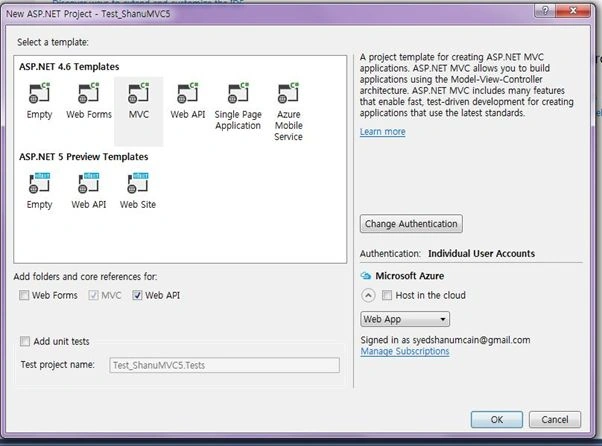
Now we have created our MVC application as a next step and we will add our SQL Server database as Entity Data Model to our application.
Add Database using ADO.NET Entity Data Model
Right-click our project and click Add -> New Item.
Select Data, then choose Select ADO.NET Entity Data Model and provide the name and click Add
Select EF Designer from the database and click Next.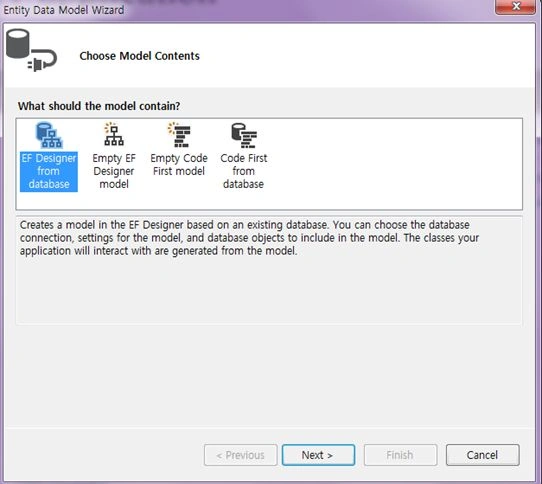
Here click New Connection and provide your SQL-Server Server Name and connect to your database.
Here we can see I have given my SQL Server name, Id and PWD and after it connected I have selected the database as studentDB since we have created the database using my SQL Script.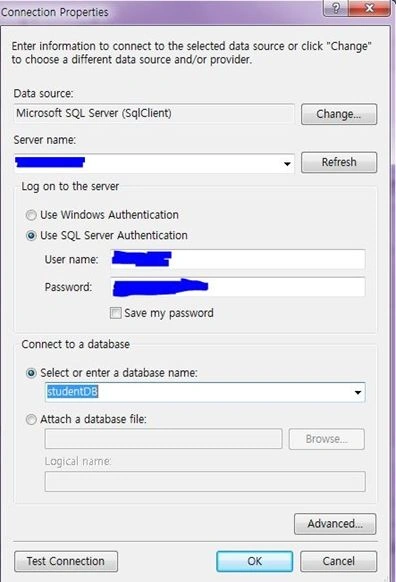
Click Next and select our tables need to be used and click Finish.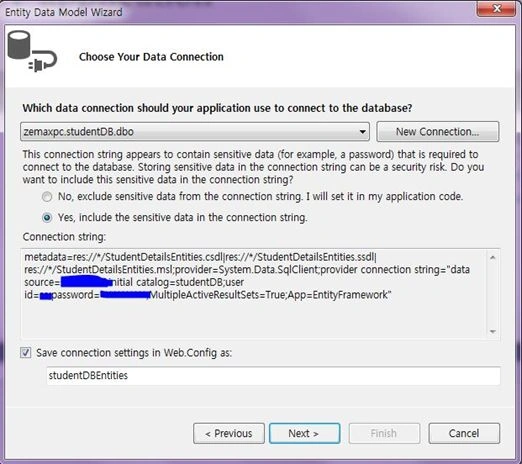
Here we can see I have selected the table StudentMasters. To use our Stored Procedure select the entire SP to be used in our project. Here we can see for performing CRUD operations I have created 4 Stored Procedures to Select/Insert/Update and Delete. Select the entire Stored Procedure and click Finish.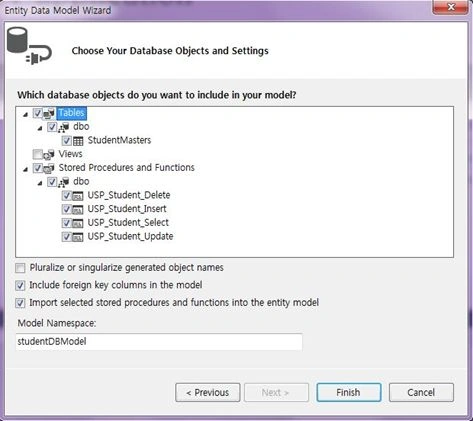
Here we can see now I have created our StudentDetailsEntities.
Once the Entity has been created the next step is to add a Web API to our controller and write function to Select/Insert/Update and Delete.
Procedure to add our Web API Controller
Right-click the Controllers folder, click Add and then click Controller.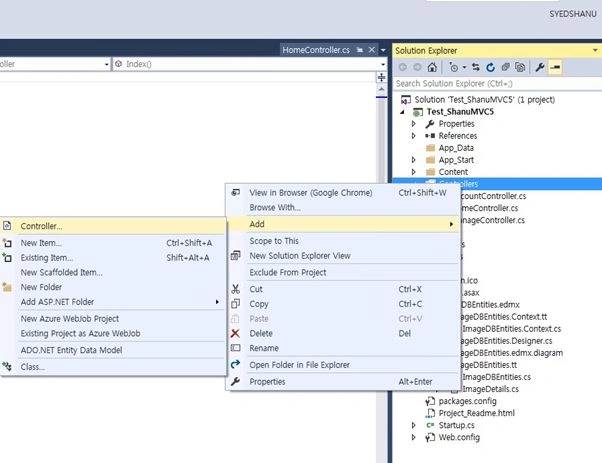
Since we will create our Web API Controller, select Controller and add an Empty Web API 2 Controller. Provide your name to the Web API controller and click OK. Here for my Web API Controller I have given the name “StudentsController”.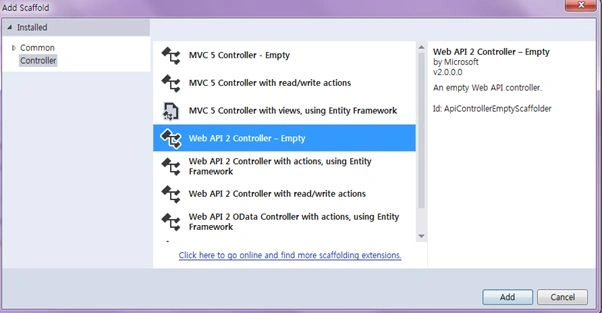
Since we have created a Web API controller, we can see our controller has been inherited and thre is something about ApiController.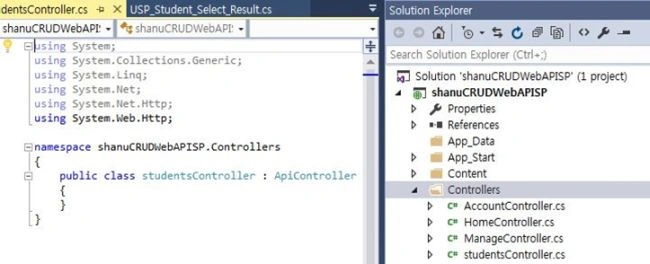
As we all know Web API is a simple and easy way to build HTTP Services for Browsers and Mobiles.
Web API has the following four methods as Get/Post/Put and Delete where:
- Get is to request for the data. (Select)
- Post is to create a data. (Insert)
- Put is to update the data.
- Delete is to delete data.
In our example we will use both Get and Post since we need to get all the image names and descriptions from the database and to insert a new Image Name and Image Description to the database.
Get Method
In our example I have used only a Get method since I am using only a Stored Procedure. We need to create an object for our Entity and write our Get Method to do Select/Insert/Update and Delete operations.
Select Operation
We use a get method to get all the details of the StudentMasters table using an entity object and we return the result as an IEnumerable. We use this method in our AngularJs and display the result in an MVC page from the AngularJs controller. Using Ng-Repeat we can see the details step-by-step as follows.
Here we can see in the get method I have passed the search parameter to the USP_Student_Select Stored Procedure method. In the Stored Procedure I used like "%" to return all the records if the search parameter is empty.
- public class studentsController : ApiController
- {
- studentDBEntities objapi = new studentDBEntities();
- // to Search Student Details and display the result
- [HttpGet]
- public IEnumerable<USP_Student_Select_Result> Get(string StudentName, string StudentEmail)
- {
- if (StudentName == null)
- StudentName = "";
- if (StudentEmail == null)
- StudentEmail = "";
- return objapi.USP_Student_Select(StudentName, StudentEmail).AsEnumerable();
- }
Here in my example I have used the get method for Select/Insert/Update and Delete operations, since in my Stored Procedure after insert/update and delete I have returned the message from the database.
Insert Operation
The same as select I passed all the parameters to the insert procedure. This insert method will return the result from the database as a record is inserted or maybe not. I will get the result and display it from the AngularJs Controller to MVC application.
- // To Insert new Student Details
- [HttpGet]
- public IEnumerable<string> insertStudent(string StudentName, string StudentEmail, string Phone, string Address)
- {
- return objapi.USP_Student_Insert(StudentName, StudentEmail, Phone, Address).AsEnumerable();
- }
Update Operation
The same as Insert I have passed all the parameter to the insert procedure. This Update method will return the result from the database as a record is updated or maybe not. I will pass the Student ID to the update procedure to update the record for the Student ID. I will get the result and display it from the AngularJs Controller to the MVC application.
- //to Update Student Details
- [HttpGet]
- public IEnumerable<string> updateStudent(int stdID,string StudentName, string StudentEmail, string Phone, string Address)
- {
- return objapi.USP_Student_Update(stdID,StudentName, StudentEmail, Phone, Address).AsEnumerable();
- }
Delete Operation
The same as update I have passed the Student ID to the procedure to delete the record.
- //to Update Student Details
- [HttpGet]
- public string deleteStudent(int stdID)
- {
- objapi.USP_Student_Delete(stdID);
- "deleted";
- }
Now we have created our Web API Controller Class. The next step is to create our AngularJs Module and Controller. Let's see how to create our AngularJs Controller. In Visual Studio 2015 it's much easier to add our AngularJs Controller. Let's see step-by-step how to create and write our AngularJs Controller.
Creating AngularJs Controller
First create a folder inside the Script Folder and I have given the folder name as “MyAngular”.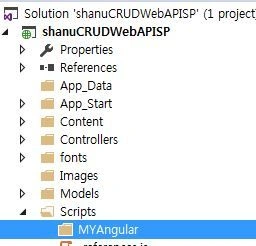
Now add your Angular Controller inside the folder.
Right-click the MyAngular folder and click Add and New Item. Select Web and then AngularJs Controller and provide a name for the Controller. I have named my AngularJs Controller “Controller.js”.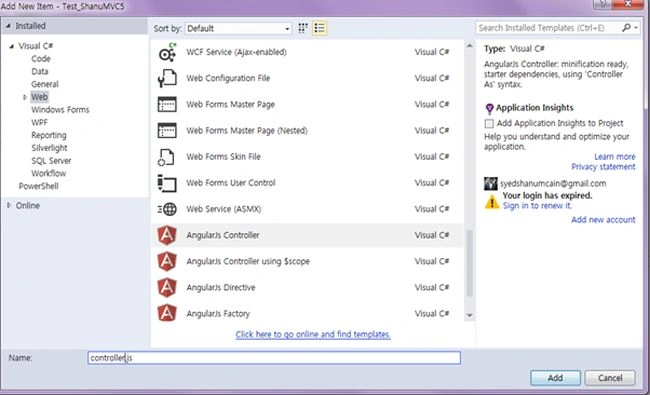
Once the AngularJs Controller is created, we can see by default the controller will have the code with the default module definition and all. 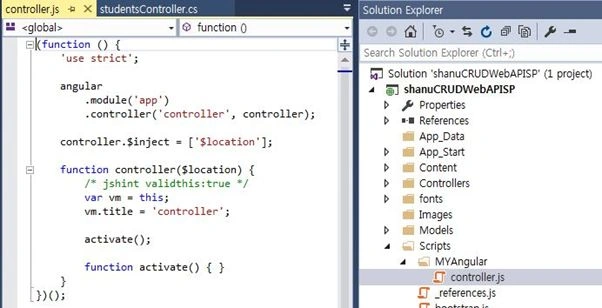
I have changed the preceding code like adding a Module and controller as in the following.
If the AngularJs package is missing, then add the package to your project.
Right-click your MVC project and click Manage NuGet Packages. Search for AngularJs and click Install.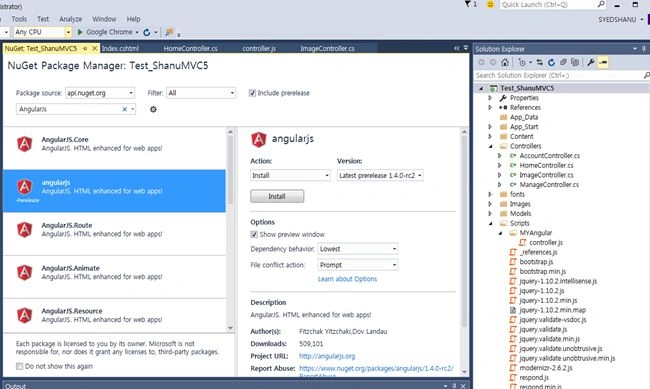
Now we can see all the AngularJs packages have been installed and we can see all the files in the Script folder.
Procedure to Create AngularJs Script Files
Modules.js: Here we will add the reference to the AngularJs JavaScript and create an Angular Module named “RESTClientModule”.
- // <reference path="../angular.js" />
- /// <reference path="../angular.min.js" />
- /// <reference path="../angular-animate.js" />
- /// <reference path="../angular-animate.min.js" />
- var app;
- (function () {
- app = angular.module("RESTClientModule", ['ngAnimate']);
- })();
Controllers: In AngularJs Controller I have done all the business logic and returned the data from Web API to our MVC HTML page.
1. Variable declarations
First I declared all the local variables that need to be used.
- app.controller("AngularJs_studentsController", function ($scope, $timeout, $rootScope, $window, $http) {
- $scope.date = new Date();
- $scope.MyName = "shanu";
- $scope.stdName = "";
- $scope.stdemail = "";
- $scope.showStudentAdd = true;
- $scope.addEditStudents = false;
- $scope.StudentsList=true;
- $scope.showItem = true;
- //This variable will be used for Insert/Edit/Delete Students details.
- $scope.StdIDs = 0;
- $scope.stdNames = "";
- $scope.stdEmails = "";
- $scope.Phones = "";
- $scope.Addresss = "";
2. Methods
Select Method
In the select method I have used $http.get to get the details from Web API. In the get method I will provide our API Controller name and method to get the details. Here we can see I have passed the search parameter of StudentName and StudentEmail using:
{ params: { StudentName: StudentName, StudentEmail: StudentEmail }
The final result will be displayed to the MVC HTML page using data-ng-repeat.
- function selectStudentDetails(StudentName, StudentEmail) {
- $http.get('/api/students/', { params: { StudentName: StudentName, StudentEmail: StudentEmail } }).success(function (data) {
- $scope.Students = data;
- $scope.showStudentAdd = true;
- $scope.addEditStudents = false;
- $scope.StudentsList = true;
- $scope.showItem = true;
- if ($scope.Students.length > 0) {
- }
- })
- .error(function () {
- $scope.error = "An Error has occured while loading posts!";
- });
Search Button Click
In the search button click I will call the SearchMethod to bind the result. Here we can see in the search Name and Email text box I have used ng-model="stdName". Using ng-model in the AngularJs Controller we can get the TextBox input value or we can set the value to the TextBox.
- <input type="text" name="txtstudName" ng-model="stdName" value="" />
- <input type="text" name="txtemail" ng-model="stdemail" />
- <input type="submit" value="Search" style="background-color:#336699;color:#FFFFFF" ng-click="searchStudentDetails()" />
- //Search
- $scope.searchStudentDetails = function () {
- selectStudentDetails($scope.stdName, $scope.stdemail);
- }

Insert new Student Details
In the ADD New Student Detail button click I will make visible the StudentAdd table details where the user can enter the new student information. For a new student I will make the Student ID as 0. In the New Student save button click I will call the save method.
- // New Student Add Details
- $scope.showStudentDetails = function () {
- cleardetails();
- pe.showStudentAdd = true;
- $scope.addEditStudents = true;
- $scope.StudentsList = true;
- $scope.showItem = true;
- }
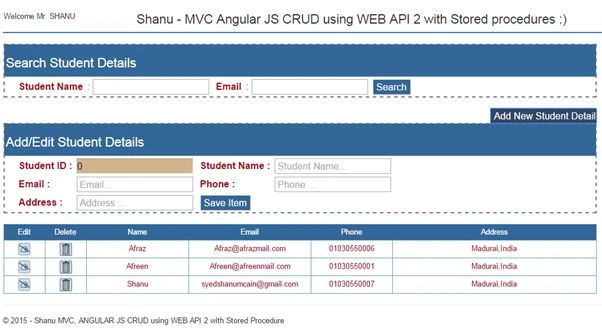
In the Save method I will check for the Student ID. If the student ID is “0” then it will insert the new student details. Here I will call the Insert Web API method and if the Student ID is > 0 then that means that to update the student record I will call the Update Web API method.
To the Insert Web API Method I will pass all the Input parameters. In my Stored Procedure I will check whether the Student Name already exists. If the Student name does not exist in the database then I will insert the records and return the success message as “inserted” and if the student name already exists then I will return the message as “Exists”.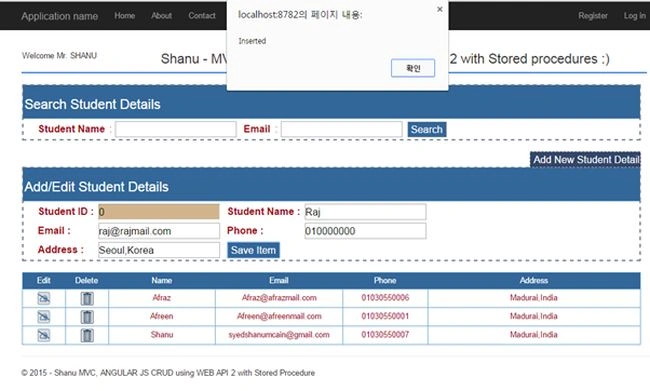
- //Save Student
- $scope.saveDetails = function () {
- $scope.IsFormSubmitted = true;
- if ($scope.IsFormValid ) {
- //if the Student ID=0 means its new Student insert here i will call the Web api insert method
- if ($scope.StdIDs == 0) {
- $http.get('/api/students/insertStudent/', { params: { StudentName: $scope.stdNames, StudentEmail: $scope.stdEmails, Phone: $scope.Phones, Address: $scope.Addresss } }).success(function (data) {
- $scope.StudentsInserted = data;
- alert($scope.StudentsInserted);
- cleardetails();
- selectStudentDetails('', '');
- })
- .error(function () {
- $scope.error = "An Error has occured while loading posts!";
- });
- }
- else { // to update to the student details
- $http.get('/api/students/updateStudent/', { params: { stdID: $scope.StdIDs, StudentName: $scope.stdNames, StudentEmail: $scope.stdEmails, Phone: $scope.Phones, Address: $scope.Addresss } }).success(function (data) {
- $scope.StudentsUpdated = data;
- alert($scope.StudentsUpdated);
- cleardetails();
- selectStudentDetails('', '');
- })
- .error(function () {
- $scope.error = "An Error has occured while loading posts!";
- });
- }
- }
- else {
- $scope.Message = "All the fields are required.";
- }
- }
Update Student Details
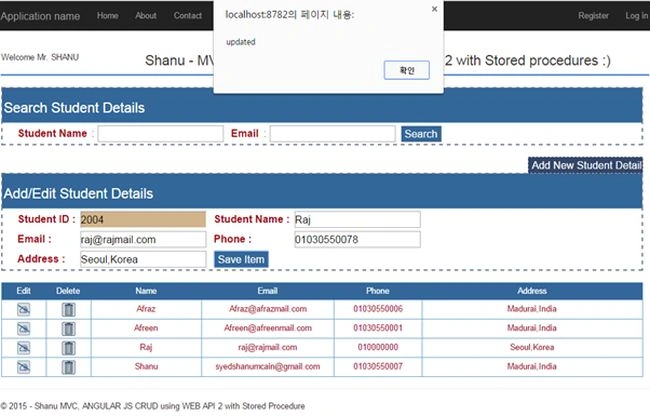
The same as Insert I will display the update details for the user to edit the details and save it. In the Edit method I will get all the details for the row where the user clicks on the Edit Icon and sets all the results to the appropriate TextBox. In the Save button click I will call the save method to save all the changes to the database like Insert.
- //Edit Student Details
- $scope.studentEdit = function studentEdit(StudentID, Name, Email, Phone, Address)
- {
- cleardetails();
- $scope.StdIDs = StudentID;
- $scope.stdNames = Name
- $scope.stdEmails = Email;
- $scope.Phones = Phone;
- $scope.Addresss = Address;
- $scope.showStudentAdd = true;
- $scope.addEditStudents = true;
- $scope.StudentsList = true;
- $scope.showItem = true;
- }
Delete Student Details
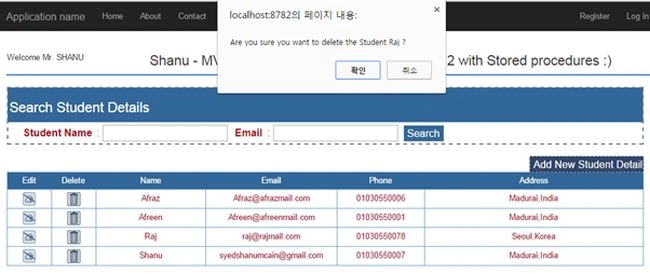
In the Delete button click, I will display the confirmation message to the user as to whether to delete the detail or not. If the user clicks the OK button I will pass the Student ID to the delete method of the Web API to delete the record from the database.
- //Delete Dtudent Detail
- $scope.studentDelete = function studentDelete(StudentID, Name) {
- cleardetails();
- $scope.StdIDs = StudentID;
- var delConfirm = confirm("Are you sure you want to delete the Student " + Name + " ?");
- if (delConfirm == true) {
- $http.get('/api/students/deleteStudent/', { params: { stdID: $scope.StdIDs } }).success(function (data) {
- alert("Student Deleted Successfully!!");
- cleardetails();
- selectStudentDetails('', '');
- })
- .error(function () {
- $scope.error = "An Error has occured while loading posts!";
- });
- }
- }
Bhavesh JadavPosted Oct 26, 2017, 1:44 AM
Very help full article for us, thank you Syed Shanu
Ravi PanditPosted Oct 15, 2017, 1:51 PM
Hello Sir, I want to add cascading dropdownlist which is populated through stored procedure in this form.Please help. Thanks in advance.
sabith byariPosted Jun 3, 2017, 7:57 AM
Hello Sir, Can you please help us to know how we can build this application using Angular 2?
Kishori DessaiPosted May 20, 2017, 5:58 AM
Hello Sir, this article is really helpful for ASP.net beginners like me. Thank you for providing with such useful article. The only thing I would like to suggest is updating that $(http).get code snippet as it throws an error when using higher version AngularJS.
Tzvi KaidanovPosted Feb 21, 2017, 7:32 AM
Why do you use mvc project template and not web app?
kishor patilPosted Dec 22, 2016, 11:32 PM
Is it mandate to mention httpget,httppost before the method in api?
Thennarasu NPosted May 26, 2016, 7:10 AM
sir Your Great teacher in Angular.js and MVC sir .
VIJAYAKUMAR MUTHUSAMYPosted May 19, 2016, 3:22 AM
the variable stdID is showing the error that 'int' type does not contain 'AsEnumerable' method. do u know a solution?
Sr KarthigaPosted Mar 3, 2016, 2:56 AM
nice one
Koushik vennkatramanPosted Mar 1, 2016, 8:09 AM
Thanks for the article.Syed
Ahned GalindoPosted Sep 14, 2015, 3:00 PM
Hey Syed, nice article, some points to clarify, on the second SQL Statements the SQL Script shoud create not alter the procedures, and on the delete function must be public string deleteStudent(int stdID) { objapi.USP_Student_Delete(stdID); objapi.SaveChanges(); return "deleted"; }
Brij KishorPosted Aug 16, 2015, 2:08 PM
Can you help to understand how we can protect from from cross site and sql injection type attacks. If you don't mind please share with example.
Brij KishorPosted Aug 16, 2015, 2:06 PM
Hi Shanu.. thanks a lot for such great articals.
jitendraPosted Aug 5, 2015, 4:11 AM
Thanks for your good article , can you please share me your contact details , and my skpye - jitendra.tech and emai
jitendraPosted Aug 5, 2015, 4:10 AM
Hi Sir
Sunita SalunkhePosted Jul 30, 2015, 9:06 AM
Thank you sir, very nice example sir
Sharad GuptaPosted Jul 29, 2015, 12:01 PM
Excellent Article! Thanks for sharing
Anurag SarkarPosted Jul 26, 2015, 9:31 PM
Great Series of article sir. Thanks for providing such nice articles.
Ranjan SenapatiPosted Jul 23, 2015, 5:49 AM
Thanks sir...for this nice article...
Gopi ChandPosted Jul 20, 2015, 1:05 PM
Commendable job done :)
Jaipal ReddyPosted Jul 20, 2015, 2:57 AM
Nice one Sir
Santhakumar MunuswamyPosted Jul 16, 2015, 3:50 PM
Excellent Article! Thanks for sharing
Narasimha Reddy ChennupalliPosted Jul 16, 2015, 8:49 AM
Good one..
Nimit JoshiPosted Jul 16, 2015, 6:12 AM
Great..keep it up...
Naren Kumar KumaresanPosted Jul 16, 2015, 2:44 AM
nice article
Sibeesh VenuPosted Jul 16, 2015, 12:59 AM
Thanks for the information
Debendra DashPosted Jul 15, 2015, 11:25 AM
Thanks sir for this nice article...
Chervine BhiwooPosted Jul 15, 2015, 10:38 AM
Great article. Thanks for the share!
RakeshPosted Jul 15, 2015, 7:55 AM
Good Explain Sir
Nilesh JadavPosted Jul 15, 2015, 7:22 AM
Nice one sir