

Introduction
In this article I will shown you how to create a simple calculator using PHP.
Design look of the Simple calculator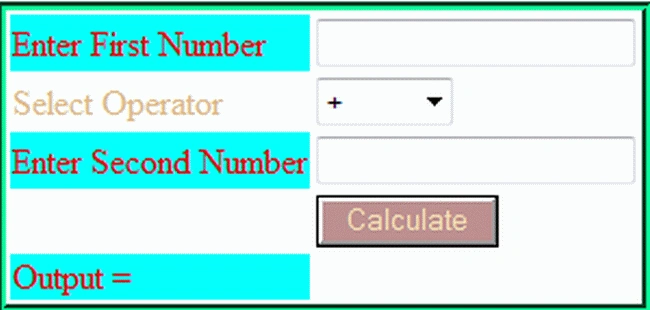
So, in this application I am using two input HTML TextBoxes for entering operands for calculations, a button for the calculation and a drop down list for selecting an operator, and a button for the calculation. In it is simply a HTML TextBox value, in other words operand value and also an operator value is accepted in this way:
$_REQUEST['name']
In that way you can simply store the TextBox value or drop down list value for calculation in a PHP variable. I handle lost of errors in this script. I am simply checking that the TextBox value is empty or not using:
if($_REQUEST['fvalue']==NULL && $_REQUEST['lvalue']==NULL)
If an error exists then an alert is shown with a message depending on the error.
The following is the calculator code:
<?php
ini_set('display_errors',0);
if( isset( $_REQUEST['calculate'] ))
{
$operator=$_REQUEST['operator'];
if($operator=="+")
{
$add1 = $_REQUEST['fvalue'];
$add2 = $_REQUEST['lvalue'];
$res= $add1+$add2;
}
if($operator=="-")
{
$add1 = $_REQUEST['fvalue'];
$add2 = $_REQUEST['lvalue'];
$res= $add1-$add2;
}
if($operator=="*")
{
$add1 = $_REQUEST['fvalue'];
$add2 = $_REQUEST['lvalue'];
$res =$add1*$add2;
}
if($operator=="/")
{
$add1 = $_REQUEST['fvalue'];
$add2 = $_REQUEST['lvalue'];
$res= $add1/$add2;
}
if($_REQUEST['fvalue']==NULL && $_REQUEST['lvalue']==NULL)
{
echo "<script language=javascript> alert(\"Please Enter values.\");</script>";
}
else if($_REQUEST['fvalue']==NULL)
{
echo "<script language=javascript> alert(\"Please Enter First value.\");</script>";
}
else if($_REQUEST['lvalue']==NULL)
{
echo "<script language=javascript> alert(\"Please Enter second value.\");</script>";
}
}
?>
<form>
<table style="border:groove #00FF99">
<tr>
<td style="background-color:aqua; color:red; font-family:'Times New Roman'">Enter First Number</td>
<td colspan="1">
<input name="fvalue" type="text" style="color:red"/></td>
Sohel RayhanPosted Dec 10, 2019, 2:41 PM
How input two value in one text by two button html5
Vinod KumarPosted Feb 5, 2016, 1:08 AM
You can this function for notice error off........
Rakesh RanjanPosted Jan 7, 2016, 9:18 AM
sir ,what is the use of ini_set('display_errors',0);
Rakesh RanjanPosted Jan 7, 2016, 9:18 AM
Hi sir
Sanjay SinghPosted Jan 3, 2015, 7:48 AM
nicely done sir... !!!
Marius Fanfarius HauganPosted Jan 2, 2015, 8:37 PM
Thanks! Btw, the script don't have to define $add1 and $add2 in every if($operator=="x") test. Define them right after $operator=$_REQUEST['operator'] instead, and we get a lighter script. Also, by adding the keyword "required" to the <input> tags, you don't need the JavaScript alerts! :)
yogesh jainPosted Feb 9, 2014, 4:03 PM
thankyou so much
Vinod KumarPosted Sep 9, 2013, 7:01 AM
thanks sharad it's very useful article...
Manish SharmaPosted Apr 20, 2013, 1:26 AM
nice article