

Introduction
The PHP HTTP functions allow you to manipulate information sent to the browser by the web server and the purpose of the HTTP extension is to provide a convenient and powerful set of functionality for major applications. The HTTP functions are part of the PHP core. There is no installation necessary to use these functions.
In this article I describe the PHP HTTP functions header, headers_list, headers_sent, setcookie and setrawcookie.
PHP header() function
The PHP HTTP "header" function sends a raw HTTP header and this function returns no value. Basically when you request an internet page be brought back to your browser, you are not simply conveying back the web page. You're additionally conveying back something referred to as a HTTP Header. This is often some additional info, like the sort of programme creating the request, date requested, whether to display it as a Hypertext Markup Language document, however long the
document is, as well as much else.
Syntax
| header(string, replace, httpRequestCode) |
Parameters of the header function
The parameters of the function are:
| Parameter | Description |
| string | It specifies the header string to send. |
| replace | It indicates whether the header should replace the previous header or add a second header. |
| httpRequestCode | It forces the HTTP response code to the specified value. |
Example
An example of the function is:
<?PHP
header("Location: http://www.c-sharpcorner.com/");
?>
Output
PHP headers_list() function
The PHP HTTP "headers_list" function returns a list of response header sent (or ready to be sent) to the client and this function returns a numerically indexed array of headers.
Syntax
| headers_list() |
Example
An example of the function is:
<?php
setcookie('PQR', 'XYZ');
header("MCNSolution: abc");
header('Content-type: text/plain');
var_dump(headers_list());
?>
Output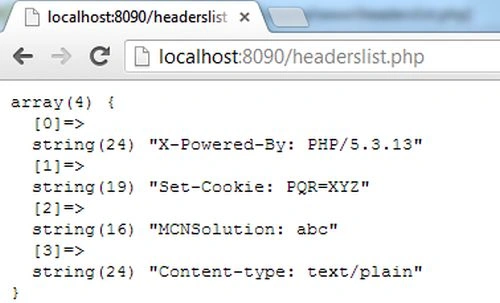
PHP headers_sent() function
The PHP HTTP "headers_sent" function checks if or where headers have been sent and this function will return false if no HTTP headers have already been sent otherwise returns true.
Syntax
| headers_sent(file, line) |
Parameters of the headers_sent function
The parameters of the function are:
| Parameter | Description |
| file | It is an optional parameter so if the file and line parameters are set then headers_sent() will be put in the PHP source file name and the line number where output was started in the file and line variables. |
| line | It specifies the line number of where the output started. |
Example
An example of the function is:
<?php
if (!headers_sent())
{
header('Location: http://www.c-sharpcorner.com/');
exit;
}
if (!headers_sent($filename, $linenum))
{
header('Location: http://www.c-sharpcorner.com/');

Join the conversation! Your thoughts help the community grow.