

Introduction
In my previous article, I told you How to Show Data in a Dynamic Grid Using AngularJS.
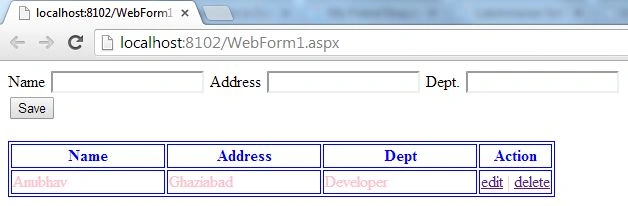
In this article, I will tell you how to apply CRUD operations in a Dynamic Grid using AngularJS.
Previously, I showed you how to show the data in Grid Format, but in this article, we will move one step further and make the Grid editable; in other words, today, I will provide CRUD operations for the Grid.
Step 1. Since I am working on a previous application you can check the previous article to see at which step I had left previously.
Now, I will update the JavaScript section and will provide the edit and delete functionality. For that, you need to write this code in the script section.
$scope.delete = function(id) {
    for (i in $scope.employees) {
        if ($scope.employees[i].id == id) {
            $scope.employees.splice(i, 1);
            $scope.newEmployee = {};
        }
    }
}

$scope.edit = function(id) {
    for (i in $scope.employees) {
        if ($scope.employees[i].id == id) {
            $scope.newEmployee = angular.copy($scope.employees[i]);
        }
    }
}
First, I provided the delete functionality; for this, I have created a function named "delete". In this function the ID of the Employee is passed, if the ID correctly matches one of the existing IDs then the delete operation will be done and that entry will be deleted.
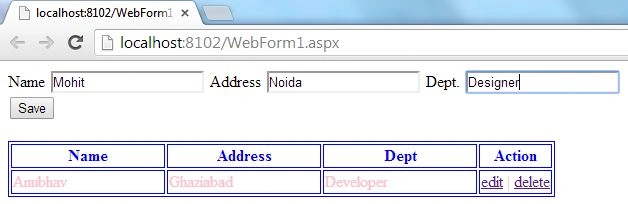
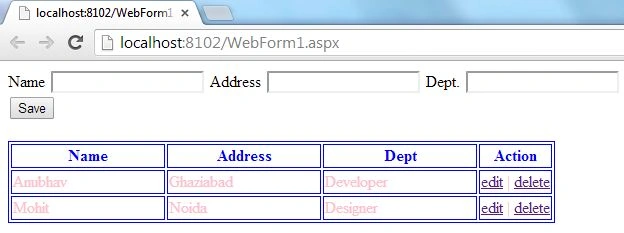
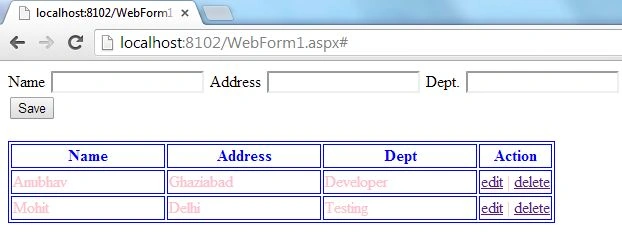
Similarly, I have created the "Edit" function. In this function, the ID of the Employee will also be passed, but this time the data related to that ID will not be deleted. Instead, it will be passed back to the corresponding textboxes so that the user can make changes, and when the user clicks the save button, the data will again be saved at the same Id position as it was stored previously.
Now, the updated Script looks like this.
<script>
    var empid = 1;

    function x($scope) {
        $scope.employees = [
            { id: 0, 'name': 'Anubhav', 'address': 'Ghaziabad', 'dept': 'Developer' }
        ];

        $scope.saveRecord = function() {
            if ($scope.newEmployee.id == null) {
                $scope.newEmployee.id = empid++;
                $scope.employees.push($scope.newEmployee);
            } else {
                for (i in $scope.employees) {
                    if ($scope.employees[i].id == $scope.newEmployee.id) {
                        $scope.employees[i] = $scope.newEmployee;
                    }
                }
            }
            $scope.newEmployee = {};
        }

        $scope.delete = function(id) {
            for (i in $scope.employees) {
                if ($scope.employees[i].id == id) {
                    $scope.employees.splice(i, 1);
                    $scope.newEmployee = {};
                }
            }
        }

        $scope.edit = function(id) {
            for (i in $scope.employees) {
                if ($scope.employees[i].id == id) {
                    $scope.newEmployee = angular.copy($scope.employees[i]);
                }
            }
        }
    }
</script>
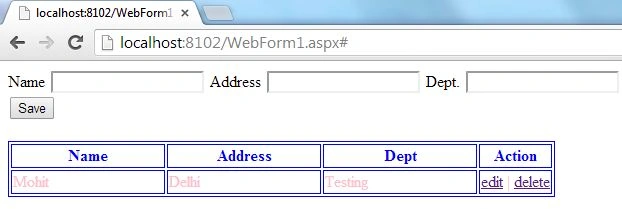
Step 2. Now, I will work on the ViewModel of this application and will modify it as well.
You need to update your Table with this code.
Gitanjali RavichandranPosted May 23, 2017, 2:15 AM
How can we bring the radio button values in the datagridview??
kalu singh raoPosted Jul 4, 2016, 2:01 AM
Nice...
Debasis SahaPosted May 26, 2016, 8:10 AM
Nice sharing..
Shriram PophaliPosted Jun 24, 2015, 6:13 AM
Nice article!
Anil SinghPosted Nov 3, 2014, 10:55 PM
It might help to others http://www.code-sample.com/2014/05/angularjs-interview-questions-and.html
Anubhav ChaudharyPosted Sep 17, 2014, 2:11 PM
Thanks Rashmi
Rashmi Ranjan SamalPosted Sep 17, 2014, 9:14 AM
Help full article
TulsiPosted Mar 8, 2014, 5:14 PM
RAR is corrupt :(