

Introduction
A C# collection is a group of multiple objects. You can group any type of object in a collection into a single collection using a System.Object class. For that the .Net Framework provides collection classes, some in the System.Collections namespace and some in the System.Collecctions.Generic namespace. As I previously said in my last article, the System.Collection classes are not type safe. But startiing with the .Net Framework 2.0 we were able to use the collections the System.Collections.Generic namespace that is type safe, so here we will focus on the newer collection classes.
There are also some other namespaces from where we can use collection classes. If you want to create a specific type of collection then there are some classes in System.collections.Specialized namespace. If you want to create a thread safe collection then you can use the System.Collections.Concurrent namespace classes. You can also use many other ways to create a collection by implementing interfaces.
C# Lists
For creating a dynamic list, .Net provide us a generic class List<T>. This class implements the IList, ICollection, IEnumrable, IList<T>, ICollection<T> and IEnumerable<T> interfaces.
| Interface | Description |
| IList<T> | For accessing values from an index. This interface defines an indexer and provides a facility to insert and insert elements from a specific location using InsertAt(), RemoveAt() methods. This interface is derived from ICollection<T>. |
| ICollection<T> | Is implemented by a generic type of collection classes. Using this you can access the number of items in a collection using a Count property. Using Remove (), Add (), Clear () and CopyTo () methods you can remove, add collection elements, and copy to an array. |
| IEnumerable<T> | This interface is required by foreach statements. This interface defines a method GetEnumerator () that returns an Enumerator that implements the IEnumerator interface. |
Just look at the scenario where we need to create a list of students where we can store Name, RollNo and Marks for each student. For this I just create a class library with the name Student and this class has three properties Name, RollNo and Marks and using a constructor I'll assign a value for all the properties. This class implements the IComparable<T> interface for sorting the student details.
using System;
using System.Collections.Generic;
using System.Linq;
using System.Text;
namespace ListStudent
{
    public class Student : IComparable<Student>, IFormattable
    {
        public int RollNo { get; set; }
        public string Name { get; set; }
        public int Marks { get; set; }
        public Student(string Name, int Marks = 0, int RollNO = 0)
        {
            this.RollNo = RollNO;
            this.Name = Name;
            this.Marks = Marks;
        }
        public string ToString(string format, IFormatProvider formatProvider)
        {
            if (format == null)
            {
                format = "N";
            }
            switch (format.ToUpper())
            {
                case "N":
                    return Name.ToString();
                case "M":
                    return string.Format("{0} Marks: {1} ", Name.ToString(), Marks);
                case "R":
                    return string.Format("{0} RollNO: {1}", Name.ToString(), RollNo);
                case "A":
                    return string.Format("{0} RollNo: {1} Marks: {2}", Name.ToString(), RollNo, Marks);
                default:
                    return string.Format(" Format {0} Is Not Supported !");
            }
        }
        public int CompareTo(Student other)
        {
            return this.Name.CompareTo(other.Name);
        }
    }
}
Now build the above program, after building the program the next step is to create a list. To create a list we can use the List<T> generic collection class where you need to specify a type for the values in the declaration. This class holds three constructors so if you create a list with the default constructor and assign an initial value for the list then the capacity for the list will bec four; if you add a fifth value in the list then the capacity will changed and will allow you to add eight elements. Again if you will add a ninth element then again your list capacity will be doubled again, in ohter words the capacity will become 16. You can create a list object with default constructor using the following:
List<int> list = new List<int>();
List<Student> StudentList = new List<Student>();
Actually what happens is that whenever the capacity is going to be changed it creates a new array with type T and uses Array.Copy () to copy the elements from the old to the new array. This process is a little time consuming; to save time if you know the number of elements then you can specify the capacity of the list calling the second type of constructor as follows:
List<int> list = new List<int>(10);
You can also assign a list capacity after calling the Capacity property as follows:
List<int> list = new List<int>();
list.Capacity = 10;
The capacity is not the same as Count. Count will return the capacity of the list minus the number of inserted values in the list. After inserting a value if you don't need to insert another value then you can call the TrimExcess() method to remove the unneeded capacity. However creating a copy of an array to a new array takes time; if the count is more than of 90% of capacity then it is better do nothing.
list.TrimExcess();
You can also assign a value to a collection using a collection initializer. The syntax of the collection intializer is the same as an array intializer.
List<Student> StudentList = new List<Student>() {
new Student("Jay",80,1),
new Student("Ajay",70,2),
new Student("Sanjay",60,3),
new Student("Digvijay",50,4),
new Student("vijay",40,5)
};
Note: Collection initializers are not reflected within the IL code of the compiled assembly. The compiler converts the collection initializer to invoke the Add () method for every item from the initializer list.
Now for adding elements to a list, we can use the class file above in another program. To do that, add a reference for the DLL of the file above in the other project and include the namespace in you program as follows:
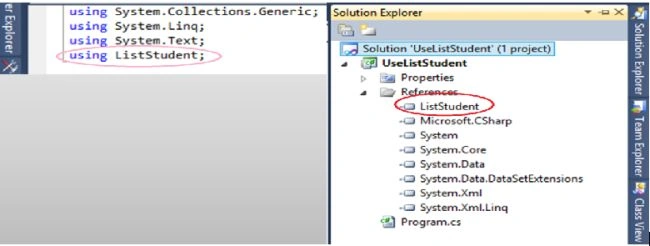
After adding a reference you will be able to use the Student class.
using System;
using System.Collections.Generic;
using System.Linq;
using System.Text;
using ListStudent;
namespace UseListStudent
{
    class Program
    {
        static void Main(string[] args)
        {
            // adding elements
            List<Student> StudentList = new List<Student>() {
            new Student("Jay",80,1),
            new Student("Ajay",70,2),
            new Student("Sanjay",60,3),
            new Student("Digvijay",50,4),
            new Student("vijay",40,5)
            };
            // accessing element
            foreach (Student student in StudentList)
            {
                Console.Write(student.Name);
                Console.Write("\t\t" + student.RollNo);
                Console.WriteLine("\t\t" + student.Marks);
            }
        }
    }
}
As I said above, there are three types of constructors and I just explained 2 type of constructors. Now you can also use the third constructor to add an element while creating a list object, this constructor accepts a collection as follows:
List<Student> StudentList1 = new List<Student>(new Student[]{
    new Student("Jay",80,1),
    new Student("Ajay",70,2),
});
You can also insert at any location in the list using the Insert() method, that takes two parameters; the first is an index number and the second value is as follows:
StudentList.Insert(2, new Student("Ajay", 30, 6));
Instead of using a foreach statement you can use the ForEach () method that is declared in the List<T> class that accepts a single parameter declared with the type Action<T>. You will see next how the ForEach() method is declared inside the List<T> class.
class List<T> : IList<T>
{
    private T[] items;
    public void ForEach(Action<T> action)
    {
        if (action == null)
            throw new ArgumentNullException("Message");
        foreach (T item in items)
        {
            action(item);
        }
    }
}
Action<T> is declared as a delegate and defines a method with void return type and a parameter type of T. So we can pass a method reference for the Action<T> delegate. So since Console.WriteLine () takes a parameter of type object, in such a situation we can pass a reference of Console.WriteLine () as follows:
StudentList.ForEach(Console.WriteLine);
// you can use lambda expression as follows:
StudentList.ForEach(r => Console.WriteLine("{0:A}",r));
For removing elements from a list you can use RemoveAt (), Remove () and RemoveRange() methods. Whereas RemoveAt () accepts a single parameter with int type, the RemoveAt () method with an element index passed to it, can remove any element from the list. Whereas the Remove() method accepts a T type parameter where we can pass an object of the student class. Actually Remove () uses the IndexOf () method to get the index of a specific element and IndexOf () compares all elements using the IEquatable<T> interface. This interface has the method Eqauls () methods which is used to check the equality of elements. If IEquatable<T> is not implemented then in such a condition it uses the Equals() method of the object class and it uses a bitwise compare with value type and compares the reference type with the reference type so it's a time consuming process to determine the index then remove the element so it's batter to use the RemoveAt () method for performance purposes. You can use Remove () and RemoveAt () as follows:
var First = new Student("Jay", 80, 1);
var Sec = new Student("Ajay", 70, 2);
var Third = new Student("Sanjay", 60, 3);
List<Student> StudentList = new List<Student>() { First, Sec, Third };
// use Remove() method
if (StudentList.Remove(Sec))
{
    Console.WriteLine("Value Removed !");
}
else
{
    Console.WriteLine("Not Found !");
}
// use RemoveAt() method
StudentList.RemoveAt(0);
You can use the RemoveRange () method to remove a number of elements that take two int types of parameters. First you need to pass an index and the second parameter is the number of elements as in the following. This will remove the two elements from index zero:
StudentList.RemoveRange(0, 2);
You can search records from a list using IndexOf (), LastIndexOf (), FindIndex (), FindLastIndex (), Find () and FindLast () and if you want to check the existence of an element then you can use the Exist () method. IndexOf () requires an object as a parameter and returns an index if it exists and -1 will be returned if it does not exist. Remember that IndexOf () is using the IEquatable<T> interface to compare the elements.
int Index = StudentList.IndexOf(first);
// if you want to check if you specific element will exist at
// specific index or not it will exist it will return index otherwise -1
int Index = StudentList.IndexOf(sec, 1);
// you can also find specific element with in specific indexes
// if it will be founded in specific index it will return index other wise -1
// following statement will find sec object with in 0-5 index range
int Index = StudentList.IndexOf(sec, 0, 5);
If you want to search for elements that have a specific characteristic then we can use FindIndex (). FindIndex () accepts a Predicate<T> type of parameter as in the following:The Predicate<T> type is a delegate that returns a Boolean value and requires type T as a parameter. The predicate returns true if an element exists and false if not exist.
public delegate bool Predicate<T>(T obj);
As you can see, the above predicate defines a method that returns a type bool value and accepts a single parameter. Since you pass a Student type parameter, the function needs to accept a Student type of object. So for that you can create a class with a name of StudentRollNo where we define a function FindRollNo () that will accept a student type of object in the parameter and returns true as you will see in the following:
using System;

using System.Collections.Generic;
using System.Linq;
using System.Text;
using ListStudent;
namespace UseListStudent
{
    class StudentRollNo
    {
        public StudentRollNo(int RollNo)
        {
            this.RollNo = RollNo;
        }
        private int RollNo
        {
            get;
            set;
        }
        public bool FindRollNo(Student student)
        {
            if (student == null)
                throw new ArgumentNullException("Parameter pass is null !");
            return student.RollNo == RollNo;
        }
    }
    class Program
    {
        static void Main(string[] args)
        {
            // adding elements
            List<Student> StudentList = new List<Student>() {
            new Student("Jay",80,1),
            new Student("Ajay",70,2),
            new Student("Sanjay",60,3),
            new Student("Digvijay",50,4),
            new Student("vijay",40,5)
            };
            Student first = new Student("Jay", 80, 1);
            var sec = new Student("Ajay", 70, 2);
            // Access index for roll No 2
            int Index = StudentList.FindIndex(new StudentRollNo(2).FindRollNo);
            Console.WriteLine(Index);
        }
    }
}
In the program above you can see I just passed a reference of FindRollNo(). You can also use a lambda expression, as in the following, so that there is no need to create a StudentRollNo class as in the program above.
int Index = StudentList.FindIndex(Roll => Roll.RollNo == 2);
You can find all details for an element using the Find () method that also uses a Predicate<T> type of parameter but returns an object as follows.
Student student = (StudentList.Find(Name => Name.Name == "Digvijay"));
Console.Write("Name: {0}\t  Marks: {1}\t RollNo: {2} \n", student.Name, student.Marks, student.RollNo);
If there are multiple elements with the same characteristics and you want get all the values such as you want all student details with the name Jay then you can use the FindAll () method that also accepts a Predicate<T> type of parameter but after getting the first element it searches for another element with the same characteristics as you will see in the following example:
List<Student> StudentList = new List<Student>() {
new Student("Jay",80,1),
new Student("Ajay",70,2),
new Student("Sanjay",60,3),
new Student("Digvijay",50,4),
new Student("Jay",50,5),
new Student("Jay",60,6),
new Student("Jay",70,7)
};
// Access all element who have name Jay
List<Student> students=(StudentList.FindAll(Name => Name.Name == "Jay"));
foreach (Student student in students)
{
    Console.WriteLine("{0:A}", student);
}
There is the Sort () method to sort the list of elements, where the Sort method are of four types as follows:
public void List<T>.Sort();
public void List<T>.Sort(Comparison<T>);
public void List<T>.Sort(IComparer<T>);
public void List<T>.Sort(int, int, IComparer<T>);
So invoking Sort () without a parameter is possible only if an element in the list implements the IComparable interface. So as in the preceding, I just created a class Library ListStudent.Student and this class also implements the IComparable interface so we can use the Sort () method for sorting our list of records. Sort use the bubble sort method to sort the records. If you want to use a custom type for sorting your records you can do that as follows:
using System;
using System.Collections.Generic;
using System.Linq;
using System.Text;
using ListStudent;
namespace UseListStudent
{
    public class SortStudent : IComparer<Student>
    {
        public enum Types
        {
            Name,
            RollNo,
            Marks,
        }
        Types type;
        public SortStudent(Types type)
        {
            this.type = type;
        }
        public int Compare(Student x, Student y)
        {
            if (x == null || y == null)
                throw new ArgumentNullException("Message");
            switch (type)
            {
                case Types.Marks:
                    return x.Marks.CompareTo(y.Marks);
                case Types.Name:
                    return x.Name.CompareTo(y.Name);
                case Types.RollNo:
                    return x.RollNo.CompareTo(y.RollNo);
                default:
                    throw new Exception("Invalid Type For compare !");
            }
        }
    }
    class Program
    {
        static void Main(string[] args)
        {
            // adding elements
            List<Student> StudentList = new List<Student>() {
            new Student("Jay",80,1),
            new Student("Ajay",70,2),
            new Student("Sanjay",60,3),
            new Student("Digvijay",50,4),
            new Student("Jay",50,5),
            new Student("Jay",60,6),
            new Student("Jay",70,7)
            };
            StudentList.Sort(new SortStudent(SortStudent.Types.RollNo));
            foreach (Student stud in StudentList)
            {
                Console.WriteLine("{0:A}", stud);
            }
        }
    }
}
You can also use another Sort () method that requires a Comparison<T> delegate to sort your list of elements. Comparison<T> accepts two T types of parameters so we can use List<T>.Sort (Comparison<T> ) in following ways:
Vijay SakshiPosted Sep 14, 2015, 6:32 AM
Nice article
Mahesh ChandPosted Sep 21, 2014, 10:31 AM
Good%20work%20Pawan
Santosh YadavPosted Feb 15, 2014, 12:52 AM
Very fine article.. Thanks
vaibhav kamblePosted Sep 3, 2013, 9:30 AM
Nice & Informative, keep it up
Pawan PandeyPosted Sep 3, 2013, 1:30 AM
thnx buddy
Manish TewatiaPosted Sep 2, 2013, 5:36 AM
Nice Article Pawan