

Introduction
This article is about creation of an ASP.Net website having CRUD operations using Language Integrated Query (LINQ) to SQL classes.
This article explains LINQ, LINQ Architecture and LINQ Providers.
It also explains step-by-step implementation of LINQ to SQL class for CRUD operations.
What is LINQ?
Language Integrated Query (LINQ) is a common query programming model and syntax that can be used across all types of data i.e. databases, XML files and in-memory objects.
LINQ Architecture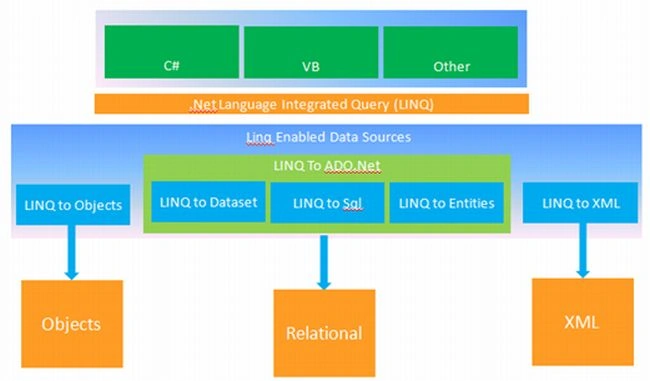
LINQ Providers:
- LINQ To Objects
- LINQ To ADO.Net
- LINQ To Dataset
- LINQ To SQL
- LINQ To Entities
- LINQ To XML
Steps to implement LINQ to SQL:
Step 1: Create Database "StudentDb"
Step 2: Create Table "Student"
In the student table set "StudentId" as the primary key and set the identity increment to 1 and also set the identity seed to 1; see: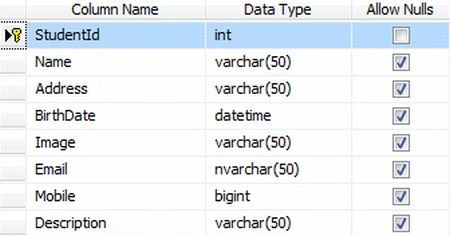
Step 3
Start >> All Programs >> Microsoft Visual Studio 2010 >> Microsoft Visual Studio 2010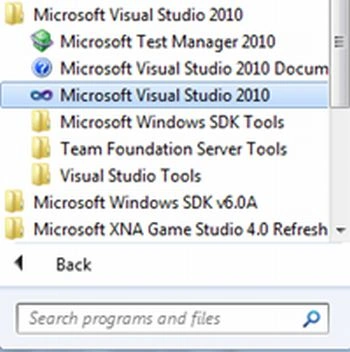
Step 4
File >> New >> Website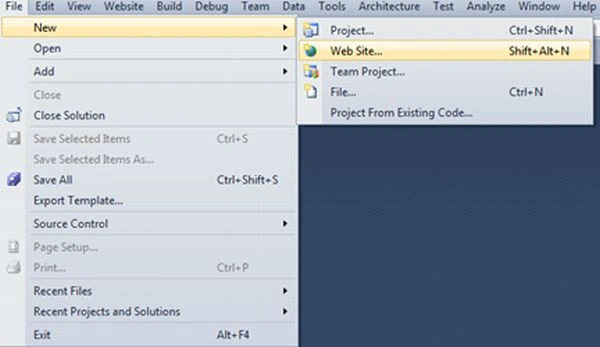
Step 5
Select .Net framework 3.5 from the dropdown list and select "ASP.NET Empty Web Site" from the templates.
Select the location and give a proper name to your website.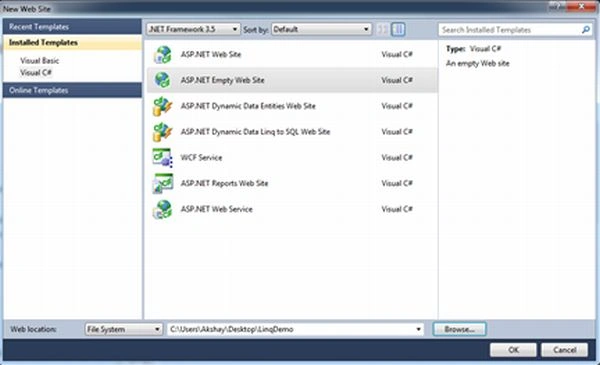
Step 6
Right-click on the project. Inside the "Add ASP.NET Folder" select App_Code.
This will add an App_Code folder in your root directory.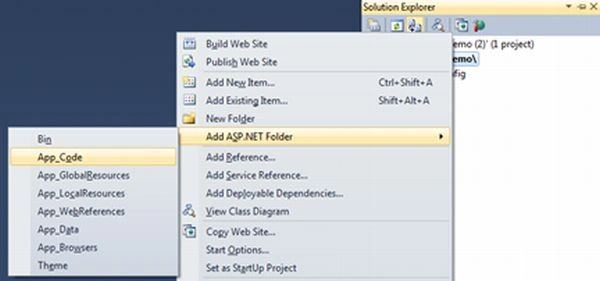
Step 7
Right-click on the "App_Code" folder and select "Add New Item..."
Select "LINQ to SQL Classes" and give the name "StudentDb.dbml".
Click on the "Add" button; see: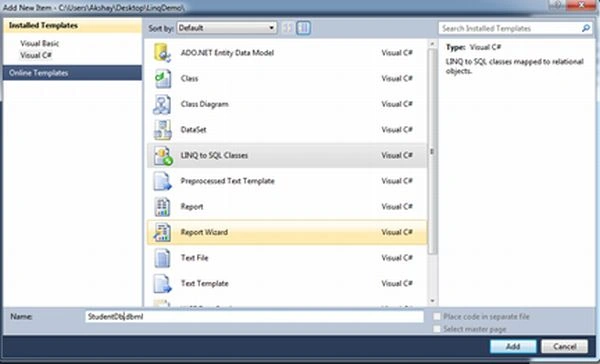
This will add a "StudentDb.dbml" file under the "App_Code" folder and opens the "Object Relational Designer". The Object Relational Designer allows us to visualize data classes in our code.
Step 8
In the Server Explorer, right-click on "Data Connections" and select "Add Connection...". 
Step 9
Select the Server name and enter the username and password for SQL Server authentication.
Select "StudentDb" for the database name.
Press the "OK" button; see: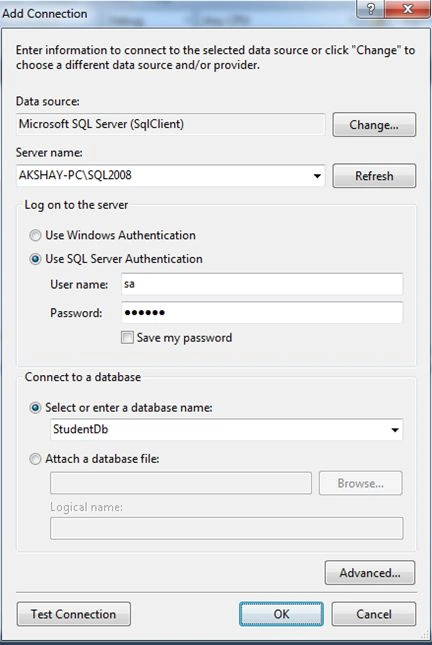
Step 10
Now we can explore our database "StudentDb". From the Tables select the "Student" table and drag & drop it to "Object Relational Designer", as in:
This will add a connection string to your web.config file.
Step 11
Right-click on the project file and select "Add New Item...".
Select "Web Form" from the templates.
Give the name as "Default.aspx".
Press the "Add" button.
This will add a Default.aspx page to your website's root directory.
Step 12
Now add the following code in your Default.aspx page under the "form" control:
<table width="80%" cellspacing="1" cellpadding="5" style="background: #ccc">
<tr style="background: #fff">
<td colspan="2">
<strong>Student Management</strong>
</td>
</tr>
<tr style="background: #fff">
<td colspan="2">
<asp:Label ID="statusLabel" runat="server" Text="" ForeColor="Red">
</asp:Label>
</td>
</tr>
<tr style="background: #fff">
<td colspan="2">
<asp:GridView ID="grid"
runat="server"
DataKeyNames="StudentId"
OnSelectedIndexChanging="grid_SelectedIndexChanging"
OnRowDeleting="grid_RowDeleting"
AutoGenerateColumns="false"
Width="100%">
<Columns>
<asp:TemplateField>
<HeaderTemplate>
<table width="100%" cellpadding="5" cellspacing="1">
<tr>
<td align="center" style="width: 5%;">
nbsp;
</td>
<td align="center" style="width: 5%;">
</td>
<td align="left" style="width: 15%">
Name
</td>
<td align="left" style="width: 15%">
Address
</td>
<td align="left" style="width: 15%">
Birthdate
</td>
<td align="left" style="width: 10%">
Photo
</td>
<td align="left" style="width: 20%">
</td>
<td align="left" style="width: 15%">
Mobile
</td>
</tr>
</table>
</HeaderTemplate>
<ItemTemplate>
<table width="100%" cellpadding="0" cellspacing="1">
<tr>
<td align="center" style="width: 5%;">
<asp:ImageButton ID="ImageButton1"
runat="server" CommandName="Select"
EnableTheming="false"
ImageUrl="~/Images/edit.png"
CausesValidation="false" />
</td>
<td align="center" style="width: 5%;">
<asp:ImageButton ID="LinkButton2"
runat="server"
ImageUrl="~/Images/delete.png"
CommandName="Delete"
EnableTheming="false"
CausesValidation="false" />
</td>
<td align="left" style="width: 15%">
<asp:Label ID="lblName" runat="server"
Text='<%# Eval("Name")%>'></asp:Label>
</td>
<td align="left" style="width: 15%">
<asp:Label ID="lblAddress" runat="server"
Text='<%# Eval("Address")%>'></asp:Label>
</td>
<td align="center" style="width: 15%">
<asp:Label ID="lblBirthdate" runat="server"
Text='<%# Eval("Birthdate")%>'></asp:Label>
</td>
<td align="center" style="width: 10%">
<asp:Image ID="imgPhoto" runat="server" Width="30" Height="30"
ImageUrl='<%# "~/Images/" + Eval("Image")%>' />
</td>
<td align="left" style="width: 20%">
<asp:Label ID="lblEmail" runat="server"
Text='<%# Eval("Email")%>'></asp:Label>
</td>
<td align="left" style="width: 15%">
<asp:Label ID="lblMobile" runat="server"
Text='<%# Eval("Mobile")%>'></asp:Label>
</td>
</tr>
</table>
</ItemTemplate>
</asp:TemplateField>
</Columns>
</asp:GridView>
</td>
</tr>
<tr style="background: #fff">
<td>
Name<asp:HiddenField ID="hdnId" runat="server" />
</td>
<td>
<asp:TextBox ID="txtName" runat="server"></asp:TextBox>
</td>
</tr>
<tr style="background: #fff">
<td>
Address
</td>
<td>
<asp:TextBox ID="txtAddress" runat="server" TextMode="MultiLine"></asp:TextBox>
</td>
</tr>
<tr style="background: #fff">
<td>
Birthdate
</td>
<td>
<asp:TextBox ID="txtBirthdate" runat="server"></asp:TextBox>
<asp:Calendar ID="calBirthdate" runat="server"
OnSelectionChanged="calBirthdate_SelectionChanged">
</asp:Calendar>
</td>
</tr>
<tr style="background: #fff">
<td>
Image
</td>
<td>
<asp:Image ID="imgThumb" runat="server" Width="100" Height="100" />
<asp:FileUpload ID="fupImage" runat="server" />
</td>
</tr>
<tr style="background: #fff">
<td>
</td>
<td>
<asp:TextBox ID="txtEmail" runat="server"></asp:TextBox>
</td>
</tr>
<tr style="background: #fff">
<td>
Mobile
</td>
<td>
<asp:TextBox ID="txtMobile" runat="server"></asp:TextBox>
</td>
</tr>
<tr style="background: #fff">
<td>
Description
</td>
<td>
<asp:TextBox ID="txtDescription" runat="server" TextMode="MultiLine">
</asp:TextBox>
</td>
</tr>
<tr style="background: #fff">
<td>
</td>
<td>
<asp:Button ID="btnAdd" ValidationGroup="add" OnClick="btnAdd_Click" runat="server" Text="Submit">
</asp:Button>
<asp:Button ID="btnReset" OnClick="btnReset_Click" runat="server" CausesValidation="false" Text="Reset">
</asp:Button>
<asp:Button ID="btnUpdate" ValidationGroup="add" OnClick="btnUpdate_Click" runat="server" Text="Update">
</asp:Button>
<asp:Button ID="btnCancel" CausesValidation="false" OnClick="btnCancel_Click" runat="server" Text="Cancel">
</asp:Button>
</td>
</tr>
</table>
Step 13
Now add the following code to your Default.aspx.cs file:
using System;
using System.Collections.Generic;
using System.Linq;
using System.Web;
using System.Web.UI;
using System.Web.UI.WebControls;
using System.Data.SqlClient;
using System.Configuration;
using System.IO;
public partial class _Default : System.Web.UI.Page
{
StudentDbDataContext SDC = new StudentDbDataContext();
protected void Page_Load(object sender, EventArgs e)
{
if (!IsPostBack)
{
btnUpdate.Visible = false;
btnCancel.Visible = false;
SqlConnection con = new SqlConnection(ConfigurationManager.ConnectionStrings["StudentDbConnectionString"].ConnectionString.ToString());
BindGrid();
}
}
private void BindGrid()
{
var students = from student in SDC.Students
select new
{
student.StudentId,
student.Name,
student.Address,
student.BirthDate,
student.Image,
student.Email,
student.Mobile,
student.Description
};
grid.DataSource = students;
grid.DataBind();
}
protected void grid_SelectedIndexChanging(object sender, GridViewSelectEventArgs e)
{
btnAdd.Visible = false;
btnReset.Visible = false;
btnUpdate.Visible = true;
btnCancel.Visible = true;
string id = grid.DataKeys[e.NewSelectedIndex].Value.ToString();
hdnId.Value = id;
SDC = new StudentDbDataContext();
var singleStudent = SDC.Students.Single(student => student.StudentId ==Convert.ToInt32(id));
txtName.Text = singleStudent.Name;
txtAddress.Text = singleStudent.Address;
txtBirthdate.Text = singleStudent.BirthDate.ToString();
imgThumb.ImageUrl = "~//images//" + singleStudent.Image;
imgThumb.Visible = true;
txtEmail.Text = singleStudent.Email;
txtMobile.Text = singleStudent.Mobile.ToString();
txtDescription.Text = singleStudent.Description;
}
protected void btnAdd_Click(object sender, EventArgs e)
{
try
{
SDC = new StudentDbDataContext();
Student student = new Student();
student.Name = txtName.Text;
student.Address = txtAddress.Text;
student.BirthDate = Convert.ToDateTime(txtBirthdate.Text);
if(fupImage.HasFile)
{
student.Image = fupImage.FileName;
string path = Server.MapPath(".") + "\\images\\";
fupImage.SaveAs(path + fupImage.FileName);
}
student.Email = txtEmail.Text;
student.Mobile = Convert.ToInt64(txtMobile.Text);
student.Description = txtDescription.Text;
SDC.Students.InsertOnSubmit(student);
SDC.SubmitChanges();
ClearControls();
statusLabel.Text = "Record Inserted Successfully.";
}
catch (Exception Err)
{
statusLabel.Text = Err.Message;
}
BindGrid();
}
protected void btnReset_Click(object sender, EventArgs e)
{
ClearControls();
}
protected void btnCancel_Click(object sender, EventArgs e)
{
ClearControls();
btnAdd.Visible = true;
btnReset.Visible = true;
btnUpdate.Visible = false;
btnCancel.Visible = false;
}
protected void btnUpdate_Click(object sender, EventArgs e)
{
try
{
SDC = new StudentDbDataContext();
var singleStudent = SDC.Students.Single(student => student.StudentId == Convert.ToInt32(hdnId.Value));
string ImageName = singleStudent.Image;
string path = Server.MapPath(".") + "\\images\\";
singleStudent.Name = txtName.Text;
singleStudent.Address = txtAddress.Text;
singleStudent.BirthDate = Convert.ToDateTime(txtBirthdate.Text);
if (fupImage.HasFile)
{
if (File.Exists(path + ImageName))
File.Delete(path + ImageName);
ImageName = fupImage.FileName;
fupImage.SaveAs(path + ImageName);
singleStudent.Image = ImageName;
}
singleStudent.Email = txtEmail.Text;
singleStudent.Mobile = Convert.ToInt64(txtMobile.Text);
singleStudent.Description = txtDescription.Text;
SDC.SubmitChanges();
ClearControls();
statusLabel.Text = "Record Inserted Successfully.";
btnAdd.Visible = true;
btnReset.Visible = true;
btnUpdate.Visible = false;
btnCancel.Visible = false;
}
catch (Exception Err)
{
statusLabel.Text = Err.Message;
}
BindGrid();
}
protected void grid_RowDeleting(object sender, GridViewDeleteEventArgs e)
{
string id = grid.DataKeys[e.RowIndex].Value.ToString();
StudentDbDataContext SDC = new StudentDbDataContext();
var singleStudent = SDC.Students.Single(student => student.StudentId == Convert.ToInt64(id));
string path = Server.MapPath(".") + "\\images\\";
if (File.Exists(path + singleStudent.Image))
{
File.Delete(path + singleStudent.Image);
}
SDC.Students.DeleteOnSubmit(singleStudent);
SDC.SubmitChanges();
BindGrid();
}
private void ClearControls()
{
txtName.Text = string.Empty;
txtAddress.Text = string.Empty;
txtEmail.Text = string.Empty;
txtMobile.Text = string.Empty;
txtDescription.Text = string.Empty;
txtBirthdate.Text = string.Empty;
imgThumb.Visible = false;
}
protected void calBirthdate_SelectionChanged(object sender, EventArgs e)
{
txtBirthdate.Text = calBirthdate.SelectedDate.ToShortDateString();
}
}
Step 14
Now run your website.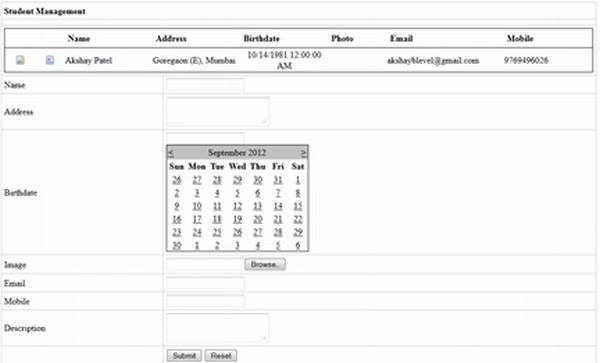
Conclusion
Here we do insert, update, delete and select operations on a SQL Server database table with the help of the LINQ to SQL class. In this sample code we are not using a stored procedure. We use a data context to do the db related operations.
Lucas TorresPosted Jun 11, 2019, 8:05 PM
Noble se?or ud acaba de salvar mi empleo, muchas gracias :D
Humayun Kabir MamunPosted Sep 28, 2016, 12:00 AM
Nice...
Mohammed AshrafPosted May 11, 2016, 8:15 AM
This is helpful to me....
Gowtham RajamanickamPosted Apr 11, 2016, 2:58 AM
good one...
nda cielPosted Oct 15, 2015, 12:05 PM
thank you very awesome tutorial ,
Akaash Chintamani MeherPosted Sep 4, 2015, 2:18 PM
Its Nice......But can u please let me know how can i do CRUD opertaions using LINQ to SQL in a single stored procedure(in that stored procedure all crud operations written). Please reply asap. its urgent...... Thanks.....
Gowtham RajamanickamPosted Apr 11, 2015, 1:26 PM
good one
Rupesh GaikwadPosted Nov 23, 2014, 2:33 AM
Extreme stuff
Mickeyy GotPosted Aug 18, 2014, 1:31 PM
i choose windows authentication when i create DB that is a only one difference thing from the article and error is up on the "StudentDbDataContext SDC = new StudentDbDataContext();" line HELP PLS.
Mickeyy GotPosted Aug 18, 2014, 1:27 PM
Can anyone explain me more about the connection with DB
Lakshmanan Sethu SankaranarayanPosted Feb 6, 2014, 7:30 AM
Good one
Prasenjit DeyPosted Oct 8, 2013, 3:35 AM
very nice
Anggi RahmanPosted Oct 8, 2013, 3:29 AM
good job..!! i like this post an this source code
burim ametiPosted Aug 29, 2013, 8:07 AM
nice one i need of your help, this is my mail pls write me to send my question ([email protected])
sairam nagothuPosted Jun 25, 2013, 7:28 AM
nice....
santhosh pothulaPosted Jun 21, 2013, 7:02 AM
Great Work Dude..i found ur articles very much helpful..they are easy to understand as well..Keep posting..
Sanjay KumarPosted May 29, 2013, 3:11 AM
thank u...
elias teklayPosted May 18, 2013, 10:05 AM
thank you a lot is is very use full to us in African peoples!!
AratrikaPosted Mar 16, 2013, 6:01 AM
Found is very helpful. Thank you :)
radit pradanPosted Dec 8, 2012, 4:09 AM
thats really help me... thank you.... :)