

Introduction
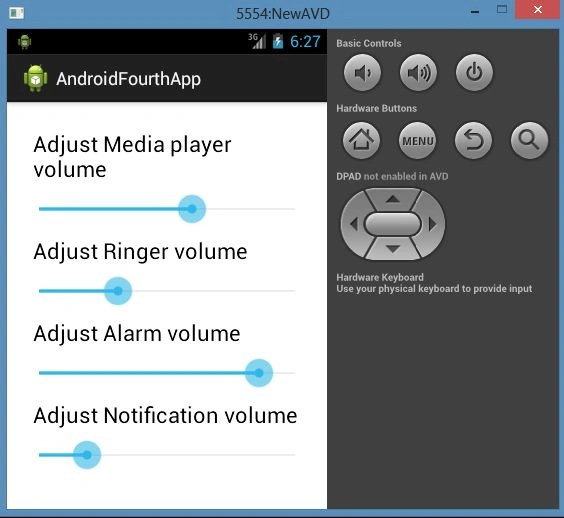
Hi guys. Today I explain how to work with the seek bar in Android. To demonstrate how it is used to set the Media Player, Ringer, Alarm, and Notification volume for your device. So you can easily understand using the following instructions.
Step 1
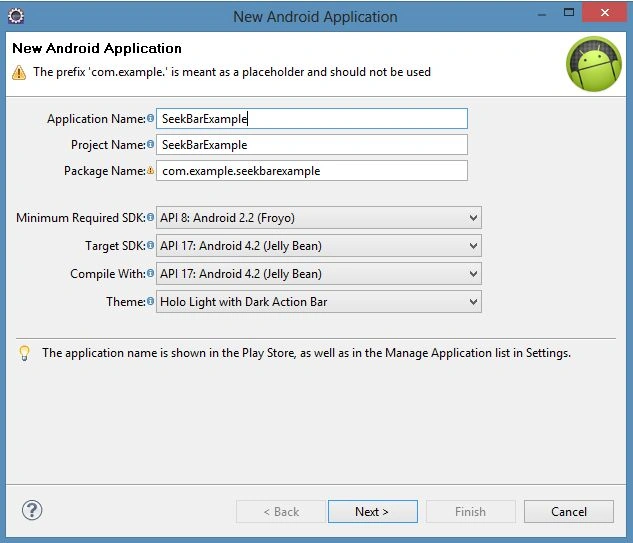
As usual, create a new project file as in the following.
Step 2
Open the "activity_main.xml" file and update it with the following code:
- <LinearLayout xmlns:android="http://schemas.android.com/apk/res/android"
- xmlns:tools="http://schemas.android.com/tools"
- android:paddingBottom="@dimen/activity_vertical_margin"
- android:paddingLeft="@dimen/activity_horizontal_margin"
- android:paddingRight="@dimen/activity_horizontal_margin"
- android:paddingTop="@dimen/activity_vertical_margin"
- tools:context=".MainActivity"
- android:layout_width="fill_parent"
- android:layout_height="fill_parent"
- android:orientation="vertical" >
- <TextView
- android:id="@+id/textView1"
- android:layout_width="match_parent"
- android:layout_height="wrap_content"
- android:text="Adjust Media player volume"
- android:textAppearance="?android:attr/textAppearanceLarge" android:padding="10px"/>
- <SeekBar
- android:id="@+id/seekBar1"
- android:layout_width="match_parent"
- android:layout_height="wrap_content"
- />
- <TextView
- android:id="@+id/textView2"
- android:layout_width="match_parent"
- android:layout_height="wrap_content"
- android:text="Adjust Ringer volume"
- android:textAppearance="?android:attr/textAppearanceLarge" android:padding="10px" />
- <SeekBar
- android:id="@+id/seekBar2"
- android:layout_width="match_parent"
- android:layout_height="wrap_content" />
- <TextView
- android:id="@+id/textView2"
- android:layout_width="match_parent"
- android:layout_height="wrap_content"
- android:text="Adjust Alarm volume"
- android:textAppearance="?android:attr/textAppearanceLarge" android:padding="10px"/>
- <SeekBar
- android:id="@+id/seekBar3"
- android:layout_width="match_parent"
- android:layout_height="wrap_content" />
- <TextView
- android:id="@+id/textView2"
- android:layout_width="match_parent"
- android:layout_height="wrap_content"
- android:text="Adjust Notification volume"
- android:textAppearance="?android:attr/textAppearanceLarge" android:padding="10px"/>
- <SeekBar
- android:id="@+id/seekBar4"
- android:layout_width="match_parent"
- android:layout_height="wrap_content" />
- </LinearLayout>
Step 3
Open the "MainActivity.java" file and update it with the following code:
- package com.example.androidfourthapp;
- import android.os.Bundle;
- import android.app.Activity;
- import android.view.Menu;
- public class MainActivity extends Activity {
- @Override
- protected void onCreate(Bundle savedInstanceState) {
- super.onCreate(savedInstanceState);
- setContentView(R.layout.activity_main);
- }
- @Override
- public boolean onCreateOptionsMenu(Menu menu) {
- // Inflate the menu; this adds items to the action bar if it is present.
- getMenuInflater().inflate(R.menu.main, menu);
- return true;
- }
- }
Step 4
Now create a new Java file named "SeekBarExampleAcitivity.java" with the following code:
- package com.example.androidfourthapp;
- import android.app.Activity;
- import android.content.Context;
- import android.media.AudioManager;
- import android.os.Bundle;
- import android.widget.SeekBar;
- import android.widget.SeekBar.OnSeekBarChangeListener;
- public class SeekBarExampleAcitvity extends Activity{
- private SeekBar mediaVlmSeekBar = null;
- private SeekBar ringerVlmSeekBar = null;
- private SeekBar alarmVlmSeekBar = null;
- private SeekBar notifyVlmSeekBar = null;
- private AudioManager audioManager = null;
- @Override
- protected void onCreate(Bundle savedInstanceState) {
- // TODO Auto-generated method stub
- super.onCreate(savedInstanceState);
- setContentView(R.layout.activity_main);
- this.setVolumeControlStream(AudioManager.STREAM_MUSIC);
- this.setVolumeControlStream(AudioManager.STREAM_RING);
- this.setVolumeControlStream(AudioManager.STREAM_ALARM);
- this.setVolumeControlStream(AudioManager.STREAM_NOTIFICATION);
- initControls();
- }
- private void initControls() {
- //Return the handle to a system-level service - 'AUDIO'.
- audioManager = (AudioManager) getSystemService(Context.AUDIO_SERVICE);
- //Find the seekbar 1
- mediaVlmSeekBar = (SeekBar) findViewById(R.id.seekBar1);
- //Set the max range(Volume in this case) of seekbar
- //for Media player volume
- mediaVlmSeekBar.setMax(audioManager
- .getStreamMaxVolume(AudioManager.STREAM_MUSIC));
- //Set the progress with current Media Volume
- mediaVlmSeekBar.setProgress(audioManager
- .getStreamVolume(AudioManager.STREAM_MUSIC));
- //Find the seekbar 2
- ringerVlmSeekBar = (SeekBar) findViewById(R.id.seekBar2);
- //Set the max range(Volume in this case) of seekbar
- //for Phone ringer volume
- ringerVlmSeekBar.setMax(audioManager
- .getStreamMaxVolume(AudioManager.STREAM_RING));
- //Set the progress with current Ringer Volume
- ringerVlmSeekBar.setProgress(audioManager
- .getStreamVolume(AudioManager.STREAM_RING));
- //Find the seekbar 3
- alarmVlmSeekBar = (SeekBar) findViewById(R.id.seekBar3);
- //Set the max range(Volume in this case) of seekbar
- //for Alarm volume
- alarmVlmSeekBar.setMax(audioManager
- .getStreamMaxVolume(AudioManager.STREAM_ALARM));
- //Set the progress with current Alarm Volume
- alarmVlmSeekBar.setProgress(audioManager
- .getStreamVolume(AudioManager.STREAM_ALARM));
- //Find the seekbar 4
- notifyVlmSeekBar = (SeekBar) findViewById(R.id.seekBar4);
- //Set the max range(Volume in this case) of seekbar
- //for Notification volume
- notifyVlmSeekBar.setMax(audioManager
- .getStreamMaxVolume(AudioManager.STREAM_NOTIFICATION));
- //Set the progress with current Notification Volume
- notifyVlmSeekBar.setProgress(audioManager
- .getStreamVolume(AudioManager.STREAM_NOTIFICATION));
- try {
- //Listener to receive changes to the SeekBar1's progress level
- mediaVlmSeekBar
- .setOnSeekBarChangeListener(new OnSeekBarChangeListener() {
- public void onStopTrackingTouch(SeekBar arg0) {
- }
- public void onStartTrackingTouch(SeekBar arg0) {
- }
- //When progress level of seekbar1 is changed
- public void onProgressChanged(SeekBar arg0,
- int progress, boolean arg2) {
- audioManager.setStreamVolume(
- AudioManager.STREAM_MUSIC, progress, 0);
- }
- });
- ringerVlmSeekBar
- .setOnSeekBarChangeListener(new OnSeekBarChangeListener() {
- public void onStopTrackingTouch(SeekBar arg0) {
- }
- public void onStartTrackingTouch(SeekBar arg0) {
- }
- //When progress level of seekbar2 is changed
- public void onProgressChanged(SeekBar arg0,
- int progress, boolean arg2) {
- audioManager.setStreamVolume(
- AudioManager.STREAM_RING, progress, 0);
- }
- });
- alarmVlmSeekBar
- .setOnSeekBarChangeListener(new OnSeekBarChangeListener() {
- public void onStopTrackingTouch(SeekBar arg0) {
- }
- public void onStartTrackingTouch(SeekBar arg0) {
- }
- //When progress level of seekbar3 is changed
- public void onProgressChanged(SeekBar arg0,
- int progress, boolean arg2) {
- audioManager.setStreamVolume(
- AudioManager.STREAM_ALARM, progress, 0);
- }
- });
- //Listener to receive changes to the SeekBar4's progress level
- notifyVlmSeekBar
- .setOnSeekBarChangeListener(new OnSeekBarChangeListener() {
- public void onStopTrackingTouch(SeekBar arg0) {
- }
- public void onStartTrackingTouch(SeekBar arg0) {
- }
- //When progress level of seekbar4 is changed
- public void onProgressChanged(SeekBar arg0,
- int progress, boolean arg2) {
- audioManager.setStreamVolume(
- AudioManager.STREAM_NOTIFICATION, progress,0);
- }
- });
- } catch (Exception e) {
- e.printStackTrace();
- }
- }
- }
Step 5
See the output.
Ashwani TyagiPosted Apr 11, 2013, 4:15 AM
nice article