

Table of Contents
- Introduction
- Azure Storage infrastructure
- Azure messaging infrastructure
- Where to use Azure Queues, a scenario
- Azure Storage Queues
- Azure Service Bus queues
- Differences between Azure Storage Queues and Azure Service Bus Queues
- When to Use What
- Best Practices for Azure storage Queue
- Best Practices for Azure service bus Queue
This article explains the differences and similarities between the two types of queues offered by Microsoft Azure, Azure Storage Queues and Service Bus Queues.
Introduction
Azure storage Queues are a part of the Azure storage infrastructure feature, a simple REST-based Get/Put/Peek interface, offering persistent, reliable messaging within and between services.
Azure Storage infrastructure
Azure Storage delivers the flexibility to store and retrieve large amounts of data, such as documents and media files by Azure Blobs structured no SQL based data by Azure Tables; reliable messages by Azure Queues, and use MB based Azure Files for migrating on-premises applications to the cloud.
Azure Service Bus queues are part of Azure messaging infrastructure that supports queuing as well as to publish/subscribe Web service remoting, and integration patterns.
Azure messaging infrastructure
Azure Service Bus is cloud-based messaging system for connecting applications, services and devices, no matter where these components exist. We can use a service bus to connect apps running on Azure with on-premises. It can also connect household appliances, like sensors and other devices like tablets or phones to a central application or to each other.
The Azure messaging infrastructure provides four separate communication mechanisms, Queues, Topics, Relays and Event Hubs.
.
Where to use Azure Queues, a scenario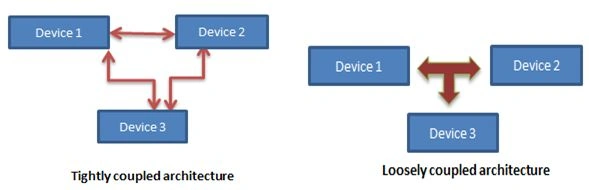
The main reason for using queues is to provide loose connectivity among various components. For example, we have two components of an application to exchange data. Here one of them is on-premise and one exists in the cloud. Here if we use a web service to exchange data we have the following issues:
- Both components should be online simultaneously; if one partner is down, then the communication will not work.
- It’s difficult to scale up if more work is present.
In Azure Queues you have a queue as mediator that connects the two components, so when the receiver is down, the sender can still insert messages into the queue, once a receiver comes online it can receive message from that queue. And for scale up we just need to add more receivers and your queue is processed in parallel.
The following are the drawbacks of using a queue:
- Queues has some charges, however these are minimal.
- Your queue is doing mediator work here. If your queue is down, devices will not able to communicate with each other.
Azure Storage Queues
Azure Queue Storage can store multile messages that we can access via HTTP or HTTPS. It offers a highly reliable and very cheap queuing service to us. A queue’s message size is allowed to be up to 64 KB in size, and when dequeueing a message, it should not be visible to other receivers. A queue can contain millions of messages, depending on the capacity of a storage account. 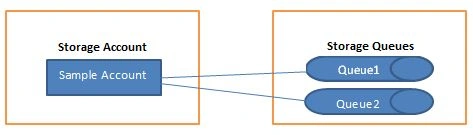
The following are common uses of Azure storage Queue:
- Queue provides asynchronous communication
- Can pass messages from an Azure Web role to an Azure worker role
- Load Leveling
- Load Balancing
- Temporal Decoupling
- Loose coupling
To understand the preceding uses in details refer to link:
Azure Service Bus queues
Microsoft Azure Service Bus provides two messaging solutions, one is relay and the other messaging solution is brokered messaging.
Brokered messaging provides asynchronous communication, where senders and receivers do not need to be online at the same time. The messaging infrastructure reliably stores messages in a broker (queue) until the receiving party is ready to receive them, and the sender does not need to wait for a reply from the receiver in order to continue its processing and send further messages. That way components of the distributed application can be disconnected.
Service bus queues have the following properties:
- Service Bus queues support brokered messaging communication.
- Queues provide First In, First Out (FIFO) message delivery, in other words messages are received and processed by the receivers in the order they were added to the queue.
- Each message is received and processed by only one message receiver.

The following are common uses of Queue storage:
- Provides communication between web and worker roles in a multi-tier Azure application.
- You can scale out your application easily by using it.
- It can provide communication between various components of an application and departments of an organization.
- Can provide communication between on-premises apps and Azure hosted apps in a hybrid solution.
Differences between Storage Queue and Service Bus Queue
Cost-based Difference
- Queue transaction cost: the storage queue charge is $0.0005 per 10,000 transactions and the service bus queue charge is $0.05 per million operations for the basic tier. So an Azure queue is cheaper than a service bus queue.
- Billable operations: For storage queues all the operations are billable but for a service bus queue only the send/receive operations are billable.
- Storage cost: For a storage queue the storage cost is $0.07 per GB/month, but for a service bus queue there is no storage cost.
- Idle transactions cost: Querying on an empty queue is counted as a billable transaction when in a service bus queue, receives against an empty queue is considered a billable message.
Performance based Difference
- Average latency: Azure storage queues have 10 ms average latency whereas service bus queues have 20-25 ms latency.
Capacity and quotas based
- Maximum queue size supported: Azure storage queue supports 200 TB for a single storage account whereas a service queue only supports 80 GB.
- Message size: Storage queue supports a 64 Kb of message size, whereas a service bus queue supports 256 KB. Here in service bus queues, each message stored in a queue has two parts, a header and a body so the total size of the message is limited to 256 KB.
- Maximum message TTL: For Azure storage queue its 7 days, whereas for service bus queue it is unlimited.
- Maximum number of queues: Azure storage queue has an unlimited number whereas a service bus queue supports 10,000 queues per namespace.
Security
For authentication, storage queues use security tokens that are shared by other storage components like tables and BLOBs. For accessing an Azure queue you need to provide the storage account name and the token associated with it.
An Azure Access Control Service (ACS) is used as the primary authentication mechanism for service bus queues, but it also supports multiple predefined identity providers as well as custom ones.
ACS is an Azure service that provides a simple way to authenticate users to access your web applications and services without having to add complex authentication logic to your code.
Other Differences
| DIFFERENCE CRITERIA | STORAGE QUEUES | SERVICE BUS QUEUES |
| Delivery guarantee | At-Least-Once | At-Least-Once At-Most-Once |
| Can send in Batch | No | Yes |
| Ordering | No | Yes - First-In-First-Out |
| Transaction support | No | Yes |
| Lease or Lock duration | 30 seconds (default) | 60 seconds (default) |
| Can log server-side transaction | Yes | No |
| Can received in batch | Explicitly supported, but max 32 messages | Implicitly support it |
| Message groups | No | Can be done by using messaging sessions |
| Support for Duplicate detection | No | Can be done on sender side |
| WCF integration allowed | No | Yes |
| Fetching message sessions by ID | No | Yes |
| Message auto-forwarding By Auto-forwarding you can chain a queue or subscription to another queue or topic in the same service namespace. When its state is on, Service Bus automatically removes messages that are located in the first queue or places them in the second queue. For more details refer link: |
No | Yes |
| Dead lettering | No | Yes |
| Dead lettering queues are used for storing messages that could not be delivered. These are generated automatically by system. There are two types of dead-letter queues, that are transactional and a non-transactional. Refer the following link to be familiar with Dead-Letter Queues. |
No | Yes |
When to Use What
Use Azure Storage Service Queues when:
- You need a 200 TB storage limit whereas a service queue supports only 80 GB limit. So if your application requires more than 80 GB of messages in a queue, then an Azure store queue is best for you.
- Azure storage has a message time-to-live of up to 7 days, so if your application does not need a message life that is not greateer than that.
- Need server-side logs of all of the transactions processed against your queues.
The following are the Best Practices for Azure storage Queues:
- Scalability
A single queue can process approximately 2,000 messages (1 KB each) per second. If you need more than that, you should use multiple queues and spread the messages across them or you can partition your application to use multiple queues to increase this throughput value.
- Proxy Auto Detection
By default it is on in Windows Azure so it will take a bit more time to do the connection since it still needs to get the proxy for each request. For that reason it is significant for you to turn it off.
- Message Size should be limited
You should place only the information the receiver needs in a message, since queue performance and scalability decreases as message size increases.
- Message can be retrieve in Batch
Fewere roundtrips from the client application will improve the performance, so can you can retrieve up to 32 messages from a queue in a single operation.
- Web or Worker role instance scaling
To handle the point in time workload, you can add or remove web or worker role instances that will increase or decrease their instance count.
- Use can use Async-Await pattern
When we use an async method, the async-await pattern suspends local execution until the call ends. This method allows the current thread to do other work, and helps to avoid performance bottlenecks and improves the overall responsiveness of the application.
- Use blobs for large messages
Use BLOBs to store large messages and images and provide their reference in the queue. This way you can optimize transaction cost and storage space cost.
- Nagle Off
The Nagle algorithm is generally bad for the performance of queue requests and you should disable it. This algorithm uses a process called nagling that increases the efficiency of a network application system by decreasing the number of packets that must be sent. For more details refer to link.
- Dynamically scale down the number of worker role instances when queues remain empty for a long period of time.
- When checking a queue for new messages, eliminate unnecessary latency enforced by a polling interval.
- You can implement an efficient queue listener service that can ensure that queues will be polled by a maximum of one dequeue thread when it is empty.
- If your queue remains empty most of the time, you scale down the number of role instances and regularly observe system metrics to determine when your application should scale up the number of instances.
- When retrieving messages from a queue, you can batch multiple messages together in a single storage transaction. TheGetMessages method in the Queue Service API dequeues the specified number of messages in a single transaction.
- Poison messages are malformed messages that the application cannot process. You should implement a mechanism to remove these messages.
Best Practices for Azure service bus Queue:
- One-way event capability
You can use a one-way event capability that supports push-based notifications to reduce latency and improve the performance of the queue-based messaging system.
- SBMP Protocols
Service Bus can work under different protocols. By default, the SDK uses the Service Bus Messaging Protocol (SBMP) that delivers the best performance and features. Unless your operations or your consumer's operations are limited to HTTP/S, then utilize the SBMP.
- Asynchronous Approach
You should apply an asynchronous development approach to your Service Bus operations. There are various asynchronous methods provided for a majority of operations.
- Use abstractions instead of direct client
In a messaging solution we have various types of clients, like QueueClient, TopicClient and SubscriptionClient. Until you totally do not need to utilize the direct client, use their abstractions that are MessageSender and MessageReceiver. By doing so you don’t need to take care of whether you are sending or receiving from a queue or a topic or a subscription.
- Batching for performance considerations
There are some performance considerations when we using batch processing such as the following:
For low throughput: Disable batching, that can be done by setting the batch flush interval to 0.
For high throughput: You can set the BatchFlushInterval to 50ms.
When you have multiple Senders and Receivers: You should set theBatchFlushInterval to 100ms.
ankitPosted Nov 6, 2020, 6:28 PM
This document is 5years old. Can I follow this?
Hashim ShafiqPosted Aug 30, 2015, 9:45 PM
nice
Gowtham RajamanickamPosted Aug 27, 2015, 9:50 AM
good
Sounik ChandraPosted Aug 27, 2015, 7:37 AM
nice article very informative
Yashwanth MuthineniPosted Aug 27, 2015, 5:51 AM
Nice Startup
Ankit BansalPosted Aug 27, 2015, 2:22 AM
Good one..Thanks for sharing..
Rajeesh MenothPosted Aug 27, 2015, 1:11 AM
Good One
Mohammed IbrahimPosted Aug 27, 2015, 12:07 AM
nice information
Karthikeyan KPosted Aug 26, 2015, 11:26 PM
Good one..Thanks for sharing
Santhakumar MunuswamyPosted Aug 26, 2015, 11:22 PM
Welcome
Santhakumar MunuswamyPosted Aug 26, 2015, 11:22 PM
Good Start
Gowtham KPosted Aug 26, 2015, 10:53 PM
Good one