

Introduction
T4 Templates in Entity Framework
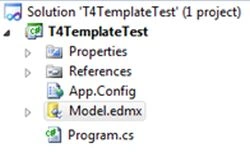
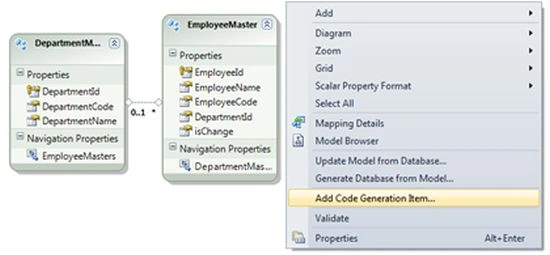
- Right-click on the entity model and select "Add Code Generator Item".
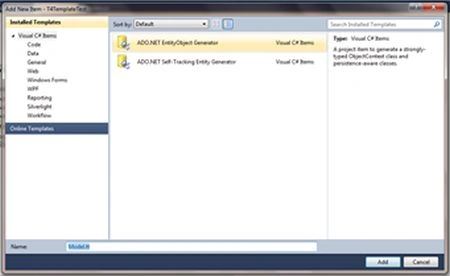 Select "ADO.net Entity Object Generator" from the "Add New Item" dialog and click on the "Add" button. At this time a security warning dialog is shown to ask if you trust the source that generated the T$ template.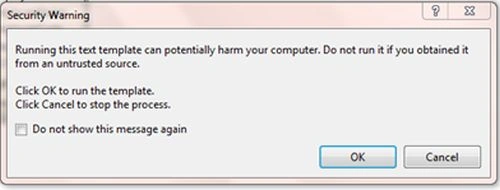
- You may also add a T4 template by right-clicking the project then select "Add new item" then select "ADO.net Entity Object Generator".
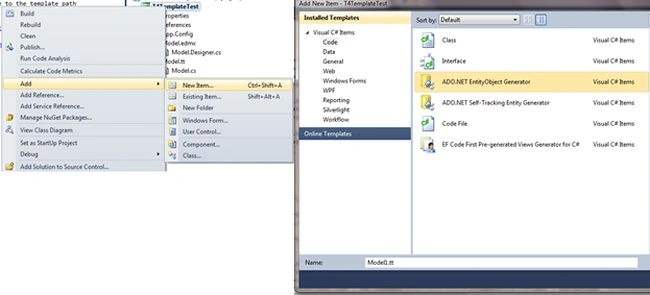
This will also show a security warning described above.
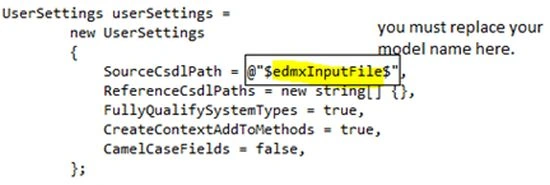
The only difference is that in this second case you must replace the entity model name manually in the model.tt file as shown below. And you must also delete the code in model.designer.cs manually.
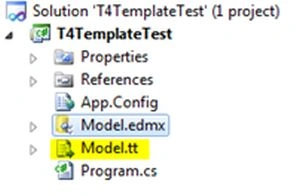
 Now all our code is within; our new T4 template file has the extension .tt.
T4 templates enable us to implement code generation. A T4 template is very useful in a large and complicated model. With the T4 template, if we change the table name in a database, we don't need to find and change the name of the corresponding C# class. Instead of this, we can re-execute the template and regenerate the class definitions; just open the model.tt file then save it, it will automatically generate new code for us. We can also force a template transformation by right-clicking on a template and selecting "Run Custom Tool". It is also the flexibility of customization and total control.
How to use Sample
To run the sample, you must change the connection string that points to the testing database. And the project also contains the database table script.
Now all our code is within; our new T4 template file has the extension .tt.
T4 templates enable us to implement code generation. A T4 template is very useful in a large and complicated model. With the T4 template, if we change the table name in a database, we don't need to find and change the name of the corresponding C# class. Instead of this, we can re-execute the template and regenerate the class definitions; just open the model.tt file then save it, it will automatically generate new code for us. We can also force a template transformation by right-clicking on a template and selecting "Run Custom Tool". It is also the flexibility of customization and total control.
How to use Sample
To run the sample, you must change the connection string that points to the testing database. And the project also contains the database table script.
Bill FenckenPosted Dec 20, 2020, 11:32 PM
Hi Jignesh, I've noticed your articles on Blazor, Patterns, T4, etc. and would welcome your participation in our oepn source project - info here: https://github.com/CodeFactoryLLC/Public-Projects - Anyone building and publishing open source CodeFactory automation templates on GitHub can qualify for waived license fees. Checkout www.codefactory.software as well. Thanks!