

- Unary: In unary operators, only one operand is used.
Eg: operator operand
- Binary: In binary operators, two operands are used.
Eg: operator1 operand operator2
Types of operators in Oracle
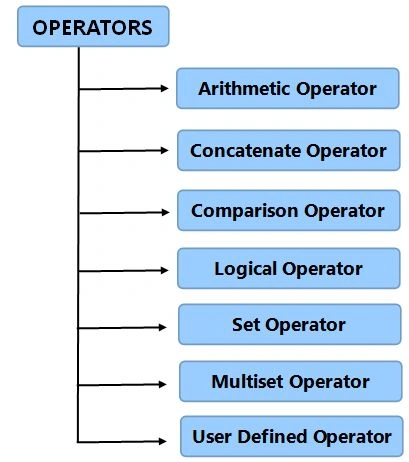
1. To perform mathematical computations on numeric operands, arithmetic operators are used.
- Addition (+)
To add two or more numbers the (+) operator is used.
- Substraction (-)
To subtract two numeric values the (-) operator is used.
- Multiply (*)
The (*) operator multiplies one number by another.
- Division (/)
The (/) operator divides one number by another.
Syntax
SELECT <Expression> [arithmetic operator] <Expression>.....
FROM [table_name]
WHERE [Expression];
Example
BEGIN
DBMS_OUTPUT.PUT_LINE(7 * 3); --multiplication
DBMS_OUTPUT.PUT_LINE(18 / 5); --division
DBMS_OUTPUT.PUT_LINE(15 + 6); --addition
DBMS_OUTPUT.PUT_LINE(32 - 16); --subtraction
END;
2. Concatenate Operator (||)
The Concatenate operator concates two strings and returns another string as the result.
Syntax
String_1 ||String_2 || String_n
Example
- ‘Friday’ || ‘January 20th’
Note: It returns Friday 20th January
-
'2' || '0' || '1' || '4'
Note: It returns 2014
3. Comparison Operator
The Comparison operator is used when we want to compare one expression with another. It returns TRUE, FALSE or NULL.
Here are the comparison operators:
- = Equals to
- < Less than
- > Greater than
- <= Less than equal to
- >= Greater than equal to
- IN Operator
To determine if a column's value exists in a given set of values we use the IN operator and if the column value is equal to any of the values specified in a given set then the condition is validated. The condition that is defined using the IN operator is also known as a membership condition.
Example
SELECT Emp_id
FROM Employees
WHERE Salary IN (24000, 50000, 35000);
- LIKE Operator
For wildcard searches and pattern dependent matching in a SELECT query we use the “LIKE” operator. If we know any portion of the column value a wildcard can be used to find the rest of the portion. It uses a wildcard for the search string; that’s why it is also known as a "wildcard search". The two wildcard operators are: Percentile (%) and Underscore (_). Percentile is used to replace more than one character and underscore is used to replace a single character.
Example
SELECT First_Name
FROM Students
WHERE Last_Name LIKE 'Arora';
- BETWEEN
It is used to compare a column value within a specified range having a lower and upper limit. It is generally the same as the composite inequality operators (<= and >=).
Example
SELECT Emp_Name
FROM Employees
WHERE Salry BETWEEN (22000 AND 45000);
- IS(NOT) NULL
NULL values are normally unknown and also unassigned whereas the equality operator tests for a definite value, that’s why it cannot be tested using the equality operator. The NULL operator serves as an equality operator to check for NULL values of a column.
Example
SELECT Emp_Name
FROM Employees
WHERE Bonus_Pct IS NULL;
4. Logical Operator
Oracle includes three types of logical operators: AND, OR and NOT. These operators operate on Boolean operands and produce Boolean results.
Join the conversation! Your thoughts help the community grow.