

Here's an exception which you can face while retrieving the TaxonomySession object. Also, I have provided the solution below.
Office 365 / SharePoint Online - Exception while retrieving the TaxonomySession object -
Cannot convert argument "context", with value: "Microsoft.SharePoint.Client.ClientContext", for "GetTaxonomySession" to type "Microsoft.SharePoint.Client.ClientRuntimeContext"
Background
We have our SharePoint online site and we have created a few TermSets. Now, we need to send those TermSets for approval to the respective department lead. We could easily import the TermSets from the .csv file but unfortunately there is no direct way to export the TermSets. One possible option is PowerShell script.
So, we have written a PowerShell script (I’ll share the complete PowerShell script in a new article).
Here's the code:
We have our SharePoint online site and we have created a few TermSets. Now, we need to send those TermSets for approval to the respective department lead. We could easily import the TermSets from the .csv file but unfortunately there is no direct way to export the TermSets. One possible option is PowerShell script.
So, we have written a PowerShell script (I’ll share the complete PowerShell script in a new article).
Here's the code:
- #Add Type for Taxonomy
- Add-Type -Path "c:\Program Files\Common Files\microsoft shared\Web Server Extensions\15\ISAPI\Microsoft.SharePoint.Client.Taxonomy.dll"
- #Variables
- $url = "https://prashamsabadra1.sharepoint.com/sites/Publishing/" // This is my Office 365 developer account
- $userName =”” # Your site user name
- $password =”” # Password
- # convert password into secured string
- $securedpw = ConvertTo-SecureString $password -AsPlainText -Force
- # creating the context object
- $context = New-Object Microsoft.SharePoint.Client.ClientContext($url)
- # Assigning credentials
- $context.Credentials = $credentials
- # Retrieving the taxonomy session
- $taxonomysession = [Microsoft.SharePoint.Client.Taxonomy.TaxonomySession]::GetTaxonomySession($context)
Exception:
Cannot convert argument "context", with value:"Microsoft.SharePoint.Client.ClientContext", for "GetTaxonomySession" to type,
- "Microsoft.SharePoint.Client.ClientRuntimeContext"
- "Microsoft.SharePoint.Client.ClientRuntimeContext": "Cannot convert the
- "Microsoft.SharePoint.Client.ClientContext" value of type
- "Microsoft.SharePoint.Client.ClientContext" to type
- "Microsoft.SharePoint.Client.ClientRuntimeContext"."
- At line:1 char:1
- + $session =
- [Microsoft.SharePoint.Client.Taxonomy.TaxonomySession]::GetTaxonomySe ...
- + ~~~~~~~~~~~~~~~~~~~~~~~~~~~~~~~~~~~~~~~~~~~~~~~~~~~~~~~~~~~~~~~~~~~~~~~~~~~~~
- ~~~
- + CategoryInfo : NotSpecified: (:) [], MethodException
- + FullyQualifiedErrorId : MethodArgumentConversionInvalidCastArgument
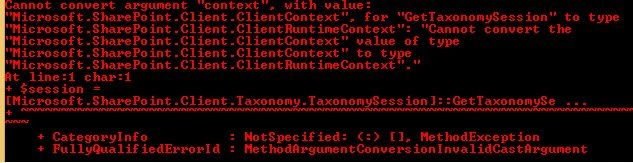
Figure 1: Exception while retrieving the TaxonomySession object
Solution: After long time of google search I got a clue that on my laptop there are two versions of “SharePoint Client Components” installed as,

Figure 2: Two versions of "SharePoint Client Components" are installed
As soon as I uninstalled the old version 15.0.4711.1001,I restarted the management shell and it started working.
Carl WilliamsPosted Jan 10, 2021, 6:08 PM
Seems like a plan, sorry for my newbieness, but where did you search for those Microsoft SharePoint Client components to reveal the various versions as shown in your last screen shot? :/ Thanks
Kafil ShahPosted Jul 5, 2018, 2:48 AM
Thanks!!! It really helps.
Prasham SabadraPosted Jan 19, 2016, 12:21 PM
Thanks!
Rupali ShindePosted Jan 19, 2016, 1:43 AM
thank you sir for sharing this Error + solution to it..
Prasham SabadraPosted Jan 18, 2016, 12:26 PM
Thanks a lot!
Ankit BansalPosted Jan 18, 2016, 12:32 AM
Really helpful..
Humayun Kabir MamunPosted Jan 17, 2016, 10:43 PM
Nice...
Prasham SabadraPosted Jan 17, 2016, 5:47 PM
Thanks
Santhakumar MunuswamyPosted Jan 17, 2016, 2:05 PM
Thanks for nice share