

Introduction
- <script src="http://ajax.googleapis.com/ajax/libs/angularjs/1.3.15/angular.min.js"></script>
How AngularJS Extend HTML?
When we read about AngularJS we hear many times that AbgularJS extends HTML. It uses ng-directives to extend HTML.
- <%@ Page Language="C#" AutoEventWireup="true" CodeBehind="Default.aspx.cs" Inherits="AngularJS_Demo.Default" %>
- <!DOCTYPE html>
- <html
- xmlns="http://www.w3.org/1999/xhtml">
- <head runat="server">
- <title></title>
- <script src="http://ajax.googleapis.com/ajax/libs/angularjs/1.3.15/angular.min.js"></script>
- </head>
- <body>
- <form id="form1" runat="server">
- <div ng-app="">
- <p>Enter Your Name:
- <input type="text" ng-model="Name">
- </p>
- <p ng-bind="Name"></p>
- </div>
- </form>
- </body>
- </html>
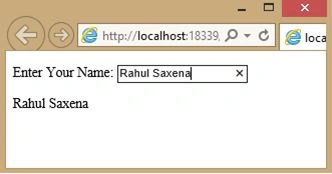
- Here ng-app declares that the application will run under the AngularJS framework.
- The ng-model directive binds the value of the input field to the application variable name.
- The ng-bind directive binds the innerHTML of the <p> element to the application variable name.
ng-init directive for initializing AngularJS application variables
- <%@ Page Language="C#" AutoEventWireup="true" CodeBehind="Default.aspx.cs" Inherits="AngularJS_Demo.Default" %>
- <!DOCTYPE html>
- <html
- xmlns="http://www.w3.org/1999/xhtml">
- <head runat="server">
- <title></title>
- <script src="http://ajax.googleapis.com/ajax/libs/angularjs/1.3.15/angular.min.js"></script>
- </head>
- <body>
- <form id="form1" runat="server">
- <div ng-app="">
- <div ng-app="" ng-init="Name='Priyanka Mathur'">
- <p>Your Name is:
- <span ng-bind="Name"></span>
- </p>
- </div>
- </div>
- </form>
- </body>
- </html>
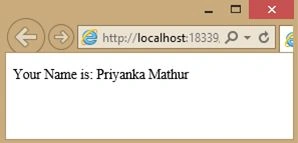
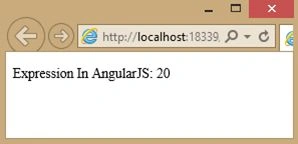
{{ expression }} is used to write AngularJS expressions.
- <%@ Page Language="C#" AutoEventWireup="true" CodeBehind="Default.aspx.cs" Inherits="AngularJS_Demo.Default" %>
- <!DOCTYPE html>
- <html
- xmlns="http://www.w3.org/1999/xhtml">
- <head runat="server">
- <title></title>
- <script src="http://ajax.googleapis.com/ajax/libs/angularjs/1.3.15/angular.min.js"></script>
- </head>
- <body>
- <form id="form1" runat="server">
- <div ng-app="">
- <p>Expression In AngularJS: {{ 10 + 10 }}</p>
- </div>
- </form>
- </body>
- </html>
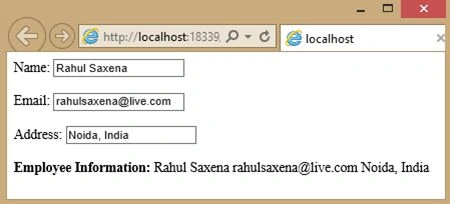
- AngularJS modules define AngularJS applications.
- AngularJS controllers control AngularJS applications.
- The ng-app directive defines the application, the ng-controller directive defines the controller.
- <%@ Page Language="C#" AutoEventWireup="true" CodeBehind="Default.aspx.cs" Inherits="AngularJS_Demo.Default" %>
- <!DOCTYPE html>
- <html
- xmlns="http://www.w3.org/1999/xhtml">
- <head runat="server">
- <title></title>
- <script src="http://ajax.googleapis.com/ajax/libs/angularjs/1.3.15/angular.min.js"></script>
- <script>
- var app = angular.module('myApp', []);
- app.controller('myCtrl', function ($scope) {
- $scope.Name = "Rahul Saxena";
- $scope.Email = "[email protected]";
- $scope.Address = "Noida, India";
- });
- </script>
- </head>
- <body>
- <form id="form1" runat="server">
- <div ng-app="myApp" ng-controller="myCtrl">
- Name:<input type="text" ng-model="Name">
- <br><br>
- Email:<input type="text" ng-model="Email">
- <br><br>
- Address:<input type="text" ng-model="Address">
- <br><br>
- <b> Employee Information:</b> {{Name + " " + Email + " " +Address}}
- </div>
- </form>
- </body>
- </html>
- <%@ Page Language="C#" AutoEventWireup="true" CodeBehind="Default.aspx.cs" Inherits="AngularJS_Demo.Default" %>
- <!DOCTYPE html>
- <html
- xmlns="http://www.w3.org/1999/xhtml">
- <head runat="server">
- <title></title>
- <script src="http://ajax.googleapis.com/ajax/libs/angularjs/1.3.15/angular.min.js"></script>
- </head>
- <body>
- <form id="form1" runat="server">
- <div ng-app="" ng-init="Product=5;Cost=20">
- <p>
- <b>Total Cost Of your Order:</b> {{ Product * Cost }}
- </p>
- </div>
- </form>
- </body>
- </html>
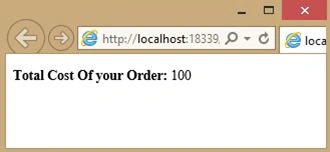
- <%@ Page Language="C#" AutoEventWireup="true" CodeBehind="Default.aspx.cs" Inherits="AngularJS_Demo.Default" %>
- <!DOCTYPE html>
- <html
- xmlns="http://www.w3.org/1999/xhtml">
- <head runat="server">
- <title></title>
- <script src="http://ajax.googleapis.com/ajax/libs/angularjs/1.3.15/angular.min.js"></script>
- </head>
- <body>
- <form id="form1" runat="server">
- <div ng-app="" ng-init="employee={Name:'Rahul Saxena',City:'Noida'}">
- <p>
- <b>Employee Information</b> {{ employee.Name + " - " + employee.City}}
- </p>
- </div>
- </form>
- </body>
- </html>
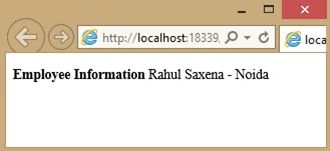
- <%@ Page Language="C#" AutoEventWireup="true" CodeBehind="Default.aspx.cs" Inherits="AngularJS_Demo.Default" %>
- <!DOCTYPE html>
- <html
- xmlns="http://www.w3.org/1999/xhtml">
- <head runat="server">
- <title></title>
- <script src="http://ajax.googleapis.com/ajax/libs/angularjs/1.3.15/angular.min.js"></script>
- </head>
- <body>
- <form id="form1" runat="server">
- <div ng-app="" ng-init="Employee=['Priya Mathur','Rahul Saxena','Sara Sinha']">
- <p>Employee at position 0: {{ Employee[0] }}</p>
- <p>Employee at position 1: {{ Employee[1] }}</p>
- <p>Employee at position 2: {{ Employee[2] }}</p>
- </div>
- </form>
- </body>
- </html>
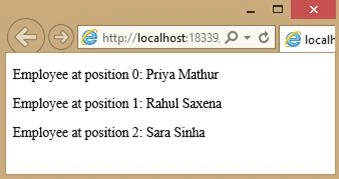
- <%@ Page Language="C#" AutoEventWireup="true" CodeBehind="Default.aspx.cs" Inherits="AngularJS_Demo.Default" %>
- <!DOCTYPE html>
- <html
- xmlns="http://www.w3.org/1999/xhtml">
- <head runat="server">
- <title></title>
- <script src="http://ajax.googleapis.com/ajax/libs/angularjs/1.3.15/angular.min.js"></script>
- </head>
- <body>
- <form id="form1" runat="server">
- <div ng-app="" ng-init="product=1;cost=5">
- Product Quantity:<input type="number" ng-model="product">
- <br />
- <br />
- Product Cost:<input type="number" ng-model="cost">
- <br />
- <br />
- Total Cost: {{ product * cost }}
- </div>
- </form>
- </body>
- </html>
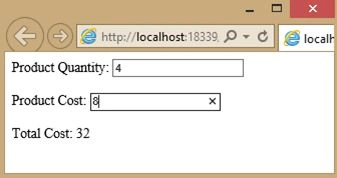
- <%@ Page Language="C#" AutoEventWireup="true" CodeBehind="Default.aspx.cs" Inherits="AngularJS_Demo.Default" %>
- <!DOCTYPE html>
- <html
- xmlns="http://www.w3.org/1999/xhtml">
- <head runat="server">
- <title></title>
- <script src="http://ajax.googleapis.com/ajax/libs/angularjs/1.3.15/angular.min.js"></script>
- </head>
- <body>
- <form id="form1" runat="server">
- <div ng-app="" ng-init="Employees=['Rahul','Shiva','Ram','Poonam']">
- <ul>
- <li ng-repeat="x in Employees">{{ x }}</li>
- </ul>
- </div>
- </form>
- </body>
- </html>
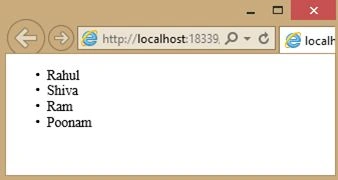
- <%@ Page Language="C#" AutoEventWireup="true" CodeBehind="Default.aspx.cs" Inherits="AngularJS_Demo.Default" %>
- <!DOCTYPE html>
- <html
- xmlns="http://www.w3.org/1999/xhtml">
- <head runat="server">
- <title></title>
- <script src="http://ajax.googleapis.com/ajax/libs/angularjs/1.3.15/angular.min.js"></script>
- <script>
- var app = angular.module('myApp', []);
- app.controller('personCtrl', function ($scope) {
- $scope.Name = "Rahul Saxena";
- $scope.Email = "[email protected]";
- $scope.Address = "Noida";
- $scope.EMP_Info = function () {
- return $scope.Name + " " + $scope.Email + " " + $scope.Address;
- }
- });
- </script>
- </head>
- <body>
- <form id="form1" runat="server">
- <div ng-app="myApp" ng-controller="personCtrl">
- Name:<input type="text" ng-model="Name">
- <br>
- <br />
- Email:<input type="text" ng-model="Email">
- <br>
- <br>
- Address:<input type="text" ng-model="Address">
- <br>
- <br>
- <b>Employee Information :</b> {{EMP_Info()}}
- </div>
- </form>
- </body>
- </html>
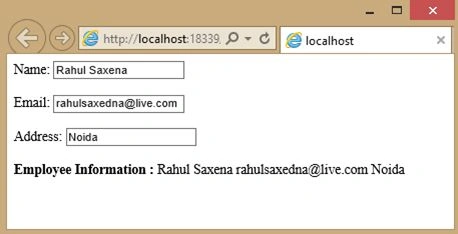
Rahul Kumar SaxenaPosted Apr 30, 2015, 12:46 AM
Thanks Upendra Pratap Shahi...
Upendra Pratap ShahiPosted Apr 30, 2015, 12:36 AM
nice and very easy article sir...
Rahul Kumar SaxenaPosted Apr 29, 2015, 10:08 PM
Thanks Nemilidinne Ashokreddy
Rahul Kumar SaxenaPosted Apr 29, 2015, 10:08 PM
Thanks Venkat Kumar
Nemilidinne AshokreddyPosted Apr 29, 2015, 6:13 AM
Nice article and good examples thanks Rahul Saxena
Venkat KumarPosted Apr 24, 2015, 2:04 AM
nice
Rahul Kumar SaxenaPosted Apr 23, 2015, 2:12 PM
Thanks Shantha Kumar T...
Shantha Kumar TPosted Apr 23, 2015, 11:52 AM
great
Rahul Kumar SaxenaPosted Apr 23, 2015, 5:47 AM
Thanks Gowtham Rajamanickam...
Gowtham RajamanickamPosted Apr 23, 2015, 3:34 AM
good one
Rahul Kumar SaxenaPosted Apr 23, 2015, 2:37 AM
Thanks Nitin Tyagi...
NitinPosted Apr 23, 2015, 2:35 AM
yet again excellent work Rahul Saxena bro :)
Rahul Kumar SaxenaPosted Apr 23, 2015, 12:19 AM
Thanks Santhakumar Munuswamy...
Santhakumar MunuswamyPosted Apr 23, 2015, 12:15 AM
Thanks for nice article
Rahul Kumar SaxenaPosted Apr 22, 2015, 10:13 PM
Thanks Shridhar Sharma
Shridhar SharmaPosted Apr 22, 2015, 5:12 PM
I just have this recipe.It was yumm. Thanks for sharing.