

AngularJS is best suited for Single Page Application (SPAs) and this tool suits the purpose of using AngularJS in its best. We are going to develop a custom notepad directive using Angular’s directive. Note - This article assumes the reader to have some experience in developing application using AngularJS. We are going to develop the Note making app using Angular’s factory and directive.
Here’s the use case of our Note Making App.
“A user should be able to create, edit and delete notes. Persisting notes should be handled too so the tool can fetch all the existing notes and show the same to user”.
In order to handle the persistence, we are going to make use of browsers local storage. Which is one of the key HTML5 feature. One may ask a question, why the need for AngularJS? How about using a simple JavaScript or JQuery? You are absolutely free to develop using any libraries or framework of your choice. But I would like to also mention the reason why I am going with AngularJS. Like I said in the beginning of the article, the Note Making App is a Single-Page Application and Angular is the best framework for develop such applications. Other than that, I was looking for an interesting real world application that can be developed to learn the AngularJS features like directives, factory. I think it’s really important for a beginner to understand the usage of these features with a real world example through which she/he can get a better understanding and the real usage of AngularJS.
Before diving into the Note Making app implementation, here’s something I would like to share with you. This application is developed or extended based on the existing open source app.
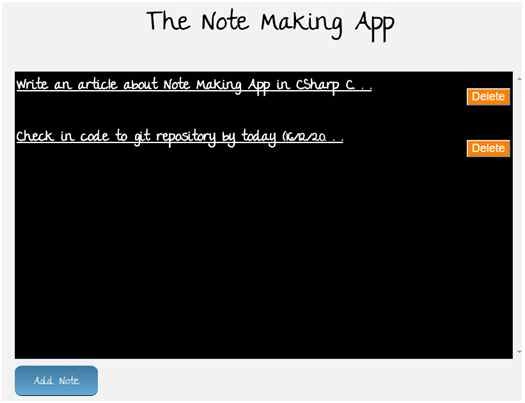
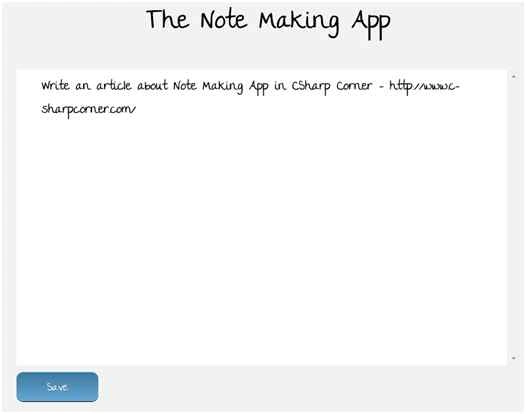
Let us take a look into the snapshot of the Note Making App. Below, you see the note making app running on a browser (Chrome in my case). It is showing two notes for now with a short title of 50 characters. On click of each of the note, you can read full notes and edit the same. There’s a delete button on the right side of each note, you can hit ‘Delete’ button remove the one which you think is no longer needed.
Using Code
Let us now try to understand the inner working of Notes Making App. The following is the code snippet of the index.html, where you can see the script references for JQuery and Angular. You will also notice the usage of <notepad/> which we call as directive in Angular’s world.
- <!DOCTYPE html>
- <html ng-app="noteApp">
- <head>
- <meta charset="utf-8" />
- <title>AngularJS Plunker</title>
- <script>
- document.write('<base href="' + document.location + '" />');
- </script>
- <link rel="stylesheet" href="style.css" />
- <script data-require="jquery@*" data-semver="2.0.3" src="http://code.jquery.com/jquery-2.0.3.min.js"></script>
- <script data-require="[email protected]" src="https://ajax.googleapis.com/ajax/libs/angularjs/1.0.8/angular.min.js" data-semver="1.0.8"></script>
- <script src="app.js"></script>
- </head>
- <body>
- <h1 class="title">The Note Making App</h1>
- <notepad/> </body>
- </html>
Below is the code snippet of ‘notesFactory’ which will be used within the directive that we will be coding next.
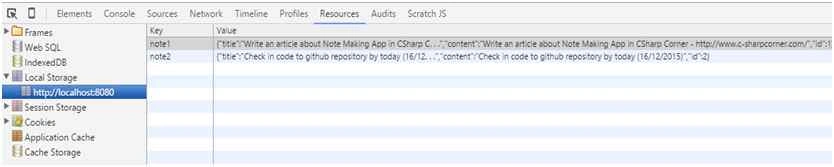
Notice the usage of localStorage for managing the user notes. Here’s the snapshot of the local storage items in Google Chrome. We are defining a unique key with the key name as “note” followed by note id which is getting started and incremented by 1.
A note item is saved in localStorage by making a call to setItem method and passing in the key as note<uniqueId> and value as note text entered by the user. The notes are retrieved by making a call to localStorage’s method ‘getItem’ by passing in the keyname.
The “getAll” function returns the list of notes by looping through all the localStorage items. Each of the note item contains a JSON info, one can get the note id, title and content and display the same on UI.
The “getLastNote” function returns the last note info present in the localStorage. By looking at the below code, you may think, why not to return the last note by simply getting the note by localStorage item length. The reason being, say if the user deletes one of the note, there will be a mismatch in the note id vs the localStorage items length and we cannot simply be able to grab the last note item from the localStorage. Note - The code can be definitely improved. For now, let us loop through all items.
The “deleteById” function is used to delete the existing note item in a localStorage. Loop through each of the local storage items and match the localStorage key name, when there’s a match, just remove that item.
- app.factory('notesFactory', function ()
- {
- return {
- put: function (note)
- {
- localStorage.setItem('note' + note.id, JSON.stringify(note));
- return this.getAll();
- },
- get: function (index)
- {
- return JSON.parse(localStorage.getItem('note' + index));
- },
- getLastNote: function ()
- {
- var lastNote = [];
- for (var i = 0; i < localStorage.length; i++)
- {
- if (localStorage.key(i)
- .indexOf('note') !== -1)
- {
- var note = localStorage.getItem(localStorage.key(i));
- lastNote = JSON.parse(note);
- }
- }
- return lastNote;
- },
- getAll: function ()
- {
- var notes = [];
- for (var i = 0; i < localStorage.length; i++)
- {
- if (localStorage.key(i)
- .indexOf('note') !== -1)
- {
- var note = localStorage.getItem(localStorage.key(i));
- notes.push(JSON.parse(note));
- }
- }
- return notes;
- },
- deleteById: function (index)
- {
- for (var i = 0; i < localStorage.length; i++)
- {
- if (localStorage.key(i) == 'note' + index)
- {
- localStorage.removeItem(localStorage.key(i));
- break;
- }
- }
- return this.getAll();
- }
- };
- });
Atlas AtlasPosted Jan 16, 2018, 9:17 AM
Thanks for a super article. We are in the process of developing an app in AngularJS for recording /; taking notes in a smart way ... by this we mean that the actual text recorded is concatenated into smaller components, some of which will be recognised as a special word and therefore the system will automatically create an entry in the database accordingly. For example: Starting with:"the @student: Tom Smith ate @Restuarent: Top Meals on @date:10/1/2018 and enjoyed it @score:70%". The database will contain a record where Student = Tom Smith, Restaurent= Top Meals, Date = 10/1/2018 and Score=70%. Please advise if possible
Sr KarthigaPosted Feb 14, 2016, 7:50 AM
Good one sir
Santhakumar MunuswamyPosted Dec 22, 2015, 10:55 AM
Thanks for nice article
Humayun Kabir MamunPosted Dec 18, 2015, 4:46 AM
Nice...