

Introduction
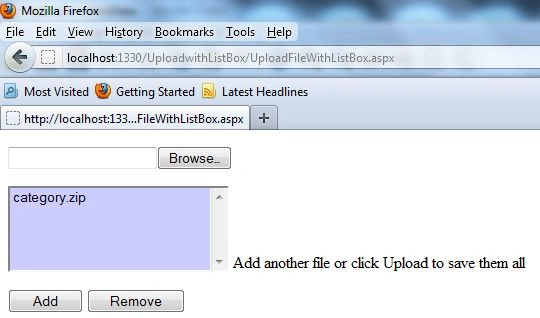
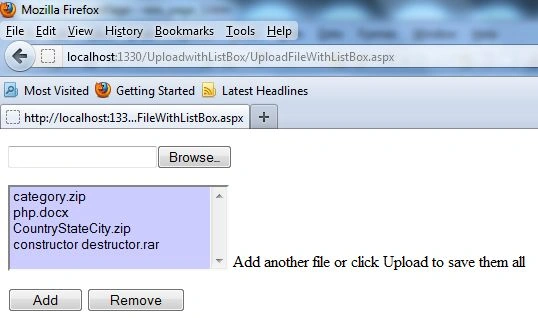
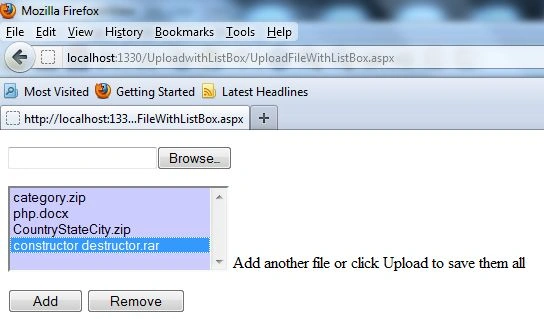
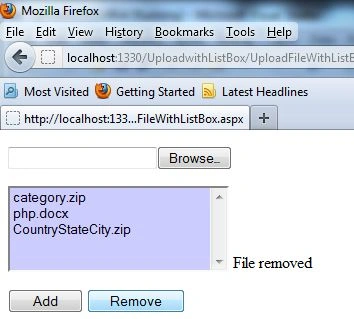
Today, I have provided an article showing you how to upload multiple files with a ListBox control in ASP.NET. We can upload a single file at a time in ASP.NET using the FileUpload control. However, there is no direct way in ASP.NET to upload multiple files at a time. We can do that in ASP.NET using FileUpload with a ListBox control. In this article, we will take a FileUpload control, an add Button, and a remove Button. When a user uploads a file and clicks on the add Button the uploaded file will be shown in the ListBox. After that select a file from the ListBox and click on the remove Button to remove the uploaded file from list. All you have to do is implement and hook it up to your website. First of all, you start Visual Studio .NET and make a new ASP.NET website using Visual Studio 2010.
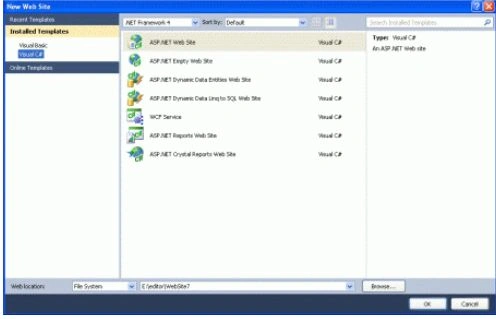
Now you have to create a website.
- Go to Visual Studio 2010
- New-> Select a website application
- Click OK
Now add a new page to the website.
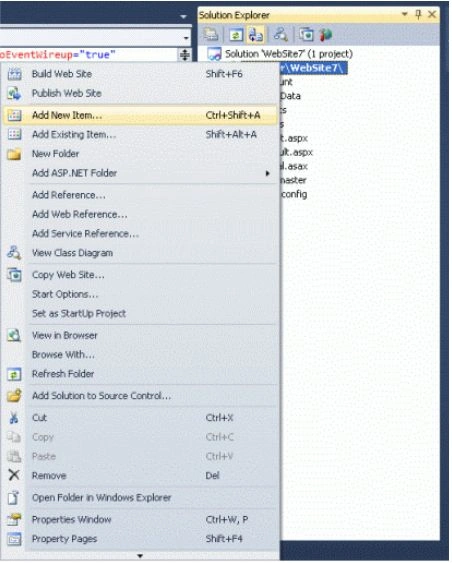
- Go to the Solution Explorer
- Right-click on the Project name
- Select add a new item
- Add a new web page and give it a name
- Click OK
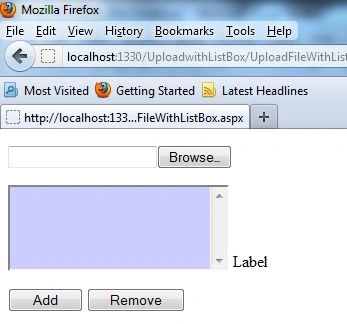
Design the page and place the required controls on it. Now drag and drop one FileUpload, add Button and remove Button control on the form. When a user uploads a file and clicks on the add Button, the uploaded files will be shown in the ListBox. After that, select a file from the ListBox and click on the remove Button to remove the uploaded file from the ListBox. Let's take a look at a practical example.
.aspx Code
<%@ Page Language="C#" AutoEventWireup="true" CodeFile="UploadFileWithListBox.aspx.cs" Inherits="UploadFileWithListBox" %>
<!DOCTYPE html PUBLIC "-//W3C//DTD XHTML 1.0 Transitional//EN" "http://www.w3.org/TR/xhtml1/DTD/xhtml1-transitional.dtd">
<html xmlns="http://www.w3.org/1999/xhtml">
<head runat="server">
    <title></title>
</head>
<body>
    <form id="form1" runat="server">
        <div>
        </div>
        <p>
            <asp:FileUpload ID="FileUpload1" runat="server" />
        </p>
        <p>
            <asp:ListBox ID="ListBox1" runat="server" Rows="5" SelectionMode="Single" Width="221px" BackColor="#CCCCFF">
            </asp:ListBox>
            <asp:Label ID="Label1" runat="server" Text="Label"></asp:Label>
        </p>
        <p>
            <asp:Button ID="Button1" runat="server" Text="Add" Width="75px" OnClick="Button1_Click" />
            <asp:Button ID="Button2" runat="server" Text="Remove" Width="98px" OnClick="Button2_Click" />
        </p>
    </form>
</body>
</html>
Now add the following namespaces.
using System;
using System.Collections.Generic;
using System.Linq;
using System.Web;
using System.Web.UI;
using System.Web.UI.WebControls;
using System.Collections;
Now double-click on the add Button control and write the following code to add the uploaded file in ListBox.
Alice NguyenPosted Dec 21, 2018, 4:28 AM
So Great, Thank you
Cris MedPosted Jan 21, 2017, 7:41 AM
The object Files from "Files.Add(FileUpload1)", where came from?
Jennifer McCarthyPosted Jan 29, 2014, 11:54 AM
Rohatash, how do you process the files in the ListBox once the user selects the files they want to upload? Though in my case, I want to be able to email the files as attachments, rather than upload and save them to a server.
Former memberPosted Sep 30, 2012, 1:22 PM
This is really nice article http://www.dotnetpools.com/Article/ArticleDetiail/?articleId=5&title=Fileupload%20Control%20In%20Asp.net
sai basiPosted Jul 13, 2012, 10:01 AM
Hello Kumar, Where are you saving the files that are being uploaded
Jay JaganathaneditedPosted May 2, 2012, 9:05 PMEdited May 2, 2012, 9:06 PM
How is it a multiple file upload?