Introduction
This article talks about 21 important FAQs from the perspective of WPF and Silver light. Both of these technologies are connected to a certain extent. This article not only explains the theory aspect of these technologies but also shows small samples for each of them.
What is the need for WPF when we had GDI, GDI+, and DirectX?
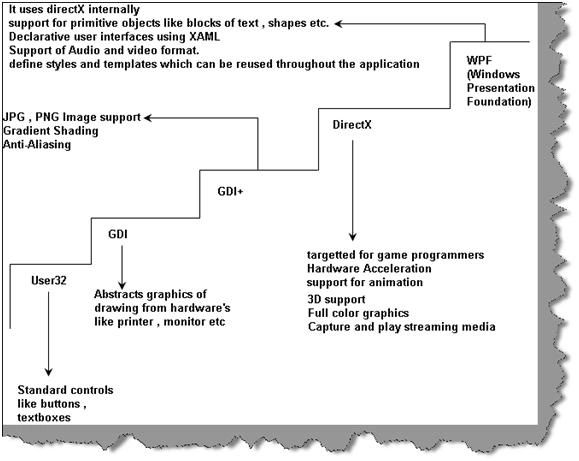
First, let's try to understand how display technology has evolved in Microsoft technology.
User32
This provides the windows look and feel for buttons and textboxes and other UI elements. User32 lacked drawing capabilities.
GDI (Graphics device interface)
Microsoft introduced GDI to provide drawing capabilities. GDI not only provided drawing capabilities but also provided a high level of abstraction on the hardware display. In other words, it encapsulates all complexities of hardware in the GDI API.
GDI+
GDI+ was introduced which basically extends GDI and provides extra functionalities like JPG and PNG support, gradient shading and anti-aliasing. The biggest issue with GDI API was it did not use hardware acceleration and did not have animation and 3D support.
Note
Hardware acceleration is a process in which we use hardware to perform some functions rather than performing those functions using the software which is running in the CPU.
DirectX
One of the biggest issues with GDI and its extension GDI+ was hardware acceleration and animation support. This came as the biggest disadvantage for game developers. To answer and server game developers Microsoft developed DirectX. DirectX exploited hardware acceleration, had support for 3D, full-color graphics, media streaming facility, and lot more. This API no matured when it comes to the gaming industry.
WPF
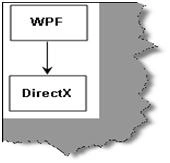
Microsoft almost had 3 to 4 API's for display technologies, so why a need for one more display technology. DirectX had this excellent feature of using hardware acceleration. Microsoft wanted to develop UI elements like textboxes, button, grids, etc using the DirectX technology by which they can exploit the hardware acceleration feature. As WPF stands on the top of DirectX you can not only build simple UI elements but also go one step further and develop special UI elements like Grid, FlowDocument, and Ellipse. Oh yes, you can go one more step further and build animations.WPF is not meant for game development. DirectX still will lead in that scenario. In case you are looking for light animation ( not game programming ), WPF will be a choice. You can also express WPF using XML which is also called XAML. In other words, WPF is a wrapper which is built over DirectX. So let’s define WPF.
WPF is a collection of classes that simplify building dynamic user interfaces. Those classes include a new set of controls, some of which mimic old UI elements (such as Label, TextBox, Button), and some that are new (such as Grid, FlowDocument, and Ellipse).
How does hardware acceleration work with WPF?
Hardware acceleration is a process in which we use hardware to perform some functions rather than performing those functions using the software which is running in the CPU.
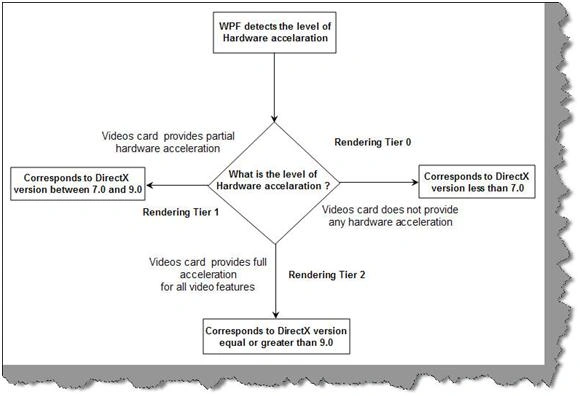
WPF exploits hardware acceleration in a two-tier manner.
WPF API first detects the level of hardware acceleration using parameters like RAM of the video card, per pixel value, etc. Depending on that it either uses Tier 0, Tier 1, or Tier 2 rendering mode.
Tier 0
If the video card does not support hardware acceleration then WPF uses Tier 0 rendering mode. In other words, it uses software acceleration. This corresponds to the working of the DirectX version less than 7.0.
Tier 1
If the video card supports partial hardware acceleration then WPF uses Tier 1 rendering mode. This corresponds to the working of the DirectX version between 7.0 and 9.0.
Tier 2
If the video card supports hardware acceleration then WPF uses Tier 2 rendering mode. This corresponds to the working of the DirectX version equal to or greater than 9.0.
Does that mean WPF has replaced DirectX?
No, WPF does not replace DirectX. DirectX will still be still needed to make cutting edge games. The video performance of DirectX is still many times higher than the WPF API. So when it comes to game development the preference will be always DirectX and not WPF. WPF is not an optimum solution to make games, oh yes you can make a TIC TAC TOE game but not high action animation games.
One point to remember WPF is a replacement for windows form and not DirectX.
So can we define WPF in a precise way?
Windows Presentation Framework is the new presentation API. WPF is a two and three-dimensional graphics engine. It has the following capabilities:-
-
Has all equivalent common user controls like buttons, checkboxes sliders etc.
-
Fixed and flow format documents
-
Has all of the capabilities of HTML and Flash
-
2D and 3D vector graphics
-
Animation
-
Multimedia
-
Data binding
What is XAML?
XAML (pronounced as Zammel) is a declarative XML-based language by which you can define objects and properties in XML. XAML document is loaded by a XAML parser. XAML parser instantiates objects and set their properties. XAML describes objects, properties, and their relation in between them. Using XAML, you can create any kind of object that means graphical or non-graphical. WPF parses the XAML document and instantiates the objects and creates the relation as defined by XAML.
So XAML is an XML document that defines objects and properties and WPF loads this document in actual memory.
So is XAML meant only for WPF?
No, XAML is not meant only for WPF.XAML is an XML-based language and it had various variants.
WPF XAML is used to describe WPF content, such as WPF objects, controls, and documents. In WPF XAML we also have XPS XAML which defines an XML representation of electronic documents.
Silverlight XAML is a subset of WPF XAML meant for Silverlight applications. Silverlight is a cross-platform browser plug-in that helps us to create rich web content with 2-dimensional graphics, animation, and audio and video.
WWF XAML helps us to describe Windows Workflow Foundation content. WWF engine then uses this XAML and invokes workflow accordingly.
Can you explain the overall architecture of WPF?
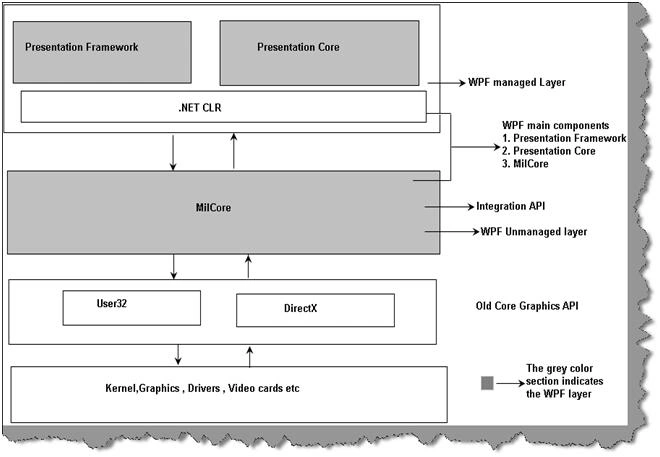
The above figure shows the overall architecture of WPF. It has three major sections presentation core, presentation framework, and mil core. In the same diagram, we have shown how other sections like direct and operating systems interact with the system. So let's go section by section to understand how every section works.
It decides which goes where on the screen.
DirectX
As said previously WPF uses DirectX internally. DirectX talks with drivers and renders the content.
Milcore
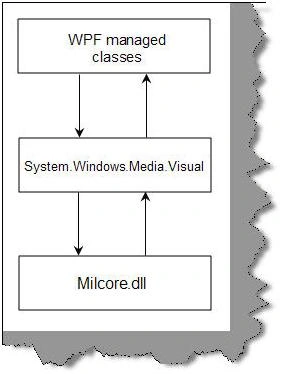
Mil stands for the media integration library. This section is an unmanaged code because it acts like a bridge between WPF managed and DirectX / User32 unmanaged API.
Presentation core
This is a low-level API exposed by WPF providing features for 2D, 3D, geometry, etc.
Presentation framework
This section has high-level features like application controls, layouts. Content etc which helps you to build up your application.
Which are the different namespaces and classes in WPF?
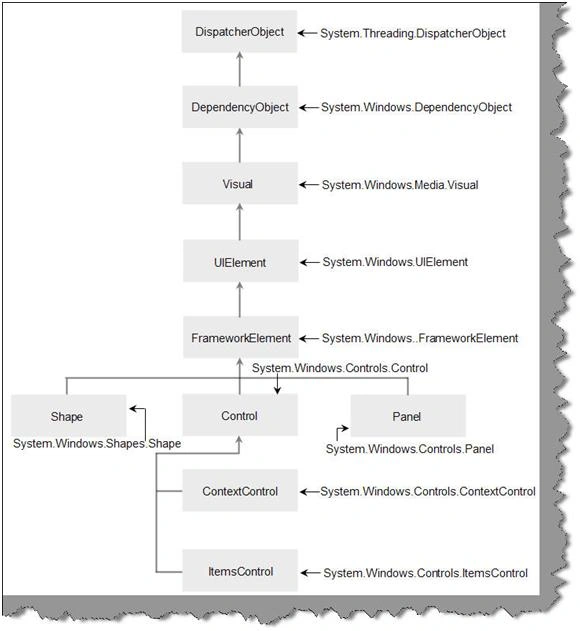
There are ten important namespaces/classes in WPF.
System.Threading.DispatcherObject
All WPF objects derive from the DispatcherObject. WPF works on the STA model i.e. Single Threading Apartment Model. The main duty of this object is to handle concurrency and threading. When any message like mouse clicks, button clicks, etc are initiated they are sent to the DispatcherObject who verifies whether the code is running on the correct thread. In the coming section, we will look into detail how WPF threading works.
System.Windows.DependencyObject
When WPF was designed property based architecture was considered. In other words, rather than using methods, functions, and events object behavior will interact using properties. For now, we will only restrict ourselves to this definition. In the coming section, we have dedicated questions for the same.
System.Windows.Media.Visual
Visual class is a drawing object which abstracts drawing instructions, how the drawing should be drawn like clipping, opacity, and other functionalities. The visual class also acts as a bridge between unmanaged MilCore.dll and WPF managed classes. When any class derived from a visual it can be displayed on windows. If you want to create your own customized user interface then you can program using visual objects.
System.Windows.UIElement
UIElement handled three important aspects layout, input, and events.
System.Windows.FrameworkElement
FrameWorkElement uses the foundation set by UIElement. It adds key properties like HorizontalAlignment, VerticalAlignment, margins, etc.
System.Windows.Shapes.Shape
This class helps us to create basic shapes such as Rectangle, Polygon, Ellipse, Line, and Path.
System.Windows.Controls.Control
This class has controls like TextBox,Button,ListBox etc. It adds some extra properties like font, foreground, and background colors.
System.Windows.Controls.ContentControl
It holds a single piece of content. This can start from a simple label and go down to a unit level of string in a layout panel using shapes.
System.Windows.Controls.ItemsControl
This is the base class for all controls that show a collection of items, such as the ListBox and TreeView.
System.Windows.Controls.Panel
This class is used for all layout containers elements that can contain one or more children and arrange them as per specific layout rules. These containers are the foundation of the WPF layout system, and using them is the key to arranging your content in the most attractive, flexible way possible.
Can explain the different elements involved in the WPF application practically?
In order to understand the different elements of WPF, we will do a small "hello world" sample and in that process, we will understand the different elements of WPF.
Note
For this sample, we have VS 2008 express edition.
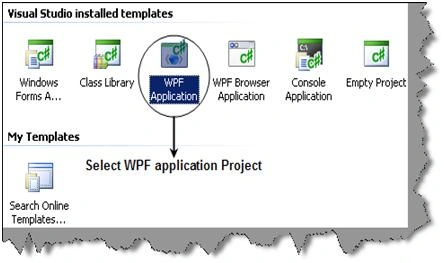
So start VS 2008 express and from the templates select the WPF application as shown in the below figure below.
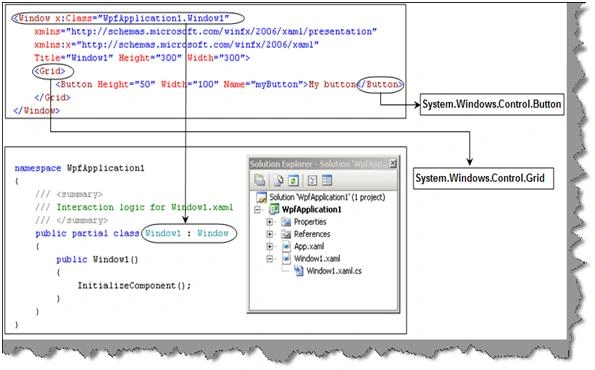
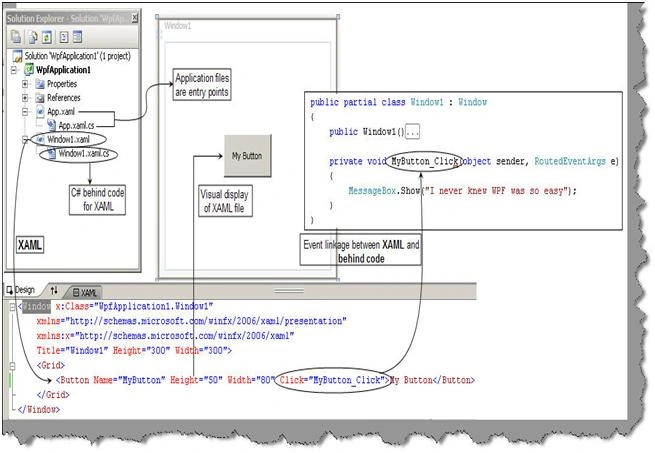
Once we have created the WPF application project you will see two file types one the XAML file and the other is the behind code i.e. XAML.cs. XAML files are nothing but XML files which has all the elements needed to display the windows UI. Every of the XAML elements maps to come to class. For instance, the "Window" element maps to "WpfApplication1.Window1" class, "Buttonâ" elements in XAML file maps to "System.Windows.Control.Button" class and the "Grid" XAML element is mapped to "System.Windows.Control.Grid".
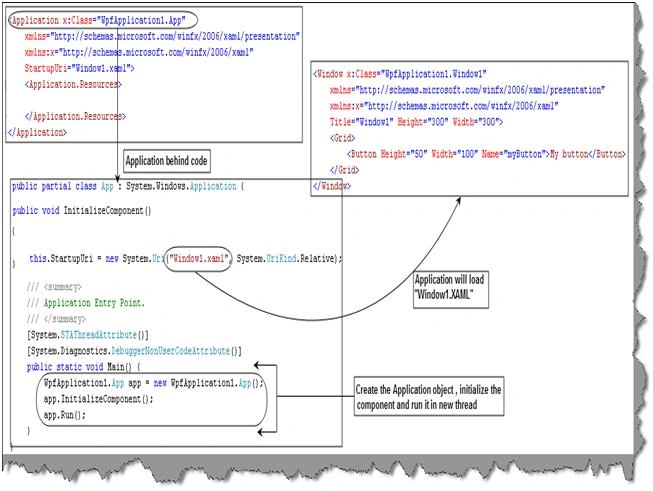
The "App.XAML" and "App.XAML.CS" are the entry point files. If we see the code for "App.XAML.CS" you will see the reference to the XAML file which needs to be loaded. So the first code which runs in the application is the "void main()" method from "App.XAML.CS" which in turn loads the "Window1.XAML" file for rendering.
We can now connect the behind code method and function to events in XAML file elements.
You can see from the above code snippet how the button element has the click event linked to the "MyButton_Click" function. "MyButton_Click" is the method that is in the XAML.CS behind code.
So now if you run the code you can see the button and if you click on it you can see the message box for the same.
What are dependency properties?
These dependency properties belong to one class but can be used in another.
Consider the below code snippet
<Rectangle Height="72" Width="131" Canvas.Left="74" Canvas.Top="77" />
Height and Width are regular properties of the Rectangle. But Canvas. Top and Canvas. Left is dependency property as it belongs to the canvas class. It is used by the Rectangle to specify its position within Canvas.
Are XAML files compiled or built on runtime?
XAML files are usually compiled rather than parsing on runtime. But it also supports parsing during runtime. When we build a XAML based project, you will see it creates g.cs extension in the obi\Debug folder. Therefore, for every XAML file, you will find a g.cs file. For instance, a Shiv.XAML will have Shiv.g.cs file in the obi\Debug folder. In short, in runtime, you actually do not see the XAML file. But if you want to do runtime, parsing of XAML file it also allows that to be done.
Can you explain how we can separate code and XAML?
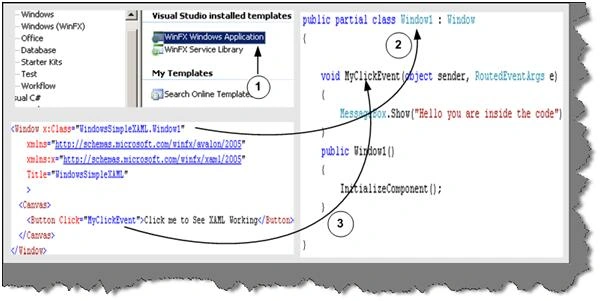
This is one of the most important features of WPF, separating the XAML from the code to be handled. So designers can independently work on the presentation of the application and developers can actually write the code logic independent of how the presentation is.
Figure 16.1:- XAML and behind code in action
Above is the code snippet, which shows a XAML file, and the code completely detached from the XAML presentation. In order to associate a class with the XAML file, you need to specify the x: Class attribute. Any event specified on the XAML object can be connected by defining a method with sender and event values. You can see from the above code snippet we have linked the MyClickEvent to an event in the behind code.
Note
You can get a simple sample in the WindowsSimpleXAML folder. Feel free to experiment with the code! experimenting will teach you much more than reading something theoretical.
How can we access XAML objects in behind code?
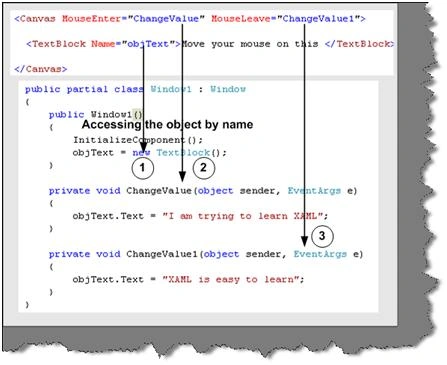
To access XAML objects in behind code you just need to define them with the same name as given in the XAML document. For instance in the below code snippet we named the object as object and the object is defined with the same name in the behind code.
Figure 16.2 Accessing XAML object
Note
You can get the source code in the WindowsAccessXAML folder.
What is SilverLight?
Silver light is a web browser plug-in by which we can enable animations, graphics, and audio-video. You can compare silver light with flash. We can view animations with flash and it's installed as a plug-in in the browser.
Can SilverLight run in other platforms other than the window?
Yes, animations made in SilverLight can run in other platforms other than the window. In whatever platform you want to be run you just need the SilverLight plug-in.
Come on, even WPF runs under browser why SilverLight?
Yes, there is something called as WPF browser application which can run WPF in the browser. For the WPF browser application, you need .Net framework to be installed in the client location while for silver light you need only the plug-in. So in other words WPF browser applications are OS-dependent while SilverLight is not. SilverLight plug-in can run in other OS other than windows while we all know .NET framework only runs in windows.
What is the relationship between Silver Light, WPF, and XAML?
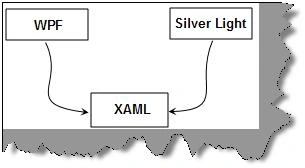
As explained previously XAML is an XML file that defines the UI elements. This XML file can be read by the WPF framework or Silver light framework for rendering. Microsoft first developed WPF and they used XAML files to describe the UI elements to the WPF framework. Microsoft then extended WPF and made WPF/e which helped to render the UI in the browser. WPF/e was the code name for Silver Light. Later Microsoft launched Silver Light officially.
So the XAML just defines the XML structure to represent the UI elements. Both the frameworks i.e. WPF and Silverlight then read the UI elements and renders the UI elements in the respective platform.
Can you explain Silver Light architecture?
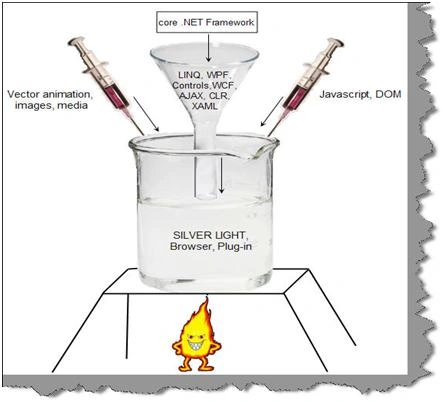
Before we talk about silver light architecture let's discuss what is silver light is really made of technically. Silver light has borrowed a lot of things from existing Microsoft technologies. We can think of silver light plug-in as a combination of some technologies from the core .NET framework, vector animations, media, and JavaScript.
So we can visualize the silver light architecture as a combination of some functionalities from the core .NET framework, Ajax, and some functionalities like animation, media, etc provided by the core silver light framework.
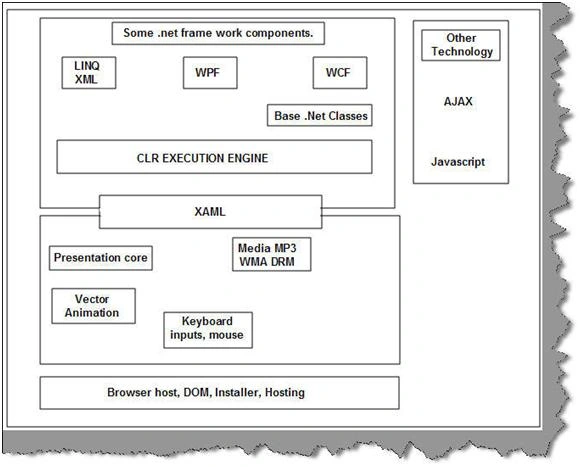
We can think silver light architecture as a combination of four important blocks:-
-
Some .NET framework components
Silver light uses some components from the .NET framework. One of the main components is WPF. Many of the UI components ( checkbox, buttons, text boxes, etc), XAML parsing, etc are taken from the core WPF system. It also has taken components like WCF to simplify data access. It also has CLR for memory management, safety checking, and garbage collection. The base class libraries of Net are used for string manipulations, algorithms, expressions, collections, and globalization.
-
Presentation core
The core presentation framework has functionalities to display vector 2d animations, images, media, DRM, and handle inputs like mouse and keyboard.
-
Other technologies
Silver light interacts with other technologies like Ajax and javascript. So it also borrows some functionalities from there technologies.
-
Hosting
Silver light animations finally run under the browser environment. So it has a hosting functionality that helps to host the application the browser, expose a DOM by which JavaScript can manipulate the silver light components and it also has an installer functionality that helps to install the silver light application and plug-in in the browser environment.
One of the things which you can notice from the architecture diagram is that the presentation core reads from the XAML file for rendering. The XAML is a component that is a part of the .NET framework and the rendering part is done by the presentation core.
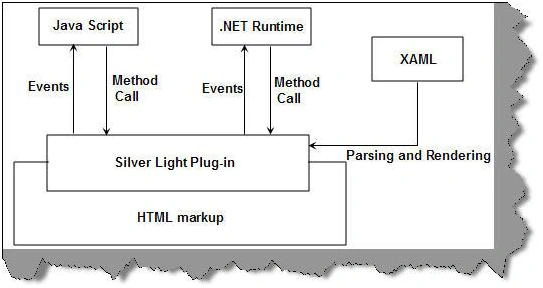
The application is a typical HTML that runs under the browser. There are markups that instantiate the silver light plug-in. Now when the user interacts with the silver light application it sends an event to the JavaScript system or the .NET system. This depends on which programming language you are using. The program code which is either in JavaScript of .NET can make calls to the silver light run-time and achieve the necessary functionalities. XAML will be read and parsed by the silver light runtime and then rendered accordingly to the browser.
What are the various basic steps to make a simple Silver Light application?
This sample we are making using VS 2008 web express edition and .NET 3.5. It's a 6 step procedure to run our first silver light application. So let's go through it step by step.
Step1
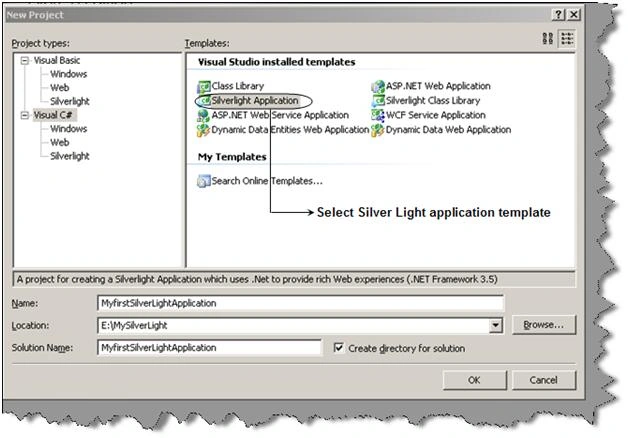
Once you install the silver light SDK you should be able to use the silver light template. So when you go to create a new project you will see a "SilverLight application" template as shown in the below figure.
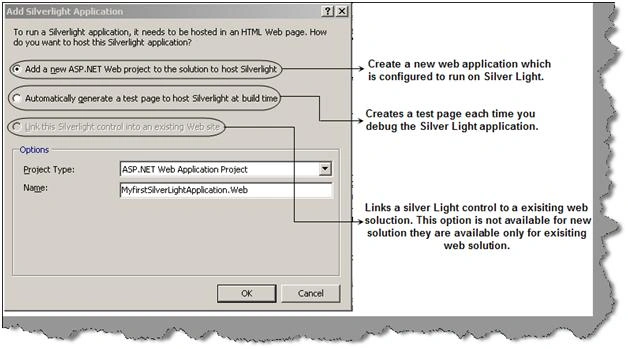
Once you click ok you will see a dialog box as shown below which has three options.
Add an ASP.NET web project to the solution to host silver light: - This option is the default option, and it will create a new Web application project that is configured to host and run your Silverlight application. If you are creating a new silver light application then this is the option to go.
Automatically generate Test Page To Host Silverlight at build time: - This option will create a new page at the run time every time you try to debug and test your application. If you want to only concentrate on your silver light application then this option is worth looking at.
Link This Silverlight Control Into An Existing Web Site
If you have an existing silver light application then this option helps to link the silver light application with the existing web application project. You will not see this option enabled to new projects, you need to have an existing web application.
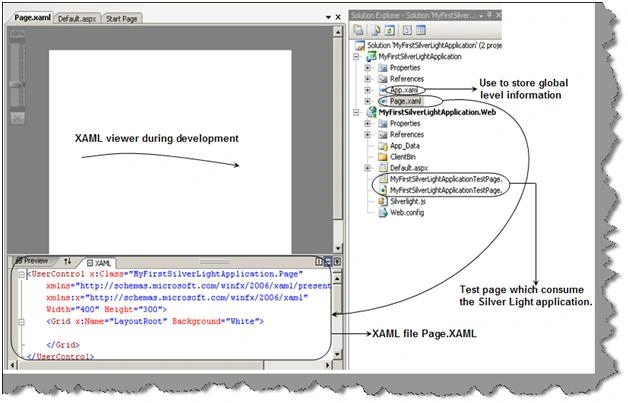
For this example, we have selected the first option. Once you click ok you should see the full IDE environment for silver light.
So let's run through some basic points regarding the IDE view what we see. You will see there are two projects one is your web application and the other is the silver light application. In the silver light application, we two XAML files one is App.XAML and the other is Page.XAML.
App.XAML has global level information.
Step 4
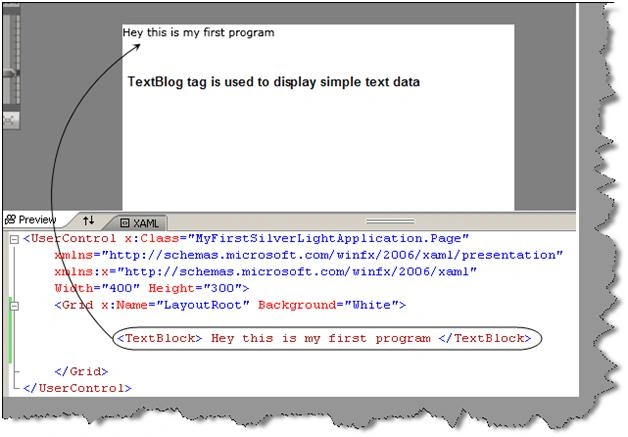
Now for simplicity's sake, we just use the TextBlock tag to display a text. You can see as we type in the Page.XAML its displayed in the viewer.
Now we need to consume the silver light application in an ASPX page. So in the HTML / ASPX page, we need to first refer the silver light namespace using the "Register" attribute.
<%@Register Assembly="System.Web.Silverlight" Namespace="System.Web.UI.SilverlightControls" TagPrefix="asp" %>
We also need to refer the script manager from the silver light namespace. The script manager control is the functionality of AJAX. The main purpose of this control is to manage the download and referencing of JavaScript libraries.
<asp:ScriptManager ID="ScriptManager1" runat="server"></asp:ScriptManager>
Finally, we need to refer to the silver light application. You can see that in the source we have referred to the XAP file. XAP file is nothing but a compiled silver light application which is compressed and ZIP. It basically has all the files that’s needed for the application in a compressed format. If you rename the file to ZIP extension you can open the same using WINZIP.
- <asp:Silverlight ID="Xaml1" runat="server" Source="~/ClientBin/MyFirstSilverLightApplication.xap" MinimumVersion="2.0.31005.0" Width="100%" Height="100%" />
So your final ASPX / HTML code consuming the silver light application looks something as shown below.
- <%@ Page Language="C#" AutoEventWireup="true" %>
- <%@ Register Assembly="System.Web.Silverlight" Namespace="System.Web.UI.SilverlightControls" TagPrefix="asp" %>
- <! DOCTYPE html PUBLIC "-//W3C//DTD XHTML 1.0 Transitional//EN" "http://www.w3.org/TR/xhtml1/DTD/xhtml1-transitional.dtd">
- <html xmlns="http://www.w3.org/1999/xhtml" style="height:100%;">
- <head runat="server">
- <title>MyFirstSilverLightApplication</title>
- </head>
- <body style="height:100%;margin:0;">
- <form id="form1" runat="server" style="height:100%;">
- <asp:ScriptManager ID="ScriptManager1" runat="server"></asp:ScriptManager>
- <div style="height:100%;">
- <asp:Silverlight ID="Xaml1" runat="server" Source="~/ClientBin/MyFirstSilverLightApplication.xap" MinimumVersion="2.0.31005.0" Width="100%" Height="100%" />
- </div>
- </form>
- </body>
- </html>
Step 6
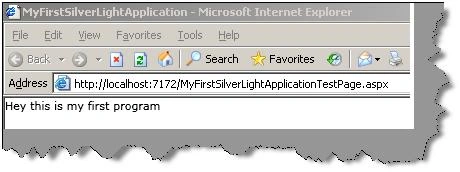
So finally set the web application as a start-up and also set this page as a start-up and run it. You should be pleased to see your first silver light application running.
Summary
In this article, we learned about 21 Important FAQ questions for WPF and SilverLight.


Gowtham RajamanickamPosted May 20, 2015, 12:57 AM
good
Michael PaineeditedPosted May 27, 2009, 4:33 PMEdited May 27, 2009, 4:35 PM
Note that GDI/GDI+ is now hardware accelerated within Windows 7 and Windows Server 2008R2 (and beyond). See article for more details.