

Hi guys. I am back with the top changes in Visual Studio 2015's context menu, by which we can develop applications very easily. In this article we'll see how to use the new options in Visual Studio 2015. Let's see:
- Quick Action
- Rename
- Peek definition
This is the new context menu in Visual Studio 2015 in the “.cs” code file and I marked all the new options in the following list.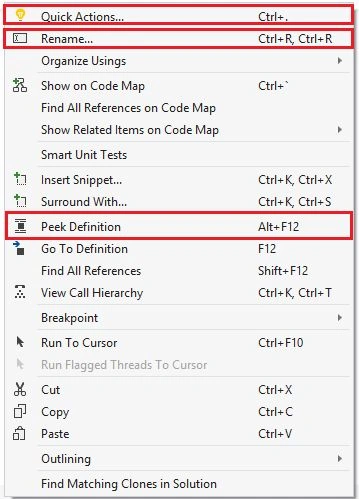
So let's see how to use all of them. Go to Visual Studio 2015 and create a project to test all of them.
Quick Action… (Light Bulb)
Quick Action is a new concept in Visual Studio 2015 that provides new reflector attributes and also provides preview windows. Let's see how to use that with a new project in Visual Studio 2015.
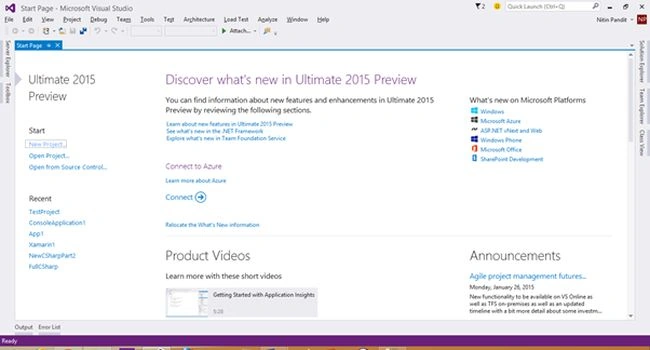
Start Visual Studio 2015 and select "File" -> "New" -> "Project...".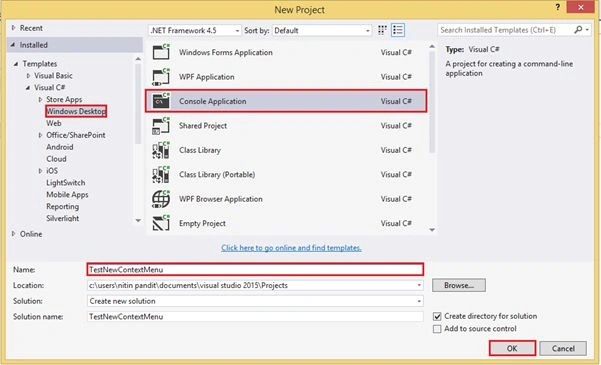
I just created a new project and opened the code file program.cs, and when I click on the using statement I see a light bulb -- that is the icon of Quick Action. 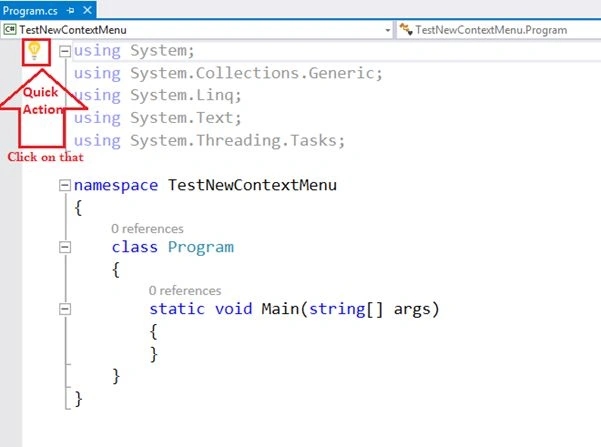
Click on the light bulb and it'll show you the option to Remove Unnecessary Using Statements with Preview window.
When I click on Preview Changes link it will open the Preview Changes window and will show the new code output after applying the changes.
Let's see the new example of Quick Action. If I just write the following statement to create an object of the employee class, but I don't have any class "Employee Class" in the current project or solutio, then the compiler will return an error.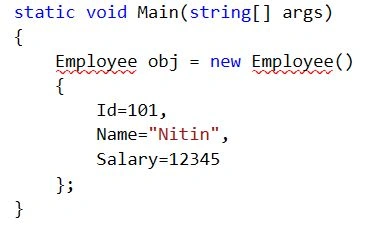
The error will be “Employee” could not be found.
And we also have a Quick Action Link in the same statement, and if I click on that then that will show you multiple options to remove the error with the preview changes link button window. 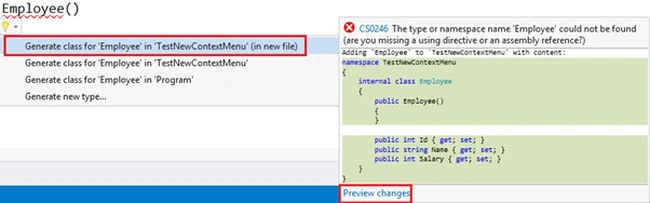
If you select any option from them and click on a Preview Changes link button then that will show the new code file again that can be in your solution after apply.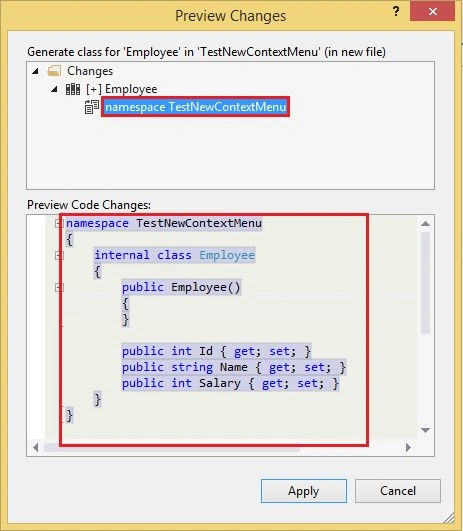
Rename
Rename is a new option in Visual Studio 2015 context menus. It's very useful for renaming a class, function, constructor, property and much more. In Visual Studio 2015 we can use that with the shortcut key Ctrl+r. In the new Visual Studio 2015 we are also able to rename any text into a string or comment line. That was not possible in the previous versions of Visual Studio so let's see how to use that. Create a class then rename that. 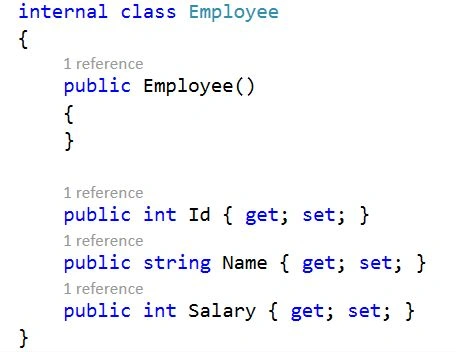
We have a class Employee that must be renamed from Employee to Emp.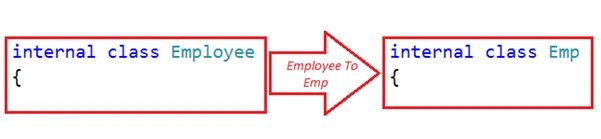
Right-click on the word that we need to rename and then you'll see a new option in the Visual Studio context menu for Rename… 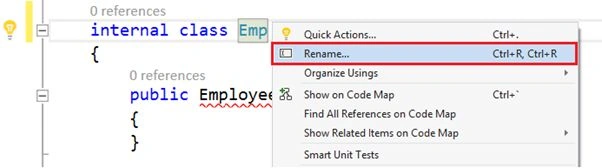
Click on the Rename Option and that will open a new window and check all the options that you want to apply.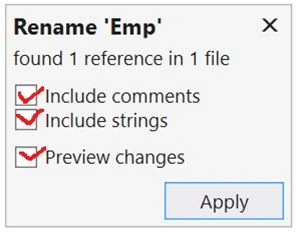
Finally Click on Apply to get the changes in your code files.
Peek definition
In previous versions of Visual Studio if we want to get the definition of a type, function, or a class defined in a DLL file then we can see that code using the F12 key or by right-clicking then clicking on “Go To Definition” but that will show you the code in a new tab, so we need to return from that class file to the class file where we were, so it's complicated to move from one code file to an other code file again and again. 
Now in Visual Studio we have the new Option Peek Definition to show the definition of any class, type, or function in the same code file so now there is no need to navigate anywhere from one to another code file. This this is known as Preview Window, so now go and right-click on any class or function name of which definition we must see.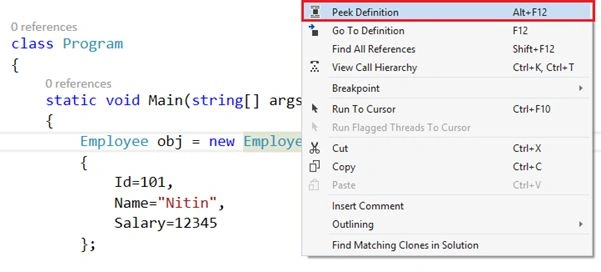
After clicking on Peek Definition now see the definition of that specific type or function in the same code file. So it's a very useful option for all developers to use Go to Definition. 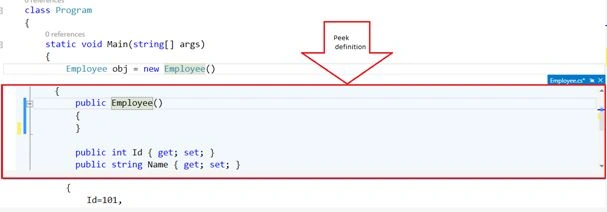
And we have also some new changes in the debugging modes in Visual Studio 2015, so if you want to read about all the new features for debugging in Visual Studio 2015 then read my article.
Debugging and Diagnostics Enhancements in Visual Studio 2015.
Thanks.
Ammar ShaukatPosted Apr 25, 2016, 8:10 AM
thanks for the share . its good.
Jaipal ReddyPosted Apr 25, 2016, 12:06 AM
Nice Share. .
Debasis SahaPosted Apr 24, 2016, 1:10 PM
Good one..
Kuppurasu NagarajPosted Apr 24, 2016, 12:39 PM
Nice Sharing..
Rahul Kumar SaxenaPosted Apr 24, 2016, 12:18 PM
Good One
Muhammad Aqib ShehzadPosted Apr 24, 2016, 11:55 AM
These are really helpful, I am already using these enhancements
Bhushan GawalePosted Apr 24, 2016, 2:32 AM
Good insights, Thanks for sharing this Nitin!
Gowtham RajamanickamPosted Apr 11, 2016, 1:55 AM
useful'
Sr KarthigaPosted Feb 19, 2016, 5:57 AM
Nice Explanation
Vipul MalhotraPosted Jan 19, 2016, 8:53 AM
nice information
Abhishek KumarPosted Jan 19, 2016, 8:29 AM
Nice Article sir..
Arul RPosted Jan 18, 2016, 9:33 PM
Nice share
Ankur MistryPosted Jan 18, 2016, 12:08 PM
Very helpful, thanks for sharing
Gowtham KPosted Jan 18, 2016, 11:01 AM
Good One, Thanks for sharing:)
Madan BhintadePosted Jan 18, 2016, 9:49 AM
Nice
Mohammed IbrahimPosted Jan 18, 2016, 8:56 AM
nice
Atul RawatPosted Jan 18, 2016, 7:50 AM
nice article sir
Raja TPosted Jan 18, 2016, 7:02 AM
Nice,Thanks for sharing
Ehsan SajjadPosted Jan 18, 2016, 5:31 AM
Useful Informtation
Aditya kumarPosted Jan 18, 2016, 4:35 AM
Great airticle sir
Humayun Kabir MamunPosted Jan 18, 2016, 3:38 AM
Nice...
Satinder SinghPosted Aug 8, 2015, 4:54 PM
Good features by Microsoft and great analysis by Nitin Pandit :)
Muralishankar SundaramPosted Jun 20, 2015, 4:57 AM
Nice Information about vs2015......
Rahul Kumar SaxenaPosted Apr 14, 2015, 2:22 PM
informative...
Santhakumar MunuswamyPosted Apr 14, 2015, 9:52 AM
good one
Santhakumar MunuswamyPosted Apr 14, 2015, 9:52 AM
thanks for sharing
Deepak MiddhaPosted Apr 14, 2015, 9:37 AM
gr8
NitinPosted Apr 14, 2015, 8:03 AM
nice
Yousef MahmoudPosted Mar 27, 2015, 12:13 PM
but I think peek definition is not new in VS 2015, or may I didn't get your intention
Ganesh SarafPosted Mar 13, 2015, 5:25 AM
thanks
Nitin PanditPosted Feb 24, 2015, 4:05 AM
thanx :)
Sachin SharmaPosted Feb 23, 2015, 11:49 PM
thanks for sharing. Peek definition is great feature !!!!!
Khargesh RajputPosted Feb 23, 2015, 11:44 PM
thanks for sharing sir and peek definition feature is new word to me .thanks
Sunder SinghPosted Feb 18, 2015, 5:01 AM
nice...
Saber ShaikhPosted Feb 15, 2015, 11:21 PM
nice one
Nitin PanditPosted Feb 14, 2015, 2:31 AM
Yes
Pramod LawatePosted Feb 13, 2015, 9:46 PM
I think Microsoft get the first feature from Resharper Tool
Anupam JainPosted Feb 13, 2015, 9:38 AM
sir no dought these advanced features will definitely make the development easy..............thanks for sharing them,,,,,,,,,,,,,,,,,,,,,,,,,,,,,,,,,,,,,,
Guest UserPosted Feb 13, 2015, 3:43 AM
Apart from that there is codemap feature, it may be available in vs2013. But, codemap is OK per my analysis
Guest UserPosted Feb 13, 2015, 3:43 AM
I find debugging improvement are certainly there in vs2015.
Pranay RanaPosted Feb 13, 2015, 1:27 AM
it seems like they number of things we do with "ctrl+." is now available with quick action ....
Michal HabalcikPosted Feb 13, 2015, 1:17 AM
thanks for sharing. Peek definition is certainly a great feature, but I don't feel like the rest will speed up my developement. Time will show.
Sourabh SomaniPosted Feb 12, 2015, 10:38 PM
Nitin Pandit: Sir every thing is OK but as I know Peek Definition is not new thing in visual studio 2015. It is the feature of Visual studio 2013 and one of the best feature instead of F12(Go to Definition)