Table of Contents
- Abstract
- History
- Revisiting previous session
- Starting with ASP.Net MVC application
- Understanding MVC flow?
- What is Model?
- Add a Model
- Attributes at a glance
- Q & A
- I do not have Visual Studio 2015 installed on my System
- Why ASP.NET MVC over ASP.NET Web-Forms?
- Define Model View Controller
- What is a Model?
- What is a View?
- What is a Controller?
- What is route?
- Conclusion
Abstract
This article explains what we have presented during the session for ASP.NET in the Delhi Developer's day held on December 28, 2014.
It was an awesome event where all developers were united under the common platform. All enjoyed and tried to explore their knowledge of ASP.NET MVC. I never forget the colder and foggy day, all the developers broke this hurdle and united together to enhance learning. I really appreciate these guys.
History
This session is the second part of the ASP.Net MVC series for beginners. I suggest reading the article ASP.NET MVC Series For Beginners: Part 1 if you that (the first) part of the series.
Here are the topics we covered in this session:
- Revisiting Previous Session
- Getting started with a simple app
- Defining Models
- Let's create a Model
- Looking into advanced Model concepts
- Learn with a demo
Revisiting previous session
In this section, we revised the things what we have discussed during the previous session, here is the overview of the discussion:
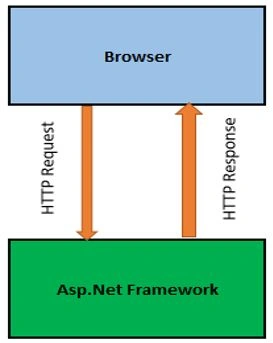
FIGURE 1: REQUEST/RESPONSE
We discussed how a request comes in and a response is sent back in any web application. Here, we discussed some common things like Round Trip, HttpHandler, How requests handled at server side (IIS) and so on.
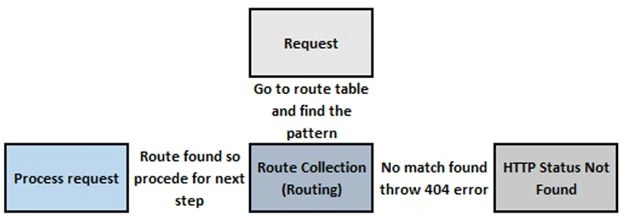
FIGURE 2: REQUEST FLOW
We also discussed how requests flow in an ASP.NET MVC application.
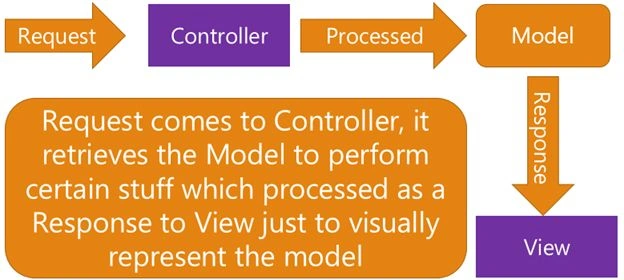
FIGURE 3: PICTORIAL REPRESENTATION OF REQUEST WORKFLOW IN MVC
Finally, we discussed how request flows in an MVC application.
The preceding is just an abstraction of the previous session, we discussed the things in details. During the session we did something.
Starting with ASP.Net MVC application
In all of our demo apps, we used Visual Studio Preview 2015. In this section we are going to start step-by-step.
- Start Visual Studio 2015.
Start Visual Studio to proceed with your first step:
FIGURE 4: VS 2015 INITIAL SCREEN
- Create New Project
Go to File -> New -> Project or press Ctrl+Shift+N
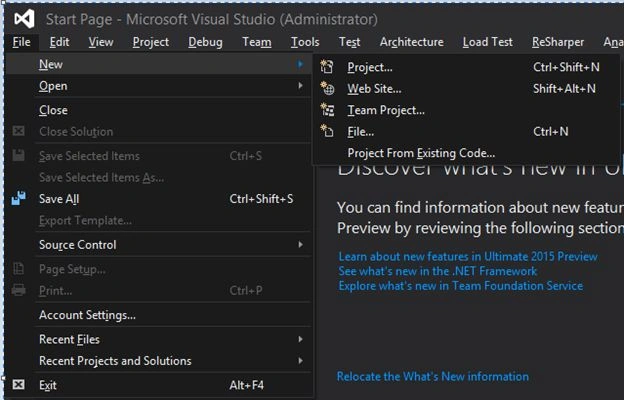
- In the New Project template select Visual C# -> Web.
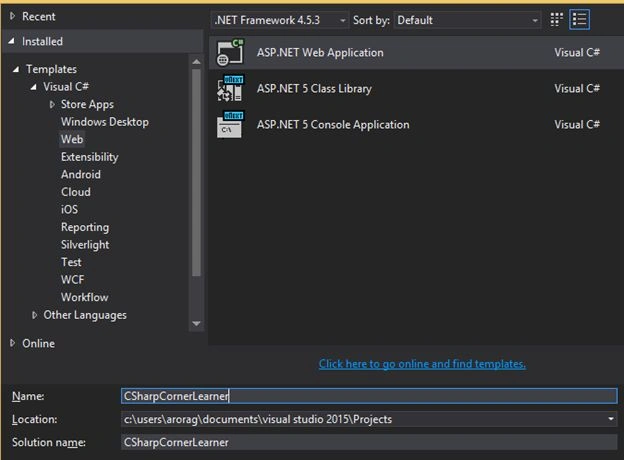
Select ASP.NET Web Application, let's choose as the name "CSharpCornerLearner" and click OK.
- The next screen is "New ASP.NET Project".
The important thing now is to create an ASP.NET WebForm or an ASP.NET MVC app under the Web template. In this section we will discuss only ASP.NET MVC templates in details.
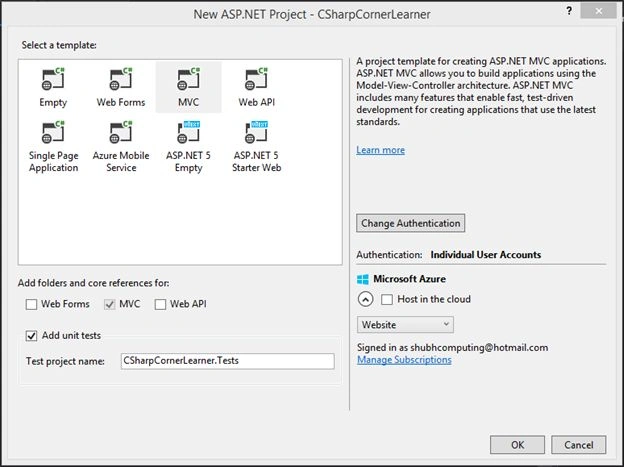
Have a look into this template. Under select a template we have:
- Empty
It creates an empty ASP.NET application, it does not contain any contents.
- Web Forms
It creates a classic ASP.NET WebForms application. We are not going into depth for this template.
- MVC
It creates an ASP.NET MVC application using the Model-View-Controller architecture. It provides many built-in features. We will go into depth in future sessions.
- Web API
It creates a RETSful HTTP service. We will not go into depth. We will have separate sessions for this. To just start you can have a look into the other articles:
- Single Page Application
It creates a rich client-side JavaScript driven HTML5 application. We will discuss this in future sessions.
- Azure Mobile Service
We will discuss this in future sessions.
- ASP.NET5 Empty
It creates an empty app for ASP.NET WebForm (now called vNext). We are not going to discuss this since it is beyond the scope of this article.
- ASP.NET5 Starter Web
It creates an application with the use of the ASP.NET MVC template and you can also create ASP.NET WebForms. Importantly, it uses Individual User Accounts authentication.
- After selection of your desired template click OK (note that we selected Unit Tests for this project).
- Now we have a default ASP.NET MVC project, let's have a look at the folder structure.
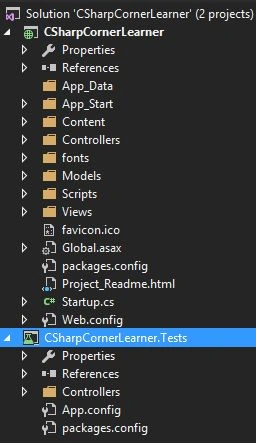
It contains two projects, one is our main ASP.NET MVC project and the other one is a test project. Have a look at our main project. We have a Models, Views and Controllers folders. Oh, great! So we have a MVC architecture here.
Can you think of why we have other folders?
All the other folders have helper files or other supported content.
Understanding MVC flow
Let's get back for a moment and try to understand the MVC app flow. We can also predict from the image that the MVC pattern divides a software application into three interconnected parts/components. Basically, it's a concept of separation (here just the separation of internal representations of information from ways/logics/techniques of how it is being represented to the end-user).
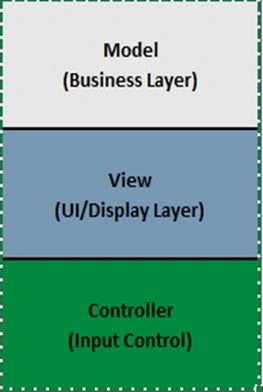
FIGURE 5: DEFINING MVC
As in the preceding image, let's elaborate on Model View Controller (MVC):
A Controller can send commands/directions to the model to update its state as well as commands over to the view.
Associated views and controllers get notified by the Model depending on the changes of its state.
The Model provides specific results as an output upon the request of the View to represent.
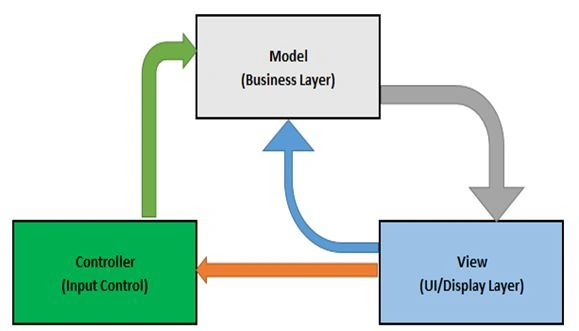
FIGURE 6: DEFINING MVC
Let's understand this from the preceding associated image.
In simple words, we can say that MVC is providing a facility to make our layers separate that are separated and interacting with each other.
Models
Returning to our project, we have created the preceding. Have a look at Models.
- A MVC Model is nothing but a class.
Yes, it is true. Models are nothing, just typical classes. We can create a simple class and add properties and many things you want and then use this class as a Model. Whenever you create a Model just ensure it should be created under the Models folder just to make a standard approach.
- Both Controllers and Views can access Models.
- A Model can be used to pass data from a Controller to a View.
Add a Model
As we know Model is a class. In Solution Explorer move to the Models folder and add a new class, here is a sample Model:
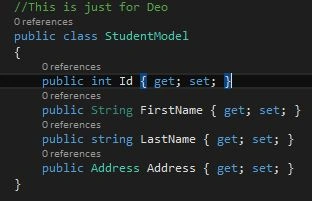
Have a look into the preceding class, we have certain properties in the Student class. Now, think of a Student table (that is in your database). This table has a few columns. Now, return to our class defined above. StudentModel is a representation of our Student table and all the properties are the representation of all the table columns.
Attributes at a glance
After creating our data models, in other words after creation of our representation of tables, we need to control all the properties, like what kind of Data Type they could accept, how much length they could accept and so on.
The following are the main attributes available:
- Attributes to check DataTypes
Let's add one more property in our model above.
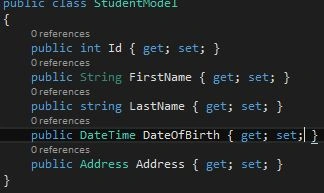
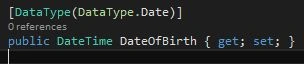
We added DateOfBirth and defined the type as a DateTime. Just think, we need only a Date and we are defining DateTime. For this we have Data Attributes.
To do the same just add the following namespace:

Now, you can add a Data Type attribute of DateType.Date as:
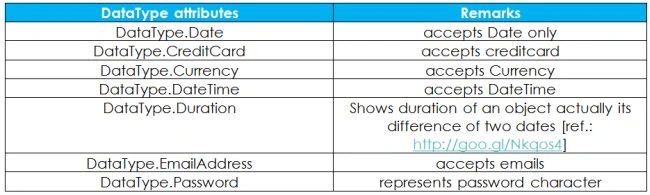
There are many other important data types available:
Let's have a look into the DataType attribute class: [ref.: http://goo.gl/4GvSlb ]
It contains properties and methods. We are not going into depth, go to the link referred to above to get more.
- Attributes to Display
Sometimes, we have requirements to display our data in some format that does not provide or is not a default format. To display in such a format we have Display attributes.
Think; we need to show our DateOfBirth in some custom date format:

Above, we applied a new DisplayFormat attribute to display our date in the format of yyyy-MM-dd (for example 2014-12-28) with the special thing ApplyFormatInEditMode = true. What does it specify? This is because we want to keep the same format during our editing. Cool, these attributes are really awesome!
- Attributes for validations
- Required
Think of a scenario where we need to force the user to enter the field. We use the Required attribute for that. In our above example we want FirstName in every scenario. So, we just use the attribute to make it required.

Now, with this our user must enter a FirstName.
- Length
Think of a scenario that we need to limit the length for the FirstName.

Now, the user must be limited by a maximum of 25 characters for First Name, otherwise the user will get an error message as defined.

Also, we can define a minimum of characters for properties.

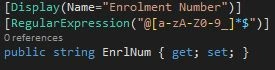
- RegularExpression
It allows us to use our own custom RegulatExpression. Let's say we need a Alphanueric Enrollment Number like:
For more details of the Customization Model and more complex models refer to: http://goo.gl/8ZQCQP.
Q & A
In this session we have covered a great Q&A section, I am trying to cover each and every question. Please add any question I missed.
I do not have Visual Studio 2015 installed on my System.
I am not going into depth about this, refer to this article for the installation of VS 2015: http://goo.gl/BGFWYw.
Choosing ASP.NET MVC over ASP.NET Web-Forms
There are numerous reasons to choose ASP.Net for web development over ASP.Net Web forms including the following:
- ASP.NET MVC is a web framework and is based on the MVC pattern.
- No view state (performance is better in ASP.NET MVC).
- Completely testable.
- Integration with the client side (easily handshake with client-side scripting like jQuery and so on).
Flexibility (provides various view engines that render HTML; the Razor View Engine is the most famous).
Let's think of a scenario where we are writing an application in ASP.NET Web Forms and there are two classes for one thing. Let's say a default page that includes Default.aspx and Default.aspx.cs pages and our designer page.
A designer page has all the server control and aspx pages that contain visualization of our server controls (UI part) and finally our cs page (class) contains all the functionality and other logics. Our class is based on the ASP.NET Page life cycle (for complete details refer to: MSDN).
We can't completely test our Web Forms. To make it properly testable at some instance, we need to implement some other UI Design pattern viz. MVP, MVVM, MVC.
If we are implementing the MVC UI Pattern in our Web Forms then why don't we use the ASP.NET MVC framework that is already using this pattern and provides everything required to create web apps.
Define Model View Controller
Here is the conclusion of what we discussed (for the ASP.Net MVC framework).
Models
- The MVC model is typically a class (of C# or VB.NET).
- Both the Controller and the View can access the Model.
- A Model can be used to pass data from the Controller to the View.
- The main purpose of a View is to display the data in a page using the Model.
Views
- A View is nothing but a page (you can say a web page) and it does not have any code-behind.
- All page-specific HTML generation and formatting can be done inside the View.
- A request to a view can be made only from a Controller's action method.
Controllers
- A Controller is typically a class (of C# or VB.Net) and inherits from “system.mvc.controller”.
- Within this class, methods can be implemented and called as action methods. These are responsible for responding to the browser and/or for calling Views.
- A Controller class can access and use a Model class to pass data to the Views.
Routes
A system works on a pattern matching mechanism. A route matches an incoming request to meet a specific pattern and allows once matched else denied.
Conclusion
In this article I tried to cover all the things we discussed about Models and Demo applications. Also, I included some questions/discussions and answers. I am continuously receiving emails with more questions and I will provide more questions/discussions and answers very soon.
Until now, we discussed Models, data attributes and complex models.
We will continue in the next session.


Thet Thet MarPosted May 30, 2019, 2:53 AM
Thanks for sharing
Jennifer BalsomPosted May 7, 2018, 3:43 AM
Amazing read, Thanks for sharing.
Joe WilsonPosted Jan 7, 2017, 5:45 AM
Well, Thank you very much for sharing.
Arjun DhilodPosted Oct 4, 2016, 2:39 AM
Great Article
Manav PandyaPosted Sep 17, 2016, 9:59 AM
Really exceptional effort for beginner sir ....
Ahmed AbdiPosted Sep 12, 2016, 12:25 PM
Great Article, thanks for the share
Ramesh PalaniappanPosted Aug 18, 2016, 8:17 AM
Nice
kalu singh raoPosted Jul 7, 2016, 1:39 AM
Nice...
Jitendra Singh PatelPosted Jun 6, 2016, 1:25 AM
Hi gaurav, I am try to find next part of this article(3,4,5,6,7,.. next) but it is not available. please share the links .
Thiruppathi RPosted Jun 3, 2016, 2:27 AM
Nice Article...
Ashish SrivastavaPosted Apr 24, 2016, 9:28 AM
Nice
Bhuvanesh MohankumarPosted Apr 19, 2016, 2:33 PM
Good one
Sirisha KPosted Mar 17, 2016, 4:25 PM
Clarity explanation
Sonu ChaudharyPosted Feb 25, 2016, 6:30 AM
good one!
Asfend YarPosted Feb 22, 2016, 2:11 PM
great job
Asfend YarPosted Feb 22, 2016, 2:11 PM
thansk
Asfend YarPosted Feb 22, 2016, 2:11 PM
very valuable information in this article
Navratna PawalePosted Feb 19, 2016, 9:07 AM
nice article...
Jithil JohnPosted Feb 16, 2016, 2:09 AM
Good one
Shailesh UkePosted Feb 16, 2016, 1:53 AM
Nice Article
Upendra Pratap ShahiPosted Oct 20, 2015, 1:18 PM
Thanks sir...very nice explain..
Arjun DhilodPosted Jul 16, 2015, 7:07 AM
pls share part 3 and 3 ++
Shuby AroraPosted Feb 5, 2015, 2:37 PM
Can you please share part-3 of this series?
Hamid KhanPosted Feb 1, 2015, 10:44 PM
Thanks'
Gaurav Kumar AroraPosted Jan 17, 2015, 3:57 PM
Thanks Shuby
Shuby AroraPosted Jan 16, 2015, 12:31 PM
detailed and nice explanation
Gaurav Kumar AroraPosted Jan 7, 2015, 2:01 AM
Manish Kumar Choudhary Thanks, glad to read that
Manish Kumar ChoudharyPosted Jan 4, 2015, 12:25 PM
Nice explanation Gaurav Kumar Arora sir... Thanks for sharing. ..
Gaurav Kumar AroraPosted Jan 4, 2015, 10:19 AM
@Thanks Jeetendra Gund and @Praveen-kumar. Glad to read that you guys liked it.
Praveen KumarPosted Jan 3, 2015, 11:59 AM
Very Nice!
Jeetendra GundPosted Jan 3, 2015, 5:30 AM
nice article sir...
Gaurav Kumar AroraPosted Jan 3, 2015, 4:48 AM
Thanks Vithal Wadje ji
Vithal WadjePosted Jan 3, 2015, 3:28 AM
Great work ,Waiting for next article