

In a previous article, how does C# code behind interact with an XAML interface within a Silverlight 2 context? - INotifyCollectionChanged: Part V we demonstrate how to implement INotifyCollectionChanged interface in order to notify XAML UI when collection object source is changed. In this article, we will see how data validations are leveraged. This article is supposed to respond the question posed in the article how does C# code behind interact with an XAML interface within a Silverlight 2 context? - Introduction: Part I, which is: what if user sets properties in inappropriate format, how to handle this situation and avoid the application from the trouble and failure?
First, we should leverage code so that notifications will be sent to the user. Once the error occurs, the binding engine sends notifications to the targeted XAML UI, and then tells it that data aren't in the appropriate format. Let's consider this example, say a form that will be used by a given user at the front end to enter data about him/her and then a given process will store all data into a data base. A question could be asked at this level. What if a funny user tries to make some dismissive things? Something un- expectable like this figure bellow shows :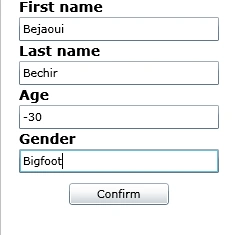
Figure 1
Something wrong with this above data, hence it will be a catastrophe if data about ages are negatives or worst if they are represented in none numeric format, at the other hand, the gender could be one of two values either male or female but not a Big foot .
Ok, how to deal and prevent this from happening before it is happening? We can implement validation logic to avoid this.
First, let's add the Person class at the C# code behind level. This class will tie our XAML user interface with the C# code behind world.
public class Person
{
public string FirstName { get; set; }
public string LastName { get; set; }
public string Age { get; set; }
public string Gender { get; set; }
I defined all types of the class as strings for two reasons. The first one is to simplify the process and the second one is that data conversion will constitute the theme of the next article how does C# code behind interact with an XAML interface within a Silverlight 2 context? -Data Conversion-Part VII.
Now, let's return to our Person class that should be rectified to fit the validation operation needs. First, let's derive four new exception types. One for none numeric entries, and another one for numeric entries, and then another one for the age that must be numeric and should respect a certain range, and then finally one latest exception for the gender that should only be either "Male" or "Female" and nothing else, not a Bigfoot by the way.
Here are the four exceptions' definitions:
public class NoneNumericValueException : Exception
{
public NoneNumericValueException()
: base("This value should be numeric")
{ }
}
public class NumericValueException : Exception
{
public NumericValueException()
: base("This value should be none numeric")
{ }
}
public class AgeException : Exception
{
public AgeException()
: base("The age should be not less than 0 and not more than 150")
{ }
}
public class GenderException : Exception
{
public GenderException()
: base("This value should be either ‘Male’ or ‘Female’")
{ }
}
And then, we will make use of the regular expressions to throw the exceptions from within the class Person that should be defined as follow:
using System.ComponentModel;
using System.Text.RegularExpressions;
public class Person : INotifyPropertyChanged
{
public Person() { }
private string _FirstName;
public string FirstName
{
get { return _FirstName; }
set
{
if (!Regex.IsMatch(value, @"^[a-zA-Z ]+$"))
throw new NumericValueException();
_FirstName = value;
if (PropertyChanged != null)
{
PropertyChanged(this, new PropertyChangedEventArgs("FirstName"));
}
}
}
private string _LastName;
public string LastName
{
get { return _LastName; }
set
{
if (!Regex.IsMatch(value, @"^[a-zA-Z ]+$"))
throw new NumericValueException();
_LastName = value;
if (PropertyChanged != null)
{
PropertyChanged(this, new PropertyChangedEventArgs("LastName"));
}
}
}
private string _Age;
public string Age
{
get { return _Age; }
set
{
int intValue = Convert.ToInt32(value);
if (!Regex.IsMatch(value, @"^\d{*}?") || intValue < 10 || intValue > 150)
throw new AgeException();
_Age = value;
if (PropertyChanged != null)
{
PropertyChanged(this, new PropertyChangedEventArgs("Age"));
}
}
}
private string _Gender;
public string Gender
{
get { return _Gender; }
set
{
if (!Regex.IsMatch(value, "Male") && !Regex.IsMatch(value, "Female"))
throw new GenderException();
_Gender = value;
if (PropertyChanged != null)
{
PropertyChanged(this, new PropertyChangedEventArgs("Gender"));
}
}
}
public override string ToString()
{
return string.Format("First name: {0}, last name: {1},age: {2} ,geder: {3}",
FirstName,
| LastName,
Age,
Gender);
}
#region INotifyPropertyChanged Members
Join the conversation! Your thoughts help the community grow.