

Introduction
This is the second method I created for performing a double entry posting to Chart Of Accounts. The first one involved “coloring” the Chart Of Accounts listing displayed in the Windows form to discern the difference between the initial postings and the offsetting postings to the user. That was my own idea for making the double entry posting for the application and it worked well, but the customer had another idea. It was based on how he manually performed double entry postings with pen and paper. His idea is also very good and it will be the subject of this article.
Here's my first article: C# Code For Making a Double Entry General Ledger Posting - Method 1
Moving Forward
Figure 1 is the pop up menu from this program for performing double entry postings to Chart Of Accounts. The option titled, “Add And Remove Double Entry Postings” has already been described in the article I wrote by the same name as this one for “Method 1”. “Add And Remove General Ledgers” is for adding and removing general ledgers from Chart Of Accounts. It does not involve the double entry posting process.

Figure 1
The other options described as “CD Ledgers Maintenance” (cash disbursements), “CR Ledgers Maintenance” (cash receipts), “GL Ledgers Maintenance” (general ledger), “J Ledgers Maintenance” (journal entry), “PR Ledgers Maintenance” (payroll) and “ST Ledgers Maintenance” (standard transaction) are double entry posting utilities, which are the subject of this article. In terms of programming, they are all mechanically identical, though the listing of general ledgers within each of these utilities differs. For the purpose of not being redundant, I will describe in detail the functions of the “CD Ledgers Maintenance” Windows form.
A description of the initial posting procedure,
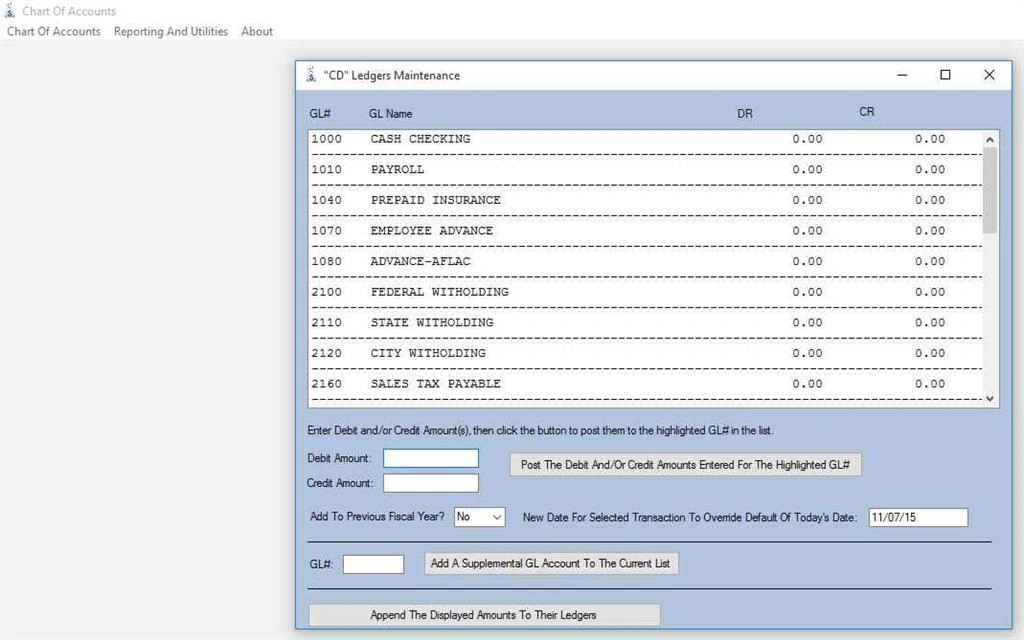
Figure 2
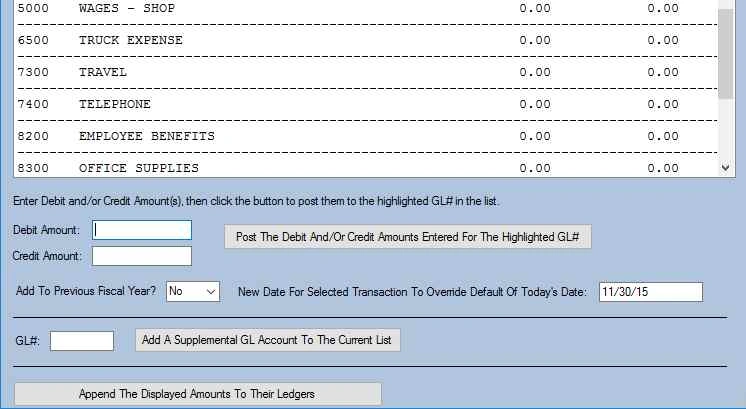
A listing of pre-determined general ledger accounts along with their DR (debit) and CR (credit) columns showing the total debit and credit amounts to be posted to each account are displayed in a list box above in Figure 2. The text boxes located directly below are for entering debit and credit amounts. When you enter an amount in either or both of two text boxes and then click the “Post The Debit And/Or Credit Amounts Entered For The Highlighted GL#” button immediately to the right, the program will post the debit and credit amount(s) entered in the corresponding column in whatever general ledger account in the list box you had previously highlighted with the mouse. There is also a “Yes or No” dropdown for adding the entered amount(s) to the previous fiscal year if desired. And there is a text box for allowing the user to override the current date for this transaction with an alternate date to be entered by the user (the current date is auto entered by default upon loading the form). Figures 3, 4 and 5 below illustrate the initial posting procedure.
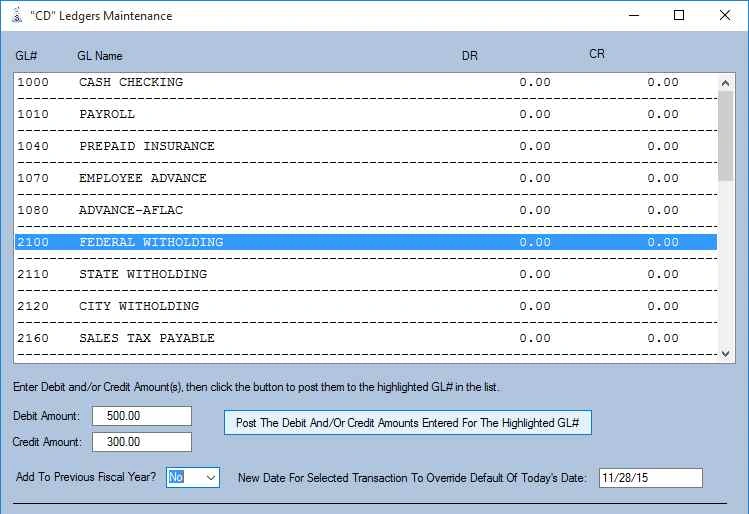
Figure 3
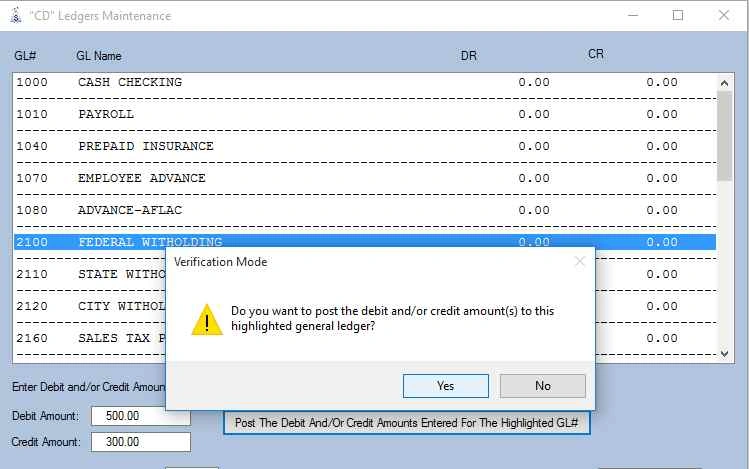
Figure 4
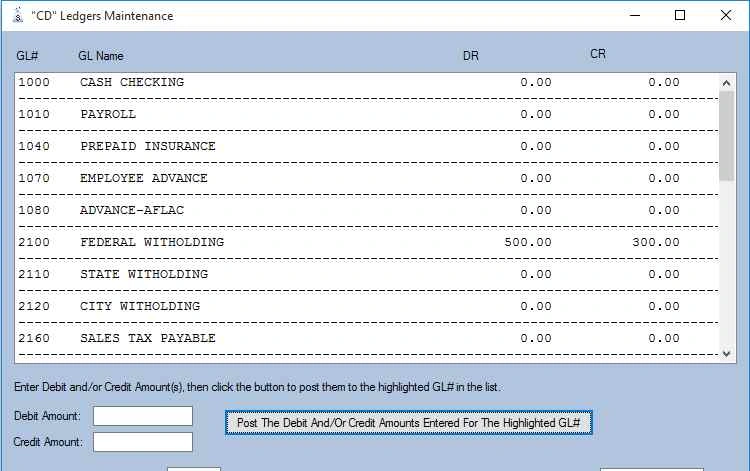
Figure 5
We have not actually posted to the Chart Of Accounts yet. These postings are only being added to a sort of staging area as a list box on the Windows form. Here is the C# code that details how the “Post The Debit And/Or Credit Amounts Entered For The Highlighted GL#” button works:
Moving Forward
Figure 1 is the pop up menu from this program for performing double entry postings to Chart Of Accounts. The option titled, “Add And Remove Double Entry Postings” has already been described in the article I wrote by the same name as this one for “Method 1”. “Add And Remove General Ledgers” is for adding and removing general ledgers from Chart Of Accounts. It does not involve the double entry posting process.
Figure 1
The other options described as “CD Ledgers Maintenance” (cash disbursements), “CR Ledgers Maintenance” (cash receipts), “GL Ledgers Maintenance” (general ledger), “J Ledgers Maintenance” (journal entry), “PR Ledgers Maintenance” (payroll) and “ST Ledgers Maintenance” (standard transaction) are double entry posting utilities, which are the subject of this article. In terms of programming, they are all mechanically identical, though the listing of general ledgers within each of these utilities differs. For the purpose of not being redundant, I will describe in detail the functions of the “CD Ledgers Maintenance” Windows form.
A description of the initial posting procedure,
Figure 2
A listing of pre-determined general ledger accounts along with their DR (debit) and CR (credit) columns showing the total debit and credit amounts to be posted to each account are displayed in a list box above in Figure 2. The text boxes located directly below are for entering debit and credit amounts. When you enter an amount in either or both of two text boxes and then click the “Post The Debit And/Or Credit Amounts Entered For The Highlighted GL#” button immediately to the right, the program will post the debit and credit amount(s) entered in the corresponding column in whatever general ledger account in the list box you had previously highlighted with the mouse. There is also a “Yes or No” dropdown for adding the entered amount(s) to the previous fiscal year if desired. And there is a text box for allowing the user to override the current date for this transaction with an alternate date to be entered by the user (the current date is auto entered by default upon loading the form). Figures 3, 4 and 5 below illustrate the initial posting procedure.
Figure 3
Figure 4
Figure 5
We have not actually posted to the Chart Of Accounts yet. These postings are only being added to a sort of staging area as a list box on the Windows form. Here is the C# code that details how the “Post The Debit And/Or Credit Amounts Entered For The Highlighted GL#” button works:
- private void PostTheAmount(object sender, EventArgs e)
- {
- // declare local variables.
- string listBox1_String, debit_str, credit_str, previousfiscal;
- char[] charVal_debit, charVal_credit, charVal_date;
- // get current working directory.
- currdir = Directory.GetCurrentDirectory();
- currdir = currdir.Substring(0, currdir.Length - 9);
- // verify that a ledger has been selected from the Chart Of Accounts
- // listing before proceeding.
- if (listBox1.SelectedIndex != -1)
- {
- // grab the selected general ledger from the Windows form into
- // a string variable, 'listBox1_String'.
- listBox1_String = listBox1.Text;
- // if the general ledger that was selected is invalid, then
- // display a message for this, then abort.
- if (listBox1_String.Substring(0, 1) == "-" || listBox1_String.Substring(0, 1) == "G") MessageBox.Show("Invalid selection...", "Error Mode");
- // if the general ledger that was selected is valid, then proceed.
- if (listBox1_String.Substring(0, 1) != "-" && listBox1_String.Substring(0, 1) != "G")
- {
- result = MessageBox.Show("Do you want to post the debit and/or credit amount(s) to this highlighted general ledger?", "Verification Mode", MessageBoxButtons.YesNo, MessageBoxIcon.Exclamation);
- if (result == DialogResult.Yes)
- {
- // grab the Windows form flag for whether or not to add these
- // entered amount(s) to the previous fiscal year.
- previousfiscal = this.addtoprevfiscal.Text;
- // grab the debit and credit amount(s) and convert to character arrays
- // to prepare for further processing.
- debit_str = debitAmount.Text;
- credit_str = creditAmount.Text;
- charVal_debit = debit_str.ToCharArray(0, debit_str.Length);
- charVal_credit = credit_str.ToCharArray(0, credit_str.Length);
- // open a file stream to the Chart Of Accounts data file for
- // subsequent read operations.
- FileInfo datafileinfo = new FileInfo(currdir + "mastcoa.txt");
- sizeofdatafile = datafileinfo.Length;
- StreamReader streamobj = new StreamReader(currdir + "mastcoa.txt");
- streamobj.BaseStream.Seek(0, SeekOrigin.Begin);
- // initialize the Chart Of Accounts data file offset to 0.
- datafileoffset = 0;
- do
- {
- // read the next sequential record from the Chart Of Accounts data file.
- stringVal = streamobj.ReadLine();
- // construct a transient general ledger file name for the current Chart
- // Of Accounts record and assign it to the variable, 'strfile_temp'.
- strfile_temp = stringVal.Substring(45, 8) + "_.txt";
- // compare the general ledger # from the 'stringVal' variable to what was
- // selected in the listing on the Windows form. if equal, then proceed with
- // the posting of the entered amount(s) to the Windows form.
- if (stringVal.Substring(41, 4) == listBox1_String.Substring(0, 4))
- {
- // clear out the character array, 'recordatavar_transactions', used
- // for the Windows form posting operation.
- for (a = 0; a < GLDETAILEN - 2; a++) recordatavar_transactions[a] = (char)32;
- // assign whatever debit and/or credit amount(s) were entered into the
- // Windows form to the character array, 'recordatavar_transactions'.
- for (a = 0; a < debit_str.Length; a++) recordatavar_transactions[a + 50] = charVal_debit[a];
- for (a = 0; a < credit_str.Length; a++) recordatavar_transactions[a + 60] = charVal_credit[a];
- // grab the date of the alternate date field and assign
- // it to the variable for the transaction date, 'dateString'.
- dateString = NewXctionDate.Text;
- // if no date was entered in the alternate date field, then assign the
- // current date to 'dateString'.
- if (dateString.Length < 8)
- {
- DateTime saveNow = DateTime.Now;
- dateString = saveNow.ToString(datePatt);
- }
- // convert 'dateString' to a character array and insert it into the
- // character array 'recordatavar_transactions', which also holds any
- // debit and/or credit amount(s) entered by the user.
- charVal_date = dateString.ToCharArray(0, dateString.Length);
- for (a = 0; a < dateString.Length; a++) recordatavar_transactions[a] = charVal_date[a];
- // if the user chose to add these debit and/or credit amount(s) to the
- // previous fiscal year, then use the '^' symbol to denote that in the
- // character array, 'recordatavar_transactions'.
- if (previousfiscal == "Yes")
- {
- recordatavar_transactions[2] = '^';
- }
- // append the character array, 'recordatavar_transactions', to the
- // transient data file specified by 'strfile_temp'.
- FileStream fstreamobj1 = new FileStream(currdir + strfile_temp, FileMode.Append);
- StreamWriter writerobj1 = new StreamWriter(fstreamobj1);
- writerobj1.WriteLine(recordatavar_transactions);
- writerobj1.Close();
- fstreamobj1.Close();
- }
- // advance the Chart Of Accounts data file offset forward by one
- // record to the next sequentially located record.
- datafileoffset = datafileoffset + GLMASTERLEN;
- } while (datafileoffset < sizeofdatafile);
- // close the Chart Of Accounts data file stream.
- streamobj.Close();
- // repaint the Windows form to reflect the changes.
- UpdateListing();
- }
- }
- }
- else
- {
- MessageBox.Show("No general ledger selection was made...please try again.", "Error Mode");
- }
- }
This next part will discuss the coding I use to add supplemental general ledger accounts to those ledger accounts displayed in the list box by default. This is a flexible feature that allows the user to add as many as 4 ledgers that may need to be incorporated into the initial posting process for any number of reasons. Here is the code that details how the “Add A Supplemental GL Account To The Current List” button functions:
- private void AddSupplementalGL(object sender, EventArgs e)
- {
- // declare local variables.
- int found_glno;
- long sizeofdatafile_supplemental;
- string glno_str, glname_str;
- char[] charVal_glno, charVal_glname;
- result = MessageBox.Show("Do you want to add a supplemental GL account to the current listing?", "Verification Mode", MessageBoxButtons.YesNo, MessageBoxIcon.Exclamation);
- if (result == DialogResult.Yes)
- {
- // get the file size of the supplemental cash disbursements
- // data file, 'cd_ledger.txt'.
- FileInfo datafileinfo_supplemental = new FileInfo(currdir + "cd_ledger.txt");
- sizeofdatafile_supplemental = datafileinfo_supplemental.Length;
- // if the number of added supplemental general ledgers
- // for the current session is less than 5, then proceed.
- if (sizeofdatafile_supplemental < GLAUXILIARY * 5)
- {
- // get the user entered supplemental general ledger # to add to
- // the Windows form listing.
- glno_str = AuxiliaryGLNo.Text;
- // if the length of the user entered supplemental general
- // ledger # is 4, then proceed.
- if (glno_str.Length == 4)
- {
- // open a file stream to the Chart Of Accounts data file for
- // subsequent read operations.
- FileInfo datafileinfo = new FileInfo(currdir + "mastcoa.txt");
- sizeofdatafile = datafileinfo.Length;
- StreamReader streamobj = new StreamReader(currdir + "mastcoa.txt");
- streamobj.BaseStream.Seek(0, SeekOrigin.Begin);
- // initialize the Chart Of Accounts data file offset to 0.
- // set the 'found_glno' flag to its default of 0 to indicate
- // the general ledger # to search for is not yet found.
- datafileoffset = 0;
- found_glno = 0;
- do
- {
- // read the next sequential record from the Chart Of Accounts data file.
- stringVal = streamobj.ReadLine();
- // if the user entered general ledger # has been matched in the Chart Of
- // Accounts data file, then proceed.
- if (stringVal.Substring(41, 4) == glno_str)
- {
- // set the 'found_glno' flag to 1 to denote the user
- // entered general ledger # has been matched.
- found_glno = 1;
- // construct a transient copy the corresponding general
- // ledger filename from the Chart Of Accounts record and
- // assign it to the variable, 'strfile_temp'.
- strfile_temp = stringVal.Substring(45, 8) + "_.txt";
- // check to see if this transient general ledger filename
- // already exists and if so, get rid of it.
- if (File.Exists(currdir + strfile_temp))
- {
- File.Delete(currdir + strfile_temp);
- }
- // clear out the character array, 'recordatavar_transactions',
- // used for the supplemental general ledger file addition to the Windows form.
- for (a = 0; a < GLDETAILEN - 2; a++) recordatavar_transactions[a] = (char)32;
- // open a file stream to transient general ledger account filename specified
- // by the user and then write the 'recordatavar_transactions' character
- // array to it.
- FileStream fstreamobj1 = new FileStream(currdir + strfile_temp, FileMode.Create);
- StreamWriter writerobj1 = new StreamWriter(fstreamobj1);
- writerobj1.WriteLine(recordatavar_transactions);
- writerobj1.Close();
- fstreamobj1.Close();
- // add the supplemental general ledger # entered by the user as well as its
- // descriptive name to character arrays.
- charVal_glno = glno_str.ToCharArray(0, glno_str.Length);
- glname_str = stringVal.Substring(0, 41);
- charVal_glname = glname_str.ToCharArray(0, glname_str.Length);
- // add the above 2 items to the 'recordatavar_aux_ledger' character array.
- for (a = 0; a < 45; a++) recordatavar_aux_ledger[a] = (char)32;
- for (a = 0; a < 4; a++) recordatavar_aux_ledger[a] = charVal_glno[a];
- for (a = 0; a < 41; a++) recordatavar_aux_ledger[a + 4] = charVal_glname[a];
- // open a file stream to the supplemental cash disbursements data file,
- // and append the 'recordatavar_aux_ledger' character array to it.
- FileStream fstreamobj2 = new FileStream(currdir + "cd_ledger.txt", FileMode.Append);
- StreamWriter writerobj2 = new StreamWriter(fstreamobj2);
- writerobj2.WriteLine(recordatavar_aux_ledger);
- writerobj2.Close();
- fstreamobj2.Close();
- }
- // advance the Chart Of Accounts data file offset forward by one
- // record to the next sequentially located record.
- datafileoffset = datafileoffset + GLMASTERLEN;
- } while (datafileoffset < sizeofdatafile && found_glno == 0);
- // close the Chart Of Accounts data file stream.
- streamobj.Close();
- // reset the supplemental general ledger # control on the Windows form to blank.
- this.AuxiliaryGLNo.Text = "";
- // repaint the Windows form to reflect the changes.
- UpdateListing();
- if (found_glno == 0)
- {
- MessageBox.Show("The GL number was not found and was not added to the current listing...please try again.", "Error Mode");
- }
- }
- else
- {
- MessageBox.Show("Invalid GL number...please try again.", "Error Mode");
- }
- }
- else
- {
- MessageBox.Show("Unable to add any more supplemental GL accounts...", "Error Mode");
- }
- }
- }

Douglas MillerPosted Dec 4, 2015, 7:25 AM
Thank you....I'm glad you like it!
Santhakumar MunuswamyPosted Dec 4, 2015, 7:10 AM
Good one
Mukesh KumarPosted Dec 4, 2015, 1:42 AM
Good Share
Mohammed IbrahimPosted Dec 3, 2015, 7:37 PM
nice