
The article will focus on threading constructs and as such, is meant for both the beginner and those who practice multithreading regularly. A thread is a unit of execution. Microsoft has used threads since the Win32 and NT days, and an understanding of this topic is necessary. For any .NET developer. In my limited knowledge, I have assembled a "manual" that could act as a reference for things like basic threading and using threading in the real world. This section, while part of the article, is only meant to be a basic introduction to the concept of threading. The one experienced in threading should overlook it. To create a thread, you must follow these steps:
- Create a method that takes no arguments and does not return any data.
- Create a new ThreadStart delegate and specify the method created in step 1.
- Create a Thread object specifying the ThreadStart object created in step 2.
- Call ThreadStart to begin execution of the new thread. The code will look something like this:
- using System;
- using System.Threading;
- public class Program
- {
- public static void Main()
- {
- ThreadStart operation = new ThreadStart(SimpleWork);
- Thread thr = new Thread(operation);
- thr.Start();
- }
- private static void SimpleWork()
- {
- Console.WriteLine("Thread: {0}",
- Thread.CurrentThread.ManagedThreadId);
- }
- }
IsAlive: Gets a value indicating that the current thread is currently executing.
IsBackground: Gets or sets whether the thread runs as a background thread.
IsThreadPoolId: Gets whether this thread is a thread in the thread pool.
ManagedThreadId: Gets a number to identify the current thread.
Name: Gets or sets a name associated with the thread.
Priority: Gets or sets the priority of the thread.
ThreadState: Gets the ThreadState value for the thread.
A more likely scenario than the example shown above is one in which you will want to create multiple threads:
- using System;
- using System.Threading;
- public class Program
- {
- public static void Main()
- {
- ThreadStart operation = new ThreadStart(SimpleWork);
- for (int x = 1; x <= 5; ++x)
- {
- Thread thr = new Thread(operation);
- thr.Start();
- }
- }
- private static void SimpleWork()
- {
- Console.WriteLine($"Thread: {Thread.CurrentThread.ManagedThreadId}");
- }
- }
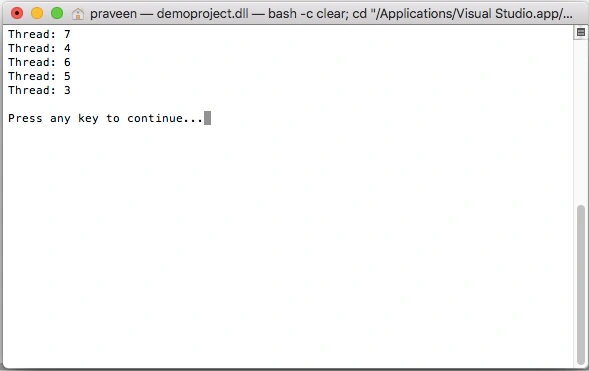
Here are some of Thread's methods (not static!!):
Abort: Raises a ThreadAbort exception on the thread to indicate that the thread should be aborted.
Interrupt: Raises a ThreadInterruptException when a thread is in blocked state.
Join: Blocks the calling thread until the thread terminates.
Start: Sets a thread to be scheduled for execution.
Using Thread.Join is sometimes necessary because more often than not, you will need your application to wait for a thread to complete execution.
To accomplish this, the Thread class supports the Join method, which is a static method:
- using System;
- using System.Collections.Generic;
- using System.Diagnostics;
- using System.IO;
- using System.Reflection;
- using System.Runtime;
- using System.Runtime.CompilerServices;
- using System.Security;
- using System.Text;
- using System.Threading;
- class InterruptAwareWorker
- {
- private bool interruptRequested;
- private Thread myThread;
- public void Interrupt()
- {
- if (myThread == null)
- interruptRequested = true;
- myThread.Interrupt();
- myThread.Join();
- }
- private void CheckInterrupt()
- {
- if (interruptRequested)
- throw new ThreadInterruptedException();
- }
- public void DoWork(object obj)
- {
- myThread = Thread.CurrentThread;
- try
- {
- while (true)
- {
- // Do some work (including some blocking operations)
- CheckInterrupt();
- // Do some more work…
- CheckInterrupt();
- // And so forth…
- }
- }
- catch (ThreadInterruptedException)
- {
- // Thread was interrupted; perform any cleanup.
- Console.WriteLine("Thread was interrupted...");
- return;
- }
- }
- public static void Main()
- {
- InterruptAwareWorker w = new InterruptAwareWorker();
- Thread t = new Thread(w.DoWork);
- t.Start();
- // Do some work…
- // Uh-oh, we need to interrupt the worker.
- w.Interrupt();
- t.Join();
- }
- }
Thread was interrupted...
This code runs as a console application in Visual Studio 2010, and therefore will only run on .NET 4.0, yet on the command line. For the sake of understanding the concept, here is an example of joining threads:
- using System;
- using System.Threading;
- public class Program
- {
- public static void Main()
- {
- int threadCount = 5;
- Thread[] threads = new Thread[threadCount];
- for (int i = 0; i < threadCount; i++)
- {
- int idx = i;
- threads[i] = new Thread(delegate () { Console.WriteLine($"Worker {idx}"); });
- }
- // Now begin execution of each thread using the delegate keyword
- Console.WriteLine("Beginning thread execution...");
- Array.ForEach(threads, delegate (Thread t) { t.Start(); });
- // And lastly join on them (wait for completion):
- Console.WriteLine("Waiting for completion...");
- Array.ForEach(threads, delegate (Thread t) { t.Join(); });
- Console.WriteLine("All threads complete");
- }
- }
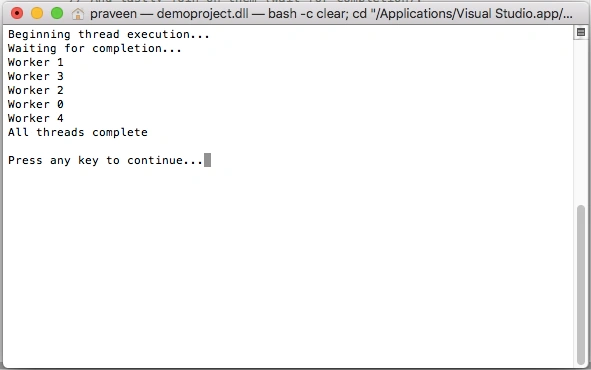
Now in the earlier examples, we were using the ThreadStart delegate, which takes no parameters. In practice, you will need to pass information to individual threads. To do this, you need to use a new delegate called ParamterizedThreadStart. This delegate specifies a method signature with a single parameter of type Object and returns nothing. Here is an example. Notice that we are passing data to a thread by using this delegate:
- using System;
- using System.Threading;
- public static class Program
- {
- public static void Main()
- {
- ParameterizedThreadStart operation =
- new ParameterizedThreadStart(WorkWithParameter);
- Thread theThread = new Thread(operation);
- theThread.Start("hello");
- // a second thread with (data) a different parameter
- Thread newThread = new Thread(operation);
- newThread.Start("goodbye");
- }
- private static void WorkWithParameter(object o)
- {
- string info = (string)o;
- for (int x = 0; x < 10; ++x)
- {
- Console.WriteLine($"{info}: {Thread.CurrentThread.ManagedThreadId}");
- Thread.Sleep(10);
- }
- }
- }
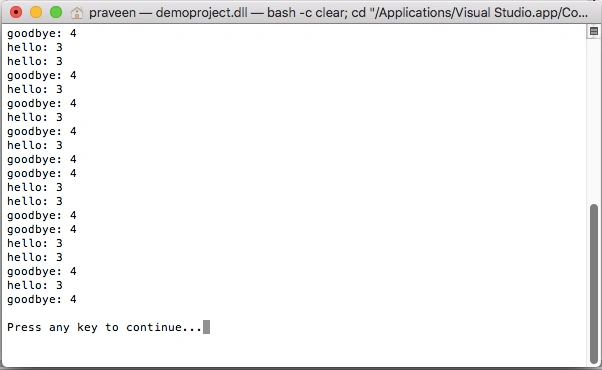
Examine the created method WorkWithParameter(object o). This is a method that takes a single Object parameter (and therefore can be a reference to any object). To use this as the starting point of a thread call, you can create a ParameterizedThreadStart delegate to point at this new method and use the Thread.Start method's overload that takes a single object parameter.
Where this Leads To
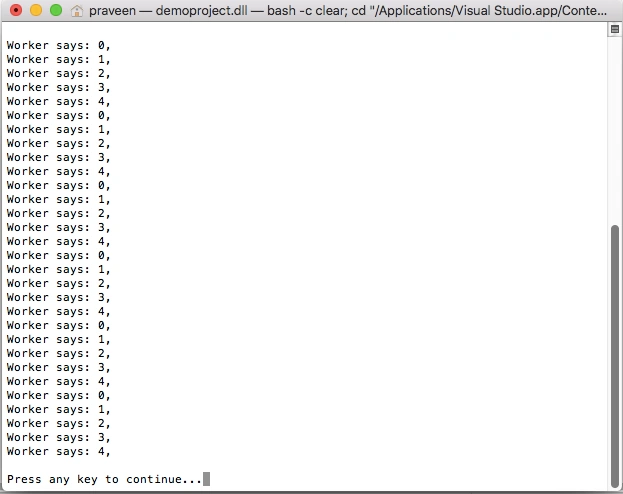
The topic of threading can sometimes fog the beginner once he or she enters the topics of synchronization, concurrency, parallelism, and the like. Let's takes the lock statement. The C# lock statement is really just a shorthand notation for working with the System.Threading.Monitor class type. Thus, if you were to look under the hood to see what lock() actually resolves, you would find code like the following:
- using System;
- using System.Threading;
- public class WhatIsAThread
- {
- private long refCount = 0;
- public void AddRef()
- {
- Interlocked.Increment(ref refCount);
- }
- public void Release()
- {
- if (Interlocked.Decrement(ref refCount) == 0)
- {
- GC.Collect();
- }
- }
- }
- internal class WorkerClass
- {
- public void DoSomeWork()
- {
- lock (this)
- {
- for (int i = 0; i < 5; i++)
- {
- Console.WriteLine("Worker says: " + i + ", ");
- }
- }
- // The C# lock statmement is really...
- Monitor.Enter(this);
- try
- {
- // Do the work.
- for (int i = 0; i < 5; i++)
- {
- Console.WriteLine("Worker says: " + i + ", ");
- }
- }
- finally
- {
- Monitor.Exit(this);
- }
- }
- }
- public class MainClass
- {
- public static int Main(string[] args)
- {
- // Make the worker object.
- WorkerClass w = new WorkerClass();
- Thread workerThreadA = new Thread(new ThreadStart(w.DoSomeWork));
- Thread workerThreadB = new Thread(new ThreadStart(w.DoSomeWork));
- Thread workerThreadC = new Thread(new ThreadStart(w.DoSomeWork));
- workerThreadA.Start();
- workerThreadB.Start();
- workerThreadC.Start();
- return 0;
- }
- }
Output
Threads: A Deeper Look
This section of the article will continue to be a reference for threading, but will also include the Operating System environment in which a thread can execute. Of the kernel objects, we will then cover the event thread synchronization object. Examining the environment can help us better understand how to effectively achieve concurrency and multithreading. The topic of thread creation will come later on in this article. We also want to know why threads can cost: stated loosely, threads are expensive. Each thread is provided with:
Thread kernel object: The OS allocates and initializes one of these data structures for each thread created in the system. The data structure contains a bunch of properties (discussed later in this chapter) that describe the thread. This data structure also contains what is called the thread's context. The context is a block of memory that contains a set of the CPU's registers. When Windows is running on a machine with an x86 CPU, the thread's context uses about 700 bytes of memory. For x64 and IA64 CPUs, the context is about 1,240 and 2,500 bytes of memory, respectively.
Thread environment block (TEB): The TEB is a block of memory allocated and initialized in user mode (address space that application code can quickly access). The TEB consumes 1 page of memory (4 KB on x86 and x64 CPUs, 8 KB on an IA64 CPU). The TEB contains the head of the thread's exception-handling chain. Each try block that the thread enters inserts a node in the head of this chain; the node is removed from the chain when the thread exists the try block. In addition, the TEB contains the thread's thread-local storage data as well as some data structures for use by the Graphics Device Interface (GDI) and OpenGL graphics.
User-mode stack: The user-mode stack is used for local variables and arguments passed to methods. It also contains the address indicating what the thread should execute next when the current method returns. By default, Windows allocates 1 MB of memory for each thread's user-mode stack.
Kernel-mode stack: The kernel-mode stack is also used when the application code passes arguments to a kernel-mode function in the Operating System. For security reasons, Windows copies any arguments passed from user-mode code to the kernel from the thread's user-mode stack to the thread's kernel-mode stack. Once copied, the kernel can verify the argument values, and since the application code can't access the kernel mode stack, the application can't modify the argument values after they have been validated and the OS kernel code begins to operate on them. In addition, the kernel calls methods within itself and uses the kernel-mode stack to pass its own arguments, to store a function's local variables, and to store return addresses. The kernel-mode stack is 12 KB when running on a 32-bit Windows system, and 24 KB when running on a 64-bit Windows system.
Using multiple threads for a single program can be done to run entirely independent parts of the program at once. This is called concurrency, and is frequently used in server-side applications. Using threads to break one big task down into multiple pieces that can execute concurrently is called parallelism. Conceptually speaking, a thread is unit of execution - an execution context that represents in-progress work being performed by a program. Windows must allocate a kernel object for each thread, along with a set of data structures. Each thread is mapped onto a processor by the Windows thread scheduler, enabling the in-progress work to actually execute. Each thread has an Instruction Pointer that refers to the current executing instruction. "Execution" consists of the processor fetching the next instruction, decoding it, and issuing it, one instruction after the other, from the thread's code. During the execution of some compiled code, program data will be routinely moved into and out of registers from the attached main memory. While these registers physically reside on the processor, some of the volatile state also belongs to the thread too. If the thread must be paused, this state will be captured and saved in memory so it can be later restored. Doing this enables the same IP fetch, decode, and issue process to proceed for the thread as though it was never interrupted. The process of saving or restoring this state from and to the hardware is called a context switch.
Execution Context
As in Windows, each thread in .NET has data associated with it, and that data is usually propagated to new threads. This data includes security information (the IPrinciple and thread identity), the localization strings, and transaction information from System.Transaction. By default, the execution context flows to helper threads, but this is costly: a context switch is a heavy-weight operation. To access the current execution context, the ExecutionContext class supplies static methods to control the flow of context information. So in the System.Threading namespace, there is an ExecutionContext class that allows you to control how a thread's execution context flows from one thread to another. Here is what the class looks like:
- public sealed class ExecutionContext : IDisposable, ISerializable
- {
- [SecurityCritical]
- public static AsyncFlowControl SuppressFlow();
- public static void RestoreFlow();
- public static Boolean IsFlowSuppressed();
- // Less commonly used methods are not shown
- }
Luiey AckermanPosted Jan 13, 2021, 4:55 AM
Great explanation Dave. Do you have idea how do I have a thread variable that can be added multiple different method so it will queue like the main UI thread? I'm intend to do in class library
Mahesh ChandPosted Jul 27, 2010, 10:06 AM
Well written Dave. Great work.