Introduction
Here we look at an example of a WCF Service in which we create a service for applying simple calculator functions (like add, subtract, multiply and divide).
Step 1: First we open the Visual Studio.
- Click on File:-> New:-> Project.
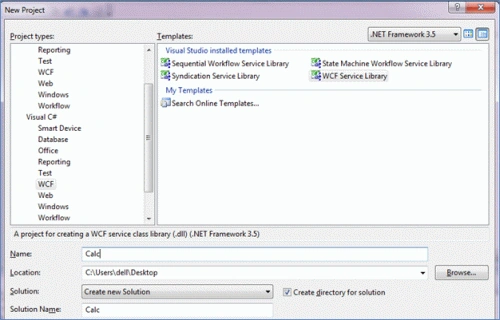
- After that, the following window will appear.
Here we select the WCF in the Project Type and then we select the WCF Service Library in it. After that, we specify the name of this library to be Calc (which we can define in the Name Section). And then we click on the OK Button.
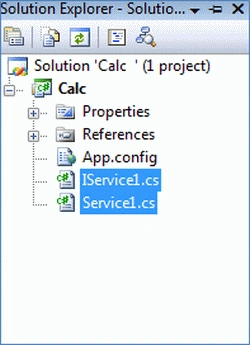
Step 2: When we click on the Ok Button, the Calc.cs will be opened. In the Solution Explorer, we delete the following files, since we want to create the service from the start.
Step 3: In Calc.cs, first we create the class public and then we create it as a WCF Data Contract. For this, we first add the namespace System.Runtime.Serialization. And then we write the following code.
Code
- using System.Runtime.Serialization;
- namespace Calc {
- [DataContract]
- public class Calc {
- [DataMember]
- public double n1;
- [DataMember]
- public double n2;
- }
- }
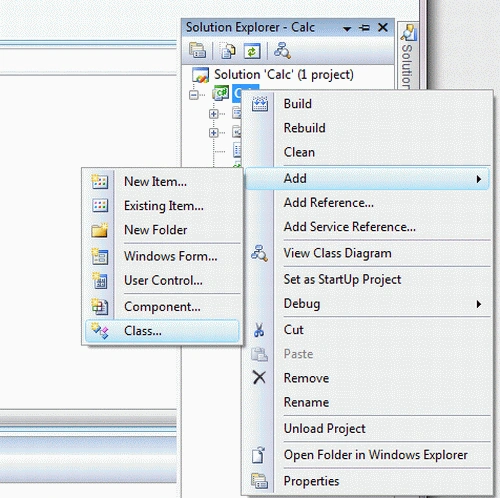
Step 4: After that we add another class.
Here we name it ICalcService.cs.
Step 5: Now we declare as an interface not a class so we change the code like this.
Code
- public interface ICalcService
- {}
Here we type the following operations:
- public interface ICalcService
- {
- double Add(double n1, double n2);
- double Subtract(double n1, double n2);
- double Multiply(double n1, double n2);
- double Divide(double n1, double n2);
- }
After that, we delare it as a Service Contract, which is in a different namespace:
System.ServiceModel. Now we look at the code:
- using System.ServiceModel;
- namespace Calc
- {
- [ServiceContract]
- public interface ICalcService
- {
- [OperationContract]
- double Add(double n1, double n2);
- [OperationContract]
- double Subtract(double n1, double n2);
- [OperationContract]
- double Multiply(double n1, double n2);
- [OperationContract]
- double Divide(double n1, double n2);
- }
- }
Step 6: After that we add another class:
CalcService.cs. It is an actual service implementation class, so here we can specify the ICalcService like this.
Code
- public class CalcService:ICalcService
- {}
Here we implement an interface by right-clicking and choosing the option Implement Interface Explicitly:
Now we add the ServiceBeahvior like this:
[ServiceBehavior(InstanceContextMode = InstanceContextMode.Single)]
It specifies the behavior of our service and InstanceContextMode.Single means it creates a single instace of our service. Now we write the following code in it.
- using System.ServiceModel;
- namespace Calc
- {
- [ServiceBehavior(InstanceContextMode = InstanceContextMode.Single)]
- public class CalcService: ICalcService
- {
- public double Add(double n1, double n2)
- {
- return n1 + n2;
- }
- public double Subtract(double n1, double n2)
- {
- return n1 - n2;
- }
- public double Multiply(double n1, double n2)
- {
- return n1 * n2;
- }
- public double Divide(double n1, double n2)
- {
- return n1 / n2;
- }
- }
- }
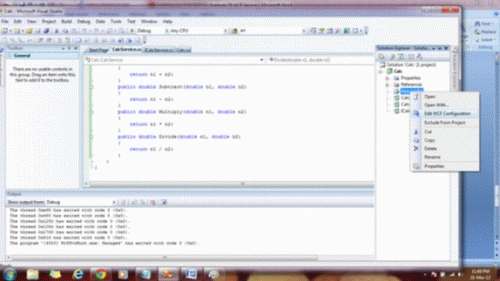
Step 7: Now we try to run the program; it can not be run since it is not yet completed. Now right-click on the
App.config file and select the Edit WCF Configuration option.
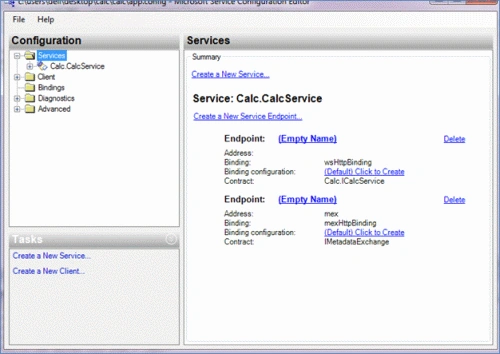
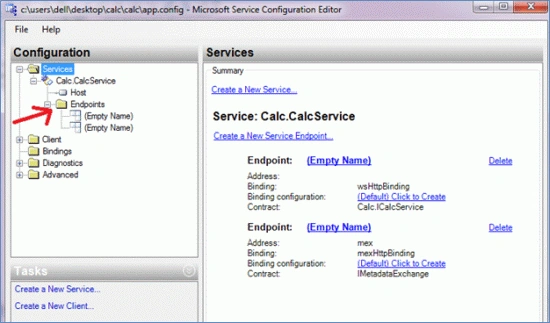
After that, the following window will appear.
After that, we select Calc.CalcService in the Configuration option:
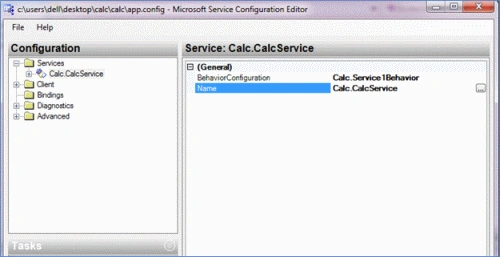
After that, we click on the Name Option:
After that, we click on EndPoints.
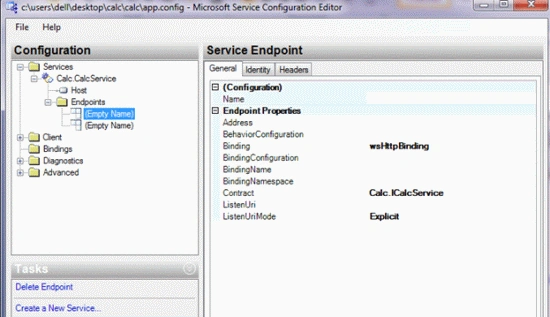
And then we click on Empty Name.
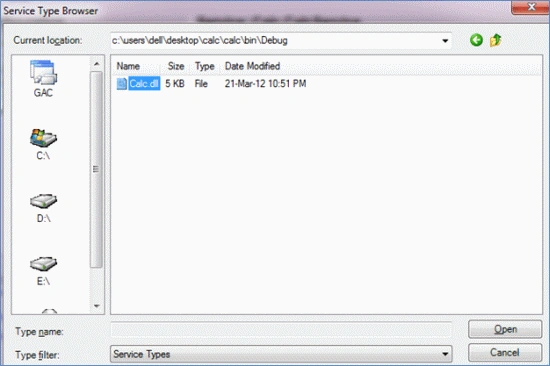
Here we click on Contract and again select the Calc.dll.
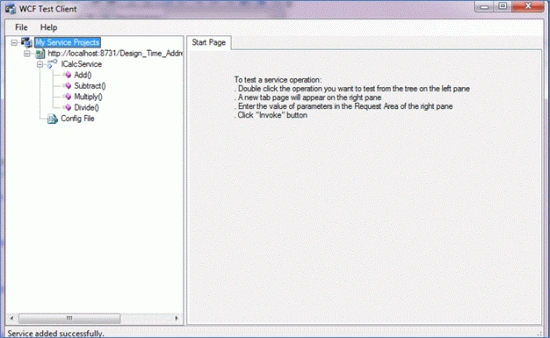
Step 8: Now we run the program.
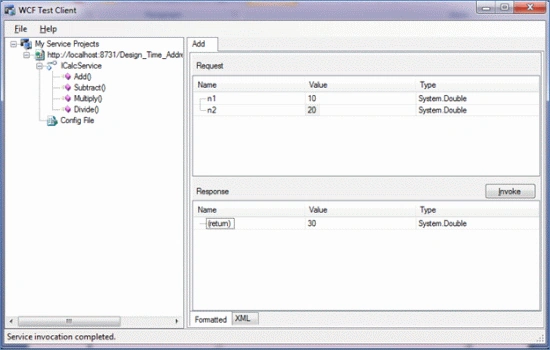
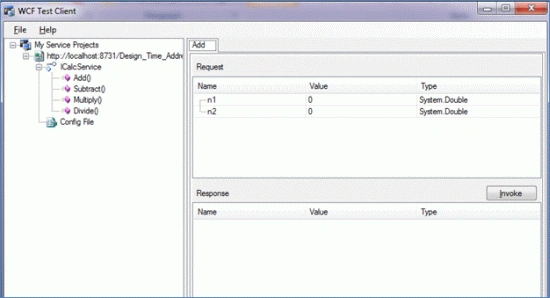
Step 9: After that, we click on Add or any other function. When we click on Add the following window will appear:
Here we enter values for n1 and n2 and click on the Invoke Button. The result will appear as:



Timmy CurtinPosted Jan 10, 2021, 8:45 AM
Does the port have to be 8731?
Sangaralingam SPosted Jul 25, 2017, 8:18 AM
Good for Beginners
Ramesh PalaniappanPosted Sep 10, 2016, 9:41 AM
Good one
SubashPosted Sep 8, 2016, 8:35 AM
Useful one
kalu singh raoPosted Jul 4, 2016, 2:07 AM
Nice...
RajaPosted Jun 28, 2016, 6:13 AM
Good one..
Venugopala Rao DivvalaPosted May 3, 2016, 8:23 AM
Good for Beginners
Amatya AgyeyPosted Apr 4, 2016, 8:23 AM
Very Nice .. Keep it up
Ajeet MishraPosted Sep 1, 2015, 6:56 AM
usefull
SharadPosted Jul 17, 2015, 3:47 AM
good one...
Shalin BhavsarPosted Mar 3, 2015, 5:01 AM
How to call WCF in asp.net C#?which is the another setting to provide security in WCF?is there any word or PDF with example then please share it [email protected]
Partha SaradhiPosted Feb 20, 2015, 5:30 AM
It is good to learn programming in WCF
Shalin BhavsarPosted Dec 16, 2014, 5:12 AM
I am using xamarin and want to call WCF service ?
Prem VermaPosted Nov 20, 2014, 6:14 AM
well discription
Gaurang BhadaniPosted Oct 14, 2014, 10:25 AM
good
sagar venkateshPosted Aug 26, 2014, 4:12 AM
Hi Mahak, the article is very good. i have one more question regarding WCF authentication, I have developed a WCF project which contains 2 simple services. In that 1 is for login authentication and another is just for displaying a data. i have used digest authentication (DigestAuthenticationHostFactory). Now it is authenticating for that service which ever is called first. but I want only to authenticate for Login service. How can this be achieved ?Its not mandatory that login service will be called first.
Neelam ParmarPosted Jul 24, 2014, 12:41 AM
Really Good One... Easy to understand for beginners... thanks a lot
Darling DollPosted Jan 1, 2014, 11:47 AM
With VS2013 netframework 4.5, an error: AddSync is not supported in the WCF test client because it uses type System.Threading.Tasks.Task System Double mscorlib , can you help me? Thanks. happy 2014
Mahak GuptaPosted Nov 26, 2013, 11:08 AM
Thanks
Santosh KumarPosted Nov 21, 2013, 9:31 AM
Very easy and nice description.
Former memberPosted Aug 6, 2013, 8:00 AM
Nice Article
Chandan SinhaPosted Jul 26, 2013, 2:25 PM
Very good working example of WCF. Great Work! Thanks.
Vinod Kumar ChennegowdaPosted Mar 26, 2013, 12:05 PM
Great explanations
Shaiju JanardhananPosted Dec 21, 2012, 4:18 AM
Thank U
Steve BlodgettPosted Mar 25, 2012, 5:16 PM
Thanks for the great article!