

MVC is an approach or method to manage a web application or software development process in three layers that have their own functionality, so that the project will be made in a more managed and distributed manner. Here distributed in the sense that the three layers Model, View, Controller can be given to individual team members.
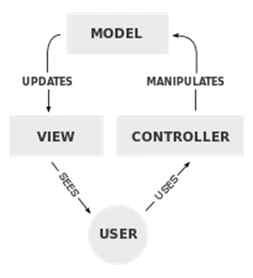
These three components are:
- Model: It contains the information about the data in the form of SQL queries manes database part.
- View: It is the front part that is viewed by the client and is mainly coded in a web application using a language like HTML, CSS, jQuery and so on.
- Controller: This provides the entire control of a project. Like if a link was clicked then what should be done next or what event will take effect. Here if more than one request are on the same page for the same controller then we will use a switch case statement to differentiate these operations.
See this entire process with an example on a PHP project that has a login, signup and user profile operation are done.
The Directory Structure will be look like this:
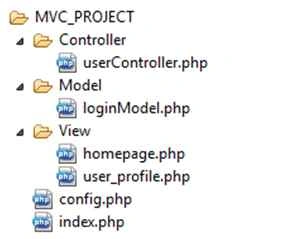
In the preceding figure mvc_project is the project name. There are three folders that it contains, Controller, Model and View. These have their own separate PHP file that has specific tasks. There are two files, config.php and index.php, that are used by every file.
Index.php code
- <?php
- require_once 'Controller/userController.php';
- $controller = new userController();
- $controller->handleRequest();
- ?>
- index.php file is the default file, in other words if we run this file locally on the local server by writing url:localhost/mvc_project then index.php is called automatically.
- In this file we require userController.php to access it's properties. Make it's object and call the userController file method in which a different operation will be handeled.
Config.php code
- <?php
- /**
- *
- */
- class Config {
- function __construct() {
- $this->localhost = "localhost";
- $this->username = "root";
- $this->password = "sandeep";
- $this->database = "mvc";
- }
- }
- ?>
- Config.php is the configuration file. It's class constructor is used and all the properties of the connection string are defined. I use MySQLi for this.
loginModel.php code snippet
- <?php
- class loginmodel
- {
- function __construct($host,$uname,$pass,$db)
- {
- $this->localhost = $host;
- $this->username = $uname;
- $this->password = $pass;
- $this->database = $db;
- }
- public function openDb()
- {
- $this->conn=new mysqli($this->localhost,$this->username,$this->password,$this->database);
- if ($this->conn->connect_error)
- {
- die("Connection failed: " . $this->conn->connect_error);
- }
- }
- public function closeDb()
- {
- $this->conn->close();
- }
- public function login($name,$password)
- {
- $this->openDb();
- $stmt=$this->conn->prepare("SELECT * FROM usertbl where name=? and password=?");
- $stmt->bind_param("ss",$name,$password);
- $stmt->execute();
- $res=$stmt->get_result();
- $stmt->close();
- $this->closeDb();
- return $res->fetch_object();
- }
- public function signup($name,$password,$address)
- {
- try
- {
- $this->openDb();
- $stmt=$this->conn->prepare("INSERT INTO USERTBL (name,password,address) VALUES (?, ?, ?)");
- $stmt->bind_param("sss", $name,$password,$address);
- $stmt->execute();
- $res= $stmt->get_result();
- $last_id=$this->conn->insert_id;
- $stmt->close();
- $this->closeDb();
- return $last_id;
- }
- catch (Exception $e)
- {
- $this->closeDb();
- throw $e;
- }
- }
- public function selectUserById($userid)
- {
- try
- {
- $this->openDb();
- $stmt=$this->conn->prepare("SELECT * FROM USERTBL WHERE id=?");
- $stmt->bind_param("i",$userid);
- $stmt->execute();
- $res=$stmt->get_result();
- $stmt->close();
- $this->closeDb();
- return $res->fetch_object();
- }
- catch(Exception $e)
- {
- $this->closeDb();
- throw $e;
- }
- }
- }
- >
- In this file I use a prepared statement of MySQLi to prevent SQL injection attacks.
- Bind_param is bindin of the parameter.
userController.php code snippet
- <?php
- session_start();
- require 'Model/loginModel.php';//include loginmodel.php file to access it’s property.
- require_once 'config.php';//include config.php.
- class userController
- {
- function __construct()
- {
- $this->conset = new Config();//make config file object to make connection string.
- $this->userobj = new loginModel($this->conset->localhost,$this->conset->username,$this->conset->password,$this->conset->database);
- }
- public function handleRequest()
- {
- $op = isset($_GET['op']) ? $_GET['op'] : NULL;
- switch ($op)
- {
- case 'logout' :
- $this->signout();
- break;
- case 'login':
- $this->login();
- break;
- case 'signup' :
- //To get user Details through it's id
- $this -> signUp();
- break;
- case NULL :
- if (isset($_SESSION['userid']))
- {
- $user = $this -> userobj -> selectUserById($_SESSION['userid']);
- include 'View/user_profile.php';
- }
- else
- {
- include 'View/homepage.php' ;
- }
- break;
- default:
- // other operation
- }
- }
- public function signout()
- {
- session_destroy();
- $this->redirect("index.php");
- }
- public function redirect($location)
- {
- header('Location:'.$location);
- }
- public function login()
- {
- if (isset($_SESSION['userid']))
- {
- $user = $this -> userobj -> selectUserById($_SESSION['userid']);
- include 'View/user_profile.php';
- }
- elseif (isset($_POST['loginbtn']))
- {
- $name = $_POST['name'];
- $password = $_POST['password'];
- $user = $this->userobj->login($name, $password);
- if ($user)
- {
- $_SESSION['userid'] = $user->id;
- include 'View/user_profile.php';
- }
- }
- else
- {
- echo "Wrong Admin name/Password";
- }
- }
- public function signUp()
- {
- if (isset($_SESSION['userid']))
- {
- $user = $this -> userobj -> selectUserById($_SESSION['userid']);
- include 'View/user_profile.php';
- }
- elseif (isset($_POST['signupbtn']))
- {
- $name = $_POST['name'];
- $password = $_POST['password'];
- $address = $_POST['address'];
- $user = $this -> userobj ->signup($name,$password,$address);
- $_SESSION['userid'] = $user;
- $user = $this -> userobj -> selectUserById($_SESSION['userid']);
- include 'View/user_profile.php';
- }
- else
- {
- echo "blank";
- }
- }
- }
- ?>
- The user controller session is begun in the first line of the file.
View/Homepage.php code snippet
- <!Doctype html>
- <html>
- <head>
- <title>Homepage</title>
- </head>
- <body>
- <h1>Sign Up</h1>
- <form method="post" action="index.php?op=signup">
- <input type="text" id="name" name="name" placeholder="name" required/>
- <input type="password" id="password" name="password" placeholder="password" required/>
- <input type="text" id="address" name="address" placeholder="address" required />
- <input type="submit" id="submitbtn" name="signupbtn" value="Signup"/>
- </form>
- <h1>Login</h1>
- <form method="post" action="index.php?op=login">
- <input type="text" id="name" name="name" placeholder="name" required/>
- <input type="password" id="password" name="password" placeholder="password" required/>
- <input type="submit" id="submitbtn" name="loginbtn" value="Login"/>
- </form>
- </body>
- </html>
The following describes how to run the process:
- index.php is executed.
- Because there no operation is provided, in index.php, in the call of the userController.php file's handleRequest method, op=null so we include homepage.php in this file.
- When a login or submit button is provided the corresponding operation will be executed and can be seen in the browser URL that is evaluated By $_GET[‘op’] in the userController.php file and the corresponding operation is execuded.
Points to be noted:
- All controlling code should be contained in the controller file.
- Every table in the database has a different model file like loginmodel.php.
- All possible quires to that table will be in it's corresponding model.
- To control various entities, like user related operations, each can have a different controller file.
- If the project contains an admin Control Panel then it is treated as a different project, all files will be made different from the user client. The directory structure can be like in these types of project:

- If a session is maintained then it will always begin at the first line of the controller file.
Summary
In this article we see how to implement MVC directory structure in PHP and got to know how it is managed using PHP5 with it's OOP approach.
Asfend YarPosted Feb 29, 2016, 10:57 AM
nice
Sandeep KumarPosted Aug 13, 2015, 7:16 AM
Thank you Santhakumar Munuswamy sir :)
Santhakumar MunuswamyPosted Aug 12, 2015, 3:07 PM
Good Article. Thanks for sharing
Sandeep KumarPosted Aug 10, 2015, 11:26 AM
Thank you Rakesh Chavda sir :)
Sandeep KumarPosted Aug 10, 2015, 11:26 AM
Thank you Gopi Chand Sir :)
RakeshPosted Aug 10, 2015, 10:46 AM
Good one
Gopi ChandPosted Aug 10, 2015, 9:38 AM
Well written
Sandeep KumarPosted Aug 10, 2015, 7:55 AM
Thank You Sibeesh Venu sir :)
Sandeep KumarPosted Aug 10, 2015, 7:54 AM
Thank you Ankit Bansal Sir :)
Sandeep KumarPosted Aug 10, 2015, 7:51 AM
Thank you Gagan Sikri sir:)
Sandeep KumarPosted Aug 10, 2015, 7:51 AM
Thank you Debasis Saha sir :)
Sandeep KumarPosted Aug 10, 2015, 7:51 AM
Thank You Rahul Sir :)
Sandeep KumarPosted Aug 10, 2015, 7:50 AM
Thank you Nilesh Jadav sir :)
Rahul PrajapatPosted Aug 10, 2015, 4:13 AM
Nice article sandeep sir, thanks for sharing
Debasis SahaPosted Aug 10, 2015, 3:35 AM
Good one....
Gagan SikriPosted Aug 10, 2015, 2:31 AM
Good One!
Ankit BansalPosted Aug 10, 2015, 2:07 AM
Thanks for sharing
Sibeesh VenuPosted Aug 10, 2015, 1:02 AM
Nice Share
Rajeesh MenothPosted Aug 10, 2015, 12:46 AM
Good Start :)
Nilesh JadavPosted Aug 10, 2015, 12:13 AM
Nice Article sir :)
Sandeep KumarPosted Aug 9, 2015, 8:32 PM
Thank you pankaj sir.
Sandeep KumarPosted Aug 9, 2015, 8:31 PM
Thank you neeraj sir.
Sandeep KumarPosted Aug 9, 2015, 8:31 PM
Thank you Afzaal Ahmad Zeeshan sir for your suggestion ,I'll take care of it for next time.
Pankaj Kumar ChoudharyPosted Aug 9, 2015, 7:55 PM
Nice Start Keep it up ...............
Neeraj KumarPosted Aug 9, 2015, 6:07 PM
Good Start Sandeep Kumar.
Afzaal Ahmad ZeeshanPosted Aug 9, 2015, 1:17 PM
A good start Sandeep, but in any cases. You must never fill in the password field on a public place. You should consider using ***** or something like <password> to fill that variable.