

ABBYY FlexiCapture Engine is a Software Development Kit (SDK) for extracting the data from different types of documents, such as PDF, images, or scanned documents, etc. It is one of the best solutions for developers to extract the text content from letters, invoices, forms, identity cards etc. Apart from this text capturing task, we can also perform the image processing ( Best Quality) task.
Note: ABBYY FlexiCapture Engine is not an open source application. You should have the license for using this application. You can get a trial license by sending the request via your business e-mail id.
FlexiLayout Studio
ABBYY FlexiLayout Studio is an application software through which you get text from structured, semi-structured and unstructured documents. The application contains the different tools for extracting the data from your document, such as - Block, Element, Group, Checkmark etc. Using this application, we can mark the area from where we have to get the data. You can export the AFL File (.afl extension), once you mark all the required text and values.
Getting text from any complex document, using FlexiLayout Studio.
- Install FlexiLayout Studio which you get from the ABBYY SDK technology.
- Open the application and create a project, as shown below.

- Add your file (Image, PDF, Scan etc.) using the Add Images button.

- Double-click on your file to display the file in the documents area.
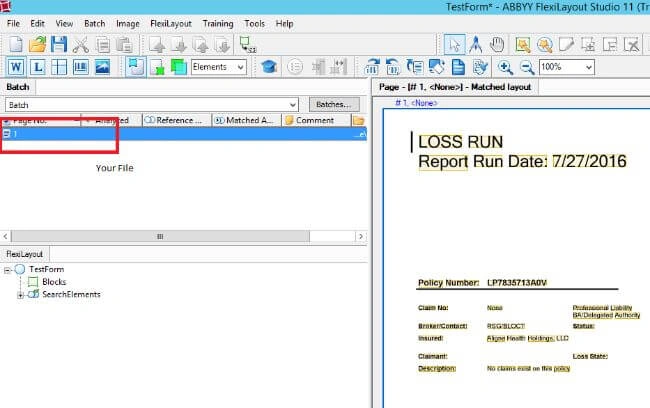
- Create a document as a Training set.

- Now, let's suppose, we have to get Policy Number, Claim No, Insured Name etc. from the document. A FlexiLayout section contains Blocks and Elements as a mark which indicates the Marked area on your document. So, create the block and element whenever required.

- For creating an element, use the element tool to select the area that you want to capture by dragging the tool. For data separation, you can create a group and add element in created group, as the following image.

- Now, create a value of policy number. And, do the same for all the required data filed.
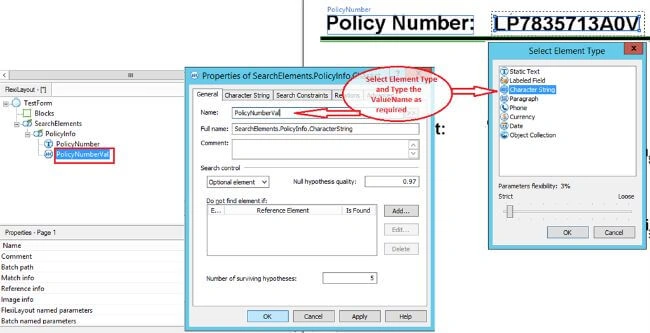
- Create a relation for an element for accessing the element value by its name in block section.


You have to create an element relation with all its value elements. And, the value element will be referenced by the block. This will be accessible by different programming languages, as C#, VB, C++ etc. - Now, create a block for accessing the element.

You have to perform the above task for referencing all the blocks from an element. Following are the final element and block sets through which we will access the field value.
- Now, export the project and save AFL (Abby FlexiLayout) file with a name you want.

The above was the AFL project creation task to access the data from any type of the document. Now, we will use this AFL file in my C# programming to access the data.
Using FlexiLayout file in Windows or Web application to access the data.
- Create a Windows or Web application in which you want to access the data. Here, we are creating a Windows application.
- Open Visual Studio.
- Go to file menu and choose New Project.
- Select Windows form application, Type the name of project and click OK button.
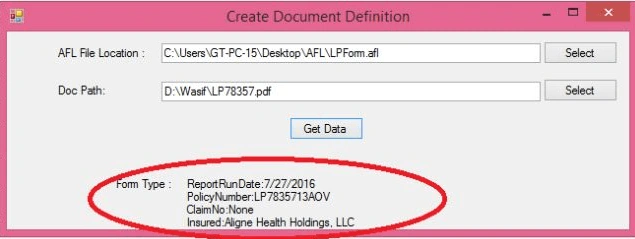
- Design the form as the following. We are using two text boxes and one button to locate the the FlexiLayout file(.afl extension), and the document whose data we have to extract.

- Go to Code behind and add FCEngine.dll in your reference folder. (From ABBYY SDK which you get from ABBYY technology.)

- Write the following code in your code behind and run the application.
vishranti kalePosted Nov 30, 2018, 3:39 AM
Hi, if i tagged table as image in abby, I am not getting its coordinates (region), i am not able to parse it in .net. how to do it? can you help me with this, my emailId is [email protected] Thanks in advance
Ramakrishna ItamsettiPosted Dec 8, 2017, 5:13 AM
Hi kumar trying to integrate flexi capture engine to my .Net windows project please help to me..... how can i integrate and how to get specified data into Excel sheet i need urgently if it is possible please send me detaild code to my emailid [email protected]
prema lathaPosted Aug 7, 2017, 2:42 AM
Field param does not contain definition and method.. what is that error. please reply .. what u have done.. i need to use this code and can u say how u used this filed param. u have any video for it?
Ravi KandelPosted Aug 14, 2016, 2:59 AM
Nice
Vignesh ManiPosted Aug 11, 2016, 11:37 AM
Nice
farooq smdPosted Aug 11, 2016, 10:40 AM
Nice one