

Introduction
Since the role of JavaScript is increasing day by day in my recent projects, currently we are using Dojo and Angular JS part SOA based projects. My managers are forcing me to use a TDD style of development including JavaScript code. I have been able to find a few interesting tools to support Test Driven Development (TDD) with JavaScript and that are also well integrated with Visual Studio 2012. I want to share that with you in this article.
Currently used tools in my projects:
- Jasmine: BDD, framework independent, easy integration with Ruby projects and continuous builds.
- Js-test-driver: The goal of JsTestDriver is to build a JavaScript test runner that easily integrates with continuous builds systems and allows running tests on multiple browsers quickly to ease TDD style development.
Acceptance Test-Driven Development (ATDD)
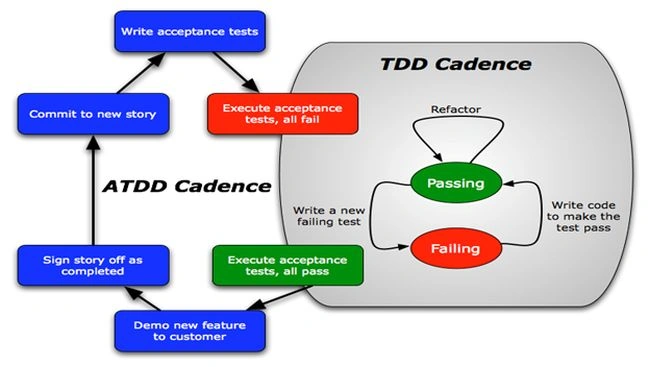
TDD is extremely valuable, but you need more to get great unit test coverage and still not deliver value to the customer. ATDD focuses on the following complete features and functionality:
- ATDD: macro view
- TDD: micro view
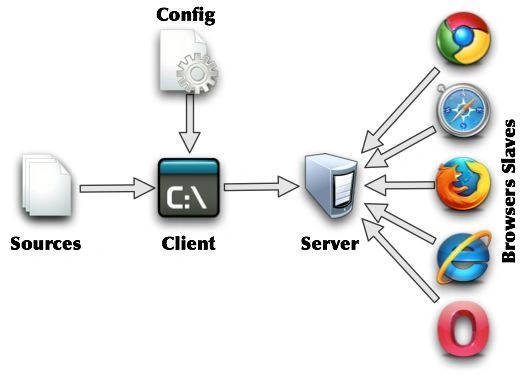
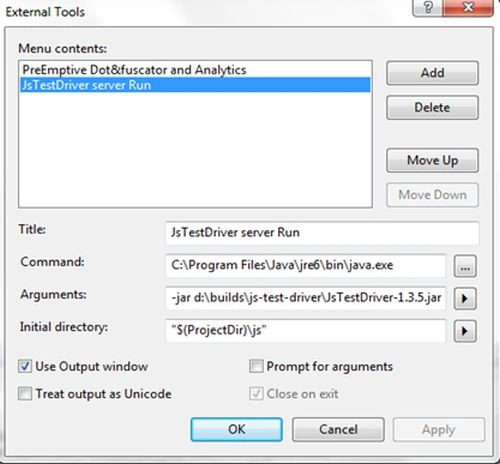
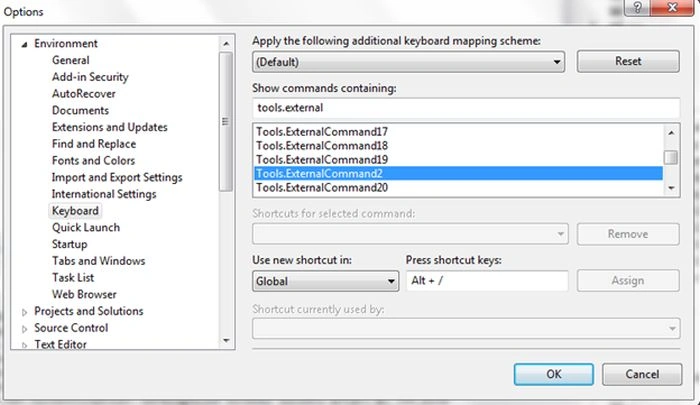
JsTestDriver is a powerful framework for running unit tests for JavaScript code. The main advantage of it is that it can be executed from the command line on automated continuous integration environments, part of your unit testing framework. I usually use Visual Studio 2012 and JsTestDriver to be attached to it using the "External Tools" mechanism.
Overview of how JsTestDriver works at runtime
 Part 1: How to run JavaScript test cases using JsTestDriver without any plugins (Visual Studio and Eclipse)
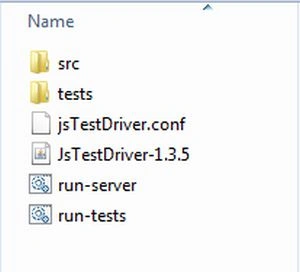
The file structure as shared in code files with the folder name "js-test-driver" is:
Part 1: How to run JavaScript test cases using JsTestDriver without any plugins (Visual Studio and Eclipse)
The file structure as shared in code files with the folder name "js-test-driver" is:
 Steps to setup and run the JavaScript tests
Step 1: Download the JsTestDriver jar file from "http://code.google.com/p/js-test-driver/downloads/list" and place it in your local machine.
Step 2: For small projects just create two folders named "src" and "tests" including a configuration file named "jsTestDriver.conf".
Step 3: Place your JavaScript code files in the folder named "src" and created TestCases either using a prototype or using an inline declaration and place in the folder "tests". Find the detailed description as given below related to how to write Test Cases in JstestDriver and the details of the command line options in JsTest Driver as given below.
Step 4: Just to create bat files named "run-server.bat" (to start the server on a specified port) and "run-tests.bat" (to run various tests on the specified browsers).
Step 5: Run the server "run-server.bat" to start the server and later run "run-tests.bat" containing tests with specified command-line switches. Or call the same to execute from the command line on an automated continuous integration environment, currently, we are using Team City for that.
run-server.bat
java -jar JsTestDriver-1.3.5.jar --port 1234
run-tests.bat
java -jar JsTestDriver-1.3.5.jar --tests all --browser "C:\Program Files\Mozilla Firefox\firefox.exe"
There are two ways to declare tests in the TestCase.
Using prototype
Using the inline declaration
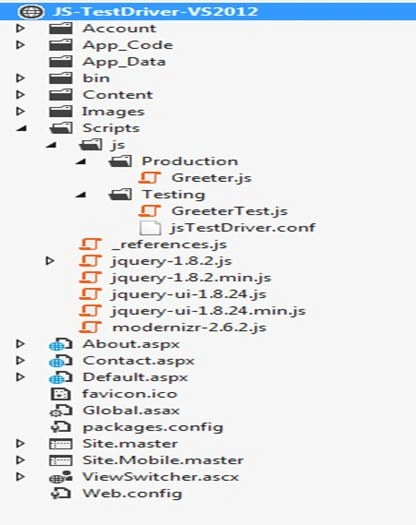
Screen spec of my JavaScript test case file:
Steps to setup and run the JavaScript tests
Step 1: Download the JsTestDriver jar file from "http://code.google.com/p/js-test-driver/downloads/list" and place it in your local machine.
Step 2: For small projects just create two folders named "src" and "tests" including a configuration file named "jsTestDriver.conf".
Step 3: Place your JavaScript code files in the folder named "src" and created TestCases either using a prototype or using an inline declaration and place in the folder "tests". Find the detailed description as given below related to how to write Test Cases in JstestDriver and the details of the command line options in JsTest Driver as given below.
Step 4: Just to create bat files named "run-server.bat" (to start the server on a specified port) and "run-tests.bat" (to run various tests on the specified browsers).
Step 5: Run the server "run-server.bat" to start the server and later run "run-tests.bat" containing tests with specified command-line switches. Or call the same to execute from the command line on an automated continuous integration environment, currently, we are using Team City for that.
run-server.bat
java -jar JsTestDriver-1.3.5.jar --port 1234
run-tests.bat
java -jar JsTestDriver-1.3.5.jar --tests all --browser "C:\Program Files\Mozilla Firefox\firefox.exe"
There are two ways to declare tests in the TestCase.
Using prototype
Using the inline declaration
Screen spec of my JavaScript test case file:

How to write Test Cases in JsTestDriver?
- MyTestCase=TesCase("MyTestCase");
- MyTestCase.prototyp.testA=function( ) {
- };
- MyTestCase.prototype.testB=function( ) {
- };
- TestCase("MyTestCase", {
- MyTestCase.prototype.testA=function( ) {
- };
- MyTestCase.prototype.testB=function( ) {
- };
Join the conversation! Your thoughts help the community grow.