

Introduction
In this article, I have explained the different ways of accessing data from DataFrames in Python. Before reading this article, I will suggest you read the previous article -
- DataFrames in Python where you learn what DataFrame in Python is and how will you create it.
- Learn DataFrame Attributes in Python where you learn about attributes of DataFrame in Python.
Now, let's understand how can we access the values of a DataFrame.
We can access data of DataFrames in many ways,
- Value
- Columns
- Rows
We are creating a DataFrame using the following commands. Then, we will see how we can access its rows, columns, & values and understand how it can be done in different ways.
##Creating DataFrame

import pandas as pd
dictObj = {'EmpId' : ['E01','E02','E03','E04'],
       'EmpName' : ['Raj','Atul','Reena','Ayushi'],
       'Department' : ['IT','IT','HR','Accounts']}
df=pd.DataFrame(dictObj, index=['First','Second','Third','Fourth'])

##Output
                  EmpId     EmpName        Department
First              E01       Raj               IT
Second             E02       Atul              IT
Third              E03       Reena             HR
Fourth             E04       Ayushi         Accounts
Accessing DataFrame Value
We can access the individual value of DataFrame in the following ways.
By using row name and row index number
Using the row name and row index number along with the column, we can easily access a single value of a DataFrame.
Syntax: <DataFrame Object> . <column name> [<row name/ row index number>]
Example
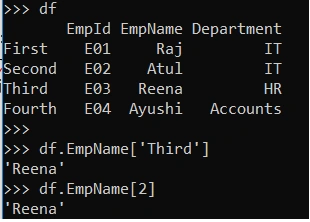
df.EmpName[‘Third’]   ##Access using row name
##Output  Reena

df.EmpName[2]        ## Access using row index
##Output Reena
Output
By using at and iat attributes
We can also access a single value of a DataFrame with the help of “at” and “iat” attributes.
| Syntax | Purpose |
| <DataFrame Object>.at [<row name>,<column name>] | Access a single value by row/column name. |
| <DataFrame Object>.iat [<row index no>,<column index no>] | Access a single value by row/column index no |
Example
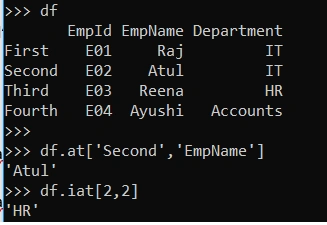
df.at[‘Second’,’EmpName’]
##Output   Atul

df.iat[2,2]
## Output   HR
Note
At and iat take two arguments. If we pass only one argument, then it will generate an error. See the below picture for error.

Accessing Single DataFrame Column
We can also access column of a DataFrame by using the below syntax,
<DataFrame Object> [ <Column Name> ]
<DataFrame Object> . <Column Name>
Like
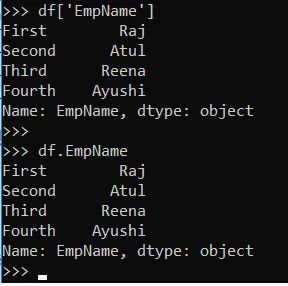
df [‘EmpName’]    ## First Way

df.EmpName    ## Second Way
Output
Accessing Multiple DataFrame Columns
We can also access multiple columns of a DataFrame by passing a list of columns name inside the square bracket.
Syntax : <DataFrame Object> [ [<Column Name1> , <Column Name2>,<Column Name3> ]]
Example
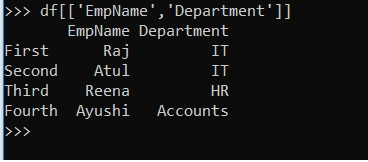
df [ [‘EmpName’,’Department’] ]
Output
Accessing DataFrame Rows
We can access rows of a DataFrame in two ways.
By using loc and iloc
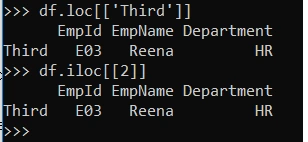
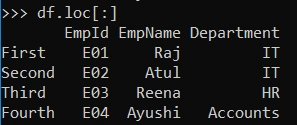
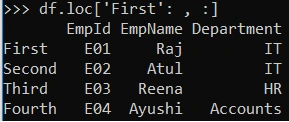
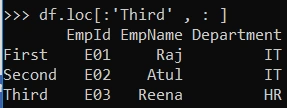
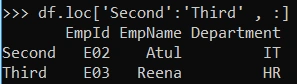
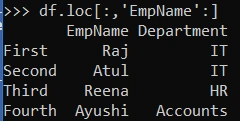
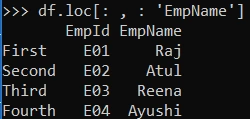
We can access a single row and multiple rows of a DataFrame with the help of “loc” and “iloc”.
| Syntax | Purpose |
| <DataFrame Object>.loc [ [ <row name>] ] | Access a single row or multiple rows by name. |
| <DataFrame Object>.iloc [ [<row index no> ] ] | Access a single or multiple rows by row index no |

Join the conversation! Your thoughts help the community grow.