

This article show how to access Outlook Contact list
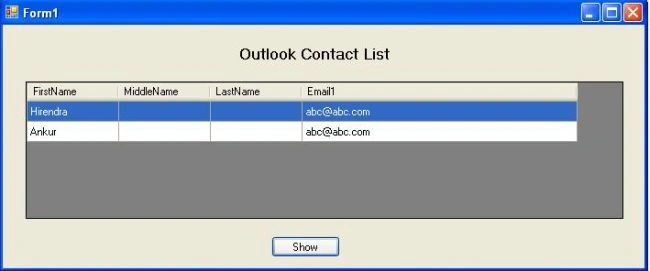
For better understanding we take an example. In this example there is one window form with datagridview. We have to show all contacts in this datagridview, something like this:
Start working with Microsoft.Office.Interop.Outlook:
Add referance of Microsoft.Office.Interop.Outlook library(example is using Microsoft.Office.Interop.Outlook 12.0)
Add one DatagridView and one button on form1.
And declare:
Microsoft.Office.Interop.Outlook.Items OutlookItems;
Microsoft.Office.Interop.Outlook.Application outlookObj;
MAPIFolder Folder_Contacts;
Work on Form1:
private void Form1_Load(object sender, EventArgs e)
{
Microsoft.Office.Interop.Outlook.Application outlookObj = new Microsoft.Office.Interop.Outlook.Application();
MAPIFolder Folder_Contacts = (MAPIFolder)outlookObj.Session.GetDefaultFolder(OlDefaultFolders.olFolderContacts);
OutlookItems = Folder_Contacts.Items;
for (int i = 0; i < oItems.Count; i++)
{
Microsoft.Office.Interop.Outlook.ContactItem contact = (Microsoft.Office.Interop.Outlook.ContactItem)OutlookItems[i + 1];
dataGridView1.Rows.Add();
if (contact.FirstName != null)
{
dataGridView1.Rows[i].Cells[0].Value = contact.FirstName;
}
else
{
dataGridView1.Rows[i].Cells[0].Value = "";
}
if (contact.MiddleName != null)
{
dataGridView1.Rows[i].Cells[1].Value = contact.MiddleName;
}
else
{
dataGridView1.Rows[i].Cells[1].Value = "";
}
if (contact.LastName != null)
{
dataGridView1.Rows[i].Cells[2].Value = contact.LastName;
Aruna GurunathanPosted Feb 10, 2014, 7:38 AM
This Works fine for Window application, Can you suggest some for web application
Sunil GoudPosted Sep 7, 2011, 6:36 AM
The above code not get list of contacts in outlook 2010
Anilkumar ManthenaPosted Mar 14, 2011, 1:18 AM
Is there any way to find out the list of delegated users from active directory using C# i.e., who are delegated using outlook/exchange account. Thanks in advance...
Rafal LukowiakPosted Mar 3, 2011, 3:26 PM
How to read other contacts, like a public contacts? (exchange)