

Accordion control provides us multiple collapsible panes or panels where only one can be expanded at a time. Each AccordionPane control has a template for its Header and its content. Before proceeding, I recommend you to read:
Let's Begin:
1. Go to File, New, then Website and Create an Empty Website. Add a webform(Default.aspx) in it.
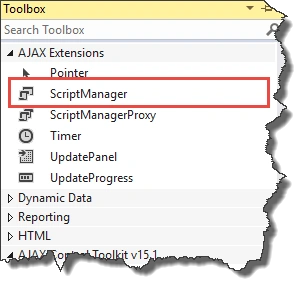
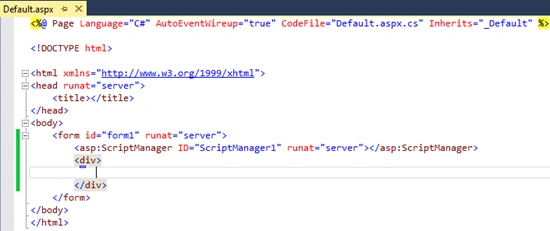
2. Add ScriptManager from AJAX Extensions (from v15.1 of AJAX Control Toolkit, ToolScriptManager is removed. Use Standard Script Manager).
2. Add ScriptManager from AJAX Extensions (from v15.1 of AJAX Control Toolkit, ToolScriptManager is removed. Use Standard Script Manager).
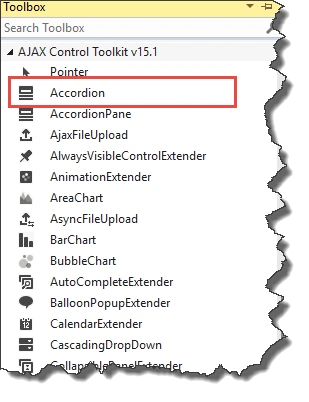
3. Go to AJAX Control Toolkit in Toolbox and drop Accordion Control on Default.aspx.
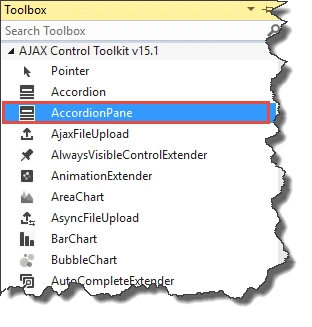
4. Add AccordionPane in Panes collection of the Accordion.
AccordionPane contains two parts i.e. Header and Content. When AccordionPane is collapsed, only Header part is visible to us.
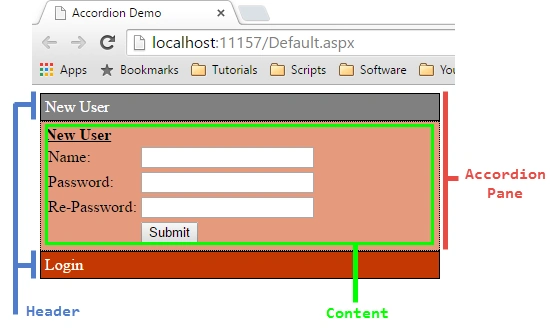
Code (Default.aspx)
- <%@ Page Language="C#" AutoEventWireup="true" CodeFile="Default.aspx.cs" Inherits="_Default" %>
- <%@ Register Assembly="AjaxControlToolkit" Namespace="AjaxControlToolkit" TagPrefix="ajaxToolkit" %>
- <!DOCTYPE html>
- <html xmlns="http://www.w3.org/1999/xhtml">
- <head runat="server">
- <title>Accordion Demo</title>
- <style>
- .headerCssClass{
- background-color:#c33803;
- color:white;
- border:1px solid black;
- padding:4px;
- }
- .contentCssClass{
- background-color:#e59a7d;
- color:black;
- border:1px dotted black;
- padding:4px;
- }
- .headerSelectedCss{
- background-color:#808080;
- color:white;
- border:1px solid black;
- padding:4px;
- }
- </style>
- </head>
- <body>
- <form id="form1" runat="server">
- <asp:ScriptManager ID="ScriptManager1" runat="server"></asp:ScriptManager>
- <div style="width:400px;">
- <ajaxToolkit:Accordion ID="Accordion1" runat="server" HeaderCssClass="headerCssClass" ContentCssClass="contentCssClass" HeaderSelectedCssClass="headerSelectedCss" FadeTransitions="true" TransitionDuration="500" AutoSize="None" SelectedIndex="0">
- <Panes>
- <ajaxToolkit:AccordionPane ID="AccordionPane1" runat="server">
- <Header>New User
- </Header>
- <Content><b><u>New User</u></b>
- <table>
- <tr><td>Name:</td><td><input type="text" /></td></tr>
- <tr><td>Password:</td><td><input type="text" /></td></tr>
- <tr><td>Re-Password:</td><td><input type="text" /></td></tr>
- <tr><td></td><td><input type="button" value="Submit"/></td></tr>
- </table>
- </Content>
- </ajaxToolkit:AccordionPane>
- <ajaxToolkit:AccordionPane ID="AccordionPane2" runat="server">
- <Header>Login</Header>
- <Content>
- <b><u>Login User</u></b>
- <table>
- <tr><td>Name:</td><td><input type="text" /></td></tr>
- <tr><td>Password:</td><td><input type="text" /></td></tr>
- <tr><td></td><td><input type="button" value="Login"/></td></tr>
- </table>
- </Content>
- </ajaxToolkit:AccordionPane>
- </Panes>
- </ajaxToolkit:Accordion>
- </div>
- </form>
- </body>
- </html>
In the above code, I have used .headerCssClass (CSS class to use for the headers),.contentCssClass (CSS class to use for the content) and .headerSelectedCss (CSS class to use for the Selected headers) class for styling the Accordion Control.
Working Preview
Working Preview

Accordion control have several other properties like:
- FadeTransitions: FadeTransitions is used for adding the transition effect.
- SelectedIndex: The AccordionPane to be initially visible.
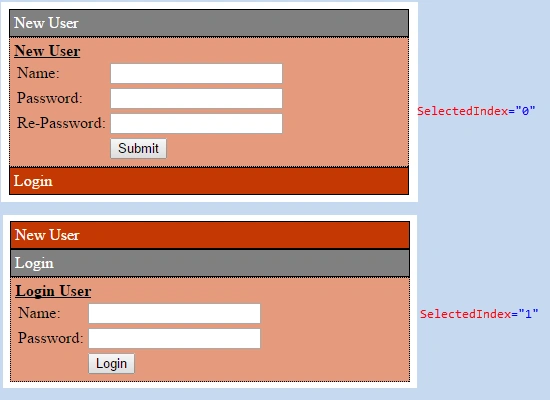
- TransitionDuration: Number of milliseconds to animate the transitions.
- Panes: Collection of AccordionPane controls.
Hope you liked it. Thanks!
Leela RameshPosted Dec 4, 2017, 11:04 AM
How does the transition works?
Delpin Susai RajPosted Aug 28, 2016, 11:10 AM
Nice
tejas gujarPosted Nov 29, 2015, 2:03 PM
Good one. i can easily understand ajax accordination tool
Anoop Kumar SharmaPosted Nov 21, 2015, 10:53 PM
Thanks Santhakumar Munuswamy..!!
Santhakumar MunuswamyPosted Nov 21, 2015, 11:48 AM
Good one
Anoop Kumar SharmaPosted Oct 19, 2015, 10:12 AM
Thanks Sibeesh Venu..!! :-)
Anoop Kumar SharmaPosted Oct 19, 2015, 10:12 AM
Thanks Mukesh Kumar..!!
Anoop Kumar SharmaPosted Oct 19, 2015, 10:12 AM
Thanks Ankit Bansal..!!
Anoop Kumar SharmaPosted Oct 19, 2015, 10:11 AM
Thanks Nilesh Jadav :-)
Anoop Kumar SharmaPosted Oct 19, 2015, 10:11 AM
Thanks Harshad Pansuriya..!!
Sibeesh VenuPosted Oct 19, 2015, 8:54 AM
Nice Share
Mukesh KumarPosted Oct 19, 2015, 12:59 AM
Good One !
Ankit BansalPosted Oct 19, 2015, 12:42 AM
nice one..thanks for sharing with us..
Nilesh JadavPosted Oct 19, 2015, 12:15 AM
Good work !!
Harshad PansuriyaPosted Oct 19, 2015, 12:04 AM
Nice one