

Introduction:
This article describes the construction of a custom control used to display a daily Dilbert comic on a site. The control is extremely simple to build and it serviced through a public web service made available by Chandu Thota on eSynaps.com. Once built, the control can be dropped on any web page and it will retrieve a new comic from the Scott Adams Dilbert archives for display each day.
The web service returns either a path to the image file or an encoded copy of the image. This example just uses the file path option to populate the image upon initialization.
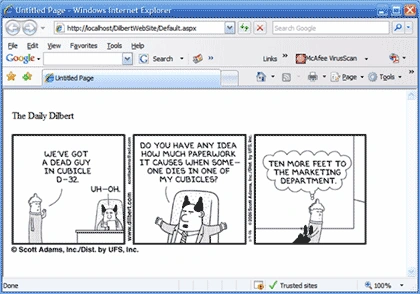
Figure 1: Daily Dilbert Custom Control in Use
Getting Started:
The files included with this project include a web control library project and a demonstration web site. In order to get started, open the included zip file and install the two projects onto your file system. Open IIS and create a virtual directory for the web application. Open the solution into Visual 2005 and make any changes necessary to bring both projects into the solution. Once properly configured, your solution explorer should show these projects, references, and files:
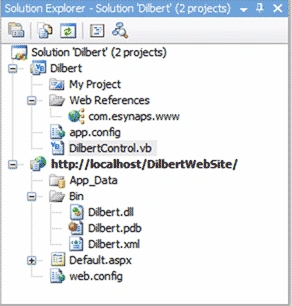
Figure 2: Solution Explorer with Web App and Control Library
In examining the solution, note that the "Dilbert" control library contains only a single control and that control is called "DilbertControl". This project also includes a web reference that points to the http://www.esynaps.com/WebServices/DailyDiblert.asmx?op=DailyDilbertImagePath; this public site supplies the web service used to capture the Dilbert archive cartoon displayed by the control.
The web application contains only a single web page (default.aspx)
and includes a reference to the "Dilbert" DLL.
The web application serves as a container used to test the custom control. The
page itself contains no addition code and the only other element on the page
displays the text "The Daily Dilbert".
The Code: Dilbert Control
The "Dilbert" custom control is constructed to retrieve
the information from the web service upon initialization; in the information
retrieved is a path to the URL of the cartoon image. Upon initialization, the
URL is retrieved and when the control is rendered, an image is created and
added; its imageURL property is set to point to the URL captured from the web
service.
In examining the code, note that, only the default imports are included in the
project. The class itself inherits from the WebControl class.
Imports System
Imports System.Collections.Generic
Imports System.ComponentModel
Imports System.Text
Imports System.Web
Imports System.Web.UI
Imports System.Web.UI.WebControls
<ToolboxData("<{0}:DilbertControl runat=server></{0}:DilbertControl>")> _
Public Class DilbertControl
Inherits WebControl
Following the class declaration, two member variables are declared; one for the web service and one string variable used to contain the path to the cartoon image file.
Private mDilbert As Dilbert.com.esynaps.www.DailyDilbert
Join the conversation! Your thoughts help the community grow.