
Introduction
Fragments
Fragments are more used for the user interface benefit. Fragments are used when the user wants to see two different views of two different classes on the same screen. Fragments were added to Android when Honeycomb was launched. So if you are developing an application only for Android 3.0 (HoneyComb) or higher then Android provides you access to the Fragments class. You can also access the FragmentManager by calling the getFragmnetManager() method in your Activities.
- oncreate(): The system calls this method when the Fragment is created.
- onCreateView(): The system calls this method when Android needs the Layout for the Fragment.
- onPause(): The system calls this method when the user leaves the Fragment. But it does not mean that the Fragment will be destroyed.
Most applications apply this method to use Fragments in its application. But you can use various methods depending on your needs.
Step 1
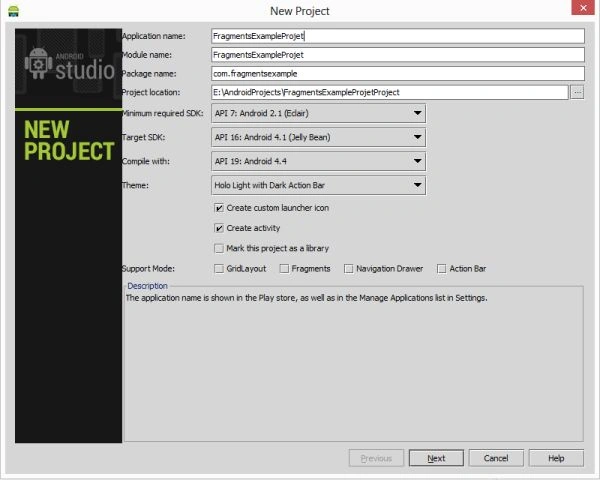
Create a project like this:
 Step 2
Create an XML file with the following.
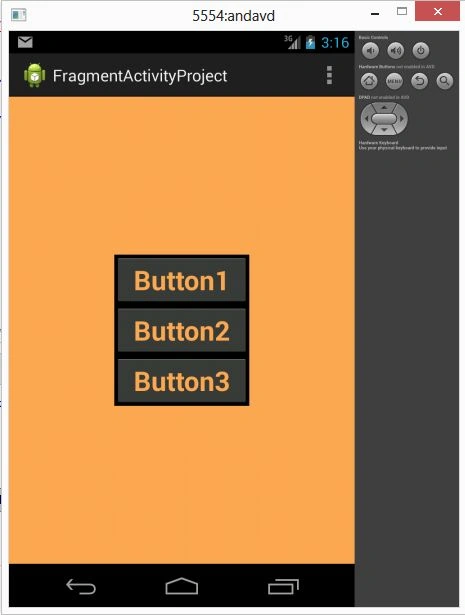
In this, you will use a Fragment to hold the Layout in an Activity. In the android:name="com.fragmentactivityproject.Second" property you will that class with a package name that you want to show on the activity at run time.
Step 2
Create an XML file with the following.
In this, you will use a Fragment to hold the Layout in an Activity. In the android:name="com.fragmentactivityproject.Second" property you will that class with a package name that you want to show on the activity at run time.
- <RelativeLayout xmlns:android="http://schemas.android.com/apk/res/android"
- xmlns:tools="http://schemas.android.com/tools"
- android:layout_width="fill_parent"
- android:layout_height="fill_parent"
- tools:context=".MainActivity"
- android:background="#ffab52">
- <fragment
- android:layout_width="150dp"
- android:layout_height="wrap_content"
- android:name="com.fragmentactivityproject.Second"
- android:id="@+id/fragment"
- android:layout_centerInParent="true"
- tools:layout="@layout/activity_main" />
- </RelativeLayout>
Join the conversation! Your thoughts help the community grow.