

Introduction
This article demonstrates how to add and delete HTML table rows dynamically at run time and save all the rows into the database using ASP.NET C#, jQuery and Ajax.
Benefits of Using HTML Table
- HTML tables are light weight as compared to GridView of ASP.NET Server Control.
- We will be adding and deleting rows using jQuery from the client side.
Let's see how to create the application:
Step 1: Creating SQL Table.
SQL Table structure for this application like the following:
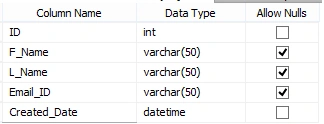
The SQL query as per the above structure is shown here:
CREATE TABLE [dbo].[Employee](
    [ID] [int] IDENTITY(1,1) NOT NULL,
    [F_Name] [varchar](50) NULL,
    [L_Name] [varchar](50) NULL,
    [Email_ID] [varchar](50) NULL,
    [Created_Date] [datetime] NOT NULL
)

ALTER TABLE [dbo].[Employee] ADD  CONSTRAINT [DF_Employee01_Created_Date]  DEFAULT (getdate()) FOR [Created_Date]
Step 2: Designing ASPX Page.
Here I have used bootstrap for better look and feel, but you can use your own css.
<head runat="server">
    <title>Demo</title>
    <meta charset="utf-8" />
    <meta name="viewport" content="width=device-width, initial-scale=1" />
    <link rel="stylesheet" href="http://maxcdn.bootstrapcdn.com/bootstrap/3.3.5/css/bootstrap.min.css" />
    <script src="https://ajax.googleapis.com/ajax/libs/jquery/1.11.3/jquery.min.js"></script>
    <script src="http://maxcdn.bootstrapcdn.com/bootstrap/3.3.5/js/bootstrap.min.js"></script>
</head>
<body>
    <form id="form1" runat="server">
        <div class="container">
            <h2>Basic Table</h2>
            <table class="table" id="maintable">
                <thead>
                    <tr>
                        <th>Firstname</th>
                        <th>Lastname</th>
                        <th>Email</th>
                    </tr>
                </thead>
                <tbody>
                    <tr class="data-contact-person">
                        <td>
                            <input type="text" name="f-name" class="form-control f-name01" /></td>
                        <td>
                            <input type="text" name="l-name" class="form-control l-name01" /></td>
                        <td>
                            <input type="text" name="email" class="form-control email01" /></td>
                        <td>
                            <button type="button" id="btnAdd" class="btn btn-xs btn-primary classAdd">Add More</button>
                        </td>
                    </tr>
                </tbody>
            </table>
            <button type="button" id="btnSubmit" class="btn btn-primary btn-md pull-right btn-sm">Submit</button>
        </div>
    </form>
</body>
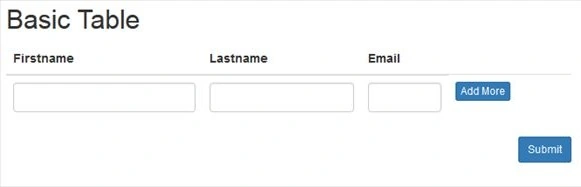
After adding this, the page will look like the following:
Step 3: Adding Controls using jQuery.
<script type="text/javascript">
    $(document).ready(function () {
        $(document).on("click", ".classAdd", function () { //
            var rowCount = $('.data-contact-person').length + 1;
            var contactdiv = '<tr class="data-contact-person">' +
                '<td><input type="text" name="f-name' + rowCount + '" class="form-control f-name01" /></td>' +
                '<td><input type="text" name="l-name' + rowCount + '" class="form-control l-name01" /></td>' +
                '<td><input type="text" name="email' + rowCount + '" class="form-control email01" /></td>' +
                '<td><button type="button" id="btnAdd" class="btn btn-xs btn-primary classAdd">Add More</button>' +
                '<button type="button" id="btnDelete" class="deleteContact btn btn btn-danger btn-xs">Remove</button></td>' +
                '</tr>';
            $('#maintable').append(contactdiv); // Adding these controls to Main table class
        });
    });
</script>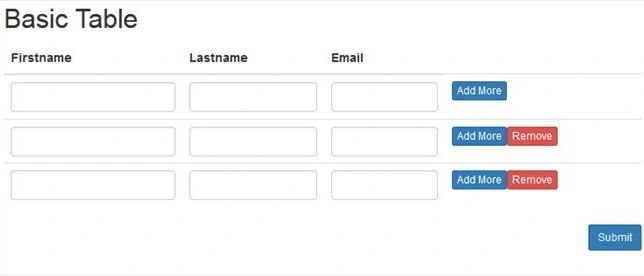
Shailesh PandeyPosted May 10, 2020, 6:46 AM
Jquery.js:9664 POST http://localhost:44360/Home.aspx/SaveData net::ERR_CONNECTION_RESETsend @ jquery.js:6931 ajax @ jquery.js:6931 (anonymous) @ Home:91 dispatch @ jquery.js:3707 r.handle @ jquery.js:3707
Shailesh PandeyPosted May 10, 2020, 6:45 AM
Failed to load resource: net::ERR_CONNECTION_RESET
Shailesh PandeyPosted May 10, 2020, 6:44 AM
Error while inserting data
Shailesh PandeyPosted May 10, 2020, 6:44 AM
Copied your same code but when I save the details unable to store data in database
Maria PrincePosted Mar 13, 2020, 6:40 AM
Thanks for Sharing
Aliya khanPosted Aug 31, 2019, 5:21 AM
Thanks for this ,i use this but i can't able to remove the 2nd row which is added dynamically?
Aliya khanPosted Aug 29, 2019, 3:33 AM
How to add new row if we have to get the data from multilple tables?
Hussnain SajidPosted Jul 1, 2019, 2:58 AM
Hope you are Good ! I copied your code everything works fine for me but when I save the details the empty row also inserts in the db tell me what to do? Thanks in advance
arsal younaPosted Aug 21, 2018, 9:11 AM
I copied the same code. Everything is working fine except Ajax call is not being made in visual studio 2015 and I am unable to store data in database, Kindly suggest solutions.
arsal younaPosted Aug 16, 2018, 6:14 AM
I want to dynamically add data from database and populate these fields dynamically. Kindly suggest how can I assign values to these fields from database
Tabarak HussainPosted Jul 29, 2018, 2:30 AM
Excellent, Thanks for sharing.
Vinod VishwakarmaPosted May 25, 2018, 6:08 AM
Can i add extra variable in insert query which is not part of GetAllEmpData Function of html???
Emran EmonPosted Apr 23, 2018, 1:56 PM
Nice Sir, Thanks for Sharing
Phuong NguyenPosted Oct 11, 2017, 11:38 AM
Tks share i have problem and see it
Pratik ShirsePosted Feb 6, 2017, 5:40 AM
Good one sir how to do calculation of particular row
SubashPosted Aug 1, 2016, 5:38 AM
Nice
kalu singh raoPosted Jul 22, 2016, 2:44 AM
Nice share
Vikash PatelPosted Mar 30, 2016, 6:19 AM
mast hai but i want to add calendar with all textbox
Michael JohnstonPosted Jan 5, 2016, 1:10 PM
Excellent code. Thank you for sharing it. Is there a way to add validation, such as required to the inputs?
Ekrem TapanPosted Nov 3, 2015, 8:31 PM
Good article
Humayun Kabir MamunPosted Sep 11, 2015, 2:34 AM
Nice...
Pratham DavePosted Sep 10, 2015, 1:25 PM
superb job.. keep it up..!
ROHAN THAKURPosted Sep 10, 2015, 2:47 AM
good one sir... Thanks for sharing....
Shridhar SharmaPosted Sep 7, 2015, 4:59 PM
nice share
Santhakumar MunuswamyPosted Sep 7, 2015, 2:33 PM
Thanks for nice share
RakeshPosted Sep 7, 2015, 12:54 PM
Good Explain sir
Mohammed IbrahimPosted Sep 7, 2015, 11:52 AM
Nice explaination
Debasis SahaPosted Sep 7, 2015, 9:41 AM
Good one..
Pankaj Kumar ChoudharyPosted Sep 7, 2015, 9:02 AM
Nice Explain Sir........
Upendra Pratap ShahiPosted Sep 7, 2015, 7:50 AM
good start.... keep it up
Ratnesh SinghPosted Sep 7, 2015, 7:03 AM
nice..
Karthikeyan KPosted Sep 7, 2015, 7:02 AM
Good one sir...Thanks for sharing